What is an SEO audit, and what does it look for?
An audit is a careful read of a site from the search engine's side: can every page be found, can it be fetched, is it allowed into the index, and does each result describe the page well. It is a list of obstacles, and the job is to remove them. An audit cannot tell you where a page will rank, and any audit report that predicts positions is guessing.
On a small site the audit fits in an afternoon. This project uses the four lab views in the same order you would use tools on a real site: the Crawler view for what was fetched and what happened (on a real site, the URL Inspection tool and a crawling tool), the Index view for what is in and out (the Pages report in Search Console), Checks for problems on the pages, and Result for how each page would look in results and when shared.
Where should the audit start?
Start with access, because nothing else matters if crawlers cannot get in. Read robots.txt and confirm it blocks only what you mean it to. Check that no public page has a stray noindex. Then check status codes: every live page should answer 200, every removed page 404 or 410, and every moved page should redirect. In the Spoke and Chain demo, robots.txt is fine and the problems start with the redirects.
Write down what you find before you fix it. A short list in the order you found things, with the address and the reason, helps you check afterwards that each fix worked, and gives you something to show the shop owner.
What goes wrong with redirects after a site move?
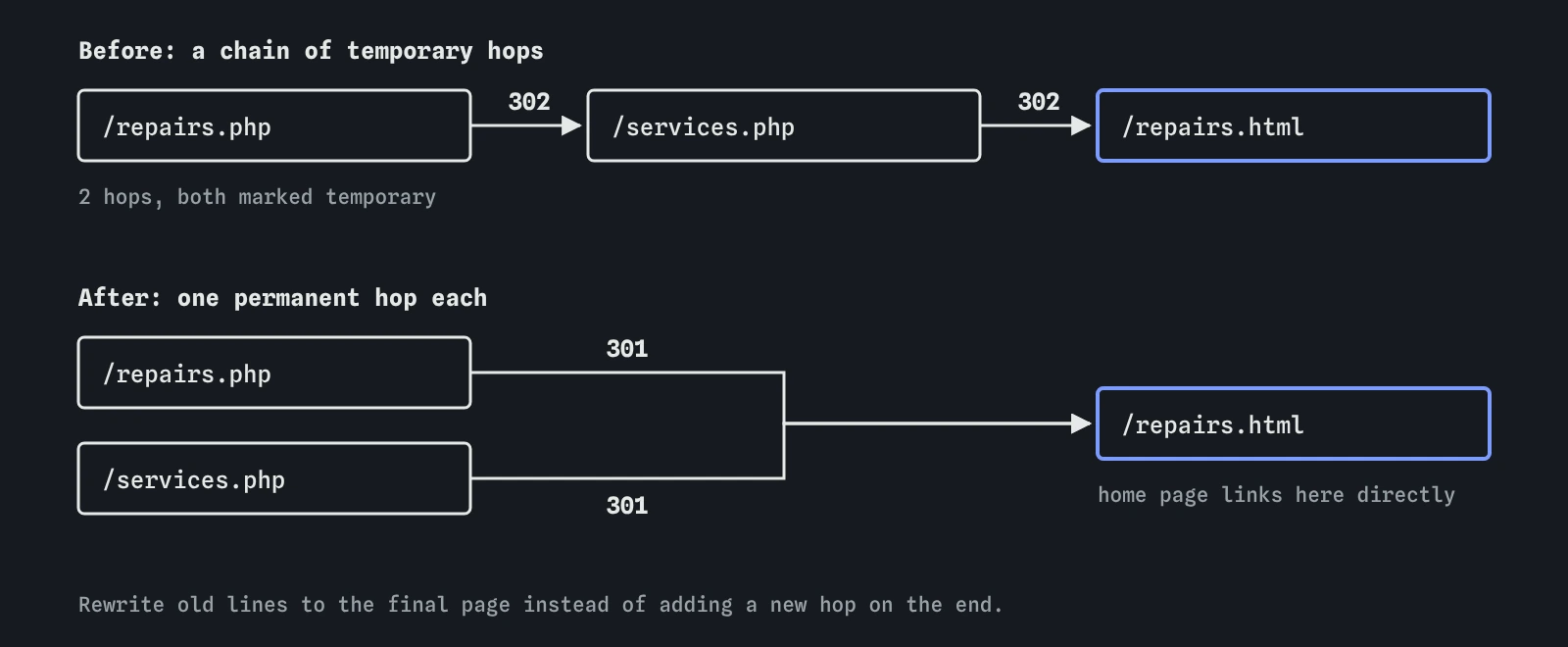
Moves are where redirect mistakes collect. The shop's old system used addresses such as /repairs.php. Two years ago someone renamed the repairs page to /services.php and added a redirect; this year the new site uses /repairs.html and another redirect was added on the end. The result is a chain: /repairs.php to /services.php to /repairs.html. Google follows up to ten hops, so the page is still reached, but each hop costs visitors time and gives crawlers more to get wrong.
The other common mistake is the redirect code. A 302 or 307 means the move is temporary, so search engines may keep the old address in the index for a while. Google treats a long-standing 302 much like a 301 eventually, but there is no reason to make it guess. When a page has moved for good, use 301 or 308. The lab reports 302s the same way as 301s in the Index view; real search engines are slower to switch the address in results.
Fix chains by pointing every old address straight at its final page. Keep the redirects in place for at least a year, and longer if other sites still link to the old addresses. Then update your own links.
# redirects.txt
/repairs.php   /repairs.html  301
/services.php  /repairs.html  301
/hire.php      /hire.html     301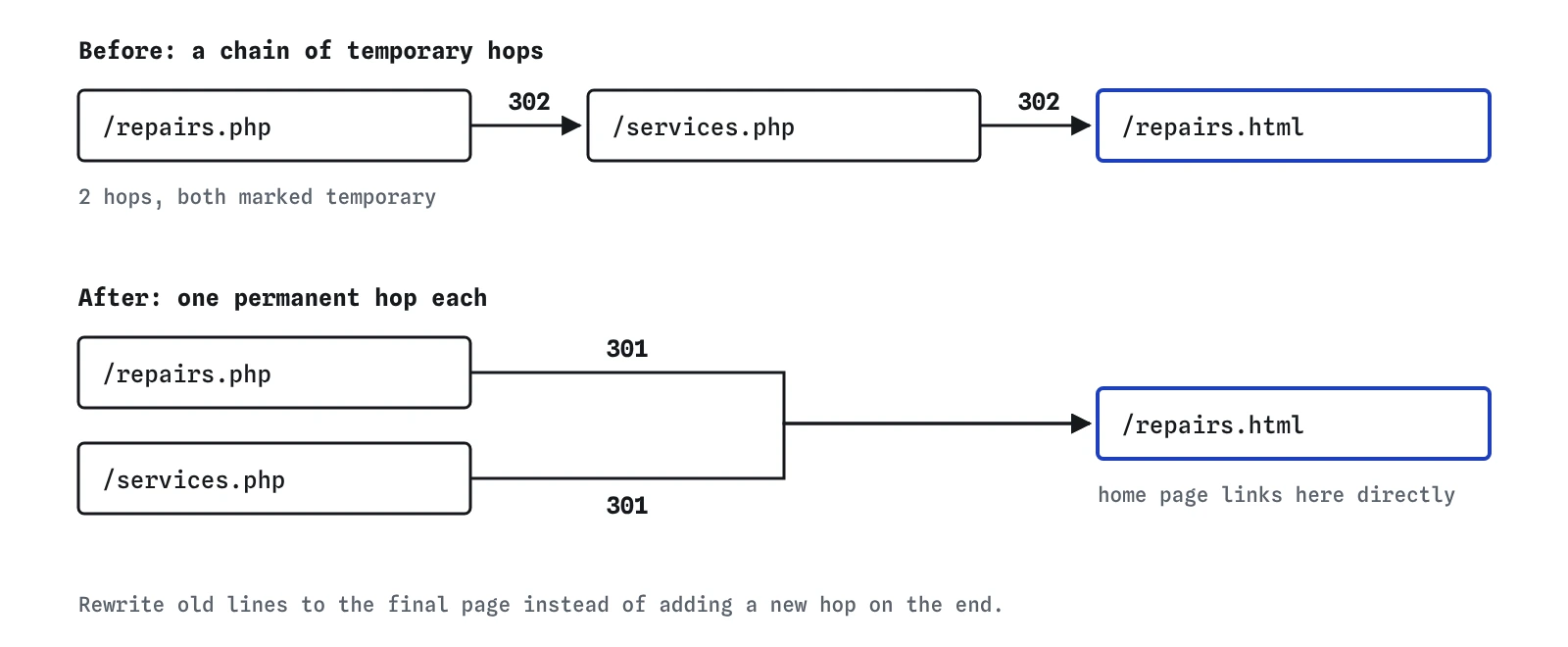
Why fix your own links when the redirects already work?
Redirects are there for addresses you do not control: bookmarks, old printed leaflets and links on other sites. Your own pages should link straight to the live address. Every internal link that goes through a redirect adds a hop for every visitor, sends crawlers on a detour, and mixes signals about which address is the main one. In the demo, the home page still links to /repairs.php and /hire.php, which is easy to miss because clicking them works.
In the lab, the Crawler view shows each of those home page links landing on a redirect before it reaches a page. On a real site, a crawling tool or the Network panel in the browser's developer tools shows a 301 for each such link. Search your templates for the old addresses after any move.
What does structured data add for a local shop?
A BicycleStore block, one of the LocalBusiness subtypes, describes the shop in a fixed vocabulary: its name, address, phone number and opening hours. Search engines use it to confirm the details they already hold. It must match what visitors can read on the page, so the name and address in the markup should appear in the page text too.
Be honest about what it can do. The panel with the map, opening hours and reviews that appears for many local searches comes mostly from the Google Business Profile the shop manages directly with Google, and from Bing Places for Bing. Distance from the searcher and reviews play a large part in local results. Markup on the website is a supporting detail. If the shop has no business profile, setting one up will make more difference than any change in the HTML.
What else belongs on an audit list for a small site?
After access and redirects, go through each page in turn. The order below works well, because earlier items hide later ones.
- Every page has a viewport tag and renders properly on a phone.
- Every page has its own clear title and meta description, and none are copies of another page's.
- Each page has one clear main heading and headings in order.
- Images have alt text that says what they show, and photos are sized for the screen.
- No page is a near copy of another, and no page is nearly empty.
- The sitemap lists only live addresses that should be indexed.
- Share cards have a title, a description and a full-address image of at least 1200 by 630.
- Structured data, where used, has no errors and matches the visible page.
How do you check the fixes on the real site?
Use URL Inspection in Search Console on each changed page and on each old address. For an old address, the live test should report a redirect to the new page. For the new page, it should report that the URL is available to Google, and show the rendered HTML with your changes. The Rich Results Test confirms the BicycleStore markup is read, and the Schema Markup Validator checks it against schema.org.
Then wait. The Pages report will move old addresses into "Page with redirect" over the following weeks, which is the expected outcome after a move. Check the Performance report after a month or two for the queries that bring people to the repairs and hire pages, and write the dates of your changes down so you can compare.
What do AI tools get wrong in an audit?
Automated audit reports, whether from an AI assistant or a scoring tool, tend to bury the few real problems under a long list of minor ones, and to score the site out of 100 as if the number meant something to Google. A missing redirect on the hire page does more harm than forty notes about title length put together. Read the list and sort it yourself, starting with access.
AI tools also suggest 302 redirects for permanent moves, chain new redirects onto old ones instead of rewriting them, recommend FAQPage markup on every page for extra space in results, and promise that fixing the audit will lift rankings. Fixing an audit removes obstacles. What happens next depends on the searches, the competition and the search engine.
Field notes
- An audit checks that pages can be crawled and indexed, have clear titles and send the right status codes.
- Start with what blocks a whole site, such as robots.txt, noindex and redirects, before page details.
- After a move, redirect each old address straight to its new page and update your own links to match.
- LocalBusiness markup with matching hours and address helps describe a local shop.
Easy to get wrong
Chained temporary redirects make crawlers take two hops and leave them unsure which address to keep. One permanent hop to the final page is quicker for visitors and leaves search engines in no doubt.
Internal links should point at live pages. Redirects are for links you cannot change, such as bookmarks and other sites.
Local panels come mostly from the business profile, reviews and distance. Markup alone does not create them.
Questions people ask
How long should old redirects stay in place?
At least a year, and as long as other sites still link to the old addresses. They cost almost nothing to keep, and removing them turns every old link into a 404.
Should I use 301 or 308?
Either one marks a permanent move, and search engines treat them the same. 301 is the common choice. 308 keeps the request method, which matters for forms posting to the old address.
What should happen to pages that have no replacement?
Let them answer 404 or 410. Redirecting every removed page to the home page creates soft 404s and confuses visitors who expected something specific.
How often should a small site be audited?
After any redesign, move or change of platform, and otherwise once or twice a year. Search Console emails you about new problems in the Pages report in between.