What does this project bring together?
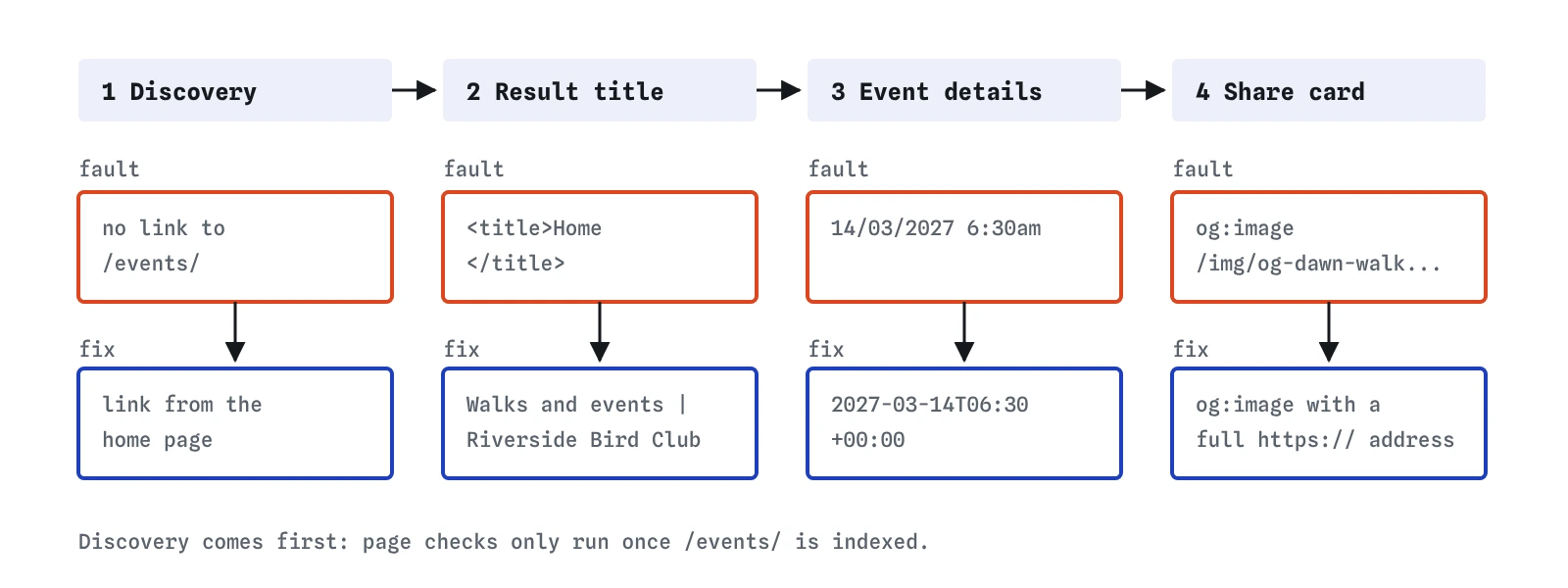
Each earlier lesson fixed one kind of problem on its own. Real sites rarely break one thing at a time. The bird club's events page has four faults at once, and each one stops a different part of the process: discovery, the result title, the event details and the share card. Working through them in order shows how the parts depend on each other.
Start with the Index view, then Result, then Checks. Fixing discovery first makes sense, because the lab only reports page-level problems for pages that are indexed. Until the crawler reaches /events/, the title and markup warnings have nowhere to appear.
Why could nobody find the events page?
The page sits at events/index.html, which the server answers as /events/. The home page links to sightings and to the join page, and the sitemap lists only those three addresses. Nothing points to /events/, so the crawler never hears of it. The Index view marks it as never discovered, the same orphan problem the bakery's menu had in the first lesson.
A link from the home page fixes it, and it also helps every visitor who arrives on the home page wondering when the next walk is. Adding the address to sitemap.xml is a second route in. Use the exact form https://riversidebirds.example/events/ with the trailing slash. The lab, like most servers, answers /events with a 301 redirect to /events/, and a sitemap should list final addresses, never redirects.
<p><a href="/events/">Walks and events</a> · <a href="/sightings.html">Recent sightings</a> · <a href="/join.html">Join the club</a></p>What is wrong with a title of Home?
The secretary copied the home page template and kept its title, which was Home. A search engine shown that title has no idea what the page offers, and Google is likely to rewrite it, often using the main heading. The lab predicts the same thing: the Result view shows the title coming from the h1 with a note about a generic title.
Write the title for the person deciding whether to click. Walks and events | Riverside Bird Club says what is on the page and who runs it, in about 40 characters. Avoid stuffing it with every bird you might see. A title like Bird walks, birdwatching events, bird talks Riverside reads like a list of searches and invites a rewrite too.
How should the event dates be written?
The Event markup had 14/03/2027 6:30am. People in the UK read that as 14 March, people used to month-first dates in the US see a month 14 that does not exist, and a program reads nothing useful at all. Schema.org asks for ISO 8601, the international date format: year, month and day with hyphens, then the letter T, then the time in 24 hour form, then the offset from UTC.
The offset matters. 2027-03-14T06:30+00:00 means 6:30 in the morning on UK winter time. On 14 March British clocks are still on GMT, so the offset is zero. From the last Sunday in March to the last Sunday in October, the UK is one hour ahead and an event at the same time of day would be +01:00. Leave the offset out and Google falls back to the time zone of the event's location, which only works if it reads the place correctly. The offset removes the guess.
Check that the date in the markup matches the date in the text. The page says Sunday 14 March 2027, 6:30am to 9am, and the markup must say the same. Markup that disagrees with the page can be ignored, and Google's structured data guidelines ask that markup describe content people can see.
"startDate": "2027-03-14T06:30+00:00",
"endDate": "2027-03-14T09:00+00:00",
Which Event fields does Google want?
Google's event documentation lists three required properties: name, startDate and location. A physical event's location is a Place with an address; an online event uses a VirtualLocation with a url. Recommended properties include endDate, eventStatus, description, image, offers and organizer. A free event can still have an Offer with a price of 0.
Use eventStatus when plans change. https://schema.org/EventCancelled marks a cancelled walk, and EventRescheduled with a new startDate and the old one in previousStartDate marks a moved one. Updating the markup is better than deleting it, because the page and any results showing the old date can both be corrected. Remove past events from the markup, or move them to an archive page, once they have happened; the lab does not show events that ended before its fixed date of 1 November 2026, and Google does not show past events in event results.
Why did the share card show no picture?
The page had og:image set to /img/og-dawn-walk.jpg. That path works for an <img> tag on the page, where the browser already knows the domain. A messaging app fetching the card image has no such context, so it needs the full address with https://riversidebirds.example. The lab knows the image is 1200×630 from assets.txt, which is the usual size for a large card.
The card's title and description fall back to the <title> and meta description when there is no og:title or og:description. Once the title is fixed, the card reads Walks and events | Riverside Bird Club, which is fine. A warmer og:title such as Spring walks with Riverside Bird Club is a small optional improvement.
How do you check the finished page?
Run through the four views in turn. The Index view should list /events/ as indexed, found from the home page and in the sitemap. The Result view should show the new title, the meta description, and an event line with the date and the water meadows car park. The share card should have the photo. Checks should show no errors, with a few notes about recommended fields.
On a real site you would then test the page in Google's Rich Results Test, which reads the live page and says which rich result types it is eligible for, and in the Schema Markup Validator for general schema.org errors. After the page is live, URL Inspection in Search Console shows whether Google has indexed it and what structured data it found. The next lesson covers those reports.
- Index:
/events/indexed, discovered by a link. - Result: title from
<title>, event date and place shown in the sketch. - Card: picture, title and description all present.
- Checks: no errors; notes only.
Where does the lab simplify this?
The lab treats an eligible event as ready. Google decides when and where to show event results, and in some countries and for some searches it shows them rarely or not at all. Valid markup is a requirement for the extra details, never a promise of them. The lab also crawls once, at once. A real crawler may take days to revisit a home page and notice the new link, and weeks to recrawl a page whose markup changed.
The lab checks a handful of Event properties and the date format. It does not check that the address is real, that the event is open to the public, or that the image shows the event. Google's guidelines say event markup is for events people can attend, rather than for things like coupons or a business's opening hours, and the human review of those rules happens outside any validator.
What do AI tools get wrong on a page like this?
Ask an AI tool to add Event markup and it will often write the date in the format of the page text, such as March 14, 2027, or drop the time zone offset. It may also invent fields that do not exist in schema.org, or mark up every event on the page as one event with a list of dates. Read each startDate, and run the result through a validator before trusting it.
Generated pages also tend to carry over template leftovers: a title of Home, an og:image copied from another page, or a relative image address. And AI tools often suggest adding FAQ markup to an events page "for rich results". FAQ rich results have been limited to well-known government and health sites since 2023, so the markup would do nothing visible here.
Field notes
- The events page was hard to find because no other page linked to it.
- A title of Home tells searchers nothing, so name the club and the events instead.
- Event dates in markup use ISO 8601 with a time zone, and must match the dates on the page.
- An og:image with a full https address gives shared links a picture.
Easy to get wrong
Structured data needs ISO 8601 dates. Local formats are ambiguous, and a time without an offset can be shown at the wrong hour.
Each page needs a title that names what it offers. A generic title is likely to be rewritten and tells nobody why to click.
Google stopped supporting Noindex: in robots.txt in 2019. A robots meta tag on a crawlable page is the supported way, and a password protects pages that must stay private.
Questions people ask
Should each event have its own page?
A single events page works well for a small club. Give each event its own Event block on that page. Larger programmes with booking details benefit from a page per event, each with its own title and markup.
What happens to the markup after the walk has happened?
Past events are not shown as upcoming events. Remove the old block or move the event to an archive page, and add the next walk. Leaving years of old events in the markup makes the page harder to maintain and to check.
Can a recurring walk use one Event block?
Schema.org has an eventSchedule property, but Google's event documentation expects a separate Event for each date. For a monthly walk, add a block for each of the next few dates.
Does the sitemap need `lastmod`?
It is optional. Google uses lastmod when it is consistently accurate, so set it to the date the page content last changed, never to today's date on every build.