What happens when a page's address changes?
Every page lives at one address. When you rename a page, move it into a folder or rebuild the site on a new system, the old address stops working unless you do something about it. Anyone who bookmarked it, followed a link from another site, or clicks the old result in search lands on an error page.
Search engines face the same dead end. They hold the old address in their index, along with everything they learned about it. If the old address disappears, the search engine eventually drops it and has to discover the new page from scratch, with no sign that the two are the same.
A redirect fixes both problems. It is an instruction from the server that says "this page is now over there". Browsers follow it in a fraction of a second, and search engines use it to move what they know about the old address to the new one.
What is the difference between 301 and 302?
The server sends a status code with every answer. A 301 means the page has moved permanently. A 302 means it has moved for now and the old address will come back. 308 and 307 mean the same as 301 and 302, with a stricter promise about how forms are resent, which makes no difference for ordinary pages.
For search, the difference is which address the search engine keeps. With a permanent redirect, Google treats the new address as the main copy and shows it in results. With a temporary one, Google may keep showing the old address for a while, because you said it would return. If a 302 stays in place for a long time, Google eventually treats it like a 301, but there is no reason to make it guess.
Use 301 or 308 for a renamed page, a new site structure or a domain move. Use 302 or 307 only for genuinely short changes, such as sending visitors to a holiday notice for a week while the hire page is being updated.
How do you set up redirects?
Where redirects live depends on your hosting. Most site builders have a redirects panel in their settings. Hosts that run Apache read rules from a .htaccess file, and cPanel has a Redirects page that writes those rules for you. Some static hosts read a file called _redirects. The lab uses a simple redirects.txt with the same idea: one line per old address.
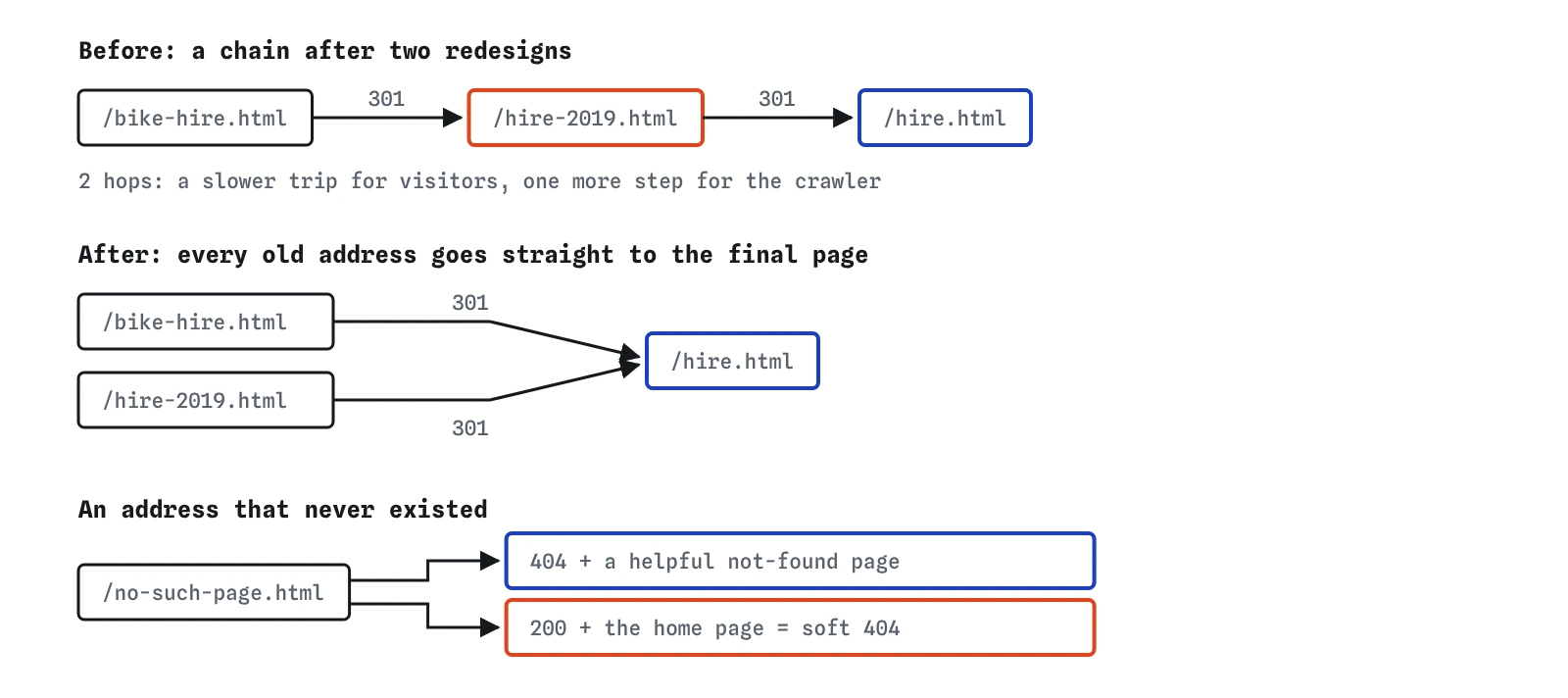
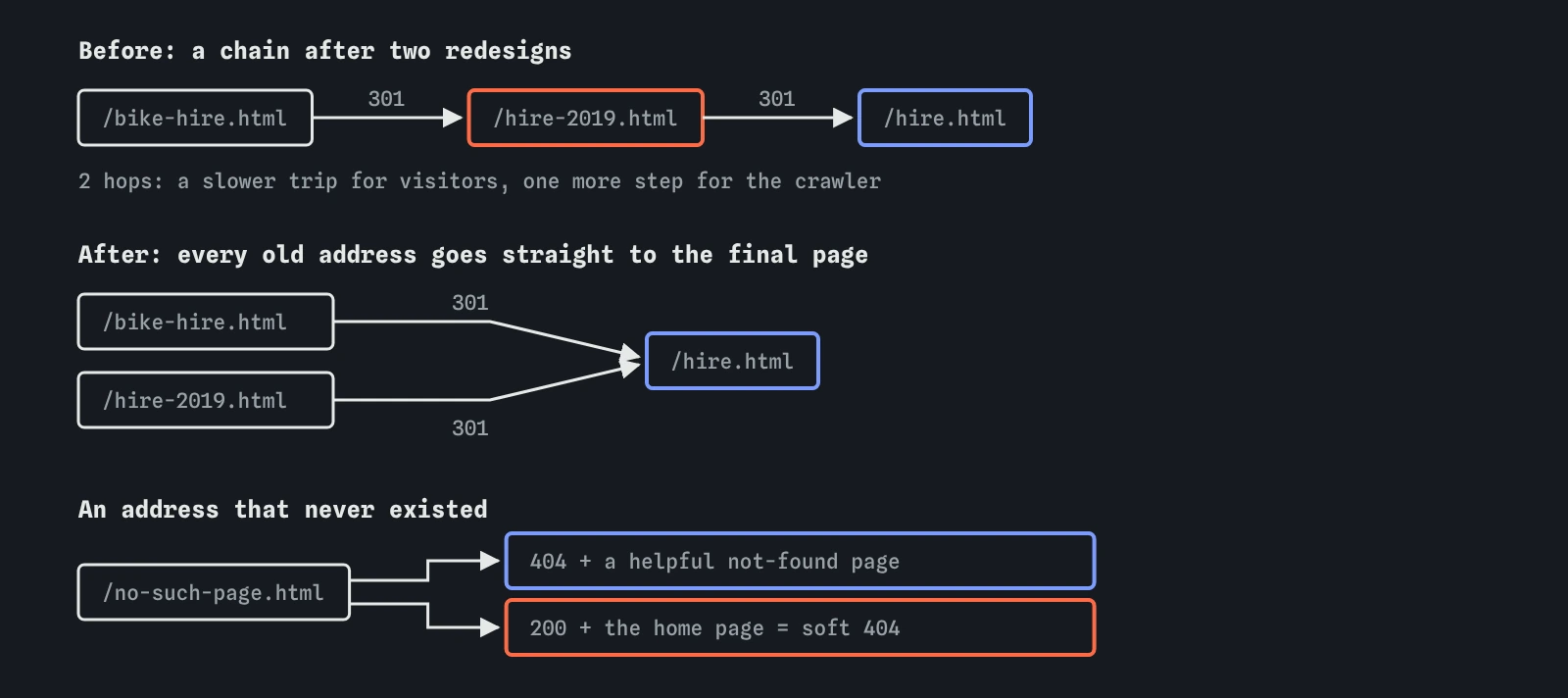
Redirect each old page to the new page that covers the same thing. The old hire page goes to the new hire page, and the old repairs page goes to the new repairs page. If a page has no real replacement, let it answer 404 or 410 rather than sending everyone to the home page. Google treats a mass redirect to the home page as a soft 404, and visitors who wanted the hire prices are no better off.
Keep redirects in place for a long time. Google suggests at least a year so it can see the move several times, and longer is better while other sites still link to the old addresses. They cost almost nothing to keep.
# redirects.txt: old address, new address, status
/bike-hire.html /hire.html 301
/services/repairs.php /repairs.html 301
/spring-sale.html 410
Why are redirect chains a problem?
A chain is a redirect that leads to another redirect. Sites collect them over several redesigns: the 2015 address points at the 2019 address, which points at today's page. Each hop adds a round trip for the visitor and one more step the crawler must take.
Googlebot follows up to 10 hops in a chain, then gives up. Long before that, the extra hops slow pages down and make mistakes more likely. A loop, where two addresses point at each other, is worse: neither ever loads.
When you add a new redirect, update the old rules so every old address goes straight to the final page in one hop. Then update your own links and your sitemap to point at the final address too, so the redirects are only used by visitors and crawlers arriving from outside.
What is the difference between 404, 410 and a soft 404?
A 404 means "not found". A 410 means "gone", removed on purpose. Both tell the search engine to drop the address from results, and Google treats them almost the same, with 410 sometimes dropped a little faster. Neither harms the rest of your site: every site has addresses that do not exist, and search engines expect that.
A soft 404 is a page that says it is missing while the server answers 200 OK, or a server that shows the home page for any address it does not recognise. To a crawler it looks like a real page, so it gets fetched again and again, and Search Console lists it as a soft 404 in the Pages report. Fix it by making the server send a real 404 or 410 status.
A good 404 page still helps people. Give it the site's normal header, a short sentence saying the page was not found, and links to the main sections. The status code is what search engines read; the page is for visitors.
How do you find broken links and old addresses?
Start with your own site. The Checks view in the lab lists every link that leads to a missing page. On a real site, Search Console's Pages report has groups called "Not found (404)" and "Page with redirect", and URL Inspection shows exactly what Google got for one address. Crawling tools for desktops can list every broken link on a small site in a few minutes.
When you redesign, make a list of every old address before you switch over. Your old sitemap, your Search Console Performance report and your analytics show which old pages people actually reached. Each of those needs a redirect or a deliberate 404.
Check a redirect yourself by opening the old address in a browser and watching the address bar change. Browser developer tools show the status code in the Network panel.
What do AI tools get wrong about redirects?
They mix up 301 and 302, and some generated server rules use 302 by default for a move that is meant to be permanent. They suggest redirecting every missing page to the home page to "save link value", which Google treats as a soft 404. They write redirect rules that create chains or loops after a redesign, because they add new rules without looking at old ones.
Some tools also claim that 404 errors hurt your rankings and must all be fixed. A 404 for an address that never existed, or for a page you removed on purpose, is the correct answer. Fix the 404s that matter: links on your own site, and old pages that people or other sites still use.
Where does the lab simplify?
The lab reports a 302 or 307 like a 301 in the index: the old address is left out and the target counts. Real search engines may keep a temporarily redirected address indexed for a while. The lab also treats http:// and www. links to the site as the same page, with a note. On a real site you must set up those redirects yourself, or the variants become separate duplicates.
The lab crawls once, all at once. A real move takes time to show: search engines need to recrawl the old addresses, see the redirects and update their index, which can take weeks for pages they visit rarely. Search Console has a Change of Address tool for moving a whole site to a new domain.
Field notes
- A 301 says a page moved for good, and a 302 says the move is temporary.
- Point each old address straight at the final one, because chains slow crawlers and visitors.
- A 404 or 410 tells search engines a page is gone, and both drop out of the index in time.
- A missing page that answers 200 OK is a soft 404, which search engines treat as an error.
Easy to get wrong
A 302 says the old address will come back. For a page that moved for good, a 301 tells search engines to show the new address.
Each hop slows visitors and crawlers. Point every old address straight at the final page.
Showing the home page for unknown addresses with a 200 status creates soft 404s. A real 404 tells crawlers the truth, and the page itself can still offer visitors helpful links.
Google treats a mass redirect to the home page like a missing page. Visitors looking for one thing land somewhere unrelated.
Questions people ask
Do 404 errors hurt my site in search?
Not on their own. Missing addresses are normal, and search engines drop them. Fix broken links on your own pages and redirect old pages that people still visit, since those are the ones that cost you visitors.
How long should I keep a redirect?
At least a year, and ideally for as long as other sites or bookmarks still use the old address. A redirect costs almost nothing to keep.
Does a redirect lose ranking signals?
Google has said that 301 and 302 redirects do not lose PageRank. The new page takes over from the old one, though a redirect never guarantees the new page will appear in the same place.
Can I use a meta refresh or JavaScript to redirect?
Google can follow both, but a server redirect is faster and every crawler understands it. Use the others only when you cannot change the server's settings.
Should I use 404 or 410 for a removed page?
Either works. A 410 says the removal was on purpose and can be dropped slightly sooner. For most small sites a plain 404 is fine.