Where does the blue link in a result come from?
The blue link at the top of a search result is what Google calls the title link. Most of the time it comes from the page's <title> element, the one in the <head> that also labels the browser tab. Google also looks at other text to decide on it: the main heading, other prominent headings, the og:title tag, the words other pages use when they link to it, and sometimes the site name.
When your <title> is a clear, honest description of the page, Google uses it in the large majority of cases. When it is missing, vague, repeated across many pages, stuffed with search terms or very long, Google is much more likely to write its own from the other text. That is why the lab shows "where it came from" under every title sketch.
<head>
  <meta charset="utf-8">
  <meta name="viewport" content="width=device-width, initial-scale=1">
  <title>Menu and prices | Crumb and Crust</title>
</head>
What makes a title worth clicking?
A searcher scans a page of results in a few seconds. The title link is the biggest text on each result, and they are asking one thing of it: is this what I want. A title that names the page plainly answers that question fastest.
In practice that means three things. Say what the page is, in the words a searcher would use: "Birthday cakes to order" says more than "Our creations". Say whose it is, usually the business name, so people who know you can spot you. Keep it short enough to read in one glance.
Honesty beats cleverness here. A title that promises "the best cakes in town" gets clicks from people who then leave when the page is an ordinary menu, and that wastes everyone's time. A title that matches the page sets the right expectation.
How long should a title be?
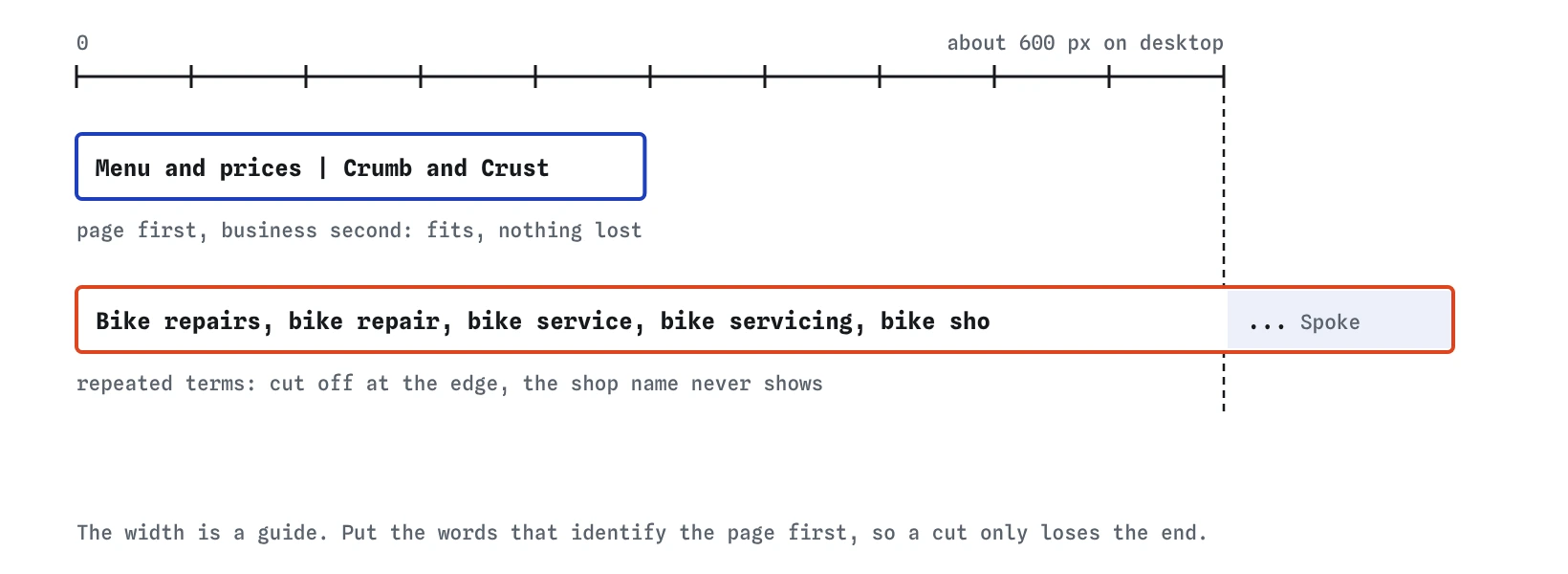
There is no official limit. Google does not count characters; it cuts the title link to fit the space available, which on desktop SEO tools usually estimate at about 600 pixels. Google does not publish a figure. In practice that is about 50 to 60 characters, fewer if you use wide letters such as W and M, more if you use narrow ones such as i and l. Phones wrap titles onto two lines and show a little more.
Treat the width as a guide. Put the words that identify the page first, so that if anything is cut it is the end. A title of 70 characters is fine if the last part is the business name and the first part does the work. The lab estimates the width from rough letter sizes and shows an ellipsis where a cut is likely. Real results vary by device, font and language.
What order should the words go in?
The most common pattern puts the page first and the site second, joined by a separator: "Menu and prices | Crumb and Crust". The pipe, a colon or a dash between words all work; Google does not prefer one. Choose one and use it across the site so results look consistent.
The home page is the exception. Its job is to say what the business is, so lead with the name and a short description: "Crumb and Crust: bakery on Mill Lane". Google also shows a separate site name above the result, which it picks from your home page, the WebSite structured data and other signals, so you do not need to cram the site name into every title. Most small sites keep it, because it helps on social cards and browser tabs too.
<title>Crumb and Crust: bakery on Mill Lane</title>
<title>Menu and prices | Crumb and Crust</title>
<title>Opening hours | Crumb and Crust</title>
<title>Birthday cakes to order | Crumb and Crust</title>
Why does every page need its own title?
Titles copied across a site are one of the commonest problems on small sites, usually because a template set "Home" or the business name and nobody changed it. Every page then looks the same in results, in bookmarks and in a row of browser tabs. Google is more likely to rewrite repeated titles, and a searcher cannot tell which page will answer them.
The Checks view flags this as a duplicate title warning, and Search Console no longer reports it, so on a real site you would spot it by looking at your pages in a crawler tool or by searching site:crumbandcrust.example and reading the list. Fix it by writing a title for each page that names what is on that page.
When does Google rewrite a title?
Google can change any title link, and it explains the common causes in its documentation. The lab predicts a rewrite for the clearest cases only.
- The title is missing, so there is nothing to use.
- The title is generic, such as "Home" or "Untitled", so it says nothing about the page.
- The same title is used on many pages.
- The title repeats search terms, which reads as keyword stuffing.
- The title is very long, so only part of it is useful.
- The title is out of date or does not match the page, such as last year's date or a heading that says something else.
How do you check titles on a real site?
Open the page and use the browser's View Source to read the <title> line, or hover over the tab. Search for site: followed by your domain and read the title links in the results; they show what Google is actually using. In Search Console, URL Inspection shows what Google has indexed for a page, and the Performance report lets you compare clicks before and after a title change. Allow a few weeks: Google has to crawl the page again, and clicks vary week to week anyway.
What do AI tools get wrong about titles?
AI assistants often state a hard rule such as "titles must be exactly 60 characters" or "under 55 or Google will penalise you". There is no penalty for a long title. It may be cut off, and that is all. They also tend to pack titles with every related term, such as "Bike Repairs | Bike Service | Cycle Repair Canal Street", which reads as a list and invites a rewrite.
Another habit is writing click-bait titles with words like "Ultimate" or "You Won't Believe", or adding a year that will soon be wrong. Some will promise that a new title will raise your ranking. A better title can help the right people choose your result; it changes nothing on its own about where the result appears.
Field notes
- The title element usually becomes the blue link, so it decides whether a searcher clicks.
- Put the words that describe the page first and the site name last, with no keyword lists.
- Give every page its own title, because repeated titles make results hard to tell apart.
- Google may rewrite a title that is vague, too long or repeated, often using the main heading instead.
Easy to get wrong
A generic title tells a searcher nothing, and Google usually replaces it with text of its own choosing. Name the business and what it does.
Repeating search terms reads as spam to people and to search engines, and it pushes the title past the width so it gets cut.
The <title> element belongs in the <head>. Each page should have exactly one.
Questions people ask
Should the title match the h1?
They should agree, and they do not have to be identical. The <h1> can be shorter, such as "Menu and prices", while the title adds the business name.
Can I stop Google rewriting my title?
No setting does that. Clear, unique, accurate titles get rewritten far less often.
Should I put my town in every title?
Only where it helps the searcher, such as on the home page and on pages for a physical service. Repeating it everywhere adds length without adding meaning.
How soon will a new title show in results?
After Google crawls the page again, which can take from a few days to a few weeks. URL Inspection in Search Console can request a recrawl of one page.