What is an alias?
An alias is a nickname for a command. You tell the shell that one word stands for a longer piece of text, and from then on, when that word is the first thing on a line, the shell swaps in the text before running anything.
The bakery reads its specials file all day. Instead of typing cat ~/bakery/specials.txt each time, one alias turns it into today:
There are no spaces around =, and the quotes keep the command together as one value. Single quotes are the usual choice because they stop the shell from expanding anything until the alias is used. The alias takes effect at once in the terminal where you typed it.
alias today='cat ~/bakery/specials.txt'
today
Today's specials, Saturday
Cinnamon buns, 2.20
Seeded rye, 3.80
Lemon drizzle slice, 2.60
How do you see and remove aliases?
alias with nothing after it lists every alias in the current shell. alias today shows just that one. type today is the most reliable check because it tells you what a name really is: an alias, a builtin or a program on PATH.
unalias today removes it from the current shell. If the alias also lives in .bashrc, it comes back in the next terminal, so delete the line from the file as well.
To skip an alias once, put a backslash in front of the name. \rm file.txt runs the real rm even if rm is aliased to something else. That's handy when you have an alias you mostly like and occasionally need to step around.
type today
today is aliased to 'cat ~/bakery/specials.txt'

unalias today
today
bash: today: command not found
Why does an alias disappear when you close the terminal?
Aliases, like exported variables, belong to one running shell. When the terminal window closes, that shell ends and everything you set in it goes with it. A new terminal starts a new shell from scratch.
To keep an alias, write it into a settings file that every new shell reads when it starts. For bash that file is ~/.bashrc. The name starts with a dot, which hides it from a plain ls. Use ls -a to see it, or cat ~/.bashrc to read it.
What is .bashrc?
~/.bashrc is a plain text file of shell commands. Each time an interactive bash shell starts, it runs the file from top to bottom as if you'd typed every line yourself. It typically holds aliases, export lines for PATH and other variables, and settings for the prompt.
Because it runs at the start of every terminal, a mistake in it shows up everywhere. Make a copy before large edits (cp ~/.bashrc ~/.bashrc.bak) so you can put the old version back.
There are related files you'll come across. ~/.bash_profile or ~/.profile run for login shells, such as when you connect to a server with ssh, and many systems have them read .bashrc too. On a Mac the default shell is zsh, and the file to edit is ~/.zshrc. Alias syntax is the same in both shells.
cat ~/.bashrc
# settings for your shell
export EDITOR=nano
alias today='cat ~/bakery/specials.txt'
How do you add a line to .bashrc safely?
There are two good ways. Open the file in the editor with nano ~/.bashrc, go to the bottom and type the line. Or append it from the command line with >>.
Appending needs care with quotes. The alias line itself contains single quotes, so wrap the whole thing in double quotes to keep them:
Check the result with cat ~/.bashrc or tail -n 3 ~/.bashrc. Never use a single > on this file. It empties the file first, and your PATH, editor and every other alias are gone with no undo. If you run the same >> line twice you get a duplicate; bash uses whichever comes last, and you can delete the extra one in the editor.
echo "alias today='cat ~/bakery/specials.txt'" >> ~/.bashrc
tail -n 1 ~/.bashrc
alias today='cat ~/bakery/specials.txt'
What does source do?
Editing .bashrc changes the file and nothing else. The shell you're typing into read it once, when it started, and won't look at it again on its own. source ~/.bashrc tells the current shell to read the file now and run every line in it, here, in this shell.
That last part is the key difference from running a script. A script runs in a separate copy of the shell, so aliases and exports it sets vanish when it finishes. source runs the lines in your own shell, so they stay. The short form is a single dot: . ~/.bashrc does exactly the same thing.
If a line in the file has a mistake, source prints the error and carries on with the next line. Read what it prints. A message such as bash: alias: ll: not found tells you which line to look at.
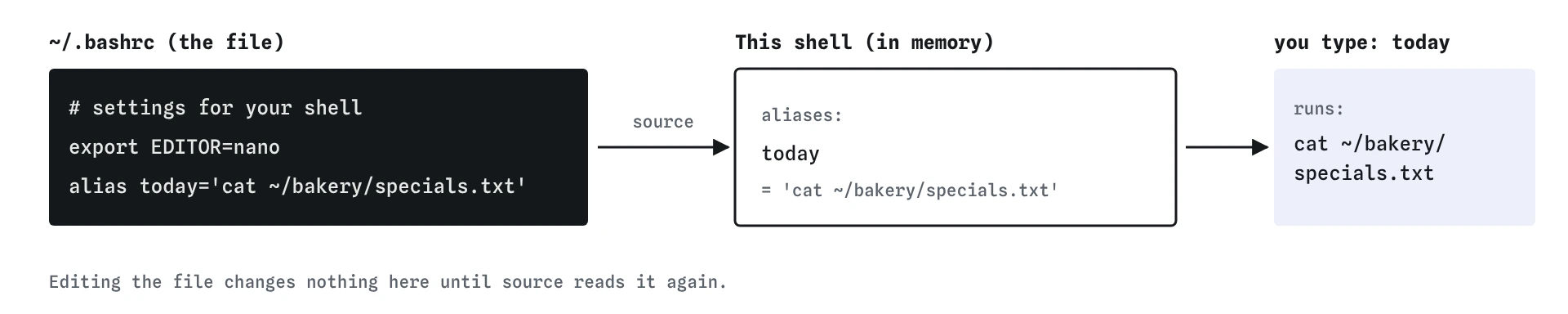
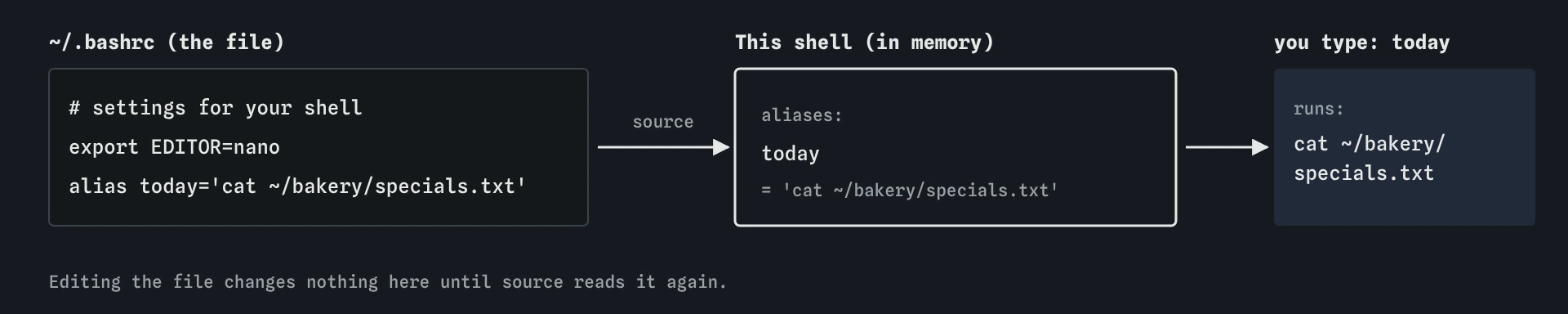
.bashrc is only a file. source ~/.bashrc loads its lines into the shell you're typing in, and only then does today work.Which aliases are safe to have?
Good aliases save typing and make risky commands more careful. alias ll='ls -l' and alias la='ls -la' are common and harmless. alias rm='rm -i', alias cp='cp -i' and alias mv='mv -i' make those commands ask before deleting or overwriting, which has saved many people's files.
Bad aliases make dangerous commands the default. alias rm='rm -rf' means every rm deletes folders and never asks. Don't create one, and if you find one on a shared machine, remove it.
Avoid relying on rm -i as your only safety net. The alias exists on your laptop and probably not on the server you ssh into, where a plain rm deletes immediately. Keep the habit of reading the command before pressing Enter, wherever you are.
Name aliases so they don't clash with real programs unless that's on purpose. An alias called test hides the test builtin every time you type it at the prompt.
What do AI tools get wrong about aliases?
AI suggestions often add spaces around =, as in alias ll = 'ls -l', because that looks natural in most programming languages. Bash rejects it. They also mix up files: a line meant for ~/.zshrc on a Mac ends up in ~/.bashrc on a server, or the other way round, and nothing happens.
Watch for suggestions that write to .bashrc with > or with a long cat <<EOF > ~/.bashrc block. Both replace the whole file. Ask for >> or open the file and add the lines yourself.
Finally, an alias is the wrong tool once it needs arguments in the middle, a condition or more than one step. That's a job for a script, which is the next lesson.
Field notes
- An alias makes one short word stand for a longer command.
- Aliases set at the prompt vanish when that terminal closes.
~/.bashrcruns each time a new shell starts, so saved aliases come back.source ~/.bashrcreloads the file in the shell you are using now.
Easy to get wrong
Bash treats the spaces as separators and tries to look up ll, = and 'ls -l' as three existing aliases, so nothing is defined.
One > replaces the file, wiping every other setting. Two >> add a line at the end.
The running shell read the file when it started. source makes it read the file again now.
An alias should make a dangerous command more careful. -rf removes folders and never asks.
Questions people ask
Can an alias take arguments?
Anything you type after an alias is added to the end, so alias ll='ls -l' then ll bakery runs ls -l bakery. If you need the argument in the middle, write a small script or a shell function instead.
Why is my alias ignored inside a script?
Scripts run in a non-interactive shell, which doesn't read .bashrc and doesn't expand aliases by default. Write the full command in scripts.
Do I need `.bashrc` or `.bash_profile`?
Put aliases in .bashrc. Many systems have .bash_profile or .profile load .bashrc for login shells. If an alias works in a new local terminal but not over ssh, check that the profile file sources .bashrc.
How do I undo a broken `.bashrc`?
Restore your backup with cp ~/.bashrc.bak ~/.bashrc, or open the file in the editor and fix the line the error message names, then source it again.