What do permissions control?
Every file and folder on Linux and macOS carries a short set of rules about who may do what with it. There are three things you can be allowed to do: read (r), write (w) and execute (x). And there are three groups of people the rules apply to: the owner of the file, the file’s group, and everyone else, called others.
On your own laptop you are usually the owner of everything in your home folder, so permissions rarely get in your way. On a web server they matter every day. The web server program runs as a different account from yours, so it counts as others. If a page isn’t readable by others, visitors get a 403 Forbidden error. If a file is writable by others, any other account or a compromised plugin on the server can change it.
Permissions also decide whether a file can run as a program. A script with the right commands inside still won’t start until it has x.
How do you read the rwx letters in ls -l?
Run ls -l and look at the first column. It has ten characters. The first is the type: - for a file, d for a folder. The next nine come in three sets of three: owner, group, others. In each set the letters are always in the order r, w, x, and a dash means that one is not allowed.
$ ls -l
total 28
-rw-r--r-- 1 you you      82 Mar 15 09:14 deploy.sh
drwxr-xr-x 1 you you    4096 Mar 22 09:15 images
-rw------- 1 you you      82 Mar  1 09:12 index.html
-rw-rw-rw- 1 you you      34 Mar  8 09:13 style.css
What do those four lines say?
deploy.sh is rw-r--r--: you can read and write it, everyone else can read it, and nobody can run it. index.html is rw-------: only you can read it, so a web server would refuse to serve it. style.css is rw-rw-rw-: everyone can change it, which is never what you want on a server. images is a folder, d, with rwxr-xr-x.
The two you columns after the link count are the owner and the group. On a shared host your group is often your own username, as here. The practice terminal always shows a link count of 1. A real one shows 2 or more for folders, which you can ignore.
To see hidden files such as .env or .htaccess too, use ls -la. Those are exactly the files whose permissions people forget to check.
What do r, w and x mean on a folder?
On a file the meanings are what you’d expect. On a folder they shift. Read (r) lets you list the names inside with ls. Write (w) lets you create, rename and delete files in it, whatever the files’ own permissions say. Execute (x) lets you enter the folder with cd and reach the files inside by name.
That last one surprises people. A folder without x can’t be entered at all, and cd says Permission denied. A web server needs x on every folder on the way to a page, from public_html down. A folder with r but no x lets you see names you can’t open, which is rarely useful. Folders almost always have r and x together.
The practice terminal starts every folder at 755. You can change a folder with chmod and try cd to see the error, but none of the starting states here can begin with a broken folder.
How does chmod with letters work?
chmod changes the mode. The letter form says who, then + to add or - to take away, then which permission. Who is u (user, meaning the owner), g (group), o (others) or a (all three). chmod u+x deploy.sh adds execute for you. chmod go-w style.css removes write from group and others and leaves everything else alone.
If you leave out who, as in chmod +x deploy.sh, it applies to all three, limited by your umask setting, which on most systems means everyone gets x. For a script that’s normal. chmod =r or u=rw set a group exactly rather than adding or removing; you’ll see these less often.
Letters are the safer choice when you want to change one thing, because they don’t touch the rest. Numbers are faster when you know the whole result you want.
What do 644 and 755 mean?
Each set of three letters becomes one digit by adding r = 4, w = 2 and x = 1. rw- is 4 + 2 = 6. r-- is 4. r-x is 4 + 1 = 5. rwx is 7. The three digits are owner, group and others in that order, so 644 is rw-r--r-- and 755 is rwxr-xr-x. 600 is rw------- and 700 is rwx------.
chmod 644 index.html sets all nine at once. The stat command shows both forms side by side if you want to check your arithmetic: Access: (0644/-rw-r--r--). The leading 0 is for special bits you won’t need yet.
Avoid 777. It lets every account on the machine change or replace the file, and many hosts refuse to run PHP from a file or folder that is writable by everyone. When a forum or an AI answer says “just chmod 777 it”, the real fix is almost always 644 for the file or 755 for the folder, or a change of owner done by your host.
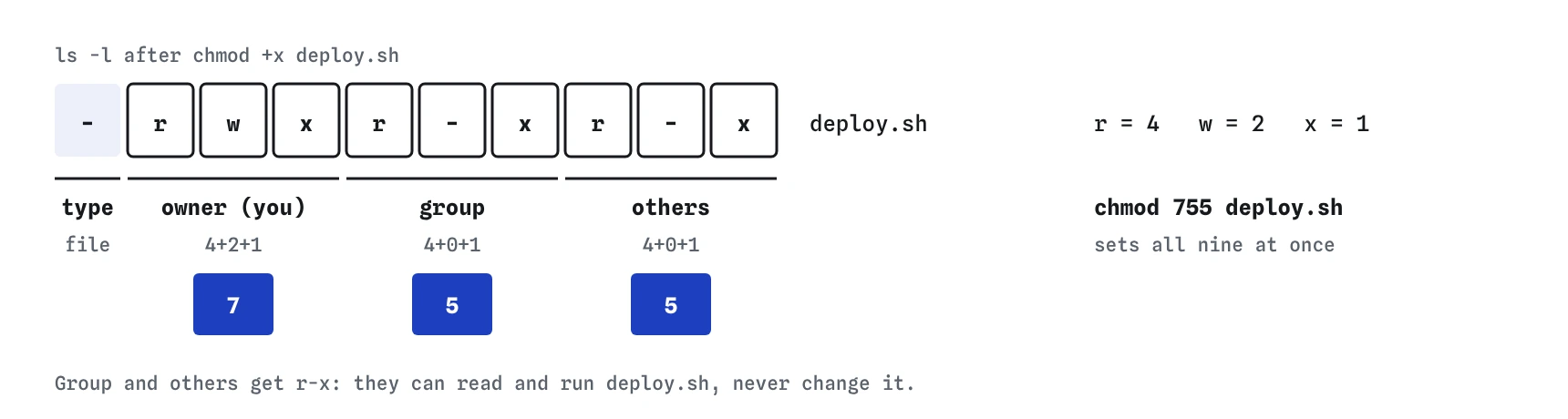

rwxr-xr-x and 755 are the same setting.Why are web files 644 and folders 755?
Your files need to be readable by the web server, which is others, and writable only by you. That’s rw-r--r--, 644. Folders need r and x for others so the server can list and enter them, and w only for you. That’s rwxr-xr-x, 755. HTML, CSS, images and most PHP files on shared hosting follow this pattern.
Secrets go tighter. A .env file, a wp-config.php with database passwords or a private key should be 600, or 640 if your host runs PHP in your group. Scripts you run yourself, such as a deploy or backup script, are 755 or 700.
Be careful with chmod -R 755 public_html. It sets 755 on every file too, making pictures and pages executable. Nothing breaks immediately, but it’s untidy and some security scanners flag it. On a real server, find public_html -type d -exec chmod 755 {} \; and the same with -type f and 644 set folders and files separately.
What does Permission denied tell you?
The message names the command and the file, as in bash: ./deploy.sh: Permission denied or cat: hire.html: Permission denied. Read which file it names, run ls -l on that file, and match the action to the letter. Reading needs r, changing needs w, running a script or entering a folder needs x. When you are writing a new file, look at the folder: it needs w.
If the file belongs to another account, as with system files under /etc, chmod itself will say Operation not permitted, and the answer isn’t to change it. On your own server you’d use sudo, carefully, and on shared hosting you’d ask the host. The practice terminal has no sudo and no other users, so every file here is yours to change.
One shortcut: a script without x can still be run with bash deploy.sh, because then bash is the program and it only needs to read the file. That’s handy for a one-off, but give scripts x if they’ll be run regularly.
Field notes
- Permissions say who can read, write or run a file: owner, group and others.
- The rwx letters in
ls -lshow those permissions in three sets. chmod +xlets a file run;chmod 644and755set all three sets at once.- Web files are usually 644 and folders 755.
Easy to get wrong
777 lets every account on the server change your site, and many hosts block PHP in world-writable folders. The server only needs r and x.
644 has no x, so ./deploy.sh says Permission denied. Scripts you run need execute permission.
-R gives every file x as well. Set folders to 755 and files to 644 separately.
644 lets every account on the server read your passwords and keys. Settings files with secrets should be readable by you only.
Questions people ask
Why do I see a 403 Forbidden error on my site?
The web server can’t read the file or enter a folder on the way to it. Check the file is 644 and every folder above it is 755 with ls -l. A missing index file or a rule in .htaccess can also cause it.
Do permissions work the same on a Mac?
Yes. macOS uses the same rwx model and chmod. Its ls -l may show an extra @ or + after the letters, which mean extra attributes or access lists that you can usually ignore.
What is chown?
chown changes who owns a file. Only the administrator can give a file to someone else, so on shared hosting you won’t use it. On your own server you’d run it with sudo.
Can permissions stop me from deleting my own file?
Deleting depends on the folder, not the file. If the folder has w for you, you can delete files in it. rm asks for confirmation when a file is write-protected, and -f skips that question.