What is a database, in plain terms?
A database is an organised store of facts that a program can search quickly and safely. A bakery keeps facts about what it sells, who orders and what they ordered. A bird club keeps facts about members and every bird they have spotted. The database holds those facts in a fixed shape, so that you can ask questions about them and get exact answers back.
In the next 10 minutes you'll ask a real database questions, break a query, and fix it. The editor on this page is connected to a small bakery database that lives in your browser. Nothing you type can damage it: every time your query runs, the page starts again from a fresh copy.
What are tables, rows and columns?
Facts in a database live in tables. A table holds one kind of thing. The bakery database has a products table, and each row in it is one product. Each column is one fact about every product: its id, name, category, price and how many are in_stock.
Columns have a type that the table expects, such as text or a number. Every row has the same columns, even when a value is missing. That fixed shape is what lets the database answer questions like "which products cost less than £3?" without reading your mind about where the price is kept.
The id column gives each row a number of its own. Two products could share a name one day, but they will never share an id. You will use these ids later to connect tables, for example to say which product an order was for.
SELECT * FROM products;- Table: one kind of thing (products, members, books).
- Row: one of those things (the Rye loaf).
- Column: one fact about every row (the price).
- Value: one cell, where a row meets a column (3.8).

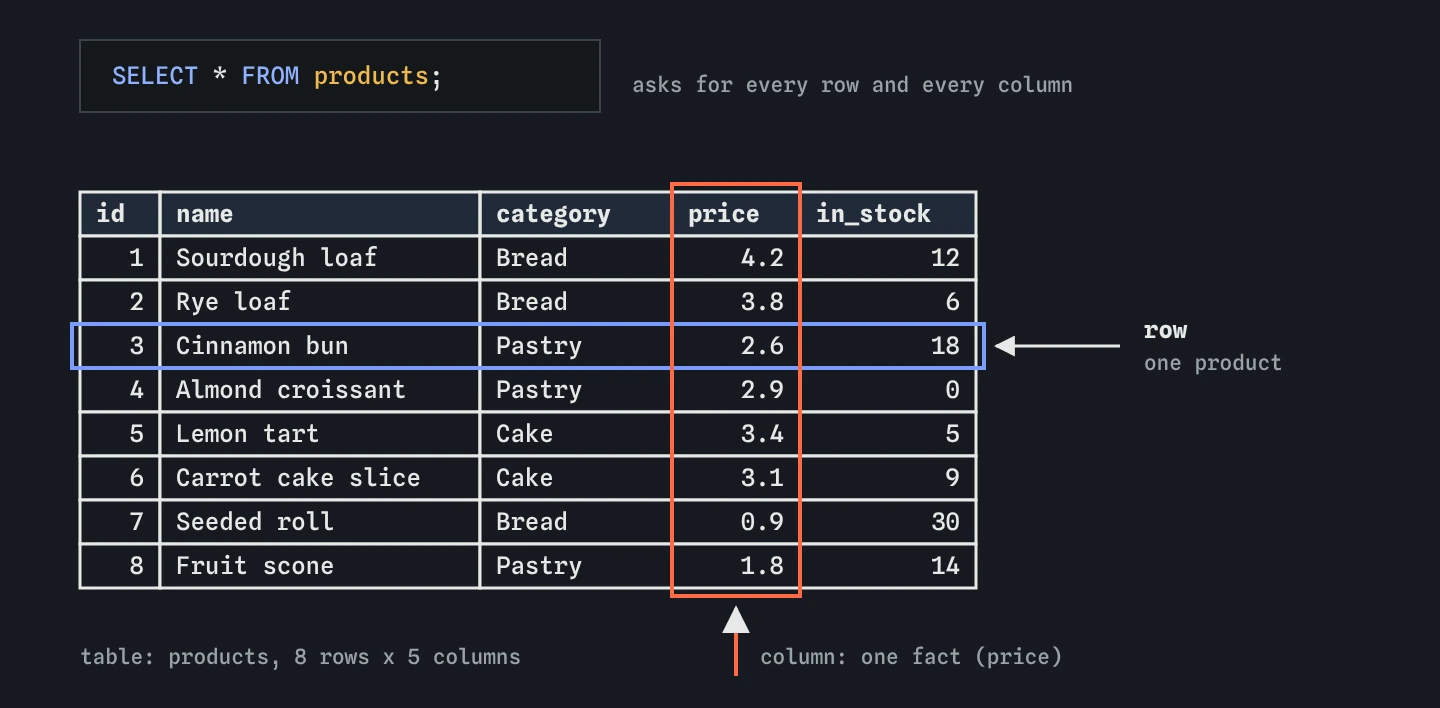
products is one item the bakery sells, and each column is one fact about every item. SELECT * FROM products returns the whole grid.Why not keep it all in a spreadsheet?
A spreadsheet is a fine place to start, and plenty of small bakeries run on one. Problems arrive as the data grows or more people touch it. Someone types "three" into a price cell. Two people edit the same file and one copy wins. A customer's address is pasted into forty order rows and then only thirty-nine get updated when they move.
A database guards against those problems. It can refuse a row whose price is not a number, refuse a second product with the same id, and let many programs read and write at the same moment without losing anything. It also splits facts into separate tables, so a customer's address is stored once and every order points to it.
The other difference is how you get answers. In a spreadsheet you click, filter and sort by hand, and the steps vanish when you close the file. With a database you write the question down as a query. The query is text, so you can save it, share it, run it again tomorrow on fresh data, and read exactly what it asks for.
What is SQL, and how do you read a query?
SQL (Structured Query Language) is the language you use to ask a database questions and to change what it holds. People say it as "sequel" or as the letters S-Q-L; both are fine. A query describes the answer you want, and the database works out how to fetch it. You never write loops or say which row to look at first.
Read the query above out loud and it almost makes sense as English: select everything from products. SELECT says what to show, * means every column, and FROM products names the table. The semicolon marks the end of the statement, like a full stop.
The result of a query is itself a table: some columns, some rows. That idea comes back again and again. Every question you ask, however complicated, hands back a grid of values that you can read just like the table it came from.
SELECT name, price FROM products;How do you choose which columns to see?
Replace the * with the column names you want, separated by commas. The result shows them in the order you list them. The table itself is unchanged; you are choosing what to look at, not deleting anything.
Spell column names exactly as the table defines them. The read-only schema tab beside query.sql shows the CREATE TABLE statement that built products, so you can copy names from there instead of guessing. If you ask for a column that does not exist, the database stops and tells you so in the Messages panel.
SELECT category, name, in_stock FROM products;What is SQLite, and where is it used?
There are many database programs. PostgreSQL, MySQL and SQL Server run as separate servers that many people connect to. SQLite is different: the whole database is one ordinary file, and the program that reads it is small enough to live inside other apps.
That makes SQLite one of the most widely deployed pieces of software there is. Your phone uses it for messages and contacts. Web browsers use it for history and bookmarks. Many desktop apps, games and small websites keep their data in it. This course runs SQLite inside your browser, which is why your queries run as you type.
The SQL you learn here carries over to the other databases. The core of SELECT, FROM, WHERE and the rest is shared. Where PostgreSQL or MySQL write something differently, later lessons point it out in a short note so you are not surprised when you meet it.
What happens when a query goes wrong?
Try it now: change products to product in the editor. The result disappears and the Messages panel says there is no such table, with the line number. Put the s back and the rows return. That is the normal rhythm of writing SQL: write, read the message, fix, run again.
Most early errors are spelling: a table or column name with a letter missing, or a stray comma before FROM. The database is strict and literal. It will not guess that you meant products, which is annoying for a minute and very helpful once your queries get longer, because a wrong name fails loudly instead of giving you the wrong data with no error.
Some mistakes do not cause an error at all. Leave out the comma in SELECT name price and the query runs, but you get one column. The Break it exercise below has exactly that bug. Get into the habit of reading the result headings as well as the values.
How can you watch the database work?
Above the result there are several views. Result shows what your query returned. Tables shows every table in the database and all its rows, which is the quickest way to see what data you are working with before you write a query.
Rows follows a SELECT step by step in the order the database runs it. For SELECT name FROM products, it shows the FROM step reading all eight rows, then the SELECT step keeping only the name column. With a simple query there is little to see yet. In the next few lessons filters and sorting will appear there as separate steps, and you will be able to see exactly which rows each step kept or dropped.
How do you read SQL that an AI tool wrote?
If you ask an AI assistant for a query, you will often get something that runs. Whether it answers your question is a separate matter. Start by finding the FROM to learn which table it reads, then the list after SELECT to learn which columns come back. Check those names against the real schema, because AI tools sometimes invent a plausible column like product_name when yours is called name.
Then run it and look at the row count and the headings. A query you can read is a query you can trust, and everything in this course is aimed at making that reading easy.
Field notes
- A table holds one kind of thing, with one row per item and one column per fact.
- SQL describes the answer you want, and the database works out how to fetch it.
SELECTnames the columns to show andFROMnames the table to read.- Choosing columns only changes what you see; the stored table stays the same.
Easy to get wrong
Without the comma, price becomes a new heading for the name column. The query runs, so nothing warns you; you only notice that one column is missing.
Table and column names must match the schema exactly. Open the schema tab and copy the name instead of typing it from memory.
A comma after the last column makes the database expect another column, so it reports a syntax error near FROM.
Questions people ask
Can I break the database while practising?
No. Each run starts from a fresh copy of the seed data, so any mistake disappears as soon as you edit the query again.
Is SQL a programming language?
It is a language for describing the data you want, and you leave the steps to the database. You say what the answer should contain, and the database decides how to find it. Many programmers use it alongside a general language such as Python or JavaScript.
Do I need to install anything to follow this course?
No. SQLite runs inside the page. If you later want to work on your own files, the free sqlite3 command-line tool or an app such as DB Browser for SQLite opens the same kind of database.
Is `SELECT *` bad?
It is great for exploring. In saved queries and app code, naming the columns is easier to read and keeps working if someone adds a column to the table later.