What problem does Git solve?
You edit the bakery's index.html, refresh the browser, and the layout falls apart. You changed three things in the last hour and can't remember which one did it. Without a record of the earlier file, your options are pressing undo until something looks right or rebuilding from memory.
Git keeps that record for you. Each time you reach a point worth keeping, you tell Git to save a snapshot of your project. Later you can list the snapshots, compare any two of them line by line, and bring back a file exactly as it was. People call Git a version control system, which means software that keeps versions of files and the story of how they changed.
It works for one person on one laptop, with no internet and no account anywhere. Teams use the same tool to share work, but you get most of the benefit on day one, alone, on a three-page site.
What exactly is a commit?
A commit is one saved snapshot of the files Git is tracking, plus a short message you write, the author's name, the time, and a pointer to the commit that came before it. Those pointers chain the snapshots into a history. The Graph view draws each commit as a dot and joins it to its parent.
Every commit gets an id: a long string of letters and digits such as 75de5111ed2385ad. You rarely type the whole thing. The first seven characters are enough for Git to find it, and that short form is what git log --oneline prints.
A commit never changes after you make it. If you edit the file again and commit, you get a new commit on top. That is why history is trustworthy: an old save point holds exactly what it held the day you made it.
git log --oneline
git show HEAD
Where do my files live while I work?
Git thinks about your project in three places, and the Areas view shows all three side by side.
Once you can name these three places, most Git messages start to make sense. A file can be changed in the working folder, a different version of it can be staged, and the last commit can hold a third version. git status reports where each file stands.
- The working folder: the real files you open in the editor. Changes here are live but not saved in history.
- The staging area: a holding space where you place the exact changes you want in the next commit. Git also calls it the index.
- The repository: the hidden
.gitfolder holding every commit. The last commit is the most recent save point on your branch.

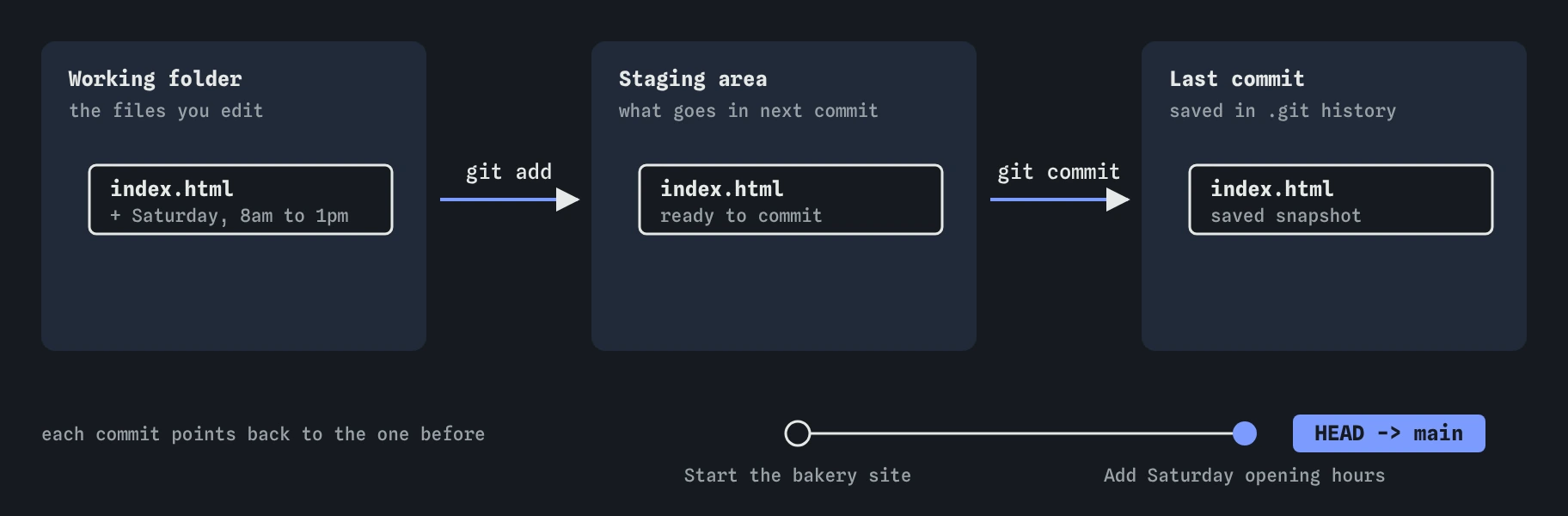
index.html in the working folder, git add stages it, and git commit saves it as a new dot on the history line, where main moves forward.What does a normal save look like?
Day to day, saving work with Git is a short loop. You edit files. You run git status to see what changed. You stage the changes you want with git add. You record them with git commit -m and a message saying what you did. Then you go back to editing.
For the bakery's new Saturday hours that is three commands after the edit. The task on this page asks you to do exactly that. Watch the Areas view as you go: the file moves from changed, to staged, to part of the last commit, and the summary line underneath updates each time.
Commit when the project is in a state you might want to return to: the menu section works, the new colours are in, the typo is fixed. Small commits with clear messages are far easier to search and undo than one giant commit at the end of the week.
git status
git add index.html
git status
Is Git the same thing as GitHub?
No. Git is the program that runs on your computer and keeps the history in the .git folder. GitHub is a website owned by Microsoft that stores copies of Git repositories online, so you can back them up, share them and publish sites from them. GitLab, Bitbucket and Codeberg do similar jobs.
You can use Git for years without GitHub. You cannot use GitHub's code features without Git, because what you push to GitHub is a Git repository. When an AI assistant tells you to "just run git push", it is assuming you already have a repository, at least one commit, and a remote called origin set up. Later lessons cover each of those pieces, so the command stops being a mystery.
This course uses a simulated Git in your browser. It behaves like real Git for the commands you need, prints Git's real messages, and adds a plain-English note when something fails. Nothing you type here can touch your own files.
What does Git not do for you?
Git saves only what you commit. Edits sitting in the working folder are not in history, and if you overwrite them or delete the file, Git has nothing to bring back. Running git status before you stop for the day tells you whether anything is still unsaved.
Git is also not an automatic backup. The history lives inside the project folder. If the laptop dies, the .git folder dies with it, unless you have pushed a copy to a remote such as GitHub.
Git is built for text: HTML, CSS, JavaScript, Markdown, config files. It can store images and PDFs, but it can only tell you that a binary file changed, never which part. Large media files make a repository slow to copy, so keep huge videos out of it.
How do I tell what state my project is in?
git status is the command you will type most. It names the branch you are on, lists staged changes, unstaged changes and untracked files, and often suggests the next command. It never changes anything, so you can run it as often as you like.
git log lists commits from newest to oldest. Add --oneline for one line per commit. On this page the log starts with one commit, Start the bakery site. After the task it has two.
When the output confuses you, compare it with the Areas and Graph views. They show the same facts as pictures. Over time you will read the text alone, which is what you will have on a real machine.
git status
git log
What should I check when an AI tool gives me Git commands?
AI assistants often hand over a block of Git commands to paste in one go. Before you run them, read each line and ask what it changes.
- Commands that only look, such as
git status,git logandgit diff, are always safe to run. git addandgit commitonly add to history. They are safe, though you should check whatgit add .will pick up first.- Anything with
reset --hard,clean -f,push --forceorcheckout -- .can throw work away. Find out what it removes before you run it. - A command that fails with "not a git repository" means the folder has no
.gityet. The fix is usuallygit initorgit clone, covered next.
Field notes
- A commit is a saved snapshot of your tracked files plus a short message.
- The everyday loop is edit, check with
git status, stage withgit add, then commit. - Git only keeps what you commit, so unsaved edits can still be lost.
- Git runs on your computer, and GitHub is a separate website that stores copies.
Easy to get wrong
Small commits let you find and undo one change without losing the rest. One giant commit forces you to undo everything or nothing.
Saving in the editor writes to the working folder only. Git has no copy until you commit, so a bad edit or a deleted file cannot be recovered from history.
Git works entirely offline on your own machine. GitHub is optional and comes later, for backup and sharing.
Questions people ask
Do I need to know the command line to use Git?
It helps. Editors such as VS Code have Git buttons, but they run the same commands underneath, and error messages are written in command-line terms. A dozen commands cover almost everything you will do on a small site.
Does Git store a full copy of every file in every commit?
Each commit describes a full snapshot, but Git stores unchanged files only once and compresses everything. A small website with hundreds of commits usually takes a few megabytes.
Can I delete a commit by mistake?
Ordinary commands such as add, commit, status and log never remove commits. A few commands can make commits hard to find, and the undoing lessons later in the course show how to use them safely.
Why is the default branch called main?
Recent versions of Git, GitHub and most hosts name the first branch main. Older projects and tutorials use master. They work the same way.