What does ssh do?
The ssh command, short for secure shell, logs you in to another computer over the network. Once you’re in, you get a prompt on that computer and every command you type runs there, as if you were sitting at its keyboard. Web hosts, cloud servers and the little computer under the shop counter all speak ssh, and it is how most people look after a website from the terminal.
Everything that travels between your laptop and the server is encrypted, including your password if you use one. That’s the “secure” part. Before ssh, people used a program called telnet, which sent everything as plain text that anyone on the same network could read. You’ll still see telnet mentioned in old tutorials; don’t use it for logging in.
In this practice terminal the second computer is pretend. It’s called shop-server, it holds the Spoke and Chain website in public_html, and the account on it is called spoke. Real servers work the same way, with a real name such as shop.example.com or an address like 203.0.113.40.
How do you log in?
The command is ssh, then the account name, an @, and the computer’s name: ssh spoke@shop-server. The account name is the user on the server, which is often different from your laptop user. Your web host shows it on its ssh or terminal page, along with the server name and sometimes a port number.
If the host uses a port other than the standard 22, add -p and the number, as in ssh -p 2222 [email protected]. Many cPanel hosts do this. The practice terminal ignores ports, so you won’t need one here.
ssh spoke@shop-server
Welcome to shop-server.
Last login: Fri 13 Mar 2026 17:02 from 192.0.2.10
How do you know which computer you’re on?
Read the prompt. Before logging in it says you@laptop:~$. After ssh spoke@shop-server it says spoke@shop-server:~$. The ~ now means the server’s home folder, /home/spoke, which has nothing to do with the home folder on your laptop.
This is the habit that saves people. Commands like rm or mv do the same thing on both computers, so the only clue to which files you’re about to change is the name in the prompt. When you’re unsure, hostname prints the computer’s name and whoami prints the account you’re using.
In the Files view, the server appears as a second tree under your laptop’s once it has been touched, so you can see both sides of every copy.
hostname
shop-server
whoami
spoke
pwd
/home/spoke
How do you leave?
Type exit. The server prints logout and Connection to shop-server closed., and the prompt goes back to your laptop. Pressing Ctrl+D at an empty prompt does the same on a real terminal.
If you type exit again on the laptop, a real terminal would close its window. The practice terminal keeps you where you are and explains that instead.
Sessions also end by themselves when the network drops or your laptop sleeps. Anything you were running in the foreground on the server usually stops with them, which is worth knowing before you start a long job over ssh.
exit
logout
Connection to shop-server closed.
How does scp copy files between computers?
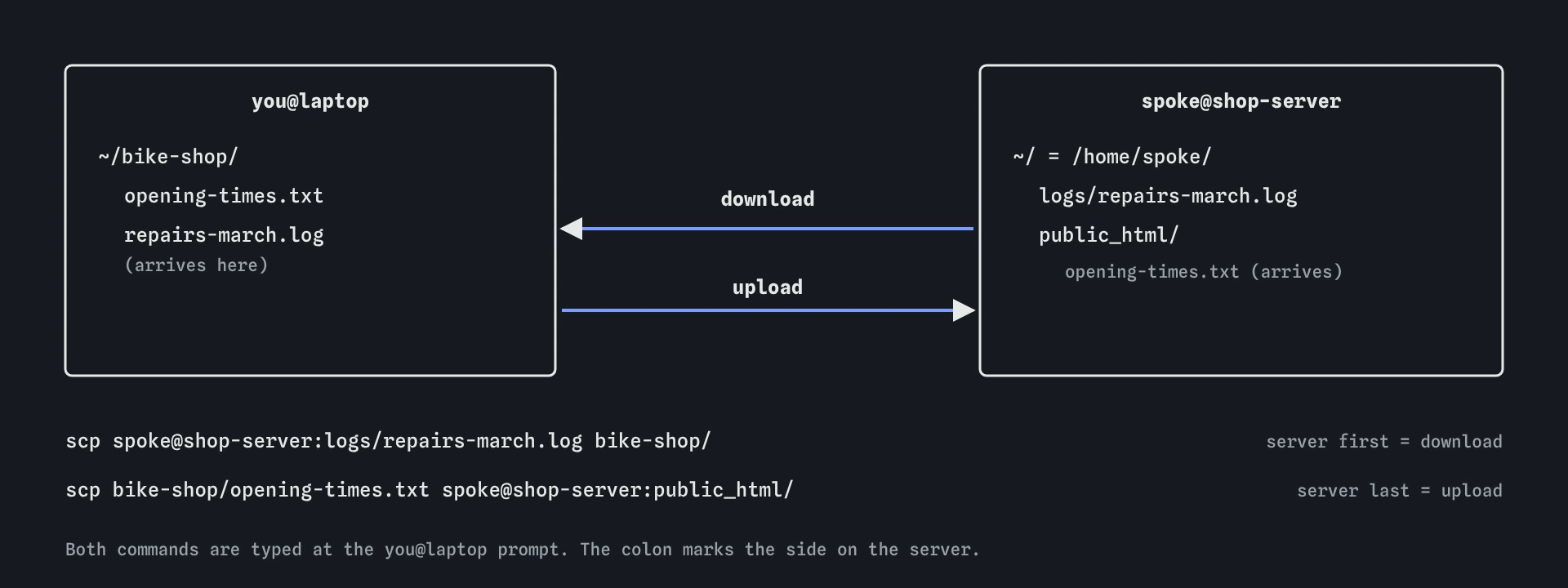
The scp command, secure copy, works like cp with one extra idea: a path can start with a computer’s name and a colon. spoke@shop-server:logs/repairs-march.log means “the file logs/repairs-march.log in spoke’s home folder on shop-server”. A path with no colon is on the computer you’re typing on.
The order is always source first, destination second, the same as cp. Put the remote side first to download and last to upload. Run scp from the laptop, at the you@laptop prompt, because it is the laptop that reaches out to the server. Typing scp inside the ssh session would try to copy from the server to itself.
To copy a folder, add -r, exactly as with cp -r. A trailing public_html/ on the destination means “into this folder”, which keeps the file’s own name.
# download: server first, laptop second
scp spoke@shop-server:logs/repairs-march.log bike-shop/
# upload: laptop first, server second
scp bike-shop/opening-times.txt spoke@shop-server:public_html/
# a whole folder
scp -r photos/new-bikes spoke@shop-server:public_html/
Which scp mistakes catch people out?
The missing colon is the classic. scp prices.txt shop-server looks right, yet with no colon scp treats shop-server as a local file name and makes a copy called shop-server next to the original. Nothing reaches the server and there is no error. It prints nothing at all, here or on a real terminal; the Files view shows the stray file.
Paths after the colon start in the remote home folder, so shop-server:public_html/ means /home/spoke/public_html/. A leading slash makes them absolute instead. Copying onto an existing file replaces it without asking, on both computers, so check the destination name before pressing Enter.
Newer versions of OpenSSH run scp over a protocol called SFTP. You type the same commands and nothing changes for you, though some guides now suggest sftp or rsync for big or repeated copies. rsync isn’t in the practice terminal.
What are keys, and are they better than passwords?
There are two common ways to prove who you are. A password is something you type each time. A key is a pair of files made on your laptop with ssh-keygen -t ed25519: a private key in ~/.ssh/id_ed25519 that never leaves your computer, and a public key in ~/.ssh/id_ed25519.pub that you give to the server. The server keeps public keys it trusts in ~/.ssh/authorized_keys, and lets in whoever holds the matching private key.
Keys are harder to guess than any password, they can’t be phished by a fake login page, and you can remove one laptop’s key without changing anything else. Many hosts now turn passwords off entirely. The honest downside is that the private key is now the thing to protect: anyone who copies that file can log in as you, so give it a passphrase when ssh-keygen asks, and never paste it into a chat, an email or an AI tool. The .pub file is safe to share.
To add your public key on a typical host, use ssh-copy-id [email protected] if you can already log in with a password, or paste the contents of the .pub file into the host’s ssh access page. Both commands work in the practice terminal too, so you can make a key and add it to shop-server.
ssh-keygen -t ed25519 -C "laptop at Spoke and Chain"
ls ~/.ssh
id_ed25519  id_ed25519.pub
What do the first-time warning and “Permission denied” mean?
The first time you connect to a real server, ssh shows its fingerprint and asks whether to trust it. Type yes only if the fingerprint matches what your host publishes. ssh then remembers the server in ~/.ssh/known_hosts. If it later warns that the host identification has changed, stop and ask your host, because that is what a server swap or an impostor looks like.
“Permission denied (publickey)” means the server didn’t accept who you said you were. The usual causes are the wrong account name before the @, a key that hasn’t been added to the server, or a host that only accepts keys. “Could not resolve hostname” means the computer’s name is misspelt or unknown. Both are covered by the Finch hints in the practice terminal.
On a Mac, ssh and scp are built in and behave the same as on Linux. Windows 10 and 11 include them too, in PowerShell and in Windows Terminal.
What do AI tools get wrong with ssh?
They fill in placeholder names like [email protected] or root@server, and people type them as they are. Swap in your real account and server name. Logging in as root is almost never right on shared web hosting, and many hosts block it.
They also tend to suggest ssh-keygen followed by commands that print or copy the private key, or tell you to chmod 777 ~/.ssh to fix a permissions error. ssh refuses a private key that others can read, and servers ignore an ~/.ssh folder others can write to, so the real fix is the opposite: chmod 700 ~/.ssh and chmod 600 ~/.ssh/id_ed25519. When an answer mentions the file without .pub, read it twice.
Field notes
ssh user@serveropens a prompt on another computer.- The prompt tells you which computer your commands will run on.
exitcloses the connection and returns you to your own machine.scpcopies files, and a server path has the server name then a colon.
Easy to get wrong
With no user name, ssh uses your laptop’s user name. On most servers the account is called something else, so the login is refused.
Without the colon, scp makes a local copy named spoke@shop-server. The colon is what marks the other side as a remote computer.
scp runs on the computer that has the file. Inside the ssh session you’re on the server, where prices.txt doesn’t exist. Type exit first.
Folders need -r, otherwise scp stops with “not a regular file”.
Questions people ask
Where do I find my server’s name and account?
In your host’s control panel, usually on a page called SSH Access, Terminal or SFTP. It lists the server name, your user name and the port. cPanel also has a Terminal page in the browser that skips ssh entirely.
Is scp the same as FTP?
It does the same job of moving files, over the encrypted ssh connection. Plain FTP sends passwords unencrypted, so prefer scp or SFTP whenever the host offers them.
Can I edit a file on the server directly?
Yes. Once you’re logged in, nano public_html/index.html opens an editor on the server. For anything bigger than a small fix, editing on the laptop and copying up is safer because you keep a copy.
Why does the server not ask for a password here?
The practice terminal skips passwords and checks only the account name, and the key file when a server is set to accept keys only. A real server asks for a password or uses your key.