What is a shell script?
A shell script is a text file containing the commands you'd otherwise type one at a time. When you run it, bash reads it line by line and does each one. Anything you can type at the prompt can go in a script: cd, cp, grep, pipes, redirection.
Scripts earn their place on jobs you repeat. The bike shop checks its weekend hire bookings every Friday. Typing cat on each file works, but a script does it with one short command, the same way every week, and anyone in the shop can run it.
By convention script names end in .sh. The ending is only a label for humans; Linux decides whether a file can run from its permissions, not its name.
What goes on the first line?
The first line of a script should be a shebang: the characters #! followed by the path to the program that should run the file. For bash scripts that's #!/bin/bash.
When you run ./list-hire.sh, the system reads those two characters and hands the rest of the file to /bin/bash. Without a shebang, bash runs the file itself, but other programs that start it may hand it to a basic sh that doesn't understand everything bash does. #!/usr/bin/env bash is a common alternative that finds bash on PATH, useful on Macs where a newer bash may be installed somewhere else.
Every other line that starts with # is a comment. Bash ignores it. Use one near the top to say what the script is for, because in six months you won't remember.
file list-hire.sh reads the shebang and reports Bourne-Again shell script, a quick way to see what kind of script you've been handed.
#!/bin/bash
# List the bike hire bookings in a folder
echo "Bookings in $1:"
How do you write the script?
Open it in an editor. In this practice terminal, nano list-hire.sh opens the file in an editor tab, and clicking it in the Files view does the same. Changes save as you type. On a real machine, nano runs inside the terminal: type, then press Ctrl+O and Enter to save and Ctrl+X to leave.
Here is the full script for the hire bookings. It prints a header, then loops over every .txt file in the folder you name and prints the first line of each.
Keep scripts small to begin with. Write two lines, run them, then add the next. A script that has never run is just a hopeful text file.
#!/bin/bash
# List the bike hire bookings in a folder
echo "Bookings in $1:"
for f in $1/*.txt; do
  echo "- $(head -n 1 $f)"
done
Why does ./script.sh say Permission denied?
A new file is created with permissions like -rw-r--r--: readable and writable, with no x. The x (execute) permission is what lets the system treat a file as a program. Without it, ./list-hire.sh hire fails:
chmod +x list-hire.sh adds execute permission for everyone, giving -rwxr-xr-x. You only do this once per file. Editing the script later keeps the permission.
The ./ matters too. It means "the file in this folder". Without it, bash searches PATH for a command called list-hire.sh, doesn't find one, and says command not found. If you put the script in a folder on your PATH, such as ~/bin from the PATH lesson, you can run it by name from anywhere.
./list-hire.sh hire
bash: ./list-hire.sh: Permission denied

chmod +x list-hire.sh
ls -l list-hire.sh
-rwxr-xr-x 1 you you     131 Mar 15 09:18 list-hire.sh
What's the difference between ./script.sh and bash script.sh?
bash list-hire.sh hire runs bash and gives it the file to read. Bash is the program, so the script needs only read permission, and the shebang line is treated as a comment. That's useful for trying out a script you've just been given, or one on a server where you can't change permissions.
./list-hire.sh hire runs the file itself. It needs execute permission, and the shebang decides which program reads it. This is the normal way once a script is finished.
Both run the script in a separate copy of the shell. Any cd or variable inside the script ends when it finishes and doesn't affect your terminal. If you want a file's settings to stay in your current shell, that's what source is for, as the aliases lesson showed. sh list-hire.sh also works for simple scripts, but sh may be a smaller shell without some bash features, so prefer bash for bash scripts.
How does a script get its arguments?
Words you type after the script name become numbered variables inside it. In ./list-hire.sh hire, $1 is hire. A second word would be $2, and so on; from the tenth word you write ${10}. $# holds how many words were given, and $@ holds all of them. $0 is the script's own name.
This is what turns a one-off script into a tool. The same script lists hire, or next season's hire-2027 folder, without being edited.
If you forget the argument, $1 is empty, and the script carries on anyway. Here the header prints Bookings in : and the loop has nothing to work on. Real scripts usually check for that at the start and print a usage line. Wrapping $1 in double quotes, as in "$1"/*.txt, also keeps folder names with spaces in one piece.
./list-hire.sh hire
Bookings in hire:
- Ella Hart, 2 hybrids, Saturday 10am
- Riverside Bird Club, 6 bikes, Saturday 8am
- Omar Diallo, 1 tandem, Sunday 9am
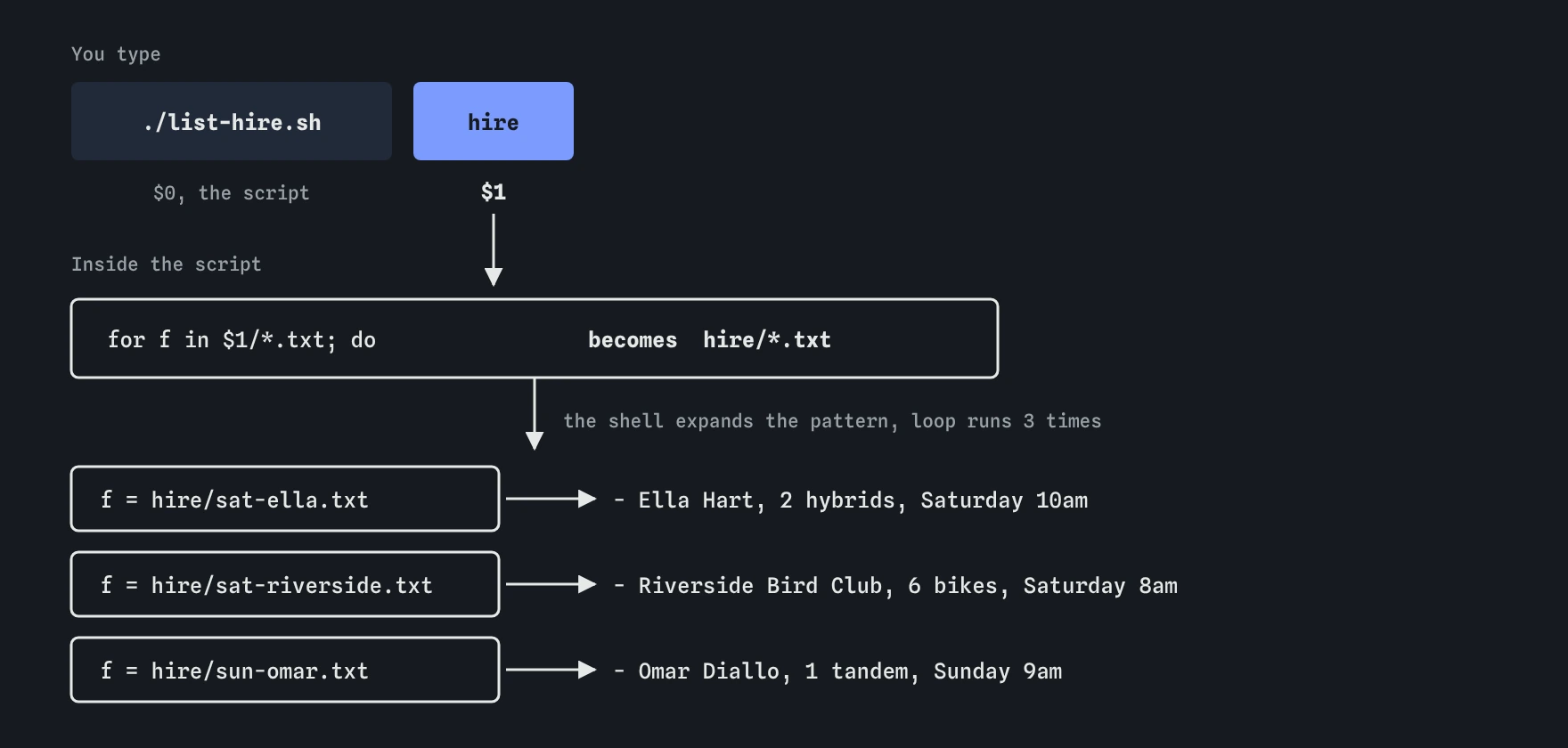
$1. The loop pattern $1/*.txt turns into hire/*.txt, and the shell expands it to the three bookings before the loop starts.How does a for loop work?
A for loop repeats the lines between do and done once for each item in a list. In for f in $1/*.txt; do, the shell first expands hire/*.txt into the three matching file names, then runs the body three times with f set to each one in turn.
Inside the body, $f is the current file, and $(head -n 1 $f) runs head and drops its output into the echo line. Indent the body by two spaces. Bash doesn't care, but you will when the script grows.
If the pattern matches nothing, bash leaves it as typed, so the loop runs once with f set to the literal text hire/*.txt. head can't open a file with that name, which is why the Break It script prints one empty label when the file ending is wrong.
How do you check a script before trusting it?
Read it with cat first, especially if you didn't write it. Look for rm, > on important files, sudo, and anything that downloads and runs code. Then run it on a test folder, or with bash script.sh and an argument you know the answer to.
On a real machine, bash -x script.sh hire prints each line before running it, which shows exactly where things go wrong. The practice terminal doesn't support -x, so here add an echo line to print values instead.
AI tools write scripts quickly and often well. Common slips: a missing shebang, Windows line endings that cause bad interpreter errors, unquoted $1 that breaks on folder names with spaces, and rm -rf "$DIR/" with a variable that might be empty. Read every line and make sure you know what it does before you give it chmod +x. Most real scripts also check their input with [ ] tests, such as [ -d "$1" ], which work here and on a real server alike.
Field notes
- A script is a text file of commands that bash runs from top to bottom.
- Its first line names the program that should run it, such as bash.
chmod +xgives the file permission to run as./script.sh.$1holds the first word typed after the script name.
Easy to get wrong
Without ./, bash searches PATH and doesn't look in the current folder, so it says command not found.
The shebang needs the full path starting with /. A wrong path gives bad interpreter: No such file or directory on a real system.
The first word after the script name is $1. $0 is the script's own name and $2 is the second word.
777 also lets every other user edit the script. +x adds execute permission and leaves write permission alone.
Questions people ask
Does a script have to end in `.sh`?
No. The ending helps people and editors recognise it. Scripts you put in ~/bin are often saved without it, so you can type list-hire instead of list-hire.sh.
Why didn't `cd` inside my script change my folder?
A script runs in its own copy of the shell. Its cd changes that copy's folder, which disappears when the script ends. Use source script.sh if you really want it to affect your terminal.
Can I use zsh to run bash scripts on a Mac?
Yes, as long as the shebang says #!/bin/bash and you run it with ./. The Mac's built-in bash is an old version 3.2, so very new bash features may need a newer bash from Homebrew.
How do I stop a script that's stuck in a loop?
Press Ctrl+C in the terminal running it. If that doesn't work, the processes lesson shows how to find it with ps and stop it with kill.