What counts as an edge case?
An edge case is an input that sits at the limit of what the code handles: the smallest value, the largest, the exact point where a rule switches on, or the input that has nothing in it at all. For Crumb and Crust's delivery rule the edges are an empty basket, a basket of exactly 30, and the values a hair either side of 30.
Most code works fine in the middle of its range. A basket of 12 or 85 gives the right fee with almost any version of the rule, because those values are far from any decision. The interesting bugs sit where one branch hands over to the next, and that is where a careful tester spends most of their effort.
The starting test checks a basket of 12. It passes, and it would keep passing if the free-delivery limit moved to 25, 31 or 1,000. A test that cannot tell those versions apart says very little about the rule.
Why do bugs cluster at boundaries?
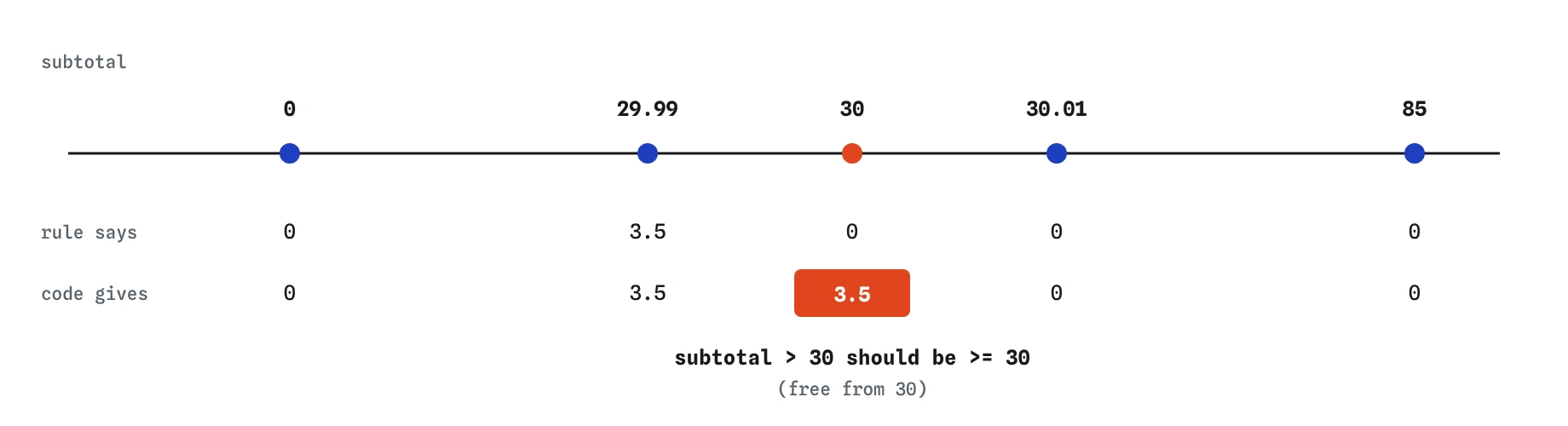
Because a boundary is written with a comparison, and comparisons come in pairs that look almost the same: > and >=, < and <=. The rule in the comment says free from 30. Line 8 of delivery.js says subtotal > 30, which means free above 30. The two agree for every basket except one, and that one is the exact amount a customer is likely to reach on purpose, since people top up their basket to hit the limit.
This family of bugs is called off-by-one, and it is one of the most common mistakes in all code, written by people and AI tools alike. It survives reviews because the line reads naturally. It survives manual testing because people try round, comfortable numbers. It does not survive a test that asks about 30 itself.
Which values should you try?
Start from the rule, not the code. Write down each point where the answer changes, then pick a value on the point and one on each side. For delivery that gives you 29.99, 30 and 30.01. Add the edges of the whole range: the smallest real basket and an empty one. One ordinary value from the middle keeps the common case honest.
This short list catches most problems with surprisingly few tests. You are not trying every possible basket. You are trying one example from each region of behaviour plus the places where regions meet.
- Nothing:
0, an empty string, an empty array - One: a single item, the smallest valid amount
- Exactly on each limit, and one step either side of it
- Many: a large basket, a long list
- Wrong or missing: a negative number, a field left out
How does test.each keep edge cases readable?
Edge cases come in groups that share the same shape: give a subtotal, expect a fee. Writing six near-identical tests by hand buries the values in repeated code. test.each takes a table of rows and runs the same test once per row, so the values sit together where you can read them as a list.
Each inner array is one row. Its items are passed to your function as arguments in order, so [30, 0] arrives as subtotal = 30 and fee = 0. The %s placeholders in the name are filled with the same values, which gives every row its own name in the Results view. When a basket of 30 pays 0 delivery fails, you know which row it was without opening the file.
test.each([
  [0, 0],
  [29.99, 3.5],
  [30, 0],
])('a basket of %s pays %s delivery', (subtotal, fee) => {
  expect(deliveryFee(subtotal)).toBe(fee);
});
When should you write separate tests instead of a table?
Use a table when every row checks the same thing with different numbers. Write separate tests when the cases need different setup, different matchers or a sentence of explanation. An empty basket returning 0 and a negative subtotal throwing an error are different behaviours, and squeezing them into one table means awkward rows with flags that say which branch to expect.
A good rule of thumb: if you find yourself adding an if inside the test body to handle some rows differently, split the table. Vitest and Jest also accept rows as objects, such as { subtotal: 30, fee: 0 }, with $subtotal in the name. Objects read better once a row has more than two or three values.
What about zero, empty and missing input?
Zero and empty are edges that every function meets sooner or later. A basket can be emptied, a sightings list can start blank, a quantity box can be cleared. Ask what the right answer is for each, write it in a test, and make the code agree. Here the rule says an empty basket pays nothing, which the first branch of deliveryFee() handles. A test for 0 keeps it that way: if someone changes <= 0 to < 0, an empty basket would suddenly be charged 3.50.
Missing input is a related question. What should deliveryFee() do with undefined, or with the string '30' from a form field? Sometimes the honest answer is to throw an error, which the next lesson covers. The point is to decide, write the decision down as a test, and stop leaving it to chance.
How do you read a boundary failure in Results?
Add the table and one row turns red: a basket of 30 pays 0 delivery, with Expected 0 and Received 3.5. The name tells you the input, and the two values tell you which branch ran. The rows for 29.99 and 30.01 both pass, so the code is right just below and just above. That pattern, wrong only on the exact value, is the fingerprint of an off-by-one bug.
Open the code and look for the comparison that decides the free-delivery branch. Change > to >=, and the whole table goes green. Check my work then puts the bug back in hidden copies of the file and confirms your table turns red again. That is the real proof that you tested the edge, as opposed to happening to pass it.
What do AI-written tests miss about edges?
Ask an AI tool to test deliveryFee() and you will often get three tests: a small basket, a large basket and maybe a medium one. They look thorough and they all pass. They rarely include the exact limit, and they very rarely include an empty basket or a negative number, because the tool tends to produce typical examples.
When you review generated tests, list the boundaries in the rule yourself and check that each one appears. Look for the value on the limit in particular. If the tests only use round numbers like 10, 20 and 50, they are testing the middle of each range and leaving the edges to luck.
Field notes
- Edge cases sit at limits: zero, empty, exactly on a threshold and just either side.
- Bugs often hide where
>was written instead of>=. - Pick one value on each limit and one step either side of it.
test.eachruns one test per row of a table, each with its own name.
Easy to get wrong
A value far past the limit passes with > or >=. Only a test on the limit itself catches an off-by-one bug in the comparison.
Three rows from the middle of the same range test one behaviour three times. Pick rows from each region and from the places where regions meet.
Logic inside a test can hide bugs of its own. When rows need different handling, they are different tests.
Questions people ask
How many edge cases is enough?
For each limit in the rule, test on it and one step either side, plus nothing, one and many. For most small functions that comes to five to eight values. Adding more rows from the middle of a range rarely finds anything new.
What does %s do in a test.each name?
It is replaced by the next value from the row, in order. %d formats a number and %# gives the row index. With object rows you can write $subtotal instead, which reads better and does not depend on order.
Why does 29.99 pay delivery when it is almost 30?
Because the rule draws a line at 30 and 29.99 is below it. Testing the value just under the limit proves the line is in the right place and has not drifted downwards.
Does the practice runner support every test.each form?
It supports arrays of arrays, arrays of objects and the %s, %d, %# and $name placeholders. The tagged template form with a table written between backticks, which Vitest and Jest also accept, is not supported here.