What does a snapshot test do?
A snapshot test saves a copy of a value the first time it runs and compares every later run with that copy. If the value is the same, the test passes. If anything differs, even one number in a large object, it fails and shows you the difference. You don't write the expected value by hand. The tool writes it for you, and you decide whether to keep it.
In Vitest and Jest there are two kinds. toMatchSnapshot() stores the copy in a separate file in a __snapshots__ folder. toMatchInlineSnapshot() writes it straight into your test file, as a template string inside the brackets. Inline snapshots are easier to review because the expected value sits next to the code that produced it, so this lesson uses those.
The test in the editor snapshots the order summary that Crumb and Crust shows before payment: the lines, the pickup day and the total. It passes. It also contains a bug, which is the whole point of the exercise.
How did a bug end up inside a passing snapshot?
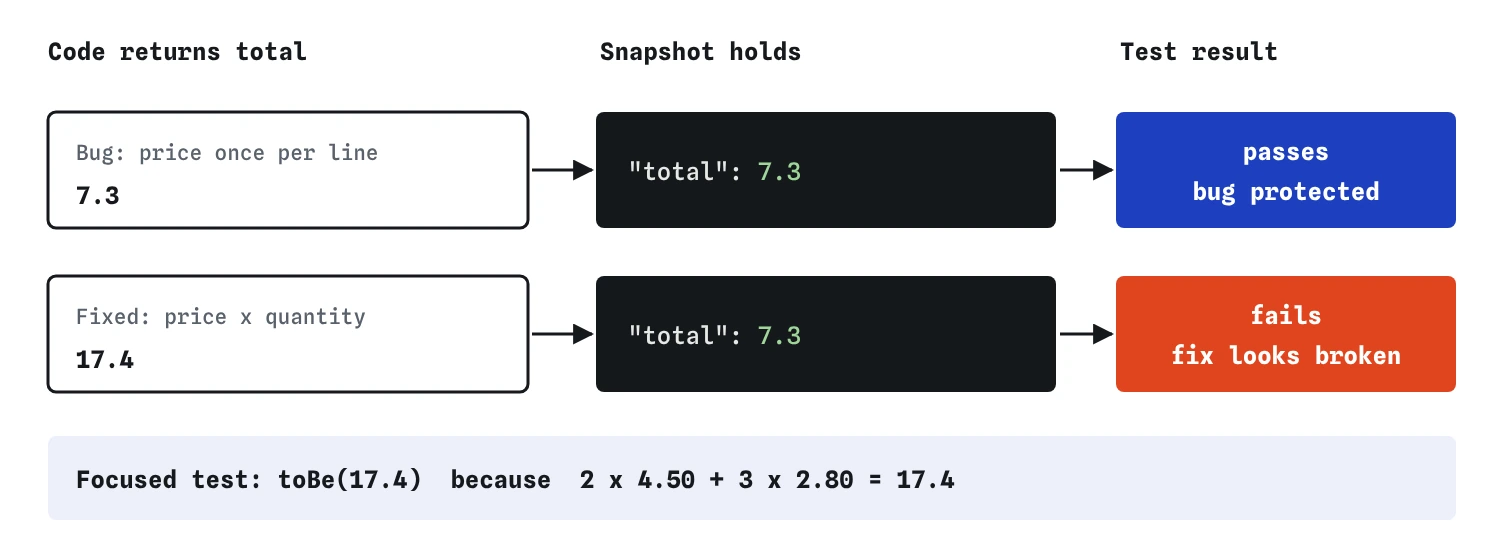
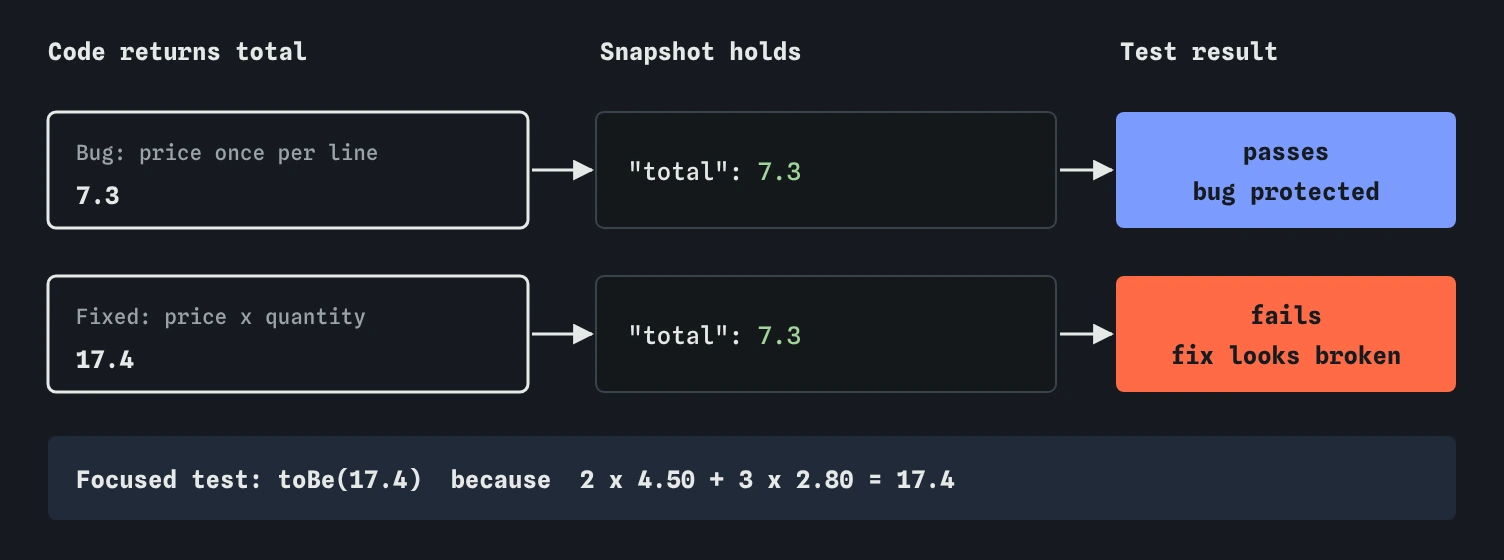
Someone wrote the test, ran it, and let the tool record whatever orderSummary() returned. At that moment the code added each item's price once and ignored the quantity, so the total came out as 7.3. Nobody checked the number. The snapshot faithfully saved 7.3, and from then on the test protected the bug: any fix to the code makes it fail.
A snapshot answers one question: is the output the same as last time? It can't tell you whether last time was right. That's the most common way snapshot tests go wrong. If you accept a snapshot without reading it, you have written a test that expects whatever the code happens to do, which is the copy-the-answer mistake from the first lesson in a more convenient form.
Fix the code first. The snapshot fails, with Expected showing "total": 7.3 and Received showing "total": 17.4. That diff is the moment to think. Two loaves at 4.50 and three buns at 2.80 come to 17.40, so the new value is right and the snapshot needs updating.
How do you update a snapshot?
With the real tools, you run the tests with vitest -u (or press u in watch mode) and Vitest rewrites every failing snapshot with the new value. Jest does the same with jest -u. For inline snapshots, the tool edits your test file in place and formats the value for you. Run toMatchInlineSnapshot() with empty brackets and the first run fills them in.
The practice runner can't rewrite your file. It fails an empty toMatchInlineSnapshot() with "(no snapshot yet)" and shows the value it got in Received, so you copy it into the brackets yourself. Here, change 7.3 to 17.4 by hand. Doing it manually is slower, and it makes you read the value, which is the habit to keep when the tool does the writing.
Before you press u on a real project, run the tests once without it and read every failing snapshot. Updating all of them in one go is how a new bug gets accepted alongside the change you meant to make.
expect(orderSummary(basket, 'Saturday')).toMatchInlineSnapshot(`
  {
    "lines": [
      "2 x Sourdough",
      "3 x Cinnamon bun",
    ],
    "pickup": "Saturday",
    "total": 17.4,
  }
`);
Why add a focused test next to the snapshot?
Because the snapshot checks everything at once and explains nothing. When it fails, its name says "summarises a Saturday order" and you have to read a whole object to find out what changed. A test called "the total counts every item, not every line" with toBe(17.4) says which rule broke in its name.
The focused test also records why 17.4 is right. A comment such as 2 x 4.50 + 3 x 2.80 turns the number from "whatever the code said" into a value someone worked out. If the snapshot and the focused test disagree after a change, the focused test is the one to trust, because a person wrote it from the rule.
Keep the snapshot too. It still guards the parts with no focused test, such as the wording of each line and the pickup day. Check my work proves that: it breaks the line text and expects your snapshot to notice.
How does Vitest format a snapshot?
Snapshots use a printer called pretty-format. Objects print with each key on its own line, in double quotes, sorted alphabetically, with a trailing comma after every entry. Arrays print the same way with square brackets. Strings print in double quotes. The order you write keys in the code doesn't matter: orderSummary() could return total first and the snapshot would still list lines, pickup, total.
The practice runner sorts keys the same way, so a snapshot lists them alphabetically whatever order the object uses. It does ignore leading spaces on each line, while Vitest re-indents the snapshot to match your code. A string snapshot such as toMatchInlineSnapshot("1 grey heron at Mill Pond") keeps its double quotes inside the backticks in both.
When are snapshots a good fit?
Snapshots suit outputs that are large, structured and mostly stable, where writing the expected value by hand would be tedious and error-prone. An order summary, a list of labels for a sightings board, the error object an API sends back, the text of a confirmation email. They are also useful when you are about to refactor code that has no tests: snapshot what it returns today, refactor, and the snapshot tells you if anything moved.
They are a poor fit for anything that changes on every run, such as dates, random IDs and timestamps, unless you freeze those first with fake timers or replace them with expect.any(String) in a regular test. The same goes for whole web pages. A snapshot of a page's HTML fails on every class rename and spacing change, and people learn to update it without looking.
What is snapshot rot, and how do you avoid it?
Rot is what happens when snapshots fail so often for unimportant reasons that the team stops reading them. Every change comes with a pile of updated snapshots, the review skims past them, and eventually a real bug slips in through an update nobody read. At that point the snapshots cost time and protect nothing.
Three habits keep them useful. Keep each snapshot small: snapshot only the part you care about, such as .lines, instead of the whole object. Prefer inline snapshots, so the expected value sits in the review next to the change. And treat every changed snapshot in a pull request as a change to read, the same as a changed line of code.
- Read every snapshot the first time it is written
- Snapshot the smallest value that shows the behaviour
- Freeze dates and random values before snapshotting
- Back important rules with a focused test that names them
- Review updated snapshots line by line in code review
What do AI tools get wrong with snapshots?
Asked to "add tests", an AI tool often wraps every function in a snapshot, runs the suite, and hands back whatever was recorded. That suite passes and says nothing about whether the output is right. Read each recorded value as carefully as you would a hand-written toBe().
The other common slip is snapshotting the wrong value, as the Break It challenge shows: calling the function and then snapshotting the input, or a copy made before the call. The test looks thorough, with a big block of data, and can never fail. Check that the thing inside expect() is the code's output, then break the code on purpose and watch the snapshot fail.
Field notes
- A snapshot saves an output once and fails whenever that output changes.
- A snapshot only says the output matches last time, and last time may have been wrong.
- Read every snapshot value before you accept or update it.
- Back an important rule with a focused test, such as
toBe(17.4).
Easy to get wrong
An update accepts every change at once, including bugs. The diff is the only moment a person looks at what changed.
Snapshotting the input instead of the output gives a test that passes whatever the code does. Put the code's result inside expect().
Huge snapshots fail on every unrelated change, so people stop reading them. Snapshot the smallest value that shows the behaviour you care about.
Questions people ask
Should I commit snapshot files?
Yes. Snapshots are part of the tests. Files in __snapshots__ belong in version control, and changes to them should be reviewed like code. Inline snapshots are already in the test file.
What happens to a snapshot in CI?
Vitest and Jest refuse to write new snapshots when they detect a CI environment, so a missing snapshot fails instead of being recorded silently. Write and review snapshots locally, then commit them.
Can a snapshot contain a value that changes?
Use property matchers: toMatchSnapshot({ id: expect.any(String) }) lets the real tools accept any string for id while checking the rest. The practice runner doesn't support property matchers, so freeze the value or test it separately.
Is a snapshot test better than `toEqual()`?
Neither is better. toEqual() with a value you wrote yourself states what should happen. A snapshot records what does happen. Use toEqual() for rules, and snapshots for large outputs you have read and approved.