Why does it matter how a test finds an element?
Every page test starts by finding something: a field to type into, a button to click, a message to read. The way you find it decides what the test can notice. A test that grabs the button by a data-testid attribute only proves that some element with that attribute exists and reacts to a click. It says nothing about whether a person could find the same button.
Testing Library is built around one idea: your tests should use the page the way people do. People look for a field next to the words "Your name". Screen reader users hear "Book my place, button". Nobody sees data-testid="submit". When the test searches using the same clues a person uses, a broken label or a wordless button breaks the test too, and you hear about it before a visitor does.
The starting tests in the editor pass. They would keep passing if the label pointed at the wrong field, if the button lost its text, or if the message stopped being announced. Check my work tries all three of those broken copies, and your rewritten tests have to fail on each one.
Which query should you reach for first?
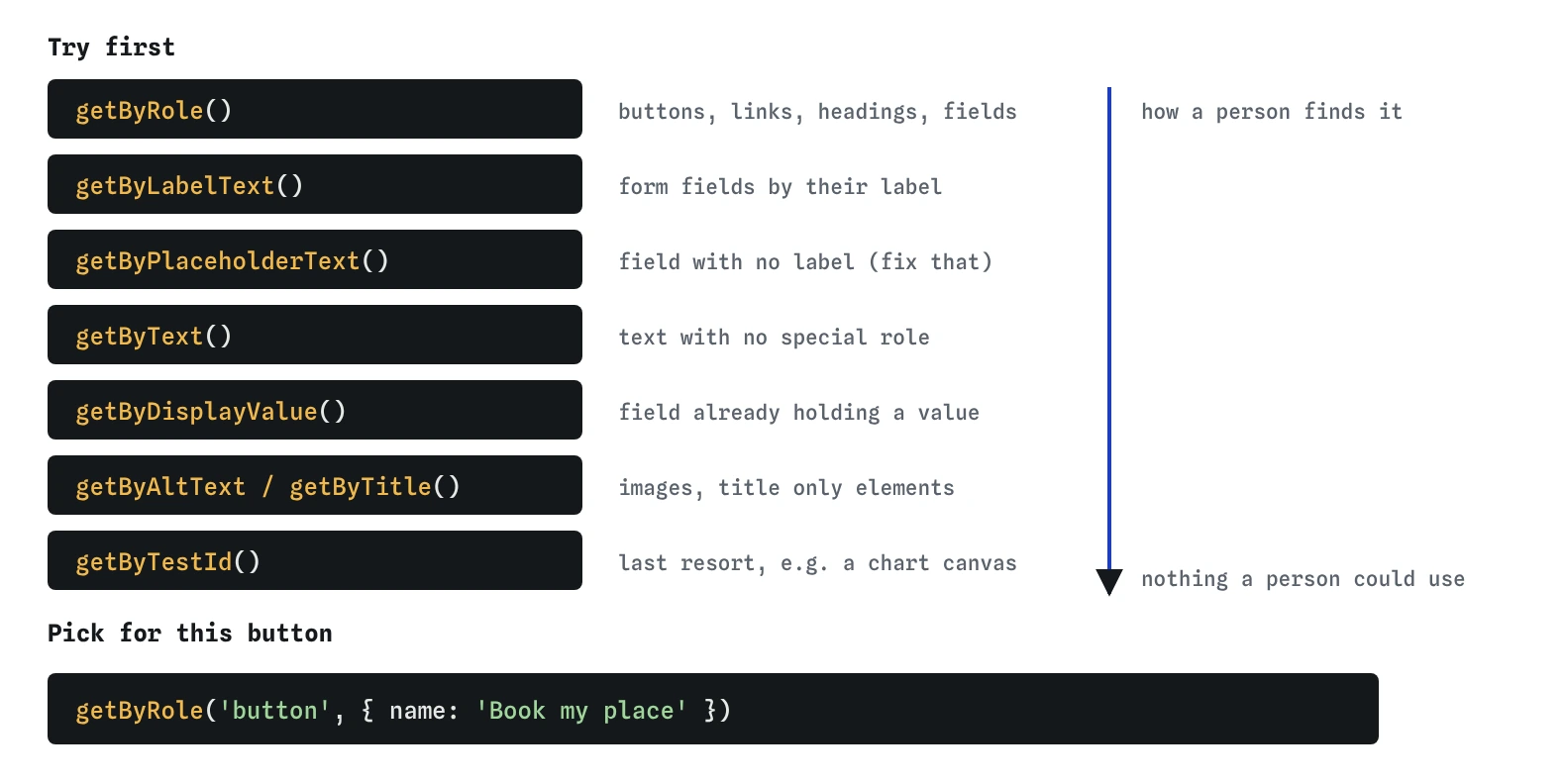
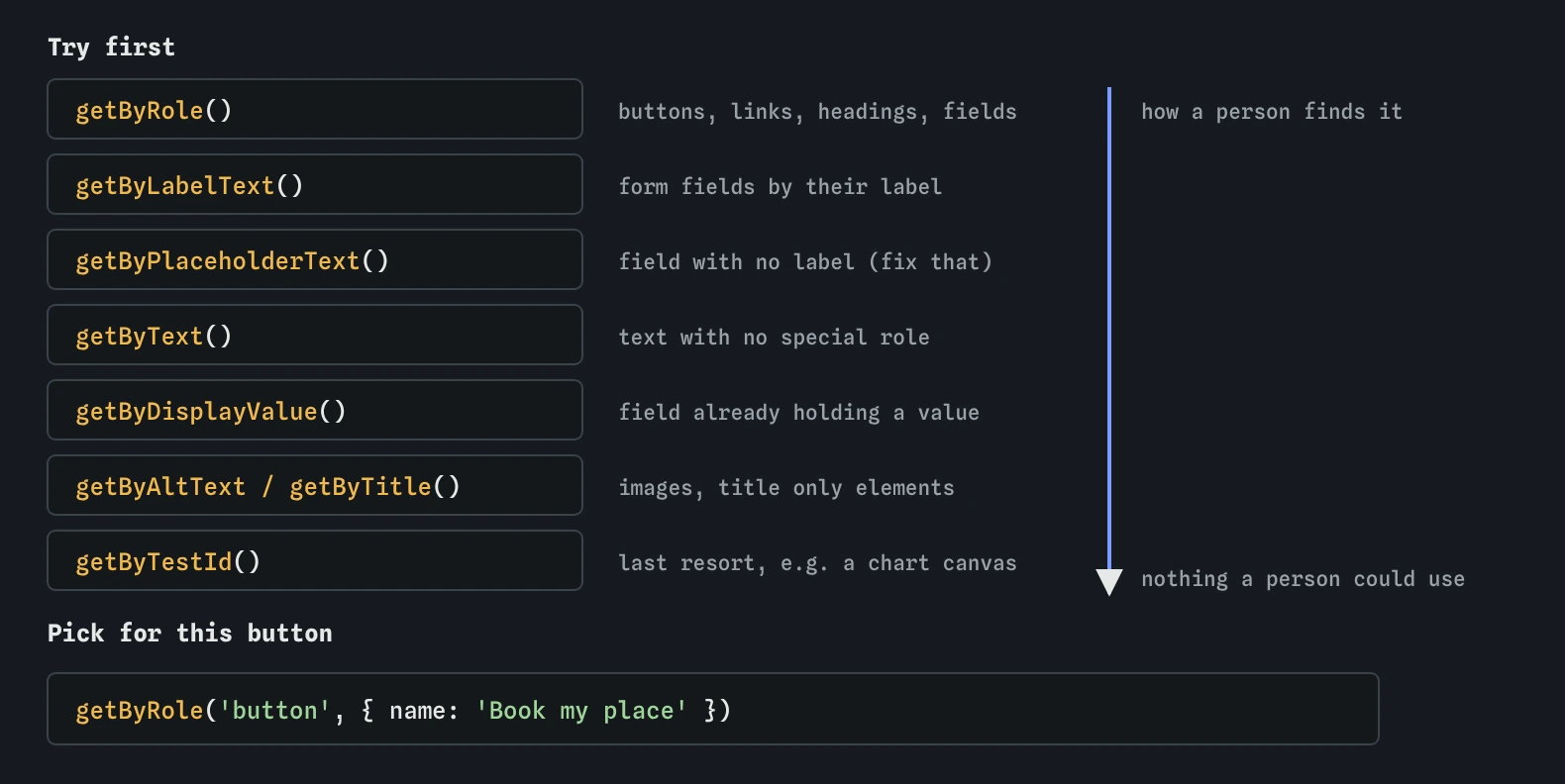
Testing Library gives the queries an order of preference. Work down the list and stop at the first one that fits the element:
getByRole()with aname: buttons, links, headings, checkboxes, form fields, lists, images. This is the one to try first for almost everything.getByLabelText(): form fields, found by the text of their<label>.getByPlaceholderText(): only when a field has no label, which is itself a problem worth fixing.getByText(): paragraphs, messages and other text that has no special role.getByDisplayValue(): a field that already holds a value, such as an edit form.getByAltText()andgetByTitle(): images and the rare element named only by a title.getByTestId(): a last resort for things no user could identify, such as a chart canvas.
How does getByRole decide what a role and a name are?
Every element on a page has an implicit role that assistive technology uses. A <button> is a button, an <a href> is a link, an <h2> is a heading, an <input type="checkbox"> is a checkbox, a <select> is a combobox, a plain text <input> is a textbox. You can also set one with the role attribute, as the message paragraph does with role="status". A div only has the role generic, so a clickable div is invisible to getByRole('button').
The name is what a screen reader reads out with the role. For a button or a heading it is the text inside. For a form field it comes from its <label>, through a matching for and id or by wrapping the field inside the label. For an image it is the alt text. An aria-label or aria-labelledby overrides all of these.
Pass the name as a string for an exact match or as a regular expression for part of it. { name: 'Book my place' } must match the whole name after spaces are tidied. { name: /book/i } matches any button whose name contains "book" in any case. Use the exact string when the wording must not change, and a pattern when small wording changes shouldn't break the test.
screen.getByRole('button', { name: 'Book my place' });
screen.getByRole('heading', { name: 'Book a guided walk', level: 2 });
screen.getByRole('combobox', { name: 'Walk' });
screen.getByLabelText('Your name');
Why is a role query also an accessibility check?
Because it fails in the same situations where a screen reader user would get stuck. Try it with the broken copies the check uses. Change the label's for to "name" while the input's id stays walker-name, and getByLabelText('Your name') reports that it found a label but no field linked to it. A screen reader would announce the field as "edit text" with no name. A test ID query keeps passing.
Swap the button text for an arrow icon marked aria-hidden, and the button has no name. getByRole('button', { name: 'Book my place' }) cannot find it, and the error lists the role and name it wanted. Remove role="status" from the message, and the paragraph still shows the right words on screen, but a screen reader no longer announces it when it changes. getByRole('status') fails.
This is a narrow check, and it isn't a full accessibility audit. It won't tell you about colour contrast, focus order across the whole page or confusing wording. It does catch a whole family of common mistakes for free, every time the tests run, which a manual audit done once a year never will.
When is getByText the right choice?
Use getByText() for content that has no interactive role: a paragraph of opening times, a total on a receipt, an empty-state message. Users read that text, so finding it by its text is honest. By default the match is exact after spaces are tidied, so getByText('Booked') won't find "Booked: Ana on the Heron hide walk.". Use a regular expression such as /booked/i for part of the text, or check the message with toHaveTextContent(), which looks for part of the text by default.
Avoid getByText() for buttons and links. getByText('Book my place') would still find the words if they were inside a span that does nothing. getByRole('button', { name: 'Book my place' }) only passes if it is really a button.
When is a test ID acceptable?
Sometimes there is nothing a person could use to find the element. A drawing on a <canvas>, a wrapper around a third-party map, or one of twenty identical cards where you need a specific one in a layout test. A data-testid is a fair choice there, and it is better than a CSS class or a long querySelector chain, because nobody renames it by accident while restyling.
When you reach for one, ask first whether the element should have a name. If a visitor needs to find it, it probably should, and the fix belongs in the HTML. A repeated card can often be reached with within(): find the card's heading by role, take its parent article, and query inside it.
const card = screen.getByRole('heading', { name: 'Dawn chorus' }).closest('article');
within(card).getByRole('button', { name: 'Book' });
What should you do when a query finds nothing, or too much?
A getBy query throws when it finds no match and when it finds more than one. Both messages are useful. "Unable to find an element with the role button and name Book my place" means the name is different from what you expected, or the element is hidden, or it isn't a button. Add screen.debug() to print the page into the Output view and compare. In real Testing Library the failure also prints the page and a list of the roles it can see, which the practice runner leaves out.
"Found multiple elements" means your query is too loose. Add a name, narrow it with within(), or use getAllByRole() if you really expect several, such as every item in a list. Use queryByRole() when you want to check something is absent, because it returns null instead of throwing, and findByRole() when the element appears after a delay.
What do AI-written page tests usually get wrong here?
They lean on container.querySelector() and data-testid because those are short and always work. That is exactly the problem: they work even when the page doesn't. They also invent test IDs and then add them to the markup to make the test pass, which spreads attributes nobody needs through the HTML.
Another pattern is getByText('Submit') for a button whose real label is different, followed by a change to the page to match the test. Read generated tests with the page open, and check that every query names something a visitor would recognise. When a role query fails on code an AI wrote, the code is often the thing to fix: a div with a click handler, an icon button with no name, a field with no label.
Field notes
- The way a test finds an element decides which problems it can notice.
- Try
getByRole()with anamefirst, and keepgetByTestId()as a last resort. - A role query fails when a label, button name or status role goes missing.
- Use
getByText()for plain text, and role queries for buttons and links.
Easy to get wrong
The test ID passes whether or not the button has a name or is a button at all. The role query fails in the same cases where a screen reader user would be stuck.
A placeholder disappears as soon as someone types and is not a reliable label. If the only way to find a field is its placeholder, add a real <label> and query that.
Text queries find words anywhere, including in a span that does nothing when clicked. Use the role for anything a person interacts with.
An exact string must match the whole accessible name. Use a regular expression when you only care about part of the wording.
Questions people ask
Is `getByRole()` slower than the other queries?
It does more work, because it calculates roles and names for many elements. On a very large page you may notice it in real Testing Library. The usual fix is to narrow the search with within(), keeping the role query.
Does `getByRole()` find hidden elements?
No. Elements hidden with hidden, display: none, visibility: hidden or aria-hidden="true" are skipped, because users can't reach them either. Real Testing Library has a hidden: true option to include them; the practice runner doesn't support it.
What role does a `<select>` have?
A single <select> is a combobox. One with multiple is a listbox. Its <option> elements have the role option, and the select's name comes from its label.
Can I check the accessible name directly?
Yes. expect(element).toHaveAccessibleName('Book my place') checks the name of an element you already have. It is handy for icon buttons that are named with aria-label.
Where can I see all the roles on my page?
Browser DevTools have an accessibility panel that shows each element's computed role and name. Real Testing Library prints the same list when a role query fails, which is a quick way to learn what your markup exposes.