How can a test look at a page?
Page code reads and changes the document: it finds elements, creates list items and sets text. A page test gives that code a document to work on, runs it, then reads the document back. In Vitest the document comes from jsdom or happy-dom, a page built in memory with no window on screen. Here the runner uses a real page inside your browser, and the Page view shows it.
The lesson's page markup, a heading, a count, an empty list and a hidden message, is put in place before each test. The test calls showWalks() with some data and then asks questions: how many list items are there, what does the count say, can you see the message. The answers come from the page itself, which is what a member of the bird club would see.
What is screen, and why use it?
screen comes from Testing Library and holds a set of queries bound to the whole page. screen.getByText('2 walks') searches every element for that text and gives back the one that matches. You import it from @testing-library/dom, or from the framework version such as @testing-library/react if you use one.
The queries are designed around what a person can perceive. getByRole('listitem') finds elements by what they are, getByText() by what they say, and getByLabelText() by the label next to a form field. They don't depend on class names or how deeply an element is nested, so a redesign that moves things around leaves the tests alone as long as the page still says the same things.
You could use document.querySelector('#walk-count') instead, and sometimes that is fine. Tests built on ids and classes break when markup changes and say nothing about what users see. Start with screen.
showWalks(twoWalks);
expect(screen.getAllByRole('listitem')).toHaveLength(2);
expect(screen.getByText('2 walks')).toBeInTheDocument();
What is the difference between getBy, queryBy and findBy?
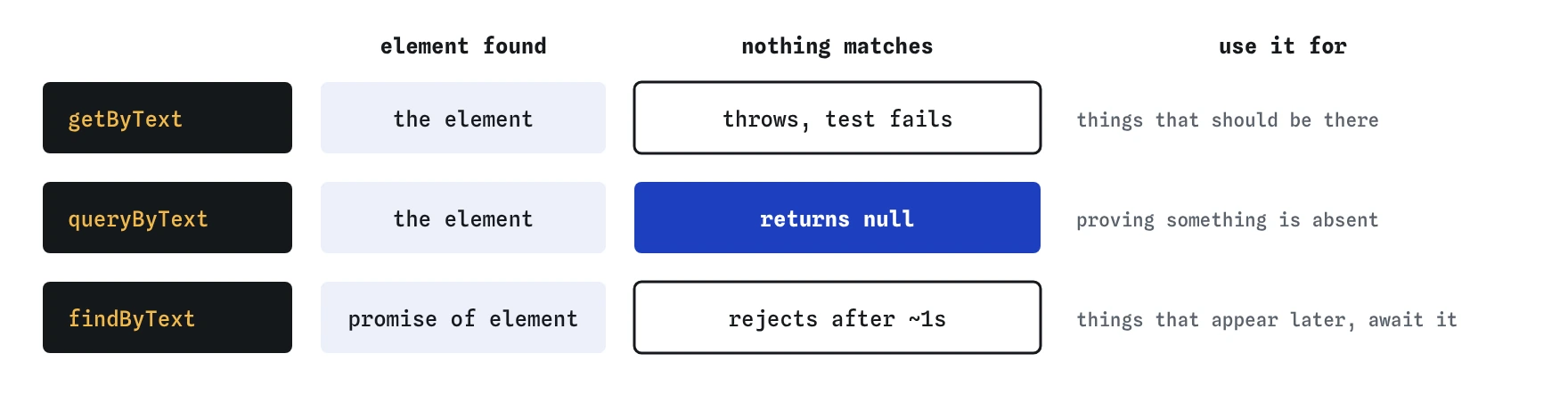
They differ in what happens when nothing matches. getBy throws an error straight away, which fails the test with a message saying what it couldn't find. Use it for anything that should be there. queryBy returns null instead, so use it only to prove something is absent: expect(screen.queryByText('Mill Pond')).toBeNull().
findBy returns a promise and keeps looking for up to a second, for things that appear after a delay, such as results from a fetch. You await it. Each has an All form, getAllBy, queryAllBy and findAllBy, which return an array. A plain getBy also throws when it finds more than one match, which is useful: it tells you the query is less specific than you thought.
getBy: must be there now, throws if missing or duplicatedqueryBy: might be missing, returnsnullfindBy: will appear soon, returns a promisegetAllBy,queryAllBy,findAllBy: the same, for several matches
Which matchers check the page?
The page matchers come from jest-dom, a companion library to Testing Library, and they read like sentences. toBeInTheDocument() checks an element is on the page. toHaveTextContent('(full)') checks its text contains those words, or matches a regular expression. toBeVisible() checks a person could see it: no hidden attribute, no display: none on it or any parent.
Choose the strongest one that fits. For the empty message, toBeInTheDocument() is too weak, because the paragraph is always in the markup and only its hidden attribute changes. toBeVisible() is the assertion that matches what a member experiences. In a real project you add the matchers with import '@testing-library/jest-dom/vitest' in a setup file. The practice runner has them built in.
How do you test an empty state?
Call the code with nothing: showWalks([]). Then check two things. The list should have no items, which queryAllByRole('listitem') and toHaveLength(0) confirm without throwing. The friendly message should be visible, which getByText(/No walks planned yet/) and toBeVisible() confirm.
Empty states are easy to forget because developers rarely see them. The test data always has walks in it, so the page always looks fine. Then the season ends, the list empties, and the page shows a heading and a blank space. A test with an empty array is the cheapest way to make sure that day looks right too.
A regular expression in getByText() is handy here. A plain string has to match the element's whole text, so getByText('No walks planned yet') misses a paragraph that goes on to say "Check back soon". /No walks planned yet/ matches part of it.
test('shows a message when no walks are planned', () => {
  showWalks([]);
  expect(screen.queryAllByRole('listitem')).toHaveLength(0);
  expect(screen.getByText(/No walks planned yet/)).toBeVisible();
});
Does each test get a fresh page?
In this runner, yes. Before every test the page goes back to the lesson's markup, so a test that adds three walks can't leave them behind for the next one. That is why every test here calls showWalks() itself.
In Vitest you set this up. With a framework such as React, Testing Library's render() adds its output to the page and cleans it up after each test automatically. With plain page code like showWalks(), the usual pattern is a beforeEach that sets document.body.innerHTML to the starting markup. Without it, jsdom keeps the same document for every test in a file, and tests start depending on each other in confusing ways.
If a test passes alone and fails in the full run, or the other way round, leftover page content is one of the first things to suspect.
beforeEach(() => {
  document.body.innerHTML = `
    <p id="walk-count"></p>
    <ul id="walks"></ul>
    <p id="no-walks" hidden>No walks planned yet.</p>`;
});
How do you read a failing page test?
Two kinds of failure turn up. In the first, a query couldn't find anything: "Unable to find an element with the text 2 walks". Something on the page is different from what you expected, and the quickest way to see it is the Page view, which shows the page as the tests left it. In Vitest, screen.debug() prints the page's markup to the console for the same purpose.
In the second, the element was found and a matcher disagreed: toHaveTextContent expected (full) and received Mill Pond, 28 March. That points at the code that builds the text. Read Received carefully, because spaces and punctuation count, and a missing space before the bracket is a real bug a visitor would notice.
What do AI-written page tests often get wrong?
The most common pattern is expect(screen.queryByText(...)).toBeDefined(). It looks like a check, but queryBy returns null when nothing matches, and null is defined, so the test passes whatever is on the page. The Break It challenge starts with exactly this. Use getBy with toBeInTheDocument() or toBeVisible() instead.
Another is a test that finds an element and stops there, under a name that promises more. "Marks a walk that is full" should look at the word full. AI tools also lean on container.querySelector('.walk-item') and data-testid everywhere, which ties tests to markup. Ask whether a person using the page could find the element the way the test does.
There is one difference to keep in mind with this runner: its getByText() skips hidden elements, while Testing Library's finds them and leaves visibility to toBeVisible(). Checking with toBeVisible(), as the solution does, behaves the same in both.
Field notes
- A page test runs your code on a document, then reads the result back from the page.
- Use
screenqueries to find elements by role or text, the way a person would. - Use
getByfor things that must be there andqueryByto prove something is absent. - Check the empty message with
toBeVisible(), since it is always in the markup.
Easy to get wrong
queryByText() returns null when nothing matches, and null is defined. The assertion can never fail, so it proves nothing about the page.
A string has to match the whole text of an element, and the paragraph says more. In the document is also weaker than visible when the element uses hidden.
Class names and nesting change with every redesign. A role query finds list items however they are styled, and the matcher gives a more specific failure message.
Questions people ask
Do I need a browser to run page tests?
No. Vitest runs them in jsdom or happy-dom, which build a page in memory. Set environment: 'jsdom' in the Vitest config, or add a comment at the top of the test file to choose it for that file only.
Why does getByText need a regular expression sometimes?
A string must match the element's whole text after spaces are tidied. A regular expression matches part of it, which suits longer sentences. You can also pass { exact: false } for a case-insensitive part match.
Can I use getByRole for a paragraph?
Newer versions of the accessibility rules give <p> the role paragraph, but many tools treat it inconsistently. For text, getByText() is the simpler choice. Save getByRole() for things with a clear role such as buttons, links, headings and list items.
What does the Page view show?
The page exactly as it was when the last test finished. If that test was the empty one, you see the message and no list items. It is the quickest way to see why a query found nothing.