What does this project ask you to prove?
That the volunteer job list works the way a club member would use it. They type a job and press Add or Enter. They tick jobs off as they finish them and expect the count to drop. They delete a job added by mistake. When the list is empty, they see a short message instead of a blank space. Each of those is a behaviour, and each one gets at least one test.
The code in todo.js works. Check my work then breaks it in five realistic ways: it lets blank jobs in, forgets to clear the field, counts ticked jobs as open, hides a deleted row instead of removing it, and never brings back the empty message. Your suite has to turn red for every one of those. A suite that passes against all of them looks busy and protects nothing.
Everything here comes from the earlier page lessons: role queries, userEvent, the Page view and queryBy for things that should be absent. The project is in putting them together into a suite you would trust before changing the code.
How is the page set up for each test?
The lesson's page starts as an empty <main id="app">. Before every test the runner resets the body to that markup and runs one line, setupTodos(document.getElementById('app')), which builds the heading, the form, the empty list and the status line, and wires up the events. Each test starts with a fresh list, so a job added in one test never leaks into the next.
In a real project the same job is done by your test setup. With Vitest and the jsdom or happy-dom environment you would call setupTodos() in a beforeEach, or render a component with a framework's render() helper, and Testing Library's cleanup() removes it after each test (automatic in Vitest only when globals is on). Either way, the rule is the same: every test builds its own page and doesn't depend on what an earlier test left behind.
beforeEach(() => {
  document.body.innerHTML = '<main id="app"></main>';
  setupTodos(document.getElementById('app'));
});
Why write a helper for adding a job?
Most tests need a job in the list before they can check anything else. Typing into the field and clicking Add takes two lines with two queries. Repeat that in every test and the interesting part, the thing being tested, gets lost among the setup. An addJob(text) helper keeps each test short enough to read in one glance.
Keep helpers thin. This one does exactly what a user does, using the same queries a test would. It doesn't reach into the code to push items into an array or set the list's HTML directly, because then the tests would stop checking the form. A good rule: a helper can save typing, and it should never skip a step a user takes.
The Enter test is the exception that proves the point. It types 'Refill the feeders{Enter}' straight into the field without the helper, because pressing Enter is the behaviour under test.
async function addJob(text) {
  await userEvent.type(screen.getByLabelText('New job'), text);
  await userEvent.click(screen.getByRole('button', { name: 'Add' }));
}
How do you test that something did not happen?
Blank jobs are the classic case. Type three spaces, click Add, and nothing should change. A getBy query is no use here, because it throws when it finds nothing. Use queryAllByRole('listitem') and expect a length of 0, or queryByRole('listitem') with toBeNull(). Both return an empty result instead of throwing.
Make sure the "nothing happened" test would fail if something did happen. A test that adds spaces and then checks nothing passes against any code, which is one of the problems in the Break It suite. Ask of every negative test: if the bug were there, what would I see on the page? Then assert that it isn't there.
The same idea covers deleting. After clicking Delete, queryByRole('listitem') should return null. One of the broken copies only adds a class to the row, so it stays in the page. A test that only clicked Delete and checked nothing afterwards would miss that, because the click itself succeeds.
How do you test the jobs left count?
Add two jobs, tick one, and read the status line. It should say 1 job left. Two jobs is the smallest list that can tell the difference between "count every row" and "count the rows not ticked", which is exactly the bug in one of the broken copies and in the Break It code.
Find the checkbox by its name. Each one sits inside a <label> with the job's text, so getByRole('checkbox', { name: 'Print the maps' }) picks the right box among several, the same way a screen reader user picks it by hearing its name. Checking toBeChecked() after the click confirms the click landed before you read the count. If the checkbox had no label, this query would fail, which is a bug worth knowing about.
Why test the empty message twice?
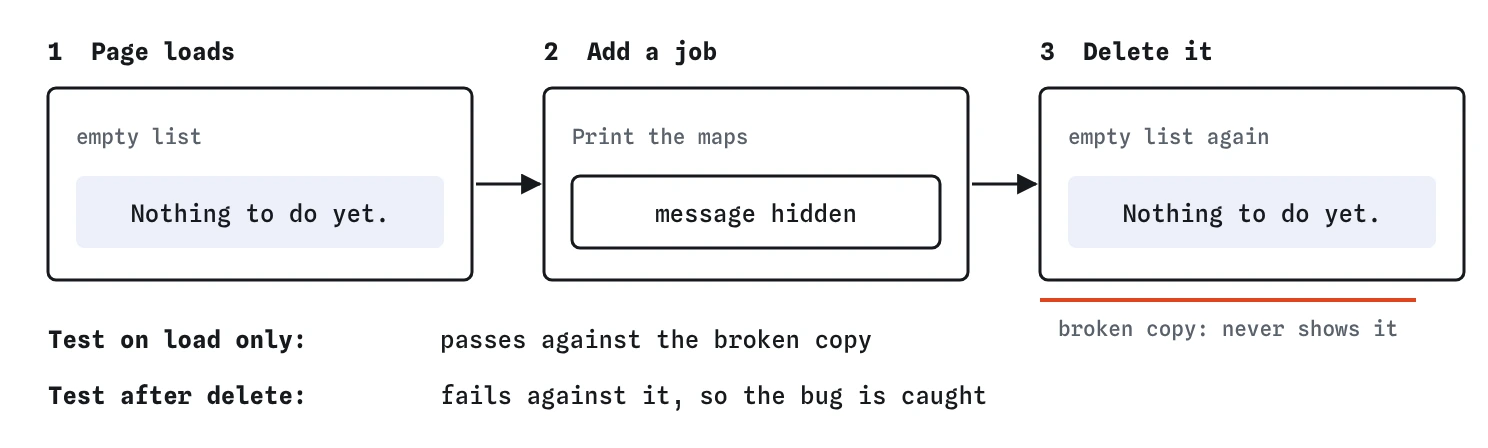
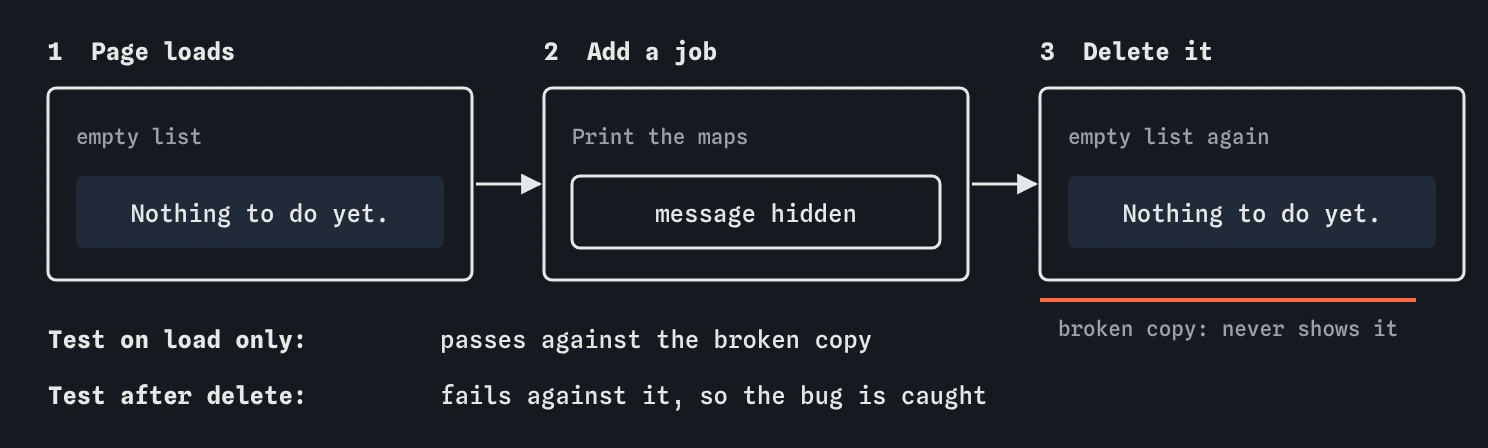
Because empty states have two moments: when the page first loads, and when the last item goes away. Code often handles the first, since the message is written into the starting HTML, and forgets the second. One broken copy does exactly that: it hides the message when a job is added and never shows it again.
A test that only checks the message on load passes against that bug. The test that adds a job, deletes it and then expects Nothing to do yet. fails, which is how you know the suite covers the round trip. Look for the same pattern on any page with an empty state: search results, a basket, a list of bookings.
How do you know the suite is good enough?
Three signals, in order of strength. First, every test passes against the working code and each one checks something with expect(). Second, Coverage shows the lines your tests ran: the blank check, the change handler, the delete handler and both branches of the count. A line that never ran can't be tested. Third, and strongest, the suite fails against every broken copy. That is what Check my work measures.
Group the tests with describe so Results reads as a short specification: adding jobs, finishing and deleting. Name each test after the behaviour, such as "counts only the jobs still open", so a red cross explains itself. Before calling the suite done, search the file for .only and .skip. Either one left in by accident makes Results look healthy while most of the suite doesn't run.
- Every behaviour a user relies on has a test
- Each test fails if its behaviour breaks
- Absent things are checked with
queryBy - No
.onlyor.skipleft in the file
Where does the practice runner differ from the real tools?
Real userEvent methods must be awaited, and a missing await usually makes a test fail or pass by accident. The practice runner does most of the typing straight away, so a forgotten await often goes unnoticed here. Keep the await on every call anyway: your tests should behave the same in Vitest.
Real Testing Library's getByText() also finds elements hidden with CSS or the hidden attribute, while only getByRole() skips them. The runner skips hidden elements in every query. That is why the empty message here is removed by clearing its text, so the tests behave the same in both.
Field notes
- Each thing a member does with the list deserves at least one test.
- A helper like
addJob()saves typing but should never skip a step a user takes. - Check that something did not happen with
queryBy, which returnsnullinstead of throwing. - Test the empty message on load and again after the last job is deleted.
Easy to get wrong
A test with no assertion passes whatever the code does. Every negative test needs an expect() that would fail if the unwanted thing happened.
getBy throws when it finds nothing, so it can't check for absence. Use queryBy, which returns null.
Work out the expected count from the rule. Copying what the code shows today records its bug as correct.
.only makes the runner skip every other test in the file. It is handy while debugging and harmful when committed.
Questions people ask
Should every test go through the form?
For a small page like this, yes. It keeps the tests honest about what a user does. On bigger apps you may set up starting data directly, as long as at least one test still covers the real form.
How many tests is enough for a page like this?
One per behaviour a user relies on, plus the edge cases that broke before. Here that is about seven. How many tests you have counts for less than whether the suite fails against each realistic bug.
Do I need end-to-end tests in a real browser too?
Tests like these, in Vitest with jsdom, are fast and catch most logic and markup bugs. A few end-to-end tests in a real browser are still worth having for the main paths, since they also catch layout, CSS and network problems.
Why does Delete have an `aria-label`?
Every row has a button reading Delete. The label Delete Print the maps tells screen reader users which job it removes, and it lets the test pick the right button by name.