What goes in a test file?
A test file is a normal JavaScript module with a name ending in .test.js. Vitest and Jest both look for that ending, so hours.test.js sits next to hours.js and the runner knows to treat it as tests. The file has two jobs: bring in the code it checks, and describe a list of examples with the answers you expect.
The top of the file is imports. The first line pulls test and expect from vitest. The second pulls isOpen from ./hours.js, the same way any other part of the bakery site would. Everything below that is a list of tests. There is no main function to call and nothing to start: the runner reads the file, collects every test() call, then runs each one and records the result.
In real Vitest the import from vitest is required unless you turn on the globals setting. Jest makes test and expect global by default, so many Jest files have no import at all. The practice runner accepts both styles and ignores the import lines, so you can write whichever you will use at work.
What do the two arguments to test() mean?
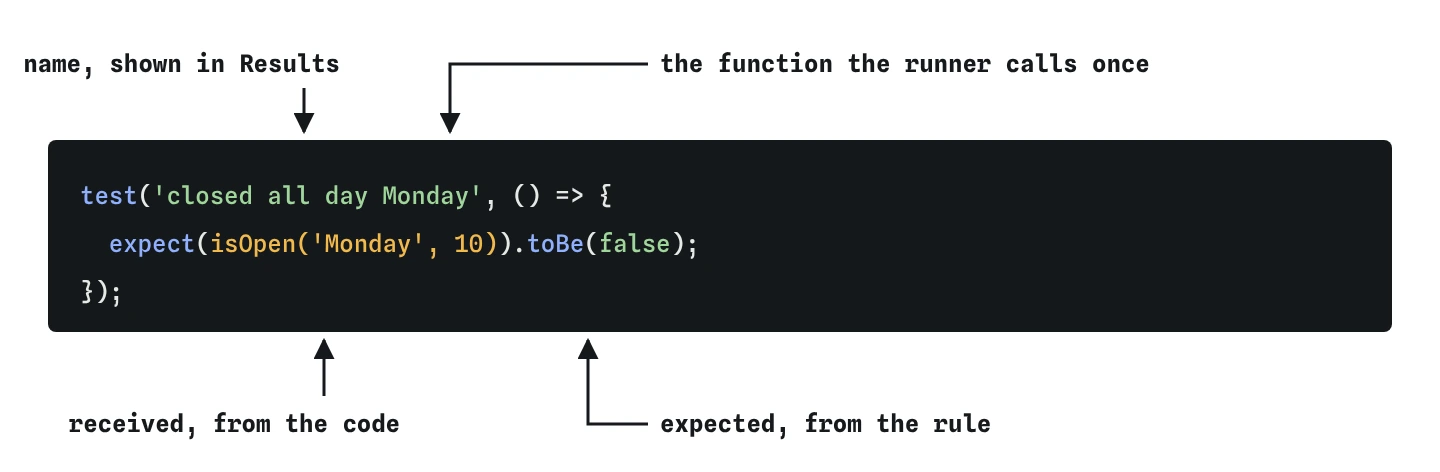
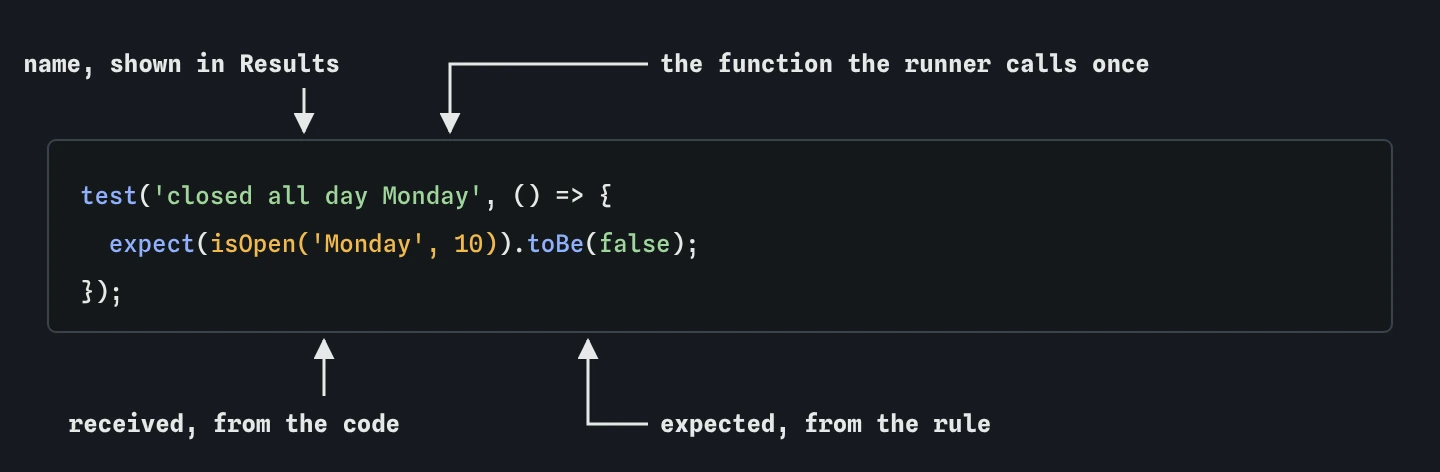
The first argument is the test's name, a short sentence that says what should be true. The second is a function that runs the code and checks it. The runner calls that function once. If it finishes without an error, the test passes. If anything inside it throws, including a failed expect(), the test fails.
The name is for people. Results shows it next to every tick and cross, and a failure report starts with it, so it should make sense to someone who has never opened the file. open on Tuesday at 10 tells you the situation and the expected outcome in five words. test 1 or works tells you nothing when it turns red at the end of a long day.
test('closed all day Monday', () => {
  expect(isOpen('Monday', 10)).toBe(false);
});
How do expect() and toBe() work together?
expect(value) takes the answer your code gave and returns an object full of matchers. toBe(expected) is the simplest matcher: it checks that the two values are the same, using the same rule as Object.is, which is very close to ===. For true, false, numbers and strings that is exactly what you want.
The order affects how you read failures. The thing inside expect() is the received value, what the code actually produced. The thing inside toBe() is the expected value, the one you worked out from the rules. Swap them and the test still passes or fails the same way, but the Expected and Received boxes in Results show the values the wrong way round, which is confusing when you are hunting for a bug.
One expect() per test is a good habit to start with. Later lessons show when two or three checks in one test make sense.
Which examples should your first tests use?
Read the rule in the comment at the top of hours.js: open Tuesday to Sunday, from 8:00 until 17:00, closed all day Monday. That one sentence holds three separate rules, and each rule deserves a test of its own. One test where the shop is open, one for Monday, one for too early and one for too late gives you a small set where every rule is checked at least once.
Pick values that obviously belong to the situation. Monday at 10 is a time the shop would be open on any other day, so if the test fails you know the Monday rule is the problem. Wednesday at 7 is clearly early. Friday at 17 sits exactly on closing time, which is where an off-by-one mistake like > instead of >= would show up.
Work out every expected value from the rule before you look at what the code does. A test that copies the current output records whatever the code does today, bugs included.
- One test where the answer is open
- One test per way the answer can be closed
- At least one value sitting right on a limit, such as 17
Why group tests with describe()?
describe() takes a name and a function, and every test() inside that function belongs to the group. In Results the tests appear indented under isOpen, and the full name of each one becomes isOpen › closed all day Monday. When a file covers several functions, one describe per function keeps the report easy to scan.
A describe block does not run any checks itself, and it does not change how the tests behave. It only adds a heading. You can nest blocks, for example describe('isOpen') with an inner describe('on Sunday'), but one level is plenty for a file this size. Remember to add describe to the import line in Vitest, or you will see describe is not defined on your own machine.
describe('isOpen', () => {
  test('open on Tuesday at 10', () => {
    expect(isOpen('Tuesday', 10)).toBe(true);
  });

  test('closed before 8 in the morning', () => {
    expect(isOpen('Wednesday', 7)).toBe(false);
  });
});
How do you run the tests on your own computer?
Install Vitest into a project with npm install -D vitest, then run npx vitest. It finds every .test.js file, runs them, prints a tick or cross for each test, and then waits. Save any file and it re-runs the tests that depend on it. That is watch mode, and it is the default when you run Vitest in a terminal.
For a single run that exits when it finishes, which is what a build server wants, use npx vitest run. Jest is the other way round: npx jest runs once, and npx jest --watch keeps watching. The practice runner on this page behaves like watch mode. It re-runs every test a moment after you stop typing, and the Results view shows the newest run.
What does .only do, and why is it risky?
Adding .only to a test, as in test.only(...), tells the runner to run that test and skip every other test in the file. It is useful when one test is failing and you want quiet output while you fix it. test.skip does the reverse and skips one test.
The danger is forgetting to take it out. A file with a .only left in looks fine: the one test that runs passes, the bar is green, and nobody notices that the other tests stopped running. The Break It challenge starts in exactly that state. Vitest lists the other tests as skipped, and on a build server, where its allowOnly setting is off by default, it fails the run when it finds a .only. Many teams also add a lint rule that rejects .only before it is committed.
What do AI tools get wrong in a first test?
Ask an AI tool to test isOpen and you will often get one long test named something like isOpen works with six expect() calls in a row. It passes, but when it fails you only learn that something about opening hours is wrong. Splitting it into named tests costs a few lines and tells you which rule broke.
The other common slip is expected values copied from the code instead of the rule. If the code says hour > 17, a generated test may happily expect the shop to be open at 17. Check every expected value against the written rule, the comment, the ticket or the shop owner, and treat the code as the thing being questioned.
Field notes
- A test file ends in
.test.jsand holds a list of examples with expected answers. - The test name is a short sentence that says what should be true.
- Put the code's answer in
expect()and the answer you worked out intoBe(). describe()groups related tests under one heading in Results.
Easy to get wrong
The name is what you read when the test fails. A name that states the rule tells you what broke without opening the file.
The code's answer goes inside expect() and the value you worked out goes inside toBe(). Swapped, the failure report labels the two values the wrong way round.
A forgotten .only silently skips every other test in the file. Remove it as soon as the test you were focusing on passes.
Questions people ask
Should I use test() or it()?
They are the same function under two names. it reads well inside a describe (it('closes at 17:00')), and test reads well on its own. Pick one per project and stick with it.
Where should test files live?
Next to the file they test is the most common choice, so hours.test.js sits beside hours.js. Some projects use a separate tests folder. Both runners find .test.js files anywhere in the project by default.
Why does the practice runner accept code without the vitest import?
It provides test, expect and describe as globals, the way Jest does. Real Vitest needs the import unless globals: true is set in its config, so keep the import in files you will run outside this page.
How many tests should a small function have?
Enough that every rule it follows is checked at least once, plus the values right at each limit. For isOpen that is four or five. Edge cases get a lesson of their own.