Why write a test before touching the bug?
A bug report is a claim: with this input, the code gives the wrong answer. Before you change anything, turn that claim into a test that fails. The failing test proves you understand the bug, because you can make it happen on demand. It also gives you a finish line. When the test goes green, the bug is fixed, and you know it without clicking through the hire form again.
Skipping this step is how people fix the wrong thing. You read “7 hours cost 42”, guess that the hourly rate is wrong, change it from 6 to 5, and now 7 hours cost 35. The report is still true in spirit and three other prices are broken. A test that says expect(hireCost(7)).toBe(30) would have stayed red after that guess and told you to look again.
The habit has a name in many teams: no bug fix without a test. It sounds strict. In practice it is the quickest route, because the test does the checking you would otherwise repeat by hand after every attempt.
How do you turn a bug report into a test?
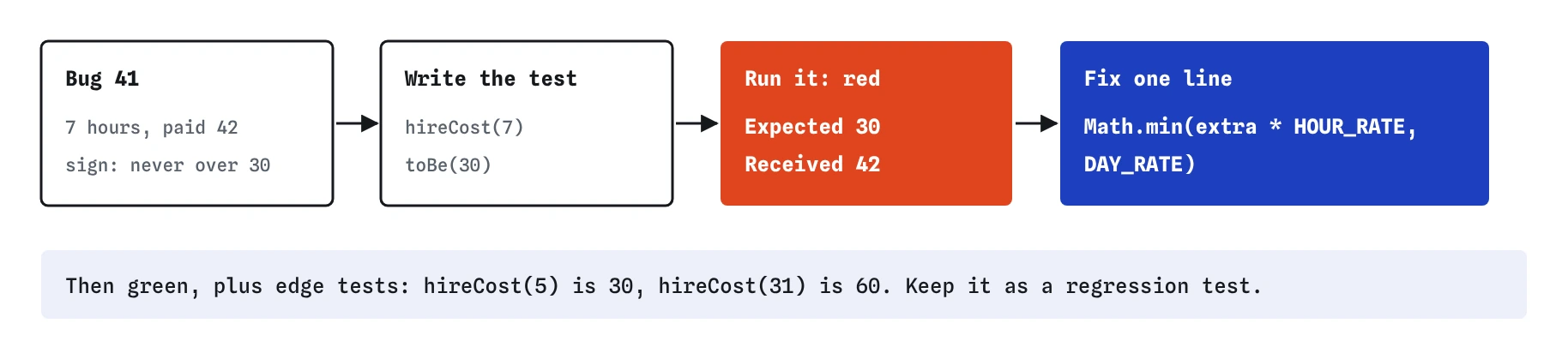
Pull three things out of the report: the input, the answer the person got, and the answer they expected. The Spoke and Chain report gives all three. The input is 7 hours, the received answer is 42, and the expected answer comes from the rule on the shop sign: a day never costs more than 30. Write the test with exactly that input and the expected answer.
Use the input from the report, even if it looks arbitrary. You may suspect that 6 hours shows the same problem, and you can add that test too, but the first test should match what the customer did. That way you know the fix covers their case, and anyone reading the test later can find the report it came from.
Put the bug number or a short quote in the test name or a comment above it. Months later, someone will wonder why there is a test for exactly 7 hours. The name answers them.
// Bug 41: "Hired a bike for 7 hours on Saturday and paid 42.
// The sign says a day never costs more than 30."
test('bug 41: seven hours never cost more than a day', () => {
  expect(hireCost(7)).toBe(30);
});

What should the failing test tell you?
Run the test before fixing anything and read the failure. Expected 30, Received 42 matches the report exactly, so the test reproduces the bug. That match matters. If Received had been 30, the test would pass and you would have learned that your test does not trigger the bug: perhaps the customer hired for 7 hours across midnight, or the price came from a different function.
A test can also fail for a reason unrelated to the bug. A typo in the import, a wrong function name or a missing argument all turn the test red, and none of them reproduces anything. Check that the message describes the bug from the report before you go and change code. The rule is simple to say: the test must fail, and it must fail with the wrong answer the customer saw.
How small should the fix be?
As small as the test allows. Here the bug lives on one line: the extra hours are multiplied by the hourly rate with no ceiling. Math.min(extra * HOUR_RATE, DAY_RATE) caps the part day at the day rate, and the rest of the function stays as it was. Resist rewriting the whole function while you are in there. A rewrite mixes the bug fix with new behaviour, and if a test breaks you no longer know which change caused it.
Once the new test passes, look at the old ones. They should still pass. If one of them fails, the fix changed something it should not have, and you have caught that before any customer did. That is the second job of the existing tests during a bug fix: they fence in the change.
If the right fix really is a larger change, do it in two steps. First make the smallest change that turns the test green. Then tidy up with every test still green, which is the refactor step from the previous lesson.
Which extra tests should a fix bring with it?
The report gives you one point. The bug usually covers a range, and its edges are where the next bug hides. For the hire cap, think about where the rule switches on. Five hours at 6 an hour is exactly 30, so 5 hours should cost 30 whether or not the cap applies. Seven hours is past the cap. And a day plus 7 hours tests that the cap applies to the part day after a full one, which a lazy fix written as if (hours < 24) would miss.
You do not need dozens of extra tests. Add the ones that would catch a plausible wrong fix. Ask yourself how someone in a hurry might have patched this, then write the test that would expose that patch.
- The exact input from the report
- The point where the rule starts to apply
- A value just past that point
- The same situation combined with another rule, such as a full day plus extra hours
Why keep the test after the bug is fixed?
Because bugs come back. Someone refactors the function, an AI assistant suggests a “simpler” version without Math.min, or two branches are merged and the older code wins. A test that reproduced the bug once will reproduce it again the moment it returns. That kind of test is called a regression test, and over time a large part of a healthy suite is made of them.
Regression tests are also documentation that nobody has to remember to update. The hire rules on the sign may change, and when they do, the test tells you which promises the code currently keeps. If the shop decides a day should cost 35, the test fails, you update the expected value on purpose, and the change is visible in review.
Can a test be marked skip until the fix is ready?
Vitest and Jest both offer test.skip, which keeps the test in the file without running it. People reach for it when a reproduction test is red and the fix is not ready yet. The risk is that the skip outlives the reason for it. A skipped test shows as a grey line in the results, the suite is green, and the bug ships without anyone noticing.
If you need to commit a known failing test, Vitest has a better tool: test.fails. It passes while the code is still wrong and turns red as soon as the bug is fixed, which reminds you to remove the marker. Use test.todo for tests you plan to write. Keep test.skip for short, local experiments and remove it before you share the code. The Break It challenge shows a skip hiding a real bug.
// passes while the bug is still there, fails once it is fixed
test.fails('bug 41: seven hours never cost more than a day', () => {
  expect(hireCost(7)).toBe(30);
});
What do AI assistants get wrong when fixing a reported bug?
Ask an assistant to fix bug 41 and it will often change the code first and write a test afterwards. The test then describes whatever the new code does, which is a different thing from what the report asked for. Check that the test uses the input from the report and the expected value from the rule, and run it against the old code to confirm it fails there.
Assistants also tend to fix the symptom. Given “7 hours cost 42”, a common suggestion is a special case such as if (hours === 7) return 30, or a cap that only applies when hours < 24. The extra boundary tests catch both. Finally, watch for unrelated edits in the same change: renamed variables, reformatted code or a new helper. Ask for the smallest fix, and review the diff line by line before accepting it.
Field notes
- Before changing code, write a test that makes the reported bug happen.
- Use the exact input from the report and the answer the rule promises.
- The test should fail with the same wrong answer the customer saw.
- Add tests at the edges of the fix, such as 5 hours and a day plus extra hours.
Easy to get wrong
A test written after the fix, from the fixed code's output, never failed. You have no proof it would have caught the bug. Write it first, see it fail with the customer's wrong answer, then fix.
A regression test should use the input from the report. Six hours shows the same bug, but the test name promises seven, and the next reader will be confused. Add a 6 hour test separately if you want one.
A skipped test never runs, so the suite looks green while the bug is still there. test.fails keeps the test running and tells you when the fix lands.
Questions people ask
What if I cannot reproduce the bug in a test?
Then you do not understand it yet, which is useful to know. Ask for more detail: the exact input, the time of day, the browser. Bugs that only happen at certain times often need fake timers, and bugs in pages need a page test. Keep trying until a test fails the same way the report describes.
Should the test name include the bug number?
It helps when your team tracks bugs by number. A short quote from the report works too. Choose it so that someone reading the test months later can tell why that exact input is there.
Is a regression test different from any other test?
It is written the same way. The difference is only its origin: it exists because a real bug happened. Over time you stop telling them apart, and they all become part of the suite.
Does the practice runner support test.fails?
Yes. It passes when the test body throws and fails with a clear message once the body passes, the same way Vitest behaves. Jest has the same feature under test.failing.