What is a promise?
A promise is an object that stands for a value you do not have yet. Asking a server for the bakery menu takes time, so fetch cannot hand you the menu straight away. It hands you a promise instead: a placeholder that will later hold the menu, or an error explaining why there is no menu.
Your code keeps running after it receives the promise. That is the point. The page stays responsive while the request travels, and you attach instructions to the promise for what to do once the value arrives.
Printing a promise shows the placeholder, not the contents. Put one on the page and you get [object Promise]; log it and the Console shows a Promise object. If you see either, the code tried to use a value before waiting for it. That is one of the most common faults in AI-generated code that talks to a server.
const later = new Promise((resolve) => {
  setTimeout(() => resolve("Fresh rye"), 500);
});
console.log(later); // the promise, not the bread
later.then((bread) => console.log(bread));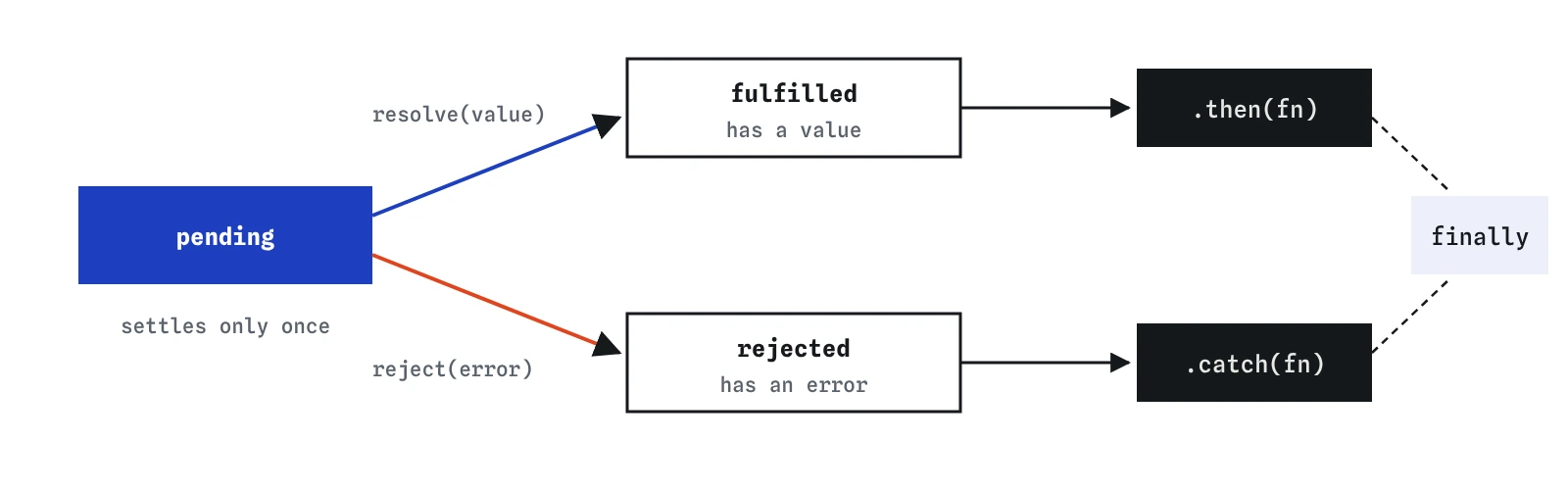
.then, rejected sends the error to .catch, and .finally runs either way.What are the three states of a promise?
Every promise is in one of three states. Pending means the work has not finished. Fulfilled means it finished and the promise holds a value. Rejected means it failed and the promise holds an error, usually an Error object with a message.
Fulfilled and rejected together are called settled. A promise settles once and then never changes. If the code that created it tries to resolve it twice, the second call is ignored. This makes promises predictable: whatever you attach will see the same single result.
You can attach a callback after the promise has already settled. It still runs, with the stored value, shortly after. You never miss the result by being late, which is a big improvement over older callback styles where you had to be listening before the event happened.
How do then, catch and finally work?
promise.then(fn) registers a function to run with the value when the promise fulfils. promise.catch(fn) registers one to run with the error when it rejects. promise.finally(fn) runs a function in both cases, with no argument, which is the right place to hide a spinner or re-enable a button.
These callbacks always run later, as queued jobs, even if the promise is already settled. Code written after .then therefore runs before the callback. Watch the order in the Console, or use the Step lens to see the script finish and the callback run afterwards.
.then can take a second function for errors, then(onValue, onError), but a separate .catch at the end of a chain is easier to read and also catches mistakes thrown inside your own .then callbacks.
const button = document.createElement("button");
button.disabled = true;

Promise.resolve(["Rye", "Spelt"])
  .then((breads) => console.log(breads.length))
  .catch((error) => console.log(error.message))
  .finally(() => {
    button.disabled = false;
  });
How does chaining work?
Each call to .then returns a new promise. That new promise fulfils with whatever your callback returns. If the callback returns another promise, the chain waits for that one too. This lets you write steps that happen in order without nesting: get the order, then get its customer, then show both.
The chain only passes values along through return. An arrow function written without braces returns its expression automatically: .then((prices) => prices.length). With braces you must write the word return. Forget it and the next step receives undefined, which is the classic promise bug.
A rejection or a thrown error anywhere in the chain skips all following .then steps and jumps to the next .catch. One .catch at the end therefore covers the whole chain. After a .catch handles the error, the chain carries on normally, so you can recover with a fallback value.
Promise.resolve([4.5, 4, 3.25])
  .then((prices) => {
    return prices.reduce((sum, price) => sum + price, 0);
  })
  .then((sum) => sum.toFixed(2))
  .then((text) => console.log(`Total: $${text}`));
How do you create your own promise?
new Promise((resolve, reject) => { ... }) creates one. The function you pass runs immediately and receives two functions: call resolve(value) when the work succeeds, or reject(error) when it fails. Always reject with an Error object, so the .catch side gets a stack trace and a message.
You will rarely need this. fetch, response.json() and most modern browser features already return promises, and an async function, covered next, returns one automatically. The main reason to build one by hand is wrapping something older that uses callbacks, such as setTimeout, into a promise you can chain.
When you see AI code wrap fetch in new Promise, that is usually unnecessary and often hides errors, because a forgotten reject leaves the outer promise pending forever.
function wait(ms) {
  return new Promise((resolve) => {
    setTimeout(resolve, ms);
  });
}

wait(300).then(() => console.log("300 ms later"));
How do you wait for several promises at once?
Promise.all([a, b, c]) takes an array of promises and returns one promise. It fulfils when every one of them has fulfilled, with an array of their values in the same order you passed them, regardless of which finished first. The work runs at the same time, so three half-second requests take about half a second in total.
It rejects as soon as any one of them rejects, with that error. The other results are thrown away. That suits work where every part is needed, such as a page that cannot show without both the menu and the opening hours.
Promise.allSettled waits for all of them no matter what and gives you an array of result objects. Each has status set to "fulfilled" with a value, or "rejected" with a reason. Use it when partial success is fine, such as loading several bird club feeds and showing the ones that worked.
const menu = Promise.resolve(["Rye", "Spelt"]);
const hours = Promise.resolve("7am to 3pm");

Promise.all([menu, hours]).then(([breads, open]) => {
  console.log(`${breads.length} breads, open ${open}`);
});
What is Promise.race for?
Promise.race settles as soon as the first promise in the array settles, with that result, whether it fulfilled or rejected. The usual use is a timeout: race the real request against a promise that rejects after a few seconds, and show an error if the timer wins.
A close relative, Promise.any, fulfils with the first success and only rejects if every promise fails. Both are rarer than all and allSettled. For timing out a fetch there is now a cleaner built-in option, AbortSignal.timeout(ms), which the fetch lesson mentions.
const slow = new Promise((resolve) => setTimeout(() => resolve("menu"), 800));
const limit = new Promise((resolve, reject) => {
  setTimeout(() => reject(new Error("Too slow")), 300);
});

Promise.race([slow, limit])
  .then((result) => console.log(result))
  .catch((error) => console.log(error.message));
What should you check in AI-written promise code?
Look at every .then callback that uses braces and ask what it returns. Look for a .catch at the end of each chain that touches the network or user data. Look for values used outside the chain, such as a variable assigned inside .then and read on the next line of the script, where it is still empty.
Also look for loose promises: a call that returns a promise with nothing attached and no await. Errors from it appear only as an uncaught promise error in the Console. Most of these problems become easier to spot, and rarer, with async and await, the lesson that follows this one.
Field notes
- A promise is an object standing in for a value you do not have yet.
- A promise is pending, fulfilled with a value, or rejected with an error.
.thenruns when the value arrives and.catchruns when something fails.- Each
.thenreturns a new promise, so steps can be chained in order.
Easy to get wrong
With braces, an arrow function returns nothing unless you write return, so the next step receives undefined.
The last line runs before the promise fulfils, so menu is still undefined. Use the value inside the callback.
Without .catch, a failure appears only as a Console error and the visitor sees nothing.
Questions people ask
Is a promise the same as the value it holds?
No. It is a container for a value that arrives later. Use .then or await to get the value out.
Can a promise be cancelled?
A promise itself cannot. The work behind it sometimes can: fetch accepts an AbortController signal, and a timer can be cleared.
Why does my .then run after code written below it?
Promise callbacks always run as queued jobs after the current script finishes, even when the promise is already settled.
Should I use Promise.all or allSettled?
Use all when you need every result and one failure means the whole task failed. Use allSettled when you can show whatever succeeded.
Do I still need .then if I use async and await?
Rarely. await reads the same promise in a more linear style. Knowing .then still helps when reading older code and AI output.