What is focus, and why does it need to be visible?
Focus is the browser's idea of which element receives the next key press. When you press Tab, focus moves to the next link, button or field, and Enter acts on whatever has it. A mouse user sees the pointer and knows what a click will hit. A keyboard user relies on the focus indicator, usually a ring around the element, for the same information.
Take the ring away and keyboard users are working blind. They press Tab, nothing on screen changes, and they have to guess how many presses it takes to reach the Place order button. Some give up. People with low vision, who often use the keyboard with magnification, lose their place even faster because only part of the page is on screen.
WCAG covers this in 2.4.7 Focus Visible, at level AA: any keyboard-operable part of the page must show a visible focus indicator. WCAG 2.2 adds rules about how good that indicator is and whether something covers it.
Why do so many sites remove the outline?
Mostly because the default ring shows up when people click, and designers or clients find it untidy. A quick search for “remove blue outline” turns up outline: none as the answer, and it ends up in resets, templates and AI-generated CSS. The starting page has the most damaging version, *:focus { outline: none; }, which removes the ring from every element at once.
The **Keyboard** view shows the result. Every stop has a flag for invisible focus, and the Checks view lists each one as a serious problem. Try it in the Page view: click the first link, then press Tab a few times. Focus moves and nothing on screen tells you where it went.
What does :focus-visible change?
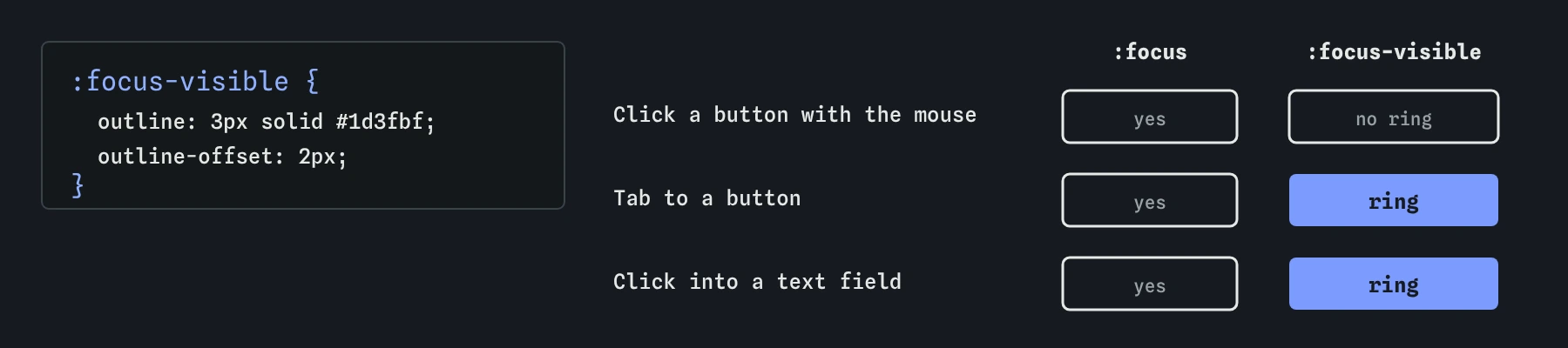
The :focus-visible pseudo-class matches an element when it has focus and the browser judges that showing focus would help. In practice it matches after keyboard navigation, and usually does not match when a button is clicked with the mouse. Text fields are the exception: they match :focus-visible even on click, because you need to know where your typing will go.
That solves the original complaint. Mouse users clicking a button don't see a ring, and keyboard users always do. It is supported in every current browser, and browsers already use the same logic for their own default ring.
Write your focus style on :focus-visible and leave :focus alone. If you must support a very old browser, the fallback is to style :focus too, which shows the ring a little more often. Showing it too often is a small cost. Hiding it from keyboard users is a barrier.
:focus-visible {
  outline: 3px solid #1d3fbf;
  outline-offset: 2px;
}
How strong does a focus ring need to be?
WCAG 2.2 has two rules here. 1.4.11 Non-text Contrast, at level AA, asks that visual information needed to identify a control's state, including focus, has at least 3:1 contrast against the colours next to it. A pale yellow ring on a white page fails, and so does a ring the same colour as the button it surrounds.
2.4.13 Focus Appearance, at level AAA, is stricter: the indicator should be at least as large as a 2 CSS pixel line around the element, with 3:1 contrast between its focused and unfocused states. Level AAA is not usually required, and it is still a good target. A 2 to 3 pixel solid outline in a strong colour meets it on most layouts.
On the bakery page, dark blue #1d3fbf is about 8:1 against the cream background. Against the brown button it is close to 1:1, so the ring must not touch the button. The outline-offset: 2px leaves a strip of cream between the two, and the ring is seen against that cream.
Why use outline rather than a border or a shadow?
An outline doesn't take up space, so adding it on focus never shifts the layout. It follows rounded corners in current browsers. It also survives forced colours mode, such as the contrast themes built into some operating systems, where the system replaces your colours with the user's own. In forced colours, box-shadow is removed entirely and background colours are overridden. A focus style that relies only on a shadow or a background change can disappear for exactly the people who switched that mode on.
If a design really wants a shadow ring, keep a transparent outline alongside it. Forced colours mode paints transparent outlines in a visible system colour, so the ring comes back there. The engine in this course treats any change on focus as visible, so it may pass a subtle background change that a real person would still struggle to see. Judge the ring with your own eyes in the Page view.
button:focus-visible {
  box-shadow: 0 0 0 3px #1d3fbf;
  outline: 2px solid transparent; /* shows in forced colours */
}
What if a sticky header covers the focused element?
A sticky header or a cookie banner fixed to the bottom of the screen can hide focus even when the ring is perfect. A keyboard user tabs backwards up the page, the browser scrolls just enough to bring the link into view, and the link lands behind the header. WCAG 2.2 added 2.4.11 Focus Not Obscured (Minimum), at level AA: a focused element must not be entirely hidden by content the author put on top.
The fix is usually one line of CSS. Set scroll-padding-top on the html element to the height of the header, and the browser leaves that much room when it scrolls focus into view. For bottom banners, use scroll-padding-bottom, or let people dismiss the banner.
The automatic checks here cannot see overlap, so test it by hand: make the window short, tab down to the bottom of the page, then Shift+Tab back up and watch each stop appear.
html { scroll-padding-top: 4rem; }
header { position: sticky; top: 0; height: 3.5rem; }
How do you test focus styles?
Press Tab through the whole page in a real browser and look at each stop. You should be able to find focus within a second, from a normal viewing distance, without hunting. Check links, buttons, fields, the <select> and anything custom. Then try a forced colours or contrast theme in your operating system if you can, or the forced colours option in your browser's developer tools rendering panel.
Here, the **Keyboard** view flags any stop where nothing changes on focus, and the Checks view lists them by name. A clean result means something changes. It doesn't prove the change is strong enough, which is a judgement you make by looking.
What should you look for in AI-generated CSS?
Search the stylesheet for outline: none, outline: 0 and outline-width: 0. If any of them appear on :focus, on a reset like *, or on button, a or input, check that a :focus-visible style replaces it. Utility-class CSS often uses a class like focus:outline-none, which is fine only when another focus utility adds a visible ring.
Also check that hover and focus styles match where it makes sense. Generated CSS often styles :hover carefully and forgets focus, so mouse users get a nice effect and keyboard users get nothing.
Field notes
- Focus marks which element will get the next key press.
- Keyboard users need to see focus to know where they are.
- Removing outlines with
outline: nonehides focus completely. :focus-visibleshows a ring for keyboard use and not for every click.
Easy to get wrong
Removing the outline everywhere leaves keyboard users with no idea where they are. :focus-visible keeps the ring for keyboard focus and usually hides it after a mouse click.
Forced colours mode removes box shadows. A transparent outline stays invisible normally and is painted in a system colour when forced colours are on.
A thin pale ring on a cream page fails 1.4.11 Non-text Contrast. The indicator needs at least 3:1 against the colours around it.
Questions people ask
Can I just delete the outline: none rule?
Yes, and that alone fixes the barrier, because the browser's default ring comes back. A custom :focus-visible style is better when the default ring is hard to see against your colours or gets clipped by overflow: hidden.
Why does the ring show when I click in a text field?
Browsers match :focus-visible on text fields even after a mouse click, because you need to see where your typing will go. That is deliberate and helpful.
Does the focus ring have to be blue?
No. Any colour works if it has at least 3:1 contrast against the background and the element it surrounds. Some sites use a two-colour ring, dark inside and light outside, so it shows on both light and dark sections.
Is focus-within useful here?
The :focus-within pseudo-class matches a parent when something inside it has focus. It is handy for highlighting a whole card or form row, as long as the focused control inside still has its own ring.