What problem does a skip link solve?
Every page on the bike shop site starts with the same header: the shop name and six menu links. A mouse user ignores them and clicks straight into the content. A keyboard user has to press Tab six times to get past them, on every page, before reaching anything new. On the starting page, Book wheel truing is the seventh Tab stop. On a big shop with a mega menu, it can be the fortieth.
That repeated cost adds up fast for people with motor disabilities, for whom each key press can be slow or tiring, and for switch users, who may step through stops one at a time. WCAG 2.4.1 Bypass Blocks, at level A, asks for a way to skip blocks of content that repeat across pages. A skip link is the most direct way to meet it for keyboard users.
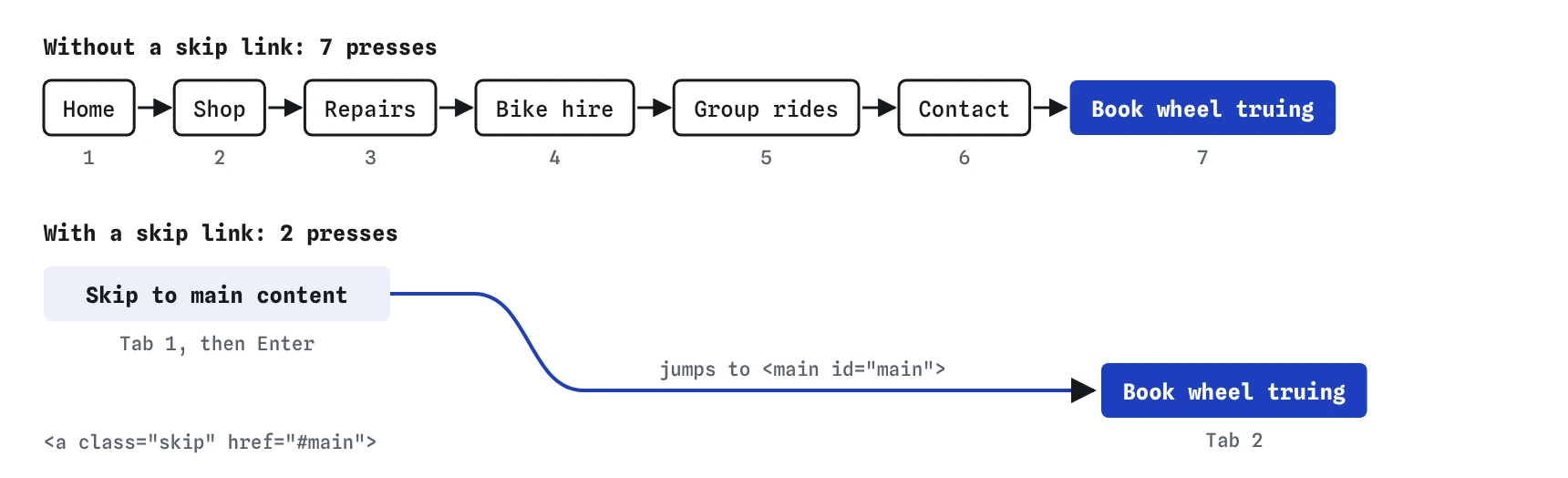

What does a skip link look like?
A skip link is an ordinary in-page link, placed as the first focusable thing in the <body>, whose href points at the id of the main content. The usual text is “Skip to main content”, which people recognise from other sites. Keep it short and specific.
Point it at the <main> element, which gives it an obvious target that every page has. The bike shop page already has <main id="main">, so the link only needs href="#main". If your template has no <main>, that is worth fixing first: it gives screen reader users a landmark to jump to as well.
<body>
<a class="skip" href="#main">Skip to main content</a>
<header>...</header>
<main id="main">...</main>
How do you hide it until it has focus?
Most sites keep the link out of sight until someone tabs to it, then slide it into view at the top of the page. The safe way is to position it off screen and bring it back with :focus. The link stays in the Tab order and in the accessibility tree the whole time.
Never hide it with display: none, visibility: hidden or the hidden attribute. Each one removes the link from the Tab order, so focus can never reach it, and a :focus rule that would reveal it can never run. That is the first bug on the Break It page. An off-screen link with opacity: 0 is no good either: it can be focused, and nobody sees where focus went.
Keeping the link visible all the time is also fine, and some sites prefer it because it helps people who don't know skip links exist. When it appears on focus, make sure it has strong contrast and a clear focus style, and that a sticky header doesn't cover it.
.skip {
  position: absolute; left: 8px; top: -60px;
  padding: 8px 14px; background: #1d3fbf; color: #fff;
}
.skip:focus { top: 0; }
Where does focus go after you use it?
When someone activates an in-page link, the browser scrolls the target into view and moves the sequential focus navigation starting point there. The next Tab press goes to the first focusable thing after the target, which on this page is Book wheel truing. All current browsers do this, even when the target itself can't take focus.
Whether focus itself lands on the target is a separate question. A <main> isn't focusable, so in a real browser document.activeElement stays where it was, and some screen readers don't announce the jump clearly. Adding tabindex="-1" to the target makes it focusable by the link without adding a Tab stop, which gives screen readers a clear place to start reading. Many teams add it for that reason. If you do, the target may show a focus ring when it receives focus; a rule like main:focus { outline: none; } is acceptable on that one non-interactive target, because nothing there can be acted on.
The preview here moves focus to the target and adds tabindex="-1" for you when it is missing, which is closer to the best case than to every real browser. Test the real thing in a browser before relying on it.
<main id="main" tabindex="-1">Why do skip links break so often?
Because nobody using a mouse ever sees one. The link gets added to a template, the target id changes during a redesign, and the link points at nothing. Clicking a link to a missing id does nothing visible: no error, no scroll. The second Break It bug is exactly this, href="#content" against <main id="trips">.
Other common faults: the link sits after the menu instead of before it, so it skips nothing; the off-screen CSS uses a fixed height that cuts off the text when people zoom; or a JavaScript router intercepts every link and treats #main as a route, so the page reloads instead of jumping. Single page apps often need to handle in-page links explicitly for this reason.
Is a skip link enough on its own?
Screen reader users have other ways past the menu: they can jump by landmarks to main, or by headings to the <h1>. That is why WCAG accepts landmarks and headings as ways to bypass blocks. Sighted keyboard users have no such shortcut built into browsers, so they still need the skip link in 2026.
Use all three together. A real <header>, <nav> and <main>, a clear <h1> at the start of the content, and a skip link as the first Tab stop. The Checks view here suggests a skip link, as a minor issue, when a page has a menu with five or more links before the main content.
How do you test a skip link?
Load the page, click in the address bar, and press Tab once. The skip link should appear, clearly, at the top of the page. Press Enter. The page should scroll to the main content, and the next Tab should land on the first link or control inside it. If the next Tab lands on the first menu link, the target is wrong or missing.
In the **Keyboard** view, the skip link should be stop number 1. Press Tab and then Enter to use it, then Tab again and check which stop has focus. Also test at 200 percent zoom and on a narrow window, where long link text can wrap and get clipped by a fixed height.
What do AI tools get wrong about skip links?
Generated templates often include a skip link copied from somewhere, pointing at #content or #main-content, while the page itself uses a different id or has no <main> at all. Search the HTML for the skip link's href and confirm a matching id exists. Generated CSS also reaches for a .sr-only class that hides the link permanently, with no :focus rule to bring it back. A visually hidden link that never appears is a Tab stop sighted keyboard users can't see. Make sure the class has a focus state that shows it.
Field notes
- A skip link lets keyboard users jump past repeated menus.
- It is the first link in the page and points at the main content's
id. - Keep it off screen until it gets focus, then show it clearly.
- Test that the target
idreally exists on the page.
Easy to get wrong
An element with display: none can't receive focus, so the :focus rule never applies. Move the link off screen and bring it back on focus.
A link to an id that doesn't exist does nothing. Check that the href and the target id match on every template.
A skip link after the menu skips nothing. It has to be the first Tab stop.
Questions people ask
Do I need a skip link on a page with only two menu links?
It is less important, since two Tab presses aren't much of a block. A skip link still does no harm, and adding it to the shared template means it is there when the menu grows.
Can I have more than one skip link?
You can, for example “Skip to main content” and “Skip to search”. Keep the list very short. Three or four skip links become a block of their own.
Should the target have tabindex="-1"?
It is often a good idea. Browsers move the Tab starting point without it, while focus itself only lands on the target when it is focusable. Adding tabindex="-1" makes the jump easier for screen readers to follow and doesn't add a Tab stop.
Does the skip link need to be translated?
Yes. It is real text that screen readers read and sighted keyboard users see, so translate it with the rest of the page and keep it in the page's language.