Why do radio buttons need a question attached?
A radio button on its own is half a sentence. “Owl prowl, Friday 8pm, radio button, not checked” tells you an option exists, and nothing about what it answers. A sighted visitor reads the bold line above and the three options below in one glance, and the layout does the joining. A screen reader user meets each control one at a time, often by pressing Tab straight into the group, and the bold paragraph above may never be read at all.
The same gap appears with checkboxes, with a set of three date fields for day, month and year, and with the street, town and postcode of an address that sits next to a second, billing address. In every case the visible page relies on position and spacing to say “these belong together, and this is what they are about”. The HTML has to say it in words.
WCAG 1.3.1 Info and Relationships asks for exactly this: when the visual design shows that things are related, the code must expose the same relationship. A <fieldset> with a <legend> is the native way to do it.
What do fieldset and legend actually do?
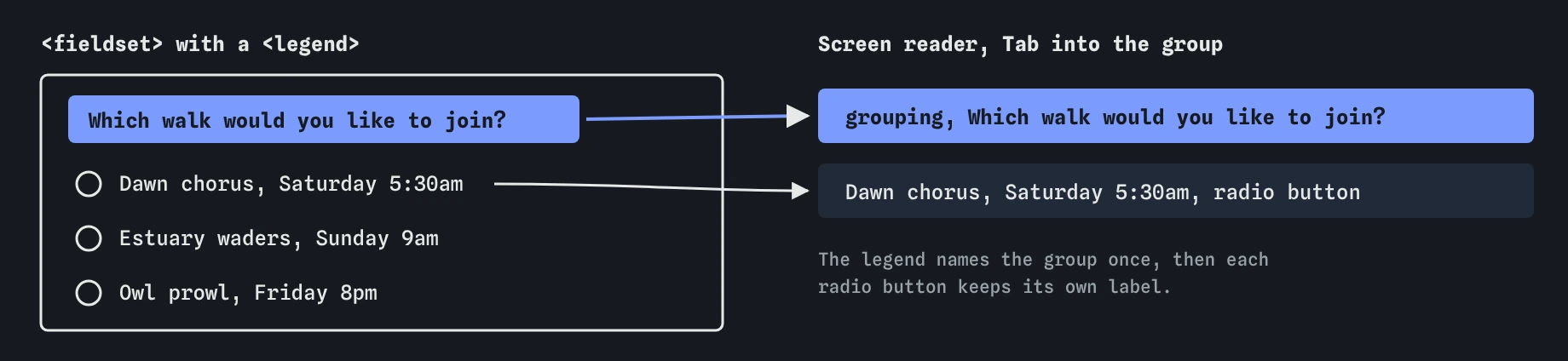
The <fieldset> element groups form controls. The browser gives it the role group in the accessibility tree. Its first child, <legend>, becomes the group’s accessible name, the way a <label> names a single field. The result is a named container: a group called “Which walk would you like to join?” holding three radio buttons.
Screen readers use that name when focus moves into the group. Most announce the legend once, together with the first control you land on, something like “Which walk would you like to join?, grouping, Dawn chorus, Saturday 5:30am, radio button, not checked, 1 of 3”. Some repeat it for every control, some only on entry, and the wording varies. The **Screen reader** view here shows the group as its own line, “grouping, …”, just before the controls inside it. That is a model of the same information, laid out flat.
The HTML standard requires the legend to be the first child of the fieldset. A heading or paragraph placed above the fieldset does not name the group, however close it sits.
<fieldset>
  <legend>Which walk would you like to join?</legend>
  <label><input type="radio" name="walk" value="dawn"> Dawn chorus, Saturday 5:30am</label>
  <label><input type="radio" name="walk" value="owls"> Owl prowl, Friday 8pm</label>
</fieldset>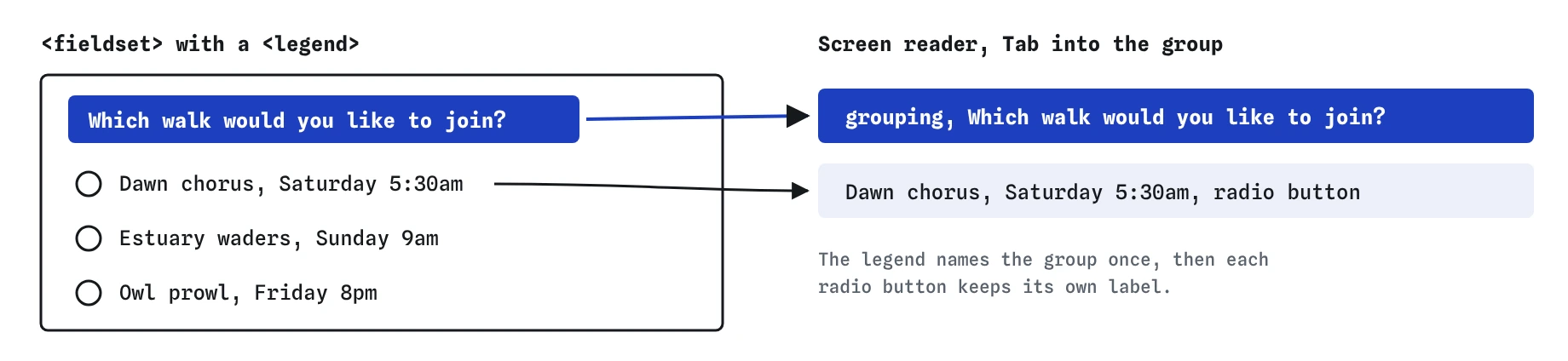
What changed on the walk booking form?
The starting form uses <p class="question"> for both questions. Each choice has a proper label, so every radio button and checkbox already has a name. What was missing is the link between the question and its choices. The Checks flag the walk choices as an ungrouped radio set, and the Screen reader view reads the question once, as plain text, before moving on.
After the fix, each question is a <legend> inside its own <fieldset>. The bold styling moves with the class, so the page looks the same. Reset the fieldset’s default border and padding in CSS if the design has no box, as this page does with border: 0; padding: 0. The grouping stays in the accessibility tree whatever the fieldset looks like.
Now press Tab in the **Keyboard** view. The walk group is a single Tab stop, because radio buttons that share a name act as one control: Tab enters the group, the arrow keys move between choices, and Tab again leaves. The two checkboxes are two separate stops, because each can be ticked on its own.
When should you group fields, and when is it too much?
Group a set of radio buttons every time. A radio button only makes sense with its question, and the Checks flag any radio group without one. Group checkboxes when there is more than one and they answer a shared question, like “Do you need anything on the day?”. A single checkbox such as “Send me the newsletter” carries its whole meaning in its label and needs no fieldset.
Group text fields when they make sense only together, or when the same labels repeat. A delivery address and a billing address both have Street, Town and Postcode; without a legend, a screen reader user hears “Postcode, edit text” twice and has to guess which is which. A date of birth split into Day, Month and Year needs a legend that says whose date it is.
Avoid wrapping the whole form in one fieldset, or nesting fieldsets three deep. Each level adds words that some screen readers repeat on every field, and a form that announces “Booking form, grouping, Your details, grouping, Contact, grouping” before every input is tiring to use. One clear level of grouping is usually right.
- Radio buttons: always in a fieldset with a legend
- Several checkboxes answering one question: group them
- Repeated labels, like two addresses: group and name each set
- One checkbox or one ordinary field: no fieldset needed
How long should a legend be?
Short, because some screen readers say it before every control in the group. Write the question people are answering, the way you would say it out loud: “Which walk would you like to join?”, “Delivery address”, “Date of birth”. Leave instructions and details out of the legend and put them in a separate paragraph, connected to a field with aria-describedby if it applies to one control.
A long legend such as “Please choose which of our guided walks you would like to attend this month, bearing in mind that places are limited” will be read in full, possibly three times, before anyone hears the first walk. Keep the extra line as normal text above the group, where sighted and screen reader users can both read it once.
Legends are also the visible question. If a design hides the legend and shows something else, the two can drift apart, and a voice control user who says the visible words may find they do not match. Keep the visible question and the legend as the same text.
Can you use role=group or role=radiogroup instead?
Sometimes, and native HTML is still the better choice. A <div role="radiogroup" aria-labelledby="walk-q"> creates the same kind of named group in the accessibility tree. It is useful when a layout makes <fieldset> hard to style, which was a real problem years ago and is rare now that browsers style fieldsets like ordinary boxes.
The cost of the ARIA version is that you must wire up the name yourself with aria-labelledby, and nothing warns you when the id is mistyped. A <fieldset> with a <legend> gets its name automatically, works without any ARIA, and is what every screen reader has handled for decades. Reach for role="group" mainly for groups of non-form controls, like a set of formatting buttons in a toolbar.
Grouping also does nothing for custom controls built from <div> elements. If the radio buttons themselves are fake, fix them first by using real <input type="radio"> elements, then group them.
<div role="group" aria-labelledby="dob-q">
  <p id="dob-q">Date of birth</p>
  <label for="dob-day">Day</label> <input id="dob-day" inputmode="numeric">
  <label for="dob-month">Month</label> <input id="dob-month" inputmode="numeric">
</div>
How do you check grouping in these views?
In **Checks**, look for the radio group warning. It catches radio buttons outside any fieldset or group. It cannot judge checkboxes or text fields, so check those yourself.
In **Screen reader**, every named group appears as “grouping, …” just before its controls. Read down the list and ask, for each control, whether you would know what it is about if you heard only the nearest grouping line and its own label. Two lines that both say “Postcode, edit text” with no grouping between them are a sign that a legend is missing.
In **Keyboard**, Tab through the form. A radio group should be a single stop, and once you are in it the arrow keys change the choice. If each radio button is its own Tab stop, check that they share the same name attribute; without it, the browser treats them as unrelated controls and two of them can be selected at once.
What do AI tools get wrong about grouping?
Generated forms often put the question in a <label> with no for, or in an <h3>, and the radio buttons below it with no fieldset. The page looks finished and reads as orphaned choices. Another common pattern is a <fieldset> with the question as a <div> above it, or a <legend> placed after the controls, which is invalid HTML and puts the question after its answers.
Watch for radio buttons with different name values in one group, which breaks the arrow key behaviour and the single Tab stop, and for checkboxes that wrap a <span> with no <label> at all. Ask for “a fieldset with a legend as its first child” in the prompt, then read the Screen reader view to confirm that each group is named.
Field notes
- A radio button makes little sense without the question it answers.
- Wrap related choices in a
<fieldset>and put the question in its<legend>. - Always group a set of radio buttons, since each one needs its question.
- Keep legends short because some screen readers repeat them for each control.
Easy to get wrong
A paragraph above radio buttons is read once as text and then forgotten. A <legend> names the group, so a screen reader says the question when focus enters the choices.
The HTML standard only allows a <legend> as the first child of a <fieldset>. Placed after the fields, it is invalid markup and comes after the controls it is meant to introduce, so people reach the choices before the question.
Some screen readers repeat the legend before every control in the group. Keep it to the question and put extra detail in a paragraph that is read once.
Questions people ask
Do I need a fieldset for a single checkbox?
No. One checkbox such as “Send me the newsletter” has its whole meaning in its own label. Use a fieldset when several controls answer one shared question.
Can I style a fieldset so it does not look like a box?
Yes. Set border: 0, padding: 0 and margin: 0, and style the <legend> like any heading or label. The group stays in the accessibility tree whatever it looks like.
Should the legend contain a heading?
It can, as <legend><h2>Delivery address</h2></legend>, which helps when a long form is split into sections people jump between by heading. For short forms a plain legend is enough.
Why do my radio buttons each take a Tab stop?
They probably have different name values. Radio buttons that share a name form one group: Tab enters it once and the arrow keys move between the choices.