What is a performance budget?
A performance budget is a short list of limits a page must stay inside, agreed before anyone adds features. The bird club's is three numbers: 350 KB of downloads, 6 requests, and a largest paint under 2.5 seconds on a phone on 4G. A new feature that breaks any of them gets changed before it ships.
The point is to turn speed from a vague wish into a test. Without a budget, every addition seems small: one more photo, one more script. A year later the page is three times heavier and nobody can say when it happened. With a budget, the gallery that pushed the page to 1,350 KB is caught the day it is added.
Which numbers should go in a budget?
Use a mix of two kinds. Quantity limits, such as total KB, KB of JavaScript, KB of images and number of requests, are easy to check and easy to explain to whoever adds the next feature. Timing limits, such as Largest Contentful Paint, layout shift and Total Blocking Time, measure what visitors feel, but they depend on the network and the device.
A quantity limit tells you why a page got slow. A timing limit tells you whether it slows the page. The bird club budget has both: KB and requests for the cause, LCP for the effect. Many teams add a separate limit for JavaScript, because a kilobyte of script costs main-thread time as well as download time, which a kilobyte of image does not.
- Total KB on the first visit, on a mid-range phone.
- KB of JavaScript, often 150 KB to 300 KB compressed for a content site.
- Number of requests, especially to other sites, which each need a new connection.
- LCP, CLS and INP at or under Google's good lines.
How do you choose the limits?
Start from what the page does now when it is in good shape, then leave a little headroom. Before the gallery, the bird club page was about 100 KB with 3 requests and a 1.5 second largest paint. A 350 KB limit gives room for a modest feature while ruling out anything that would double the load time on 4G.
Another way is to work back from a target time. At about 200 KB per second, 350 KB takes roughly 1.75 seconds to download, which leaves time for connections and the server and still lands under 2.5 seconds. Pick a slower connection for the sum if many of your visitors are on poor signal.
Write the budget down where the people who change the page will see it, such as the project README or the review checklist. A budget only one person knows about is a preference.
How did the gallery break the budget?
Open the Waterfall on the starting page. Three gallery photos at roughly 360 KB to 400 KB each are the bulk of the 1,350 KB. They are 1,600 pixels wide, sized for a desktop slideshow, and on the phone each tile is only about 328 CSS pixels across.
The second problem is carousel.js in the head. It is a plain script, so the parser stops until its 110 KB arrive and its 120 ms task runs. That pushes first paint to about 2.2 seconds and the heron photo, the largest thing on the first screen, to about 3.4 seconds.
Neither change looked large on its own. Each was one line of HTML. That is the usual story behind a slow page, and the reason a budget checks the total.
How do you add a feature and stay inside the budget?
Ask what the feature needs, then build that and no more. The gallery needs three photos that look sharp on a phone and scroll sideways. It does not need 1,600 pixel files or a JavaScript carousel, because CSS scroll snap in club.css already makes the row swipe neatly.
Switching to the -600.jpg copies brings each photo to under 50 KB. The gallery sits below the first screen, so loading="lazy" on those three tells the browser it can fetch them after the important things. Removing the carousel script saves a request, 110 KB and the parser block. The page lands at about 245 KB, 6 requests and a 2.2 second largest paint, with every bird still there.
<div class="gallery">
  <img src="/img/egret-600.jpg" alt="Little egret"
       width="600" height="400" loading="lazy">
  ...
</div>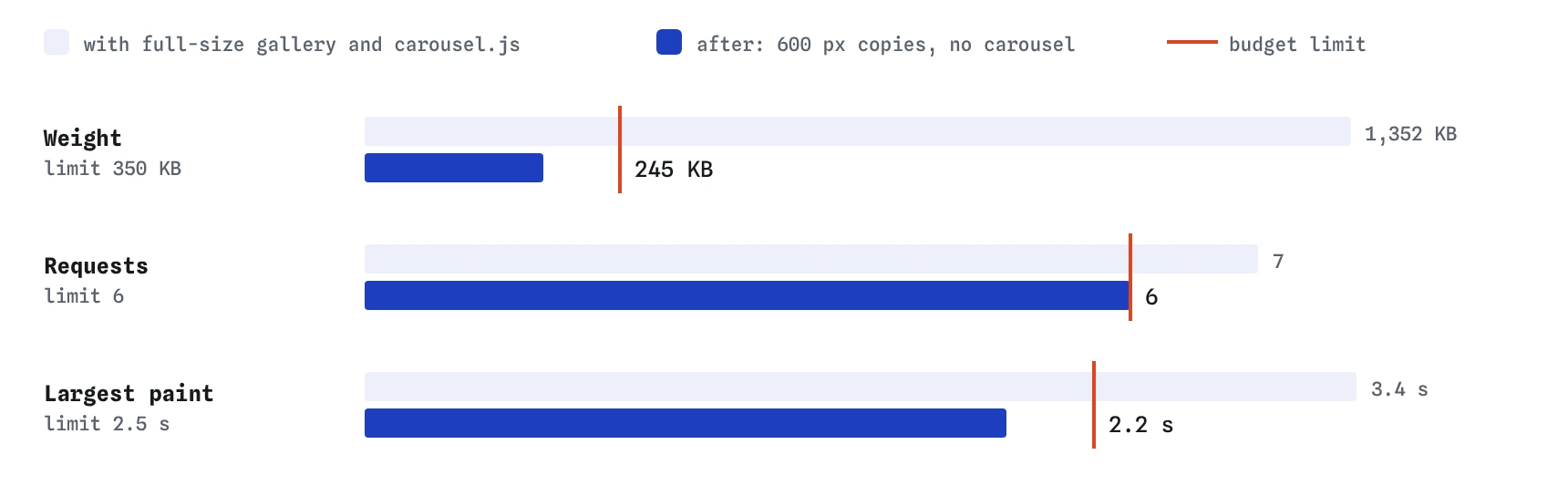
What if a feature cannot fit?
Sometimes a feature is worth more than the budget allows. Then trade: remove or slim something else, or agree to raise the limit with a clear reason written down. The worst outcome is going over without noticing and leaving the budget on paper only.
There are usually cheaper versions of the same idea. A static map image with a link to a full map instead of a 240 KB map library. One photo and a link to the album instead of a slideshow of ten. A chat link instead of a chat widget on every page. Each gives most of the value for a fraction of the weight.
How do you check a budget automatically?
Lighthouse CI can check limits such as total KB, request count and LCP on every change, and fail the build when one is broken. Lighthouse itself dropped its old budget file in version 12, so put the limits in Lighthouse CI's assertions. Many build tools also print bundle sizes and can warn when a JavaScript file grows past a set size.
Automated checks catch quantity limits reliably. Timing limits vary from run to run in a real browser, so run the test a few times and compare the middle result with the budget. For the real-world view, PageSpeed Insights shows the Chrome UX Report's 75th percentile numbers for pages with enough visitors, which tells you whether actual visitors are inside the timing budget.
What do AI tools get wrong about budgets?
Ask an AI assistant to add a gallery and it will often reach for a carousel library, full-size images and a script in the head, because that is what many examples look like. It rarely knows your budget unless you state it. Put the numbers in the request: 'add a gallery; the page must stay under 350 KB and 6 requests.'
Then measure, because AI tools also guess at sizes. A claim like 'this library is lightweight' means little until you see its row in the Waterfall. Treat a budget as the test the generated code has to pass, the same way you would treat a failing check here.
Field notes
- A budget is a short list of limits agreed before adding features.
- Mix quantity limits, like KB and requests, with timing limits like LCP.
- Base the limits on the page in good shape, with some headroom.
- Build what a feature needs and no more, so it fits the budget.
Easy to get wrong
A vague goal cannot be checked. Concrete numbers let anyone see at once whether a change fits.
Scroll snap gives swipeable tiles with no download and no main-thread work. The carousel here cost 110 KB, a request and a parser block.
A budget that moves whenever it is broken stops protecting the page.
Questions people ask
Should the budget be for the first visit or a repeat visit?
Set it for the first visit on a phone. Repeat visits are usually faster thanks to the cache, and first visits are where people decide whether to stay.
Is 350 KB a good number for every site?
No single number fits every site. A text-heavy club page can be far lighter, and a shop with many product photos may need more. Start from your own page in good shape and leave some headroom.
Do lazy images count towards the budget?
Count everything that downloads during a normal first visit. Lazy images inside the first couple of screens are usually fetched straight away, as the gallery photos are here, so they do count.
Who should own the budget?
Whoever reviews changes to the page. On a small site that may be you alone, and a note in the README is enough. On a team, put the check in the build so nobody has to remember it.