Why does a web font make text disappear?
When the browser lays out text whose font-family names a web font it has not downloaded yet, it has a choice: draw the words in a fallback font now, or wait for the real one. By default, Chrome, Firefox and Safari wait, with the text invisible, for up to about 3 seconds. If the font arrives in that time the text appears in it; if not, they give up and show the fallback.
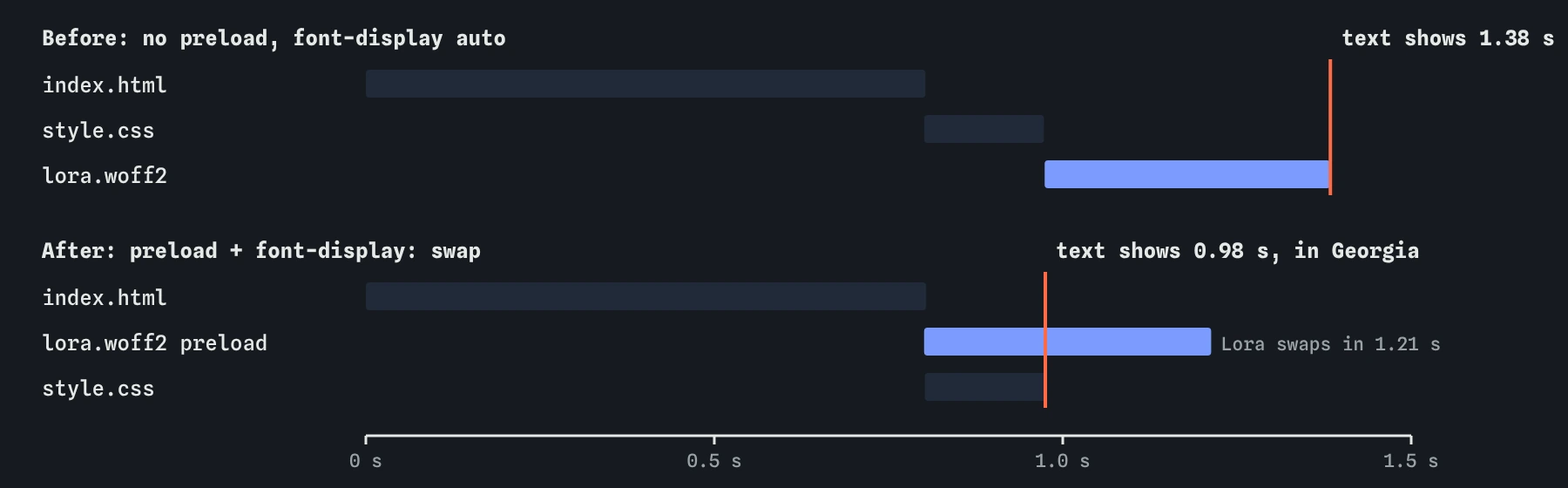
On the bakery page that wait is the whole problem. The Waterfall shows the HTML at about 0.8 seconds and style.css at about 0.97 seconds. The phone could paint then, but every piece of text uses Lora, so the Filmstrip stays blank until lora.woff2 finishes at about 1.4 seconds. On a slower connection it is far worse.
Invisible text counts against you twice. Visitors see nothing, and the first paint and largest paint both wait for a file that is purely decoration.
Why is the font found so late?
The browser only asks for a font when it knows it needs it. That means it must first download the HTML, then download the stylesheet that contains the @font-face rule, then lay out some text that uses the family. Only then does the font request start. The Waterfall shows that chain clearly: the font's bar starts exactly where style.css ends.
This is a chain of three requests in a row, each one waiting for the last. The font itself is only 48 KB and takes about 240 milliseconds to download here, but it cannot start until almost a second in.
The same happens when fonts come from another site's stylesheet. Then the chain has another link, and a new connection to that site on top, which is one reason many sites now host their own font files.
What does font-display change?
The font-display descriptor in @font-face tells the browser what to do while the font is missing. The values divide the wait into a short hidden period and a swap period.
Use swap for body text and headings you want readable at once: the fallback shows immediately and the web font replaces it whenever it arrives. Use optional when the font is nice to have: the browser hides text for about 100 milliseconds, and if the font is not there by then it keeps the fallback for this page view, while the file still downloads for next time. Avoid block for text people need to read, since it asks for the long hidden period.
@font-face {
  font-family: "Lora";
  src: url("/fonts/lora.woff2") format("woff2");
  font-display: swap;
}autoorblock: text hidden for up to about 3 seconds, then the fallback.swap: fallback at once, web font replaces it whenever it arrives.fallback: hidden for about 100 milliseconds, then the fallback; a swap only if the font arrives within about 3 seconds.optional: hidden for about 100 milliseconds; the web font is used only if it is already there.
Does swap cause layout shift?
It can. Georgia and Lora have different letter widths, so a paragraph may wrap onto a different number of lines when the swap happens, and everything below moves. Real browsers count that as layout shift if the text was already on screen.
Pick a fallback that is close in shape, as the bakery page does with Georgia for a serif. Modern CSS also lets you tune the fallback with size-adjust, ascent-override and descent-override in a second @font-face that points at a local font, so its lines match the web font's.
The simulator keeps the same line breaks for every font, so it shows no shift from the swap. That is kinder than a real phone. Check a real page in Chrome DevTools with the Performance panel, or with optional, which avoids late swaps altogether.
Why preload the font, and why crossorigin?
A <link rel="preload" as="font"> in the head tells the browser about the font as soon as the head arrives, before the stylesheet. The request starts at about 0.8 seconds instead of 0.97 here, and it finishes about 170 milliseconds sooner. On pages with a slower stylesheet, or fonts named in an @import, the saving is larger.
Add crossorigin even when the font is on your own site. Browsers always fetch fonts in CORS mode, and a preload without crossorigin is a different kind of request, so the browser downloads the font a second time when the stylesheet asks for it. The simulator does not model that double download; Chrome warns about it in the DevTools Console, and the Network panel shows both requests.
Preload only the one or two fonts the first screen really uses. Preloads run at high priority and compete with the HTML, CSS and the main image, so every extra one slows something else down.
<link rel="preload" href="/fonts/lora.woff2"
      as="font" type="font/woff2" crossorigin>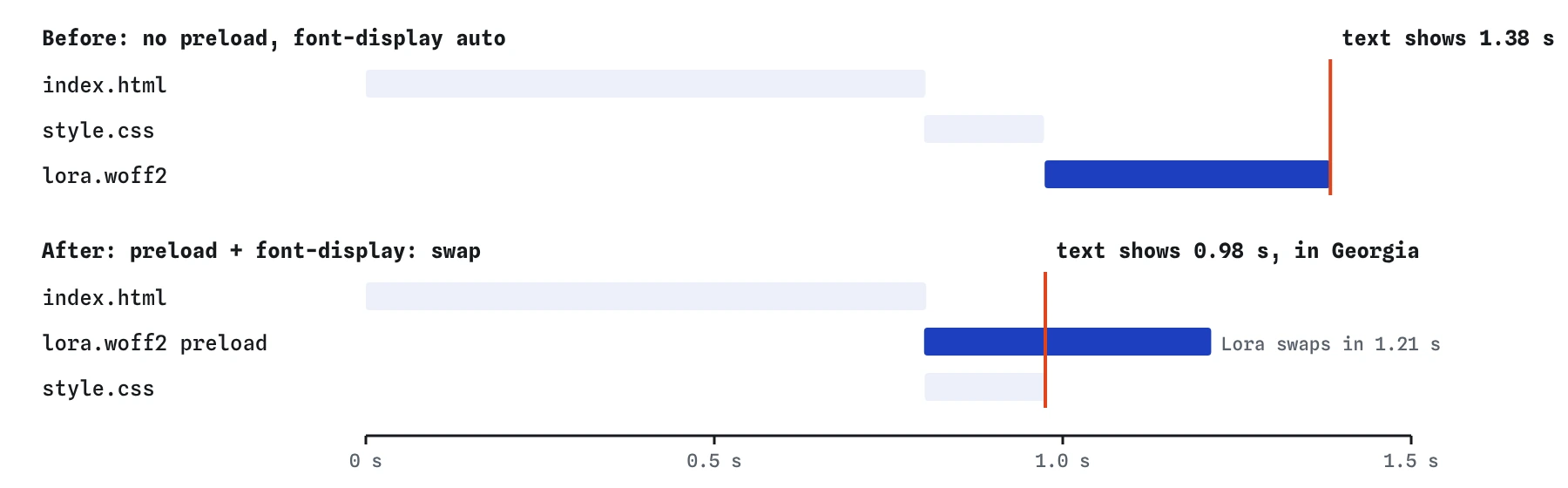
How many font files do you need?
Each weight and style is a separate file: regular, italic, bold and bold italic of one family are four downloads, often 30 to 60 KB each. A design that uses two families in three weights each can add 300 KB before any photo.
Start from what the page shows. The bakery needs Lora regular for everything; headings can use the same file at a larger size. If you need bold, one extra file is reasonable. A variable font, one file that holds a whole range of weights, can replace several static files when you need three or more weights.
Also check the character set. A file that covers Latin, Greek, Cyrillic and Vietnamese is much bigger than one with only the letters your text uses. Font services often split files with unicode-range so the browser only fetches the ranges a page needs.
When is a system font the better choice?
A font stack such as system-ui, sans-serif costs nothing to download and shows instantly, and it looks at home on every phone because it is the phone's own font. For forms, booking pages and dashboards that is often the right answer.
Brand matters too, and a well-loaded web font is fine. The bakery's Lora gives the page its warmth, and with swap and a preload it costs very little. The point is to decide on purpose, instead of adding four web font files because a template did.
What does AI often get wrong about fonts?
AI tools frequently paste a font service link that requests five or six weights the page never uses, and leave font-display out. Count the font rows in the Waterfall and compare them with the weights your CSS really sets.
They also write preloads without crossorigin, preload every weight, or preload a file name that does not match the one in @font-face, as in the Break It below. Each of those either wastes bandwidth or saves nothing. Check that every preloaded font appears once in the Network panel and is marked as used.
Field notes
- By default, browsers can hide text for up to about three seconds while a font loads.
font-display: swapshows a fallback font at once, then swaps in the web font.- Fonts are found late because the browser needs the CSS and layout first.
- Preload the key font file, with
crossorigin, so it starts with the head.
Easy to get wrong
Without crossorigin, real browsers fetch the font a second time when the stylesheet asks for it, so the preload is wasted.
With no font-display, text that uses the font is hidden for up to about 3 seconds on a slow connection.
Every preload competes for the same connection at high priority, so extra ones slow down the files the page needs first.
Questions people ask
Should I use swap or optional?
Use swap when the font is part of the brand and you accept a visible switch. Use optional when steady text is more important than the font, for example on a long article; on a slow first visit people read the fallback and get the web font next time.
Is WOFF2 enough on its own?
Yes. Every browser in use in 2026 supports WOFF2, and it is the smallest format. Older WOFF, TTF and EOT fallbacks only add requests and code.
Does hosting fonts myself help?
Usually. The font comes over the connection the page already opened, you control its caching, and you can preload it. A font service needs at least one extra connection before any font starts.
Why does the simulator not show a shift when the font swaps?
It keeps line breaks the same for every font. Real browsers may rewrap text when the web font arrives, so check real pages with Chrome DevTools.