Why does AI speed advice need checking?
AI tools learned from a huge amount of web code and advice, much of it written for other pages, other browsers or other years. They are good at producing changes that look like speed work: preloads, lazy loading, async, comments saying 'optimised'. They have no way to see your waterfall, so they cannot tell which of those changes helps your page and which makes it worse.
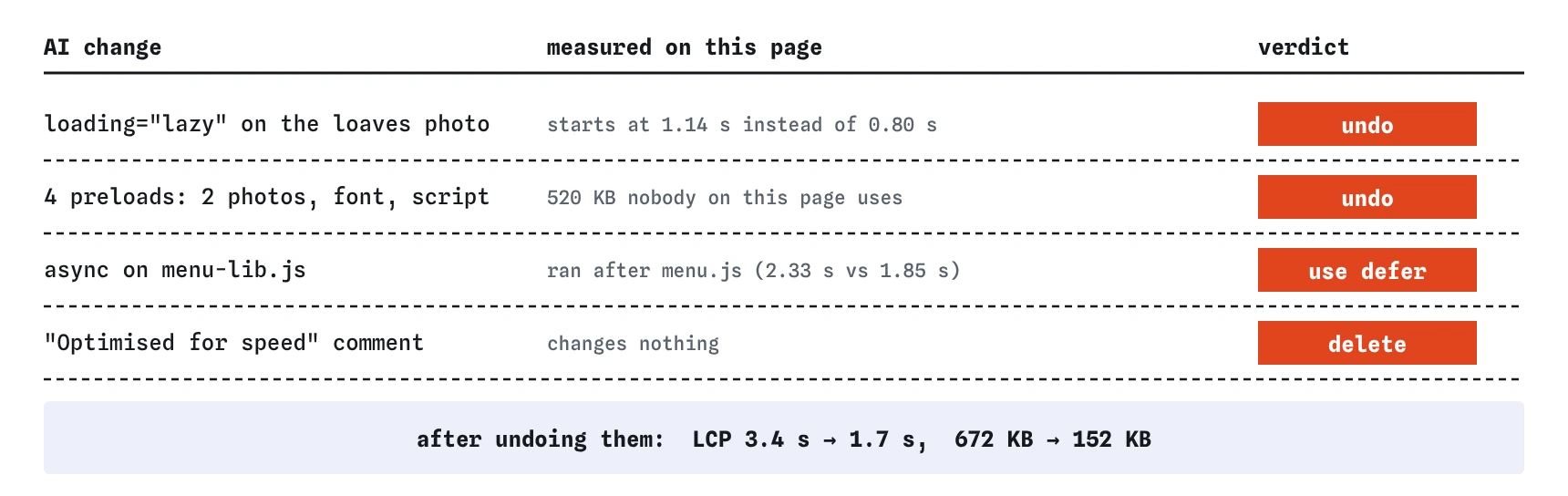
On the bakery page every change was plausible on its own. Together they took the largest paint from about 1.7 seconds to about 3.4. Nothing looked broken in the code, which is exactly why the result has to be measured.
How should you test a list of suggested changes?
Change one thing at a time and measure after each. Start from the version before the AI's edit, apply one suggestion, reload, and write down LCP, CLS, first paint and KB. Keep the change if the numbers improve or stay level with a clear benefit elsewhere. Undo it if they get worse.
When the changes arrive already applied, as here, work backwards: undo one, measure, and see whether the page gets faster. A change that made things worse shows up as an improvement when you remove it.
Use the same test conditions every time. The simulator is the same on every run. In Chrome DevTools, pick one throttling preset and keep it, and run Lighthouse a few times and take the middle result, because real runs vary.
Why is lazy-loading the hero photo harmful?
loading="lazy" tells the browser to wait until an image is laid out near the screen before fetching it. That is ideal for photos further down the page. On the largest thing in the first screen it means the browser cannot start the download when the preload scanner first sees the <img>. It has to wait for the CSS, the layout and the first paint.
On this page the loaves photo is the largest paint, so the delay goes straight into LCP. AI tools often add loading="lazy" to every image because it is a popular tip, and Lighthouse has a specific warning for a lazy-loaded LCP image for that reason. Keep lazy loading for images below the first screen.
<!-- AI version -->
<img src="/img/loaves-800.jpg" ... loading="lazy">
<!-- measured fix -->
<img src="/img/loaves-800.jpg" ... fetchpriority="high">
Why can preloading everything slow a page down?
A preload tells the browser to start fetching a file now, because it will be needed soon. It helps when the file really is needed early and the browser would otherwise find it late, such as a font referenced only inside CSS. It hurts when the file is not needed, or not yet.
The AI preloaded a shop-front photo and a rye photo that this page does not show, a decorative font that no rule uses, and a reviews script that no <script> tag loads. That is about 520 KB of downloads sharing one phone connection with the main photo. Chrome prints a console warning when a preloaded file is not used within a few seconds, and the Vitals view here lists each one.
A good test: if you cannot point to the line on this page that uses the file in its first few seconds, do not preload it.
What goes wrong with async on a script others need?
async runs a script as soon as it arrives, whatever order it was written in. defer waits until the HTML is read and then runs scripts in the order they appear. When menu.js calls functions from menu-lib.js, the library must run first. With async on the library it usually does on a fast connection, because it starts first, and fails on the day it arrives a little late.
Bugs that depend on timing are the worst kind to ship, because they pass every test on a good connection. Use defer on both, or load them as modules that import each other. The simulator does not model one script needing another, so this lesson checks the markup for this one change; in a real browser the failure would appear in the console as an error saying a function is not defined.
<script src="/js/menu-lib.js" defer></script>
<script src="/js/menu.js" defer></script>
Which AI suggestions usually do help?
Plenty of common suggestions are good on most pages. They still need measuring, because a good idea in the wrong place does nothing or harm.
- Adding
widthandheightto images. It reserves space and rarely has a downside. fetchpriority="high"on the one image that is the largest paint, and only that one.deferon scripts that do not need to run before the page shows.- Smaller image files sized for where they are shown, in WebP or AVIF.
- Compression and long cache lifetimes for fingerprinted CSS and JavaScript files.
- Removing unused CSS, scripts and third-party tags, which helps more than any hint.
What other plausible advice should you test with care?
Some advice sounds universal and is not. preconnect to many origins can waste connections the page never uses. decoding="async" on images is harmless but rarely makes a visible difference. Inlining all CSS into the HTML removes a request but makes every page heavier and stops the stylesheet being cached. Switching to a new framework or adding a service worker to speed up a small page usually adds weight before it saves any.
Watch for a combined 'all pages' stylesheet or script too. It looks tidy, and it means every page downloads the rules for every other page. The repairs page in Break It pays 160 KB for rules it never uses.
How do you keep yourself honest?
Write the before numbers down first. It is easy to feel that a page got faster after a lot of edits, and feelings are poor measurements. Two lines in a note, such as 'LCP 1.7 s, 150 KB' before and 'LCP 3.4 s, 670 KB' after, end any argument.
Ask the AI tool why each change should help, and what it expects to see in the waterfall. A good suggestion comes with a reason you can check, such as 'the font is found late, so preload it to start earlier'. If the reason does not match what the waterfall shows, discard the change.
Field notes
- AI speed changes can look right and still make a page slower.
- Apply one change at a time and measure after each.
- Lazy-loading the main photo delays the largest paint.
asynccan break a script that depends on another; usedeferinstead.
Easy to get wrong
Lazy loading the largest image delays the download until after layout, and that delay is added straight to LCP.
Every preload competes for the same connection. Unused preloads here cost about 520 KB and pushed the real photo back by about a second and a half.
async scripts run in whatever order they arrive. A library that runs second breaks the script that needs it, but only on some visits.
The bakery page's comment said 'Optimised for speed' and every number was worse. Measure each change.
Questions people ask
Should I stop using AI tools for performance work?
No. They are quick at producing ideas and code. Treat each change as a suggestion to test, and keep a before and after measurement for each one.
How do I spot an unused preload on a real site?
Chrome prints a console warning when a preloaded file is not used within a few seconds of the load. The Network panel also shows which line started each request, so you can see preloads that nothing else asks for.
Is fetchpriority="high" safe to add everywhere?
No. Priority is relative. If every image is high priority, none of them is. Use it on the one image that is the largest paint.
What if the AI's change helps one page and hurts another?
Then it belongs on the page it helps. A preload for the home page hero, for example, should not sit in a template shared by every page.