What does a plain script in the head do?
When the browser's parser reaches <script src="/js/map-lib.js"></script>, it stops. It cannot read any further HTML until the script has downloaded and run, because the script might change the page with document.write or look for elements. In the head, that also means nothing can be painted: the body has not been read yet.
The bird club page has three of those. The preload scanner spots all three early, so they download together from about 0.8 seconds, but the parser still has to wait for the slowest. map-lib.js is 110 KB and takes until about 1.7 seconds to arrive, then runs for 120 ms. The first paint lands at about 1.9 seconds.
Browsers have worked this way since the early web. Scripts in the head were the normal place for them, and many old tutorials and plugins still put them there without either attribute.
What does defer change?
A script with defer downloads in the background while the parser keeps going. It runs only after the whole HTML has been read, just before the DOMContentLoaded event. Deferred scripts run in the order they appear in the page, even if a later one arrives first.
That order guarantee is what the map needs. sightings-map.js calls functions from map-lib.js. With defer on both, sightings-map.js arrives at about 1.26 seconds and waits; map-lib.js arrives at about 1.7 seconds and runs first, then the sightings script runs.
Deferred scripts also see the whole page, so code that looks for #map or attaches click handlers finds every element without a DOMContentLoaded listener. For most of your own scripts, defer in the head is the default worth using.
<script src="/js/map-lib.js" defer></script>
<script src="/js/sightings-map.js" defer></script>
What does async change?
A script with async also downloads in the background, then runs the moment it arrives, wherever the parser has got to. Two async scripts run in whichever order they finish downloading. There is no waiting for the HTML and no waiting for each other.
That suits scripts that stand alone: a visit counter, an analytics snippet, an error reporter. Nothing calls them and they call nothing on the page. The club's visit-counter.js is that kind of script.
It is the wrong choice for anything with a dependency. Put async on both map scripts and the 18 KB sightings-map.js would usually arrive first and fail, because the library it needs has not run yet. On a faster connection it might work by luck, which makes the bug come and go between visits.
<script src="/js/visit-counter.js" async></script>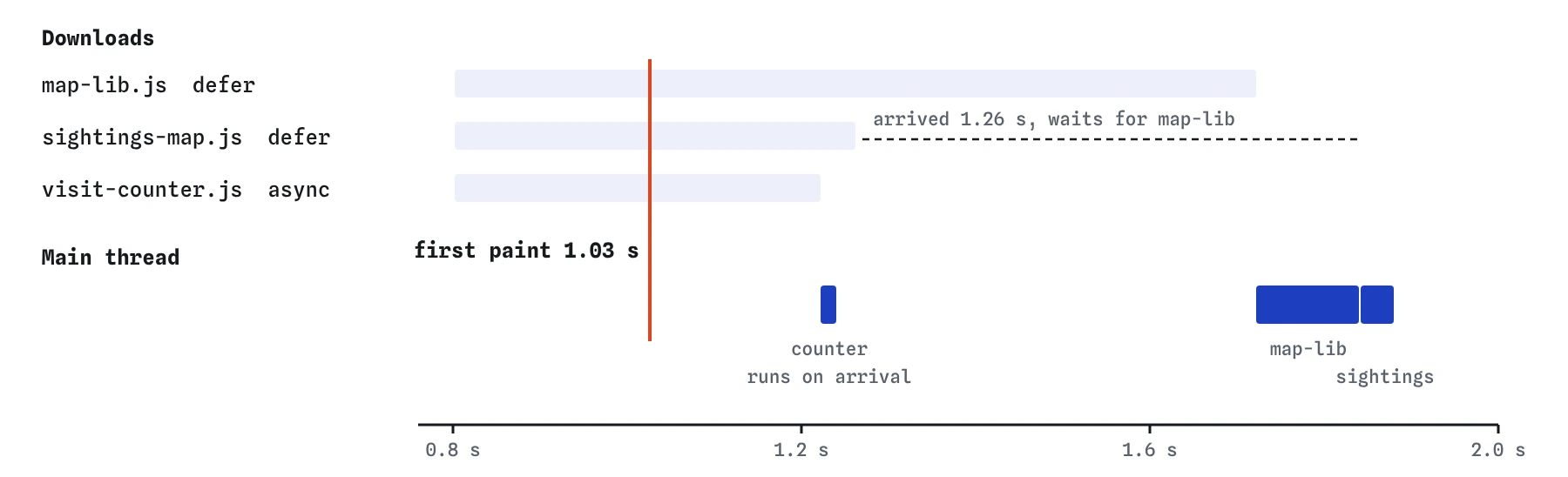

How do you decide between them?
Ask two questions about each script. Does it depend on another script, or does another script depend on it? Does it need the full HTML to have been read? If either answer is yes, use defer. If both are no, async works and lets it run as early as possible.
Keep a plain script only when it truly must run before the page is shown, which is rare. A tiny inline snippet that sets a dark-mode class on <html> to prevent a flash is one example. Even then, keep it small and inline, never a large external file.
- Your own page code, libraries and the code that uses them:
defer. - Independent counters, analytics and error reporting:
async. - Modules (
type="module"): deferred already; addasynconly for an independent module. - Tiny inline setup that must run before paint: a short inline
<script>, nosrc.
What happens to the numbers after the change?
The first paint moves from about 1.9 seconds to about 1 second. The Waterfall still shows all three scripts downloading at about the same times, now at low priority, so the 8 KB stylesheet gets more of the connection and arrives at about 1.03 seconds.
Total blocking time rises a little, from 0 to about 70 ms. Before, map-lib.js ran before anything was painted, so its 120 ms did not count. Now it runs after the first paint, while the visitor is reading, and the part over 50 ms counts as blocking. The page is plainly better, and the later lessons on shipping less JavaScript and long tasks deal with that remaining cost.
The simulator runs deferred scripts once parsing is done and the scripts have arrived, which matches what browsers do. It does not model document.write or the DOMContentLoaded event itself.
Is putting scripts at the end of the body the same thing?
It is close, and it was the standard advice before defer was reliable. A plain script at the end of the body lets the content above it be read and painted first. The download, though, only starts when the parser or preload scanner reaches it, and it still stops the parser at that point.
A deferred script in the head starts downloading as soon as the head arrives and never stops the parser. You get the earliest download and no blocking, and your script tags stay together in one place. A plain script placed in the middle of the body, like the walk banner in the Break It, is the worst of both: it stops everything below it.
What about inline scripts and modules?
The defer and async attributes only work on scripts with src. On an inline <script> they are ignored, and the code runs as soon as the parser reaches it. If an inline script needs the page, move it into a file and defer it, or wrap it in a DOMContentLoaded listener.
A <script type="module"> is deferred by default and keeps document order with other deferred scripts. Adding async to a module makes it run as soon as it and its imports arrive. Modules that import other modules start more requests in a chain, one after another. A <link rel="modulepreload"> in the head lets the browser start those downloads early.
What does AI often get wrong here?
AI-written pages often put every script in the head with no attribute, or add async to everything because it sounds fastest. The first slows every visit; the second breaks scripts that depend on each other, sometimes only on fast or slow connections, which is hard to debug.
Another common pattern is defer on a script and a DOMContentLoaded listener inside it, which is harmless, alongside async on the library it uses, which is not. Read each script tag and ask what it depends on. The Waterfall tags and the order of the bars tell you the rest.
Field notes
- A plain script in the head stops the parser until it downloads and runs.
deferdownloads in the background and runs scripts in page order after the HTML is read.asyncruns each script as soon as it arrives, in any order.- Use
deferfor scripts that depend on each other or need the full page.
Easy to get wrong
Async scripts run in arrival order, so the small script that needs the library can run first and fail. Deferred scripts keep page order.
The defer attribute is ignored on inline scripts, so the code runs immediately, before the deferred library exists.
A plain script stops the parser where it sits, so everything below it waits. Deferred, it downloads early and blocks nothing.
Questions people ask
Can a script have both defer and async?
It can, and async wins in every current browser. There is no reason to write both today.
Does defer delay my script for too long?
It runs as soon as the HTML has been read and earlier deferred scripts have run. On most pages that is a fraction of a second after the first paint, which is when the visitor starts reading anyway.
Where should I put deferred scripts?
In the head. The preload scanner finds them at once, so they start downloading as early as possible, and the attribute stops them blocking.
Do analytics scripts need async?
Most analytics snippets are written to work with async and should use it. If yours has a separate setup snippet that must run first, follow its instructions, and keep that snippet tiny.