Why does CSS hold back the first paint?
A browser will not paint a page until it has every stylesheet that might apply to it. Painting early with no CSS would show a flash of unstyled text, then redraw everything once the styles arrived, which looks broken. Browsers choose to wait instead, and that makes every stylesheet in the head render-blocking by default.
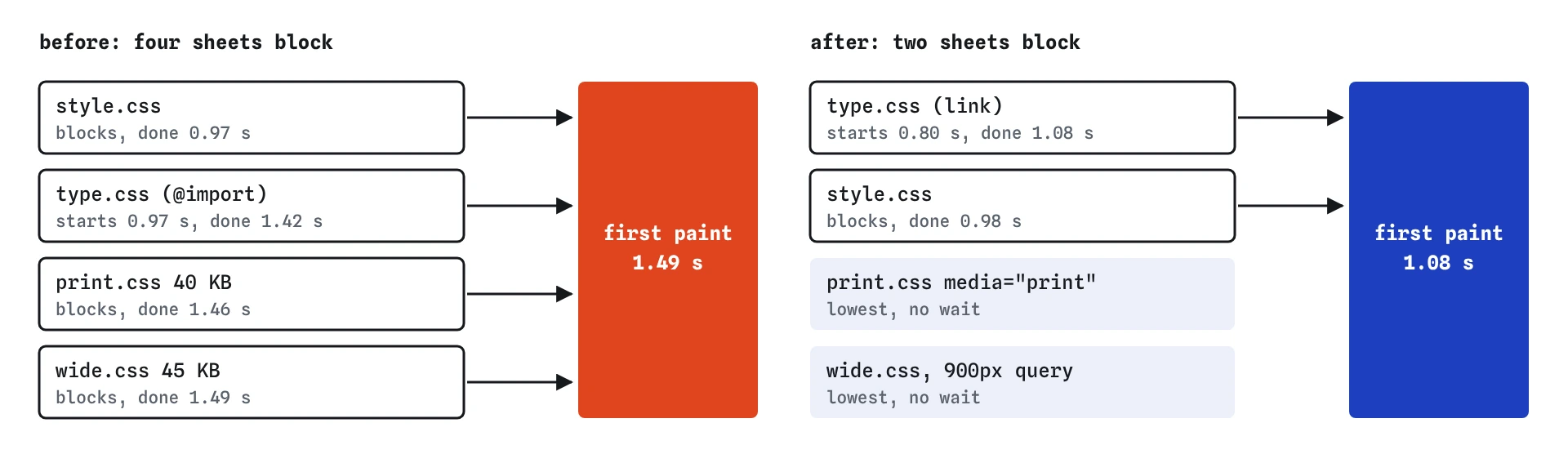
On the sightings page, the HTML has arrived by about 0.8 seconds. The text is ready to show, yet the first paint waits until about 1.49 seconds for four stylesheets. Two of them are not needed on a phone at all, and the third is found late.
What is wrong with @import?
An @import rule sits inside a stylesheet, so the browser cannot see it until that stylesheet has downloaded. On the start page, style.css arrives at about 0.97 seconds, and only then does the browser learn about type.css and ask for it. That second request needs another round trip and its own download before the page can paint.
Each level of @import adds a step to that chain. A theme stylesheet that imports a reset, which imports a font sheet, can cost several round trips on a phone. The preload scanner can see <link> tags as soon as the HTML arrives, so replacing an import with a link lets both files start at once.
Keep the order of the rules the same. An @import at the top of style.css means its rules come first, so the replacement <link> goes before the style.css link.
<link rel="stylesheet" href="/css/type.css">
<link rel="stylesheet" href="/style.css">
How does media="print" stop a sheet blocking?
A media attribute on a <link> tells the browser when the sheet applies. If it does not match the current screen, the browser still downloads it, so it is ready if things change, but it does not wait for it before painting, and it gives the request the lowest priority.
A print stylesheet is the clearest case: no phone is printing while it loads the page. With media="print", the 40 KB print.css moves out of the critical path. In the Waterfall its row loses the blocks paint tag and shows lowest priority.
Putting print rules inside @media print within a sheet that has no media attribute does not help. The browser still has to download the whole sheet to find out what is inside it, so the link blocks paint regardless.
What about stylesheets for wide screens?
The same trick works with any media query. The sightings page has wide.css, whose rules only apply from 900 pixels. A link with media="(min-width: 900px)" tells a 360 pixel phone it can paint without it. On a laptop the query matches, so the sheet blocks there as it should.
This only pays off when the rules really are only for that width. If you split one stylesheet into a phone part and a desktop part, the phone part must contain everything a phone needs, or it will paint with missing styles. Most sites are better served by one small main stylesheet than by many media-specific files; the media attribute is for sheets that are already separate.
<link rel="stylesheet" href="/css/print.css" media="print">
<link rel="stylesheet" href="/css/wide.css" media="(min-width: 900px)">
Is it a problem to have many stylesheets?
Each blocking sheet is another request that has to finish before the first paint. They download in parallel on one connection, so four small sheets cost less than four times one, yet they still share the bandwidth and every one must arrive. The first paint waits for the slowest.
Plugins and themes often add a stylesheet each: one for a slider, one for a cookie banner, one for an icon font, one for a contact form. A page can end up with ten or more blocking sheets, some for features that are not on that page at all. Combining them into one file, or removing the ones a page does not use, usually helps more than any clever trick.
Why did first paint drop by about 400 ms?
After the fix, type.css and style.css both start at about 0.8 seconds, with the HTML. print.css and wide.css start too, at the lowest priority, so they take only a small share of the connection. The 18 KB type.css arrives at about 1.08 seconds, and the page paints at once.
Before the fix, the four blocking sheets shared the link equally and type.css started 175 ms late. The page could not paint until the last of them, wide.css, finished at about 1.49 seconds. All the files still download. The difference is that the phone stops waiting for the ones it cannot use.
How do you find render-blocking CSS in real tools?
Lighthouse in Chrome DevTools has an audit that lists render-blocking resources with an estimate of the time each costs. In the Network panel, sort by start time and look at the CSS rows that start before the first paint; a stylesheet that starts noticeably later than the HTML is often an @import. The Performance panel shows the first paint marker on the same timeline.
The Coverage panel in DevTools shows how much of each stylesheet was used for the current page. A sheet that is almost all unused on a phone is a candidate for a media attribute or for removal.
Where does the simulator differ from a real browser?
The simulator follows one level of @import: if an imported sheet imports another, that second file is not modelled. Real browsers follow the whole chain, and each level adds a round trip, so real chains can be worse than what you see here.
Real browsers also download non-matching sheets in a slightly different order and may delay them until after the first paint. The effect on first paint is the same: they do not block.
What does AI advice get wrong about CSS blocking?
A common suggestion is to load every stylesheet with media="print" and an onload handler that switches it to all. Used on the main stylesheet, that makes the page paint unstyled and then jump into shape, which hurts CLS and looks broken. The pattern belongs only on sheets that are not needed for the first screen, and the critical CSS lesson covers how to choose.
AI-generated CSS also uses @import freely, especially for web fonts and resets, because it is shorter to write than an extra link. When reviewing generated code, search for @import and check every <link rel="stylesheet"> for whether a phone needs it before it can show the page.
Field notes
- The browser waits for every stylesheet that might apply before it paints.
- An
@importis found only after its parent sheet downloads, adding a delay. - A
mediaattribute that does not match lets the browser paint without that sheet. - The sheet still downloads at low priority, ready if the screen changes.
Easy to get wrong
An import is found only after its parent sheet downloads, which adds a round trip before the first paint. A link starts with the HTML.
The browser cannot know the contents are print-only until it has downloaded them. The attribute tells it in advance.
If a phone needs some of those rules, it paints without them and then restyles, which looks broken and can shift the layout.
The page paints unstyled and then snaps into shape when the CSS arrives. Visitors see a flash and a jump.
Questions people ask
Does a non-matching stylesheet still download?
Yes. The browser fetches it at the lowest priority so it is ready if the page is printed or the window is resized. It does not wait for it before painting.
Is a style element in the head render-blocking?
It is parsed with the HTML, so there is no extra request to wait for. That is why the critical CSS lesson inlines the styles the first screen needs.
Can I use @import for Google Fonts or similar services?
It works, and it adds a round trip to another site before the font CSS can even start. A <link> in the head, with a preconnect to that site, starts sooner.
Does the order of link tags matter?
For the cascade, yes: later sheets win when rules conflict. For loading, all links in the head start as soon as the preload scanner sees them, so order makes much less difference than how many there are.