What does `loading="lazy"` do?
It tells the browser it may wait before fetching an image or iframe until the element is close to the visible part of the page. Without it, the browser fetches every image it finds as soon as it can, whether the visitor will ever scroll that far or not.
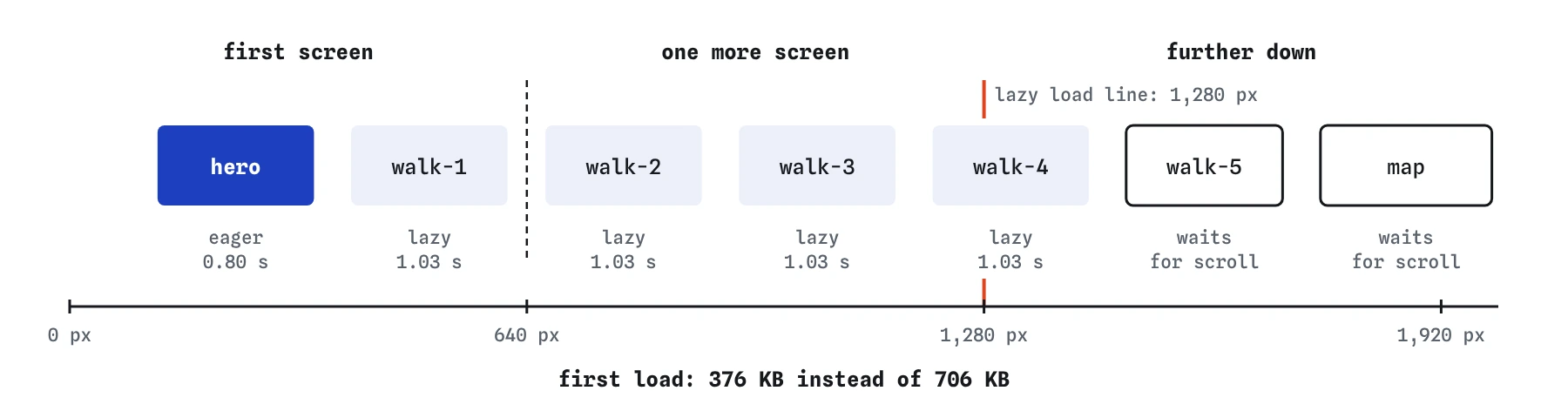
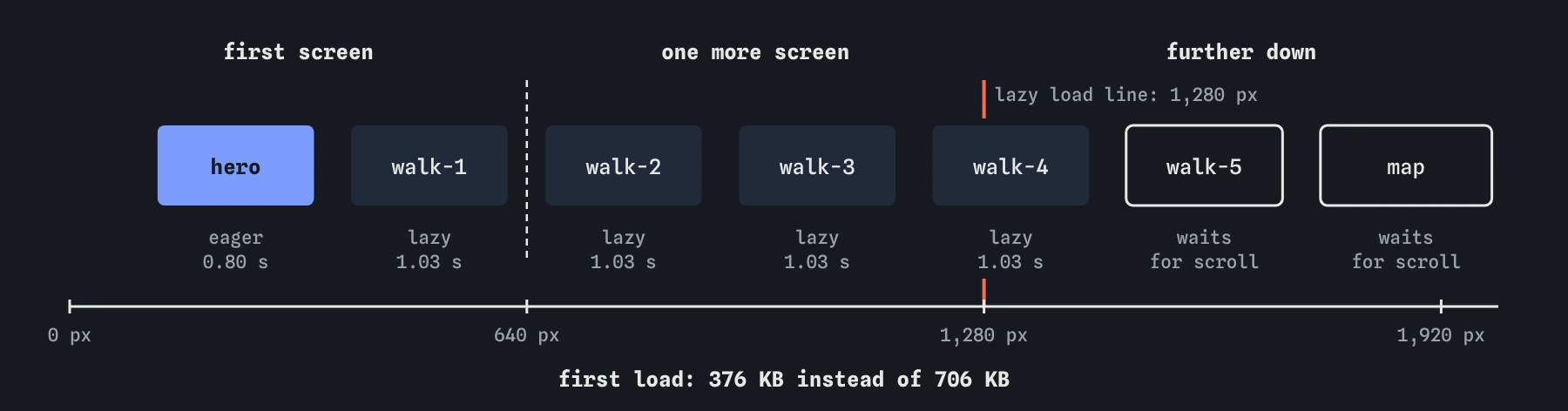
On the spring walks page, the phone screen shows the heading, the intro and the first photo. The five walk photos and the map sit below. In the starting Waterfall all of them begin within the first second, about 700 KB in total, and they share the one connection with the first photo. Add loading="lazy" to the photos further down and to the map, and the first load drops to under 400 KB.
<img src="/img/walk-3.jpg" alt="Wading birds on the mud"
     width="720" height="480" loading="lazy">

<iframe src="https://maps.example.org/embed/boathouse"
        title="Map of the boathouse" width="328" height="240"
        loading="lazy"></iframe>
When does a lazy image actually start loading?
A lazy image is only known once the page has been laid out, because the browser needs to know where it sits. When it is within a certain distance of the viewport, the browser starts the download, hopefully early enough that it is ready by the time the visitor scrolls to it.
Chrome uses a distance of about 1,250 pixels on fast connections and about 2,500 on slower ones. The simulator uses one screen height, 640 pixels, so it starts lazy images a little later than Chrome would. On this page that means the first four walk photos still load at the start, tagged lazy, and only the last one waits.
Lazy loading isn't a promise to save bytes. If a visitor scrolls down the whole page, everything loads in the end. It saves the bytes of people who don't scroll, and, more importantly for speed, it keeps those downloads from competing with what the visitor sees first.
Why should the first-screen image never be lazy?
An eager <img> is found by the preload scanner the moment its tag arrives, often in the first few kilobytes of HTML, and its download starts at once. A lazy one has to wait until the CSS has arrived, the page has been laid out and the browser has worked out it is on screen. Only then does the request begin.
That wait lands right on the largest paint. On the bike shop page in Break It, the lazy fleet.jpg starts only after the first paint and the largest paint suffers for it. Lighthouse flags a lazy-loaded largest image, and so does the simulator's Vitals view whenever the lazy image is the one it measures as the largest paint.
Any image that might be on the first screen on a common phone or laptop should stay eager. That usually means the hero photo, a logo and the first product or article image. Lazy load the rest.
Which elements does it work on?
The loading attribute works on <img> and <iframe> in all current major browsers. Firefox was the last to add lazy iframes, in 2023. For images inside <picture>, put the attribute on the <img>, which is the element that actually loads.
It doesn't apply to CSS background images, which load once a rule applies to an element on the page, or to <video> posters. A <video> with preload="none" already waits for a tap before fetching the video file itself.
Iframes are often the better win. A map, video player or social post embed loads its own page, scripts and styles, often several hundred kilobytes and plenty of main-thread work. The video embed in Break It is 420 KB on its own, more than all the shop's photos together.
Do lazy images still need `width` and `height`?
Yes, more than ever. A lazy image with no size takes up no space until it loads. If a visitor scrolls while it is loading, the content around it jumps. Worse, with zero height many images can appear to be inside the loading distance at once, so the browser fetches them all and the saving disappears.
With width and height, the page has its true shape from the start, each image sits where it belongs, and the browser can judge accurately which ones are near the screen. Every image on the walks page keeps its attributes for that reason.
Is JavaScript lazy loading still needed?
For ordinary images and iframes, no. Older sites used scripts that swapped a data-src attribute into src when an image scrolled into view. They needed a script to download and run first, they hid images from the preload scanner, and they showed nothing at all if the script failed.
The loading attribute does the same job built into the browser, with no script and with a sensible fallback: a browser that doesn't know the attribute just loads the image normally. Keep scripted lazy loading for rare cases such as content that is fetched and inserted as the visitor scrolls.
How do you check lazy loading on a real site?
In Chrome DevTools, open the Network panel, filter to Img and reload without scrolling. Only the images near the top should appear. Scroll slowly and watch new rows arrive. Throttle the connection to see whether images are ready by the time you reach them.
To find the largest paint element, open the Performance panel, record a reload and look for the LCP marker, or read the Lighthouse report, which names the element and warns if it is lazy. PageSpeed Insights shows the same with real visitor data where it exists.
What do AI tools get wrong about lazy loading?
The most common mistake is adding loading="lazy" to every image on the page, including the hero. It looks like a free win and often makes the largest paint slower. Check every image an assistant marked lazy and remove the attribute from anything on the first screen.
AI-written pages also still produce old script-based lazy loading with data-src and a library, or add loading="lazy" to images that have no width and height. Prefer the attribute, keep the sizes, and test with a cleared cache on a throttled connection.
Field notes
loading="lazy"lets the browser wait to fetch images and iframes until they are near the screen.- Never make the image on the first screen lazy; it delays the largest paint.
- Lazy images still need
widthandheightto keep their space. - The attribute works on
<img>and<iframe>in all current major browsers.
Easy to get wrong
A lazy image waits for layout before it starts. On the first screen that delay goes straight onto the largest paint.
Embeds are often the heaviest things on a page, with their own scripts and styles. They benefit most from waiting.
Without a size the image is zero pixels tall until it loads. Content jumps, and the browser may judge many images near the screen at once.
Questions people ask
Should I add `loading="eager"` to the hero?
It is the default, so it isn't needed. Leaving the attribute off is enough. To make the hero start even sooner, fetchpriority="high" raises its priority, which the lesson on the biggest image covers.
Does lazy loading hurt search engines?
No. Search engine crawlers that render pages understand loading="lazy" and see the images. Script-based lazy loading that hides the real src was the riskier approach.
Why does the simulator load some lazy images straight away?
It starts lazy images within one screen height of the viewport. Those near the top are inside that distance from the first layout, so they load early, tagged lazy. Chrome uses a larger distance, so on this page it would load the last photo straight away too.
What about images in a carousel?
Keep the first slide eager if it is on the first screen and make the hidden slides lazy. Browsers also skip lazy images inside elements hidden with display: none until they are shown.