What is critical CSS?
Critical CSS is the small set of rules the browser needs to draw the first screen correctly. On the bike shop page that is three rules: the body font and margins, the header's height, and the cream background of the .hero block. Everything else in the 96 KB stylesheet styles things further down, or on other pages: the booking form, the hire calendar, the footer, print layouts.
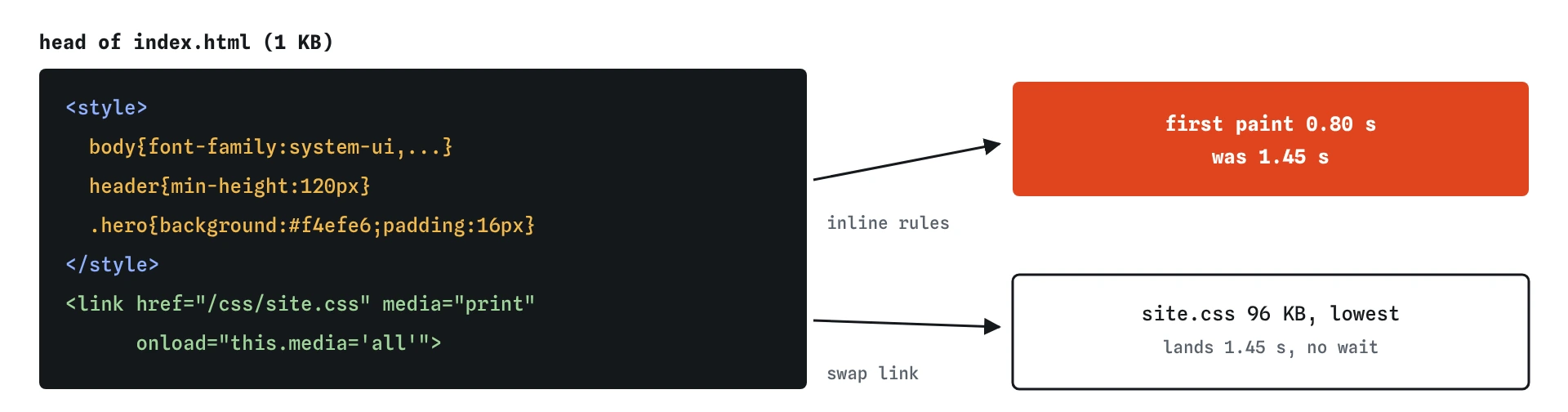
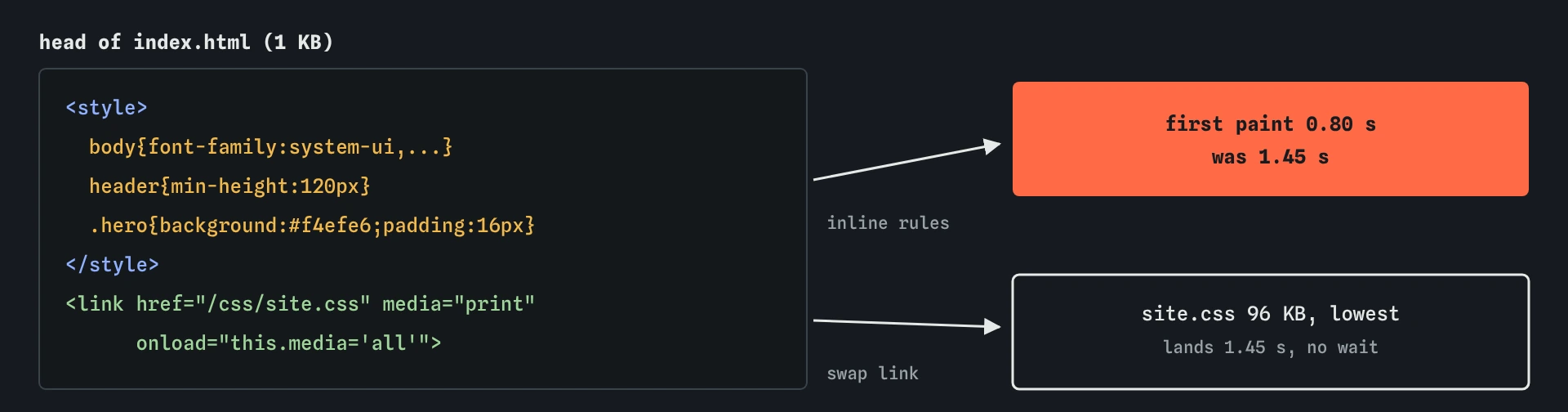
The technique has two halves. You copy the first-screen rules into a <style> element in the head, so they arrive inside the HTML with no extra request. Then you load the full stylesheet in a way that does not block painting, so the phone draws the first screen at once and applies the rest when it arrives.
It is a targeted fix for one specific problem: a large stylesheet that blocks the first paint on a slow connection. When your stylesheet is already small, or the HTML itself is the slow part, critical CSS gains little and costs you some tidiness.
Why does a stylesheet hold back the whole page?
Browsers refuse to paint before the stylesheets in the head have arrived. If they painted early, visitors would see raw unstyled text for a moment, then watch it snap into place. That flash looks broken, so every browser waits.
Open the Waterfall on the starting page. The HTML finishes at about 0.8 seconds. site.css starts at the same moment, takes about 650 milliseconds to download at 4G speed, and the first paint marker sits at about 1.45 seconds, exactly where that bar ends. For more than half a second the phone has the words and has nothing to show them with.
The earlier lesson on render-blocking CSS covered replacing @import with links and marking print and wide-screen sheets with media. Critical CSS goes one step further: it removes the wait for the first screen entirely.
How do you choose which rules to inline?
Look at the first screen of the page on a phone, 360 by 640 CSS pixels, and list what is visible: here the header with its heading and paragraph, and the start of the booking section. Then find the rules that style those elements and anything they inherit from, such as body. Those are your candidates.
Keep the list short. A good target is a few kilobytes of CSS, small enough that it fits in the first part of the HTML response. Inlining 40 KB defeats the purpose, because the HTML itself then takes longer to arrive and every page carries that weight again.
Include anything that affects size and position, even if it looks dull. If the header's min-height lives only in the full stylesheet, the header will be shorter at first paint, then grow when site.css arrives and push the content down. That is a layout shift you created yourself. Fonts, margins, heights and display rules matter more than colours here.
<style>
  body{font-family:system-ui,sans-serif;margin:0 16px;color:#222}
  header{min-height:120px}
  .hero{background:#f4efe6;padding:16px}
</style>
How do you load the rest without blocking?
The common pattern sets media="print" on the link. A stylesheet for print does not affect the screen, so the browser downloads it at the lowest priority and paints without waiting. When it finishes, the onload handler changes media to all and the rules apply to the screen.
Add a <noscript> copy of the plain link after it. A visitor with JavaScript turned off never runs the onload swap, so without the fallback they would never get the full styles.
Another option is <link rel="preload" as="style"> with the same onload trick, which downloads at a higher priority. Some sites put a plain stylesheet link at the very end of the body instead. Browsers treat that one inconsistently: Chrome generally paints the content above it first, but it is less predictable than the print swap, so the swap is the one to reach for.
<link rel="stylesheet" href="/css/site.css"
      media="print" onload="this.media='all'">
<noscript><link rel="stylesheet" href="/css/site.css"></noscript>
What changes in the waterfall after the fix?
The first paint marker jumps from about 1.45 seconds to about 0.8 seconds, right after the HTML arrives. The site.css bar is still there and still takes about 650 milliseconds, but it has lost its “blocks paint” tag and its priority dropped to lowest. The page finishes loading at roughly the same time as before.
That is the honest shape of this technique. The total bytes are the same, about 97 KB, and the last file arrives no sooner. What changes is when the visitor first sees something useful: here more than half a second earlier, which on a phone feels like the difference between instant and a pause.
The simulator applies every rule from site.css to the layout from the start, as if it were already loaded. A real browser would draw the first screen with only the inline rules and then restyle when site.css arrives, so anything you forgot to inline can shift or change colour at that moment. Check that in the Filmstrip, and on a real phone with Chrome DevTools throttling.
What are the costs?
Inline CSS cannot be cached on its own. Every page view downloads those rules again inside the HTML, while an external stylesheet with a long Cache-Control lifetime costs nothing on the second visit. With a few kilobytes inlined that trade is clearly worth it on the first visit and nearly free afterwards; with tens of kilobytes it starts to hurt repeat visitors.
You now have two copies of the same rules. Change the header colour in site.css and forget the inline copy, and the header flashes the old colour at first paint. Sites that use critical CSS seriously generate the inline block with a build step from the real stylesheet, so the copies cannot drift apart.
The first screen also depends on the visitor's device. A rule that is needed on a 360 pixel phone may not be needed on a wide laptop, and the other way round. Pick for the phone first, since that is where the waiting hurts, and check the wide layout for flashes too.
When is critical CSS the wrong fix?
If the stylesheet is 8 KB, it downloads in about 40 milliseconds on this connection. The connection setup and the round trip cost more than the bytes, and you would save very little by inlining. Make the stylesheet small first; that often solves the problem without two copies of anything.
If the slow part is the HTML itself, a slow server or a page built on every request, the first paint waits for that and no CSS trick helps. Look at the waiting part of the HTML's bar before reaching for critical CSS.
If the largest thing on the first screen is an image or a web font, critical CSS can bring the first paint forward while the largest paint stays where it was. Fix the thing your largest paint is waiting for, which is often a photo or a font file, as the font loading and image lessons show.
What does AI often get wrong here?
Ask an AI tool for critical CSS and it often inlines the whole stylesheet, or most of it, into the head. The first paint improves on the first visit and every later page gets heavier, with nothing cached. Check how many kilobytes the <style> block adds to the HTML in the Waterfall.
It also tends to write the media="print" link without the <noscript> fallback, or with an onload that sets rel instead of media, which does nothing useful for a stylesheet link. Another common slip is leaving the original blocking link in place after adding the inline styles, so the page still waits; the Break It below has exactly that bug.
Finally, AI-generated critical CSS often leaves out heights and spacing and keeps colours, because colours look important. Run the page, open the Filmstrip and watch for anything that moves when the full stylesheet lands.
Field notes
- Critical CSS is the small set of rules needed to draw the first screen.
- Inline those rules in a
<style>block so the page can paint right away. - Load the full stylesheet with
media="print"and anonloadthat switches it toall. - Inline styles cannot be cached alone, so keep the inlined part small.
Easy to get wrong
Inlining everything makes the HTML slower to arrive and stops the browser caching those rules. Keep the inline block to a few kilobytes.
Without JavaScript the onload never runs, so the full stylesheet would never apply. The <noscript> copy covers those visitors.
Missing size rules make the first screen change shape when the full stylesheet arrives, which shows up as layout shift.
Questions people ask
How big should the inline style block be?
A few kilobytes is a good target. It should arrive with the first part of the HTML, so the first paint does not wait for an extra round trip.
Does critical CSS help repeat visits?
Barely. On a second visit a cached stylesheet arrives almost instantly anyway. Critical CSS mainly helps the first visit, which is the one that decides whether people stay.
Do I need a tool to extract critical CSS?
For a small site you can pick the rules by hand, as here. For a large site with many templates, a build step that generates the inline block from the real stylesheet keeps the two copies in step.
Is the onload swap safe with a strict Content Security Policy?
An inline onload attribute counts as inline script, so a strict policy blocks it. In that case use a tiny external script that switches the media attribute, or a plain link at the end of the body.