What happens between tapping a link and seeing the page?
The phone first needs a connection to the server. On this pretend 4G network each trip to the server and back takes 150 milliseconds, and opening a secure connection takes three of them: one to find the server, one to say hello, one to agree on encryption. That is 450 milliseconds before a single byte of the page has been asked for.
Then it sends the request, the server spends about 200 milliseconds building the page, and the HTML starts to arrive. In the Waterfall the first row, the page itself, ends at about 0.8 seconds. Nothing at all can be on screen before that point, however small the rest of the page is.
Everything after that is a chain. The HTML names stylesheets, scripts and images. Those files may name more files: a stylesheet can import another stylesheet, or point at a background image or a font. Each new link in the chain usually costs at least one more round trip, and the screen can only fill in once the right links have arrived.
How does the browser find the files a page needs?
The browser reads the HTML from top to bottom, building the page as it goes. Real browsers also run a second, quicker reader called the preload scanner. It skims ahead through the HTML looking for things to download: <link rel="stylesheet">, <script src>, and <img> tags. As soon as it sees one, the request goes out, even if the main parser is still stuck further up the page.
The scanner only reads HTML. Anything mentioned only inside CSS or JavaScript is invisible to it. A background image named in a CSS rule is found after that stylesheet has arrived, been read, and been matched against an element that has been laid out. A stylesheet pulled in with @import is found only once the stylesheet that imports it has downloaded. A file a script adds is found only once that script has run.
That is why where you mention a file is as important as how big it is. In the starting page, workshop.jpg is named in style.css as a background. The Waterfall shows its request beginning at about 1.6 seconds, after the first paint, even though the HTML had arrived 0.8 seconds earlier.
/* found late: only after style.css arrives and applies */
.hero{background-image:url(/img/workshop.jpg)}

<!-- found early: the preload scanner sees it in the HTML -->
<img src="/img/workshop.jpg" alt="A bike on the repair stand"
     width="800" height="533">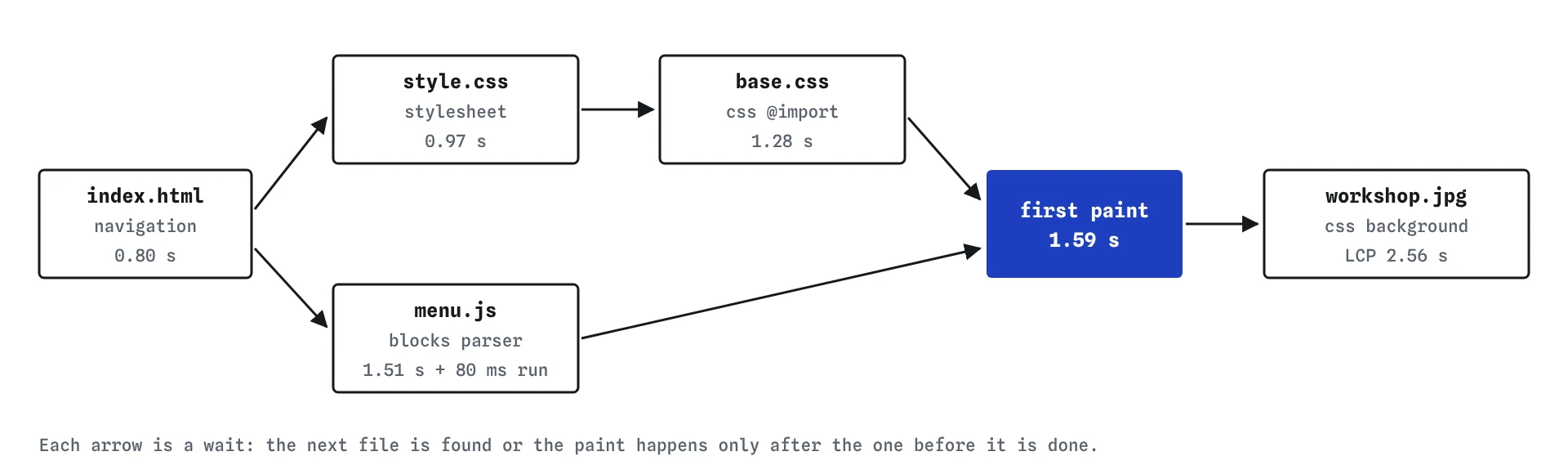
Why can't the browser paint as soon as the HTML arrives?
Stylesheets block the first paint. The browser could draw the text with no styling, but then it would have to redraw everything a moment later when the CSS arrived, and visitors would see a flash of unstyled page. Browsers decided long ago that a short wait is better than that flash, so every ordinary stylesheet in the head must arrive before anything is painted.
A plain <script src> in the head is worse. The parser stops where the script is, waits for the file to download, waits for earlier CSS, runs the script, and only then carries on reading. The browser won't paint a page it hasn't finished reading the head of. In the starting page, menu.js is 90 KB and takes until about 1.5 seconds to arrive; it then runs for 80 milliseconds, and the first paint lands at about 1.6 seconds.
Images, by contrast, never block the first paint. The page can show its text and leave space for a photo that is still on its way. That is why the photo can be the last thing to finish without holding up the headline.
What does `@import` cost?
Look at the two stylesheet rows in the starting Waterfall. style.css runs from about 0.80 to 0.97 seconds. Only then does the browser read it, find @import url(/css/base.css), and ask for the second file, which arrives at about 1.28 seconds. Both files block the first paint, so the page waited for two downloads in a row instead of two at once.
The fix is to name both stylesheets in the HTML. The scanner sees both links within the same few bytes and requests them together. In the solution, base.css and style.css start at the same moment, and the CSS part of the wait shrinks to the time of the slower file.
The same pattern turns up in other places: a font stylesheet that imports another, a theme file that imports a reset file, a framework that pulls in its parts one by one. Every hop is another round trip, and on a slow phone a round trip can be 300 milliseconds or more.
<!-- two sheets, requested at the same time -->
<link rel="stylesheet" href="/css/base.css">
<link rel="stylesheet" href="/style.css">
What does `defer` change for a script?
A script with defer downloads in the background while the parser keeps reading, and runs once the whole HTML has been parsed, in the order the deferred scripts appear. It never stops the parser and never holds back the first paint. For almost any script that sets up menus, sliders or forms, that is the behaviour you want.
In the solution menu.js still downloads, and it still runs before the page counts as loaded. It just runs at about 2.3 seconds instead of at 1.5 seconds, after the visitor can already see the opening hours and the booking link. The menu button does nothing until then, which is a fair trade for a page that appears half a second sooner.
A later lesson compares defer, async and type="module" in detail. For now the rule of thumb is short: a script in the head without one of those attributes is almost always a mistake.
Where should the main photo live?
If a photo is content, the thing a visitor came to see, put it in the HTML as an <img>. The scanner finds it immediately, you can give it alt text, width and height, and you can tell the browser it is a priority with fetchpriority="high". In the solution the photo request starts at about 0.8 seconds, right after the HTML, and the photo appears at about 2.1 seconds instead of 2.6.
CSS backgrounds are fine for decoration: a texture, a faint pattern, a small icon. They are a poor home for the largest thing on the first screen, because they are always discovered late. Many page builders and AI-written templates put hero photos in background-image so that text can sit on top; you can get the same look with an <img> and a little positioning.
When a background really is the right choice, a <link rel="preload" as="image"> in the head lets the scanner find it early. A later lesson on hints covers that.
How do you read the chain in the Waterfall?
Look at where each bar starts, as well as how long it is. A request that starts long after the HTML arrived is waiting for something: a stylesheet it was found in, a script that added it, or layout. Hover a row to see why it was requested; the simulator labels requests such as css @import and css background so the cause is clear.
Then find the first paint marker and ask which rows end just before it. Those are the files on the path to first paint. In the starting page they are style.css, base.css and menu.js. In the solution only the two stylesheets remain, and they run in parallel.
Chrome DevTools shows the same information. In the Network panel the Initiator column says what caused each request, and hovering it shows the whole chain. The Performance panel draws the same requests against a timeline of paints.
How is this simulator different from a real browser?
A real browser starts downloading some files before the HTML has finished, decodes images, builds style and layout trees, and has to share the phone's processor with everything else. This simulator models the parts that cause most waiting: connections, shared bandwidth, discovery, blocking and the main thread. It leaves out decoding and the browser's own overhead, and it gives the same numbers every time.
The order of events is the same, though. HTML first, then what the HTML names, then what those files name. Real numbers wobble from run to run, but a chain that is two links shorter is faster on every real phone too.
What do AI-written pages often get wrong here?
Generated templates often load fonts and frameworks through @import at the top of a stylesheet, put the hero image in a CSS background, and drop a script tag into the head with no defer. Each choice looks harmless on a fast laptop. On a phone they stack up into the exact chain you fixed here.
When you review a generated page, open the Waterfall before reading the code. Any row that starts late is a question worth asking: what made the browser wait to find this file, and could the HTML name it directly?
Field notes
- The browser reads the HTML first, then asks for the files it names.
- Stylesheets hold back the first paint until they arrive.
- An
@importinside CSS adds a second wait, because it is found late. - Put the main photo in the HTML as an
<img>so the browser finds it at once.
Easy to get wrong
An import is only found after the stylesheet containing it has downloaded, so the two files load one after the other. Two links in the HTML load together.
A plain script stops the parser and holds back the first paint until it has downloaded and run. defer keeps the download and the order but lets the page paint first.
A photo named only in CSS is invisible to the preload scanner, so its download starts after the first paint. As an <img> it starts the moment the HTML arrives.
Questions people ask
Does the order of tags in the head matter?
Yes. The scanner finds files in the order they appear, and a plain script stops the main parser at its position. Put stylesheets and preloads early, and scripts with defer anywhere in the head.
Is the HTML itself ever the slow part?
It can be. A slow server or a long redirect adds directly to every later step, because nothing else can start before the HTML arrives. Lesson five shows how much the network alone changes this.
Does `defer` work on inline scripts?
No. defer and async only apply to scripts with a src. An inline script runs where it sits, after any stylesheet above it has arrived.
Why is my photo row tagged medium priority?
Images found through CSS get a medium priority in this simulator, and images in the HTML start low unless marked as important. The next lesson explains what priority changes.