What are you building?
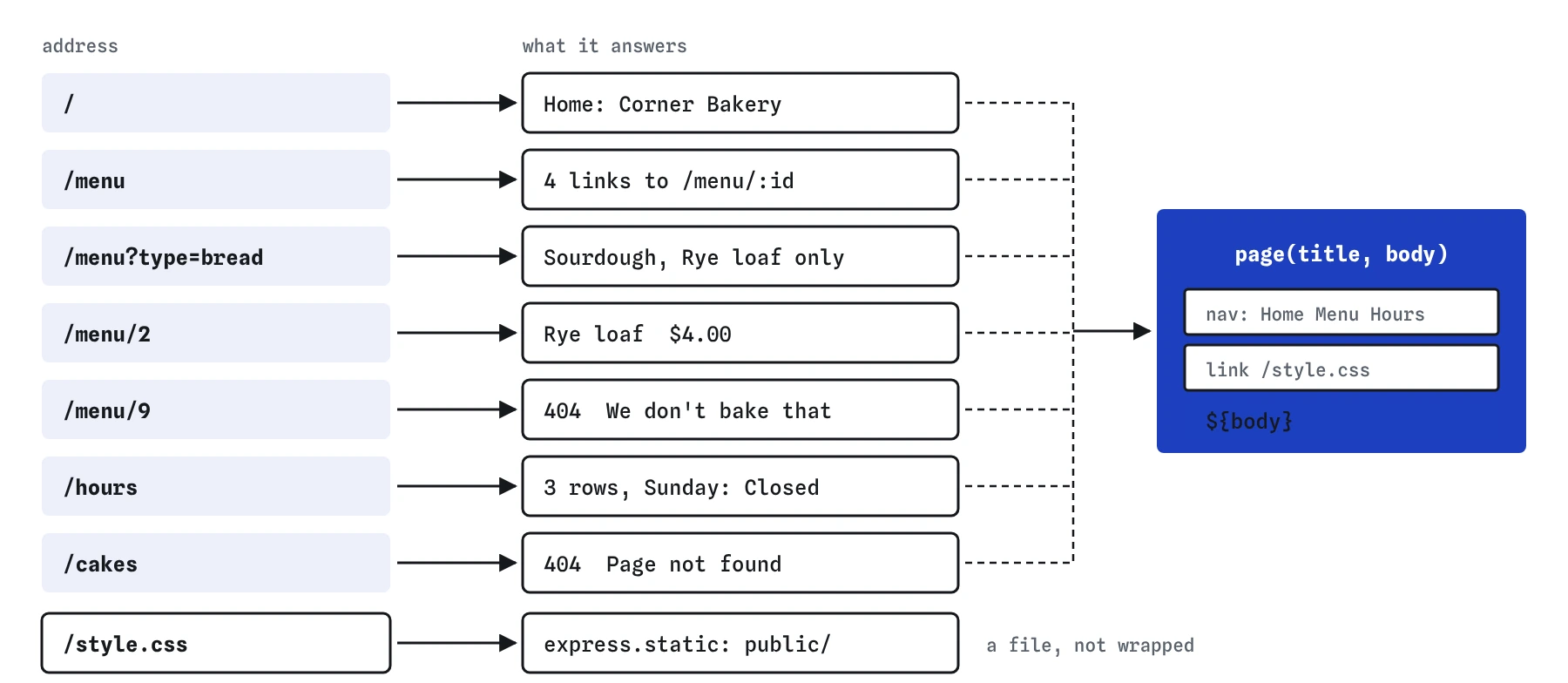
This project puts the last twelve lessons together into one small, real website server for the Corner Bakery. It has five kinds of page: a home page, a menu that can be filtered, a page for each item, the opening hours, and a friendly page for addresses that do not exist. A stylesheet comes from the public folder, and every page shares one layout.
Nothing here is new. You will use routes and status codes from the first lessons, HTML built with template literals, express.static(), route parameters, query strings and a custom 404. The new part is making them work side by side in one file, which is where most real bugs come from: two pieces that each work alone and get in each other's way.
How should you plan the routes?
Write the list of addresses before writing any code. For each one, note the method, the path, what it shows, and what happens when something is missing. A short plan like the one below catches problems early, such as two routes that would match the same address, or a page that needs data you do not have.
Every route here uses GET, because every page only reads information. Order the routes from most specific to least specific, and finish with the catch-all. /menu and /menu/:id never clash, because :id needs something after the slash, while the 404 handler must come after both of them or neither will ever run.
GET /: the home page, already written.GET /menu: every item as a link, with an optional?type=breador?type=pastryfilter.GET /menu/:id: one item's name and price, or404with a link back to the menu.GET /hours: a table of opening hours built from thehoursarray.GET /style.css: served byexpress.static()frompublic/style.css.- Anything else: a
404page in the same layout, with a link home.
Why share one layout function?
The starting code has a page(title, body) function that wraps any content in the same HTML: the doctype, the <title>, the stylesheet link and the navigation. Every route calls it, so the site looks consistent and a change to the navigation happens in one place.
The layout is also where small mistakes are easiest to spot. The stylesheet link uses /style.css with a leading slash. Without the slash, a browser on /menu/3 would ask for /menu/style.css, because a relative link is resolved against the current folder in the address. That request would fall through to your 404 page and the item pages would lose their styling, while the home page looked fine.
Use the layout for the error page too. A visitor who hits a missing address should still see the bakery's name, colours and navigation, so they know they are in the right place and can click their way back.
function page(title, body) {
  return `<!doctype html>
<html lang="en"><head><meta charset="utf-8"><title>${title} | Corner Bakery</title>
<link rel="stylesheet" href="/style.css"></head>
<body><nav>...</nav>${body}</body></html>`;
}

res.send(page('Menu', '<h1>Menu</h1>...'));
How do the menu and item pages fit together?
The menu page and the item pages both read from the same menu array, and the link on one is the address of the other. Build each link from the item's id: <a href="/menu/${item.id}">. Then /menu/:id reads req.params.id, converts it with Number(), and looks the item up with find(). Because the links and the lookup use the same field, they cannot drift apart.
The filter belongs on /menu as a query string, since /menu?type=pastry is still the menu, viewed differently. Start with the whole array and narrow it only when req.query.type is a string. A missing key shows everything, and a repeated key, which arrives as an array, is ignored instead of crashing the route.
An item that does not exist is a normal situation, so the item route answers it itself: return res.status(404).send(...). The return matters. Without it the function carries on to the next line, tries to read item.name from undefined, throws, and Express ends up handling an error you could have avoided.
app.get('/menu/:id', (req, res) => {
  const item = menu.find((m) => m.id === Number(req.params.id));
  if (!item) {
    return res.status(404).send(page('Not on the menu', '<h1>We don\'t bake that</h1>'));
  }
  res.send(page(item.name, `<h1>${item.name}</h1>`));
});
Where do static files and the 404 page go?
Order in the file decides which handler gets a request first. express.static() sits near the top, so a request for /style.css is answered from public/ before any route is tried. When static middleware finds no matching file it does nothing visible: it passes the request on to the routes. A wrong folder name therefore produces no error at startup, only missing styling and a 404 for the stylesheet.
The custom 404 handler goes at the bottom, after every route and just above app.listen(). Put it anywhere higher and every route below it becomes unreachable. In the Requests view that shows up as a page you know you wrote, answered by app.use instead of its own app.get.
The order also keeps the public folder honest. Only files inside public can be served, so server.js and any future .env file stay private. Serving the project folder itself, with express.static(__dirname), would hand your source code to anyone who asks for /server.js.
How do you test the whole site?
Press every Try button and read the status of each answer in the Requests view. You should see 200 for the real pages and the stylesheet, and 404 for /menu/9 and /cakes. Then open the Browser view and use the site the way a visitor would: click from the home page to the menu, from the menu to an item, and back with the navigation.
Watch the Requests view while you click. Every page load is followed by a request for /style.css, answered by express.static. If that request ever says 404, the layout link or the static folder is wrong. Finally type a few odd addresses into the request bar: /menu/abc, /menu?type=cake, /MENU, /menu/. Each one should give a sensible answer and none should give 500.
What would change on a real bakery site?
The menu would live in a database, so staff could change prices without editing code. Later lessons swap the array for SQLite. The routes stay almost the same: menu.find() becomes a database query, and the 404 logic does not change at all.
Item names would also come from people, which means they could contain HTML. Putting text into a page without escaping it lets someone inject their own tags and scripts. The names here are yours, so it is safe for now, and the lesson on unsafe HTML shows how to escape everything that comes from outside.
What should you check when an AI tool writes a site like this?
Generated site servers tend to look complete and hide the same few problems. Check for a catch-all app.use() above the real routes, or an Express 4 style app.get('*'), which Express 5 refuses to start with,, for req.params.id compared directly to a number, and for 404 pages sent without res.status(404). Each one passes a quick look in the browser.
Also check paths. A stylesheet link without a leading slash, or express.static() pointed at the wrong folder, breaks without any error message. And look for express.static(__dirname) or express.static('.'), which publishes your whole project. Ask for one file per change and test each route in the Requests view before you accept the next.
Field notes
- Plan the list of addresses, methods and missing cases before writing code.
- One shared
page(title, body)function gives every page the same layout. - The menu links to each item page, built from the item's id.
- Static files go near the top and the 404 handler goes last, because order decides who answers.
Easy to get wrong
A relative link is resolved against the current address, so on /menu/3 the browser asks for /menu/style.css. The leading slash makes it work from every page.
Route parameters are always strings. A strict comparison between the number 2 and the string '2' is false, so nothing is ever found.
Without return the function keeps going after the first answer, reads a property of undefined and throws. Stop the handler once it has responded.
Serving the project folder publishes server.js and any secrets next to it. Serve only a folder that holds public files.
Questions people ask
Why does the menu page use links instead of buttons?
Moving to another page is what links are for. A link sends GET, can be opened in a new tab, bookmarked and shared, and works with the keyboard and screen readers without extra code.
Should /menu/ with a trailing slash work?
By default Express treats /menu and /menu/ as the same route, and the practice server does the same. Pick one form for your own links and use it everywhere so search engines see one address.
Can I split the routes into several files?
Yes, with express.Router(), which a later lesson covers. For a site this size one file is easier to read, and the order of handlers is obvious at a glance.
How would I run this on my own computer?
Create a folder with server.js and a public folder holding style.css, run npm install express, then node --watch server.js, and open http://localhost:3000 in your browser.