What does a browser send when someone submits a form?
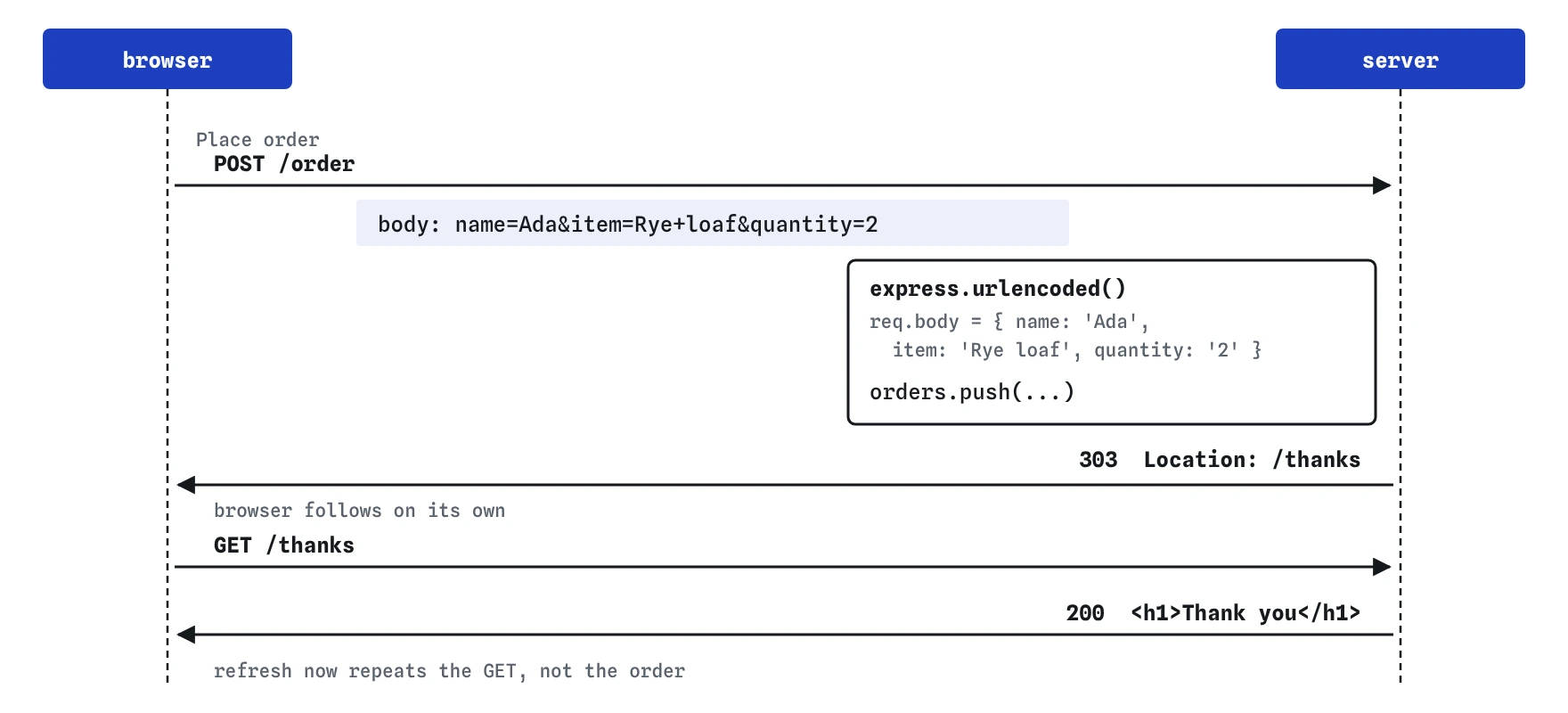
Open GET /order in the Browser view. The form has three fields, each with a name, and the <form> tag says method="post" and action="/order". When someone presses Place order, the browser collects every named field and sends one request: POST /order, with the values in the request body.
The body is a single line of text in a format called URL-encoded: name=Ada&item=Rye+loaf&quantity=2. It looks like a query string because it is the same format, with spaces written as + and symbols escaped with %. The request also carries the header Content-Type: application/x-www-form-urlencoded, which tells the server how to read the body.
Field names come from the name attribute, never from the label or the id. An input without a name is left out of the request entirely, which is a common reason a field goes missing on the server.
POST /order
Content-Type: application/x-www-form-urlencoded

name=Ada&item=Rye+loaf&quantity=2
Why is req.body undefined at first?
Press **Post an order** and read the Log. The route crashes on req.body.name with a TypeError, because req.body is undefined. Express does not read request bodies on its own: a body can be large, can come in several formats, and many requests have none, so Express leaves the choice to you.
In Express 5, req.body stays undefined until a body parser actually reads the body. In Express 4, once any parser was installed, req.body was at least an empty object, even for a body that parser couldn't read, so a form posted to a JSON-only server saved an empty order without any error. Express 5 fails loudly, which is easier to debug.
How does express.urlencoded() fill req.body?
express.urlencoded() is a body parser for form posts. Add it once with app.use(), near the top of the file and before your routes. On every request it checks the Content-Type. When it says application/x-www-form-urlencoded, the parser reads the body, splits it into fields and puts them in req.body as an object. Any other request passes through untouched.
After the parser, req.body for the order is { name: 'Ada', item: 'Rye loaf', quantity: '2' }. Every value is a string, the same as in req.query, so the route converts quantity with Number() before saving it.
The extended option chooses how nested names like item[size] are read. Express 5 defaults to false, the simpler parser, which suits ordinary forms. Writing { extended: false } makes the choice visible to anyone reading the code.
const app = express();
app.use(express.urlencoded({ extended: false }));

app.post('/order', (req, res) => {
  console.log(req.body);   // { name: 'Ada', item: 'Rye loaf', quantity: '2' }
});
What is the difference between express.urlencoded() and express.json()?
They read different formats. express.urlencoded() reads what an HTML form sends. express.json() reads JSON, which is what code using fetch() usually sends with Content-Type: application/json. Each parser ignores bodies in the other format, so a server with only express.json() gets undefined for every form post.
A server that takes both forms and JSON can use both parsers, one line each. Only add what you need, though. Each parser is one more way for strangers to send your server data, and each has a size limit, 100 kilobytes by default, that protects the server from huge bodies.
Why redirect after a POST?
The starting route answers the POST with a page directly. That works once. Then the visitor presses reload, and the browser asks whether to send the form again, because reloading means repeating the last request, and the last request was the POST. Some people click yes, and the bakery gets two orders for the same rye loaf.
The fix is a pattern called Post/Redirect/Get. The POST route saves the order and answers with a redirect to /thanks. The browser follows it with a fresh GET /thanks, and that GET becomes the page on screen. Reloading now repeats the harmless GET, and the back button works the way people expect.
Use res.redirect(303, '/thanks'). Status 303 See Other says exactly “the result is over there, fetch it with GET”. Plain res.redirect('/thanks') sends 302 Found, which browsers also follow with a GET for form posts, so both are fine in practice.
app.post('/order', (req, res) => {
  orders.push({ name: req.body.name, item: req.body.item, quantity: Number(req.body.quantity) });
  res.redirect(303, '/thanks');
});

app.get('/thanks', (req, res) => {
  res.send('<h1>Thank you</h1>');
});
How do you follow a form post in the Requests view?
Open GET /order in the Browser view, fill in the form and press Place order. The Requests view gains two exchanges. The first is the POST /order, with the form fields in its request body and a 303 response carrying a Location: /thanks header. The second is the GET /thanks the browser sent by itself after reading that header.
Then open GET /orders. Your order is there, saved in the orders array. Remember the practice server restarts on every code edit, so the array empties each time you change server.js. A real server loses it on restart too, which is why a later lesson moves orders into a database.
Can you trust what a form sends?
No. The required, min and <select> options in the HTML help honest visitors, and anyone can skip them. A person can edit the form in their browser's developer tools, or send a request from a script with any fields they like: an empty name, a quantity of -5, an item the bakery does not sell. Try it from the request bar with the Form body.
The server has to check every field before saving it, which the next lesson covers in full. The same goes for showing form data back on a page: the /orders page puts names straight into HTML, which is unsafe once strangers can type them. The lesson on unsafe HTML adds escaping.
What do AI tools get wrong with forms?
Generated form handlers often set up express.json() alone and then wonder why req.body is empty, because the form sends URL-encoded data. Others still use the separate body-parser package, which Express has included as express.json() and express.urlencoded() for years. Neither is needed as an extra install.
Look also for a POST route that ends with res.send() of a full page instead of a redirect, for a form without method="post", and for field names in req.body that do not match the name attributes in the HTML. A mismatch gives undefined with no error, so print req.body in the Log when a field seems to vanish.
Finally, check what the handler does with the values. Generated code often saves req.body whole, as in orders.push(req.body), which stores any extra field a stranger chose to send. Copy the fields you expect into a new object by name, convert numbers with Number(), and leave everything else behind.
Field notes
- A form sends its fields, each named by its
name, in the body of a POST request. - Express does not read request bodies on its own, so
req.bodystarts out undefined. app.use(express.urlencoded())before your routes fillsreq.bodywith the form fields.- Redirect after a POST so pressing reload does not send the form again.
Easy to get wrong
An HTML form sends URL-encoded data. express.json() ignores it, so req.body stays undefined.
A form with no method sends GET and puts every field in the address, where it lands in history and logs and never reaches app.post().
A page sent straight from a POST makes reload repeat the post. Redirect so the page on screen comes from a GET.
Only fields with a name attribute are sent. Without it, the field never appears in req.body.
Questions people ask
Where does the redirect after a POST go?
Anywhere that makes sense for the visitor: a thank-you page, the list the item was added to, or the new item's own page. Send them to a GET route that shows the result.
How do I show the order details on the thanks page?
Redirect to an address that names the order, such as /orders/17, and look it up in that route. Putting the details in the query string works for harmless values, though they end up in history and logs.
Can a form send files?
Yes, with enctype="multipart/form-data". Neither express.urlencoded() nor express.json() reads that format, so file uploads need a separate parser, which this course does not cover.
Why does the form use POST instead of GET?
Placing an order changes something on the server. GET is meant for reading, and browsers, search engines and link previews may send GET requests on their own. Anything that saves, buys or deletes should use POST.