Why keep data in a database instead of an array?
An array in server.js lives in the server’s memory. When the server restarts, after a crash, a deploy or an edit, the array starts empty again and every order is gone. On this page the server restarts on every edit, so you’ve already seen it happen.
A database keeps data on disk, separate from your code. The server can stop and start a thousand times and the orders are still there. A database also answers questions about the data quickly: all orders for Mo, the ten most recent, how many cinnamon buns this week. With an array you would write a loop for each of those.
SQLite is a database that lives in a single file next to your server. There is no separate database program to install or run, which makes it a good fit for small and medium sites and for learning. Larger sites often use a database server instead, but the SQL you write looks almost the same.
How does better-sqlite3 connect to the database?
In Node.js, a popular way to use SQLite is the better-sqlite3 package. new Database('bakery.db') opens the file, creating it if it doesn’t exist, and gives you a db object. You open it once, at the top of server.js, and every route uses the same db.
The better-sqlite3 package is synchronous: each call waits for the database and returns the result straight away, with no await. That sounds slow, but SQLite reads from a local file and typical queries take well under a millisecond, so the code stays short and easy to follow.
On this page, the file name is ignored. Every lesson gets its own small database, created from the lesson’s SQL and reset each time the server restarts, so you can add and delete freely. Open the Data view to see the orders table and its three rows.
const Database = require('better-sqlite3');
const db = new Database('bakery.db');

const orders = db.prepare('SELECT * FROM orders ORDER BY id').all();
// [{ id: 1, customer: 'Priya', item: 'Sourdough loaf', quantity: 1 }, ...]
What is the difference between all, get and run?
db.prepare(sql) turns a line of SQL into a statement object. On its own it does nothing to the data. You then call one of three methods on it, and choosing the right one is most of the skill.
.all()runs aSELECTand returns every matching row as an array of objects. An empty result is[]. Use it for lists..get()runs aSELECTand returns the first matching row as an object, orundefinedwhen nothing matches. Use it to fetch one thing, and check forundefinedto answer404..run()runsINSERT,UPDATEorDELETEand returns{ changes, lastInsertRowid }: how many rows changed, and the id of the row just inserted.
Why must values go in through ? placeholders?
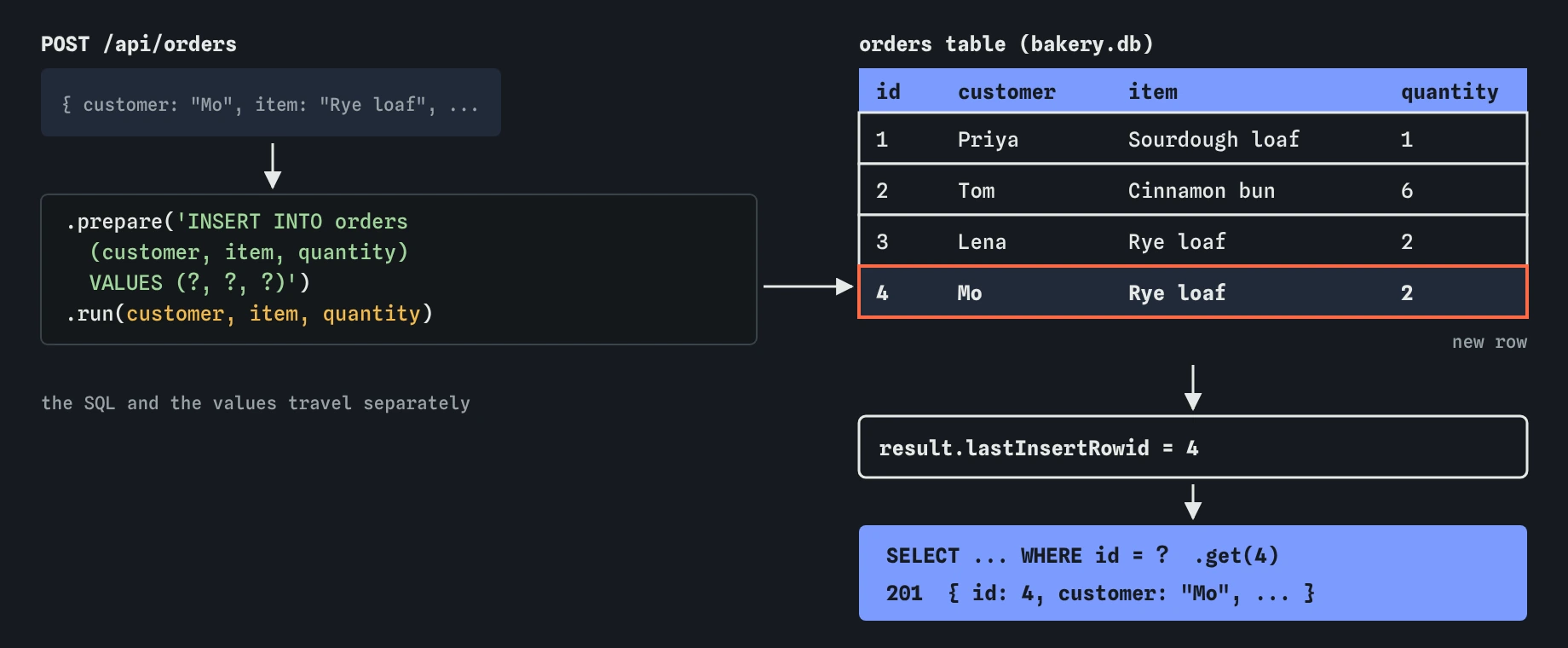
Each ? in the SQL is a slot. The values you pass to .all(), .get() or .run() fill the slots in order. SQLite receives the SQL and the values separately, so a value can only ever be a value, never part of the command.
The alternative is gluing text together: '... WHERE id = ' + req.params.id. That works for 2 and breaks for anything else. A name like O'Brien contains a quote, which ends the SQL string early and causes an error. Worse, someone can send text that is valid SQL, such as 1 OR 1=1, and your server runs it. That is SQL injection, one of the oldest and most damaging bugs on the web.
The rule is simple to follow: every value that comes from a request goes through a placeholder. Table and column names can’t be placeholders, so if those ever depend on the request, pick them from a fixed list in your code. better-sqlite3 also accepts named placeholders like @customer with an object, which reads well when there are many values.
// safe: the value travels separately from the SQL
db.prepare('SELECT * FROM orders WHERE customer = ?').all(req.query.name);

// unsafe: the value becomes part of the SQL
db.prepare("SELECT * FROM orders WHERE customer = '" + req.query.name + "'").all();
How do you add a row and get its id back?
An INSERT with .run() returns an object. Its lastInsertRowid is the id SQLite gave the new row, because the id column is an INTEGER PRIMARY KEY that numbers itself. Use it to read the full row back with .get(), so the answer includes anything the database filled in, such as the id or a default quantity.
When you need several inserts to succeed or fail together, such as an order and its line items, wrap them in db.transaction(). If any statement throws, none of the changes are kept. Answer with 201 Created and the saved order. A page that just submitted the order can then show it, link to it or add it to a list without asking again.
const result = db
  .prepare('INSERT INTO orders (customer, item, quantity) VALUES (?, ?, ?)')
  .run(customer, item, quantity);

const order = db.prepare('SELECT * FROM orders WHERE id = ?').get(result.lastInsertRowid);
res.status(201).json(order);
How can you watch the database change?
Send **Order for Mo**, then open the Data view. The orders table shows a fourth row. Send GET /api/orders and the list includes it. Edit any line of code and the server restarts with a fresh copy of the database, back to three rows. That reset is a practice server convenience; a real SQLite file keeps every change until you delete it.
When a query fails, better-sqlite3 throws an error with a message from SQLite, and the Log shows it as a SqliteError. The messages are short and literal: no such column: custmer means a typo, NOT NULL constraint failed: orders.item means a value was missing. Express then answers 500. Validating the body first, as in the previous lesson, turns most of those into a clear 400.
What should you look for in AI-written database code?
First, find every SQL string and check that values come in through ? or @name, never through + or ${}. AI tools still produce template literals like ` SELECT * FROM orders WHERE id = ${id} ` surprisingly often, and the code works perfectly in testing, which is why it slips through.
Then check each method: .get() for one row with an undefined check, .all() for lists, .run() for changes. A common mix-up is calling .all() for one order and sending an array where a page expected an object, or calling prepare() for an insert and never running it. Finally, look for code that opens a new Database inside every route. Open it once at the top and share it.
Last, look at what the route sends back. Some generated code answers with result from .run() directly, so the client gets { changes: 1, lastInsertRowid: 4 } instead of the order. That works, but it leaks how the server stores data and gives the page nothing to display. Read the row back and send that.
Field notes
- Data in an array is lost when the server restarts, while a database keeps it in a file.
db.prepare(sql)makes a statement, and.all(),.get()or.run()runs it.- Pass values through
?placeholders, never by pasting them into the SQL text. - After an INSERT,
lastInsertRowidgives you the id the database chose.
Easy to get wrong
A value glued into the SQL can change what the SQL does. With a placeholder, the value can only ever be data.
.all() always returns an array, even for one row or none, so the route can never tell when the order is missing. .get() returns undefined for no match.
Preparing a statement doesn’t run it. Without .run() nothing is saved, even though the route may still answer 201.
Questions people ask
Do I need to write SQL, or can a library write it for me?
Libraries that build queries from JavaScript objects exist and are widely used. Knowing plain SQL still pays off: you can read what those libraries produce, debug slow queries and check AI-written code. The SQL in this course stays small.
Why does lastInsertRowid sometimes show up as a BigInt?
better-sqlite3 returns it as a normal number by default. If the database is set to return large integers safely, it comes back as a BigInt, and res.json() can’t send that without converting it first.
Where does the SQLite file live on a real server?
Wherever you tell new Database(), usually a data folder next to server.js. Keep it out of any folder served by express.static(), or anyone could download the whole database, and back it up.
Why do my orders disappear on this page?
The practice server builds a fresh copy of the lesson’s database each time it restarts, which happens on every edit. A real SQLite file keeps its data until you change it.