What is a cookie, and why would a server need one?
HTTP has no memory. Each request arrives at your server on its own, and nothing in it says “this is the same person who chose the dark theme two minutes ago”. A cookie fixes that. It is a small named value that the server asks the browser to store, and the browser then sends it back with every later request to the same site.
That loop is the whole idea. The server sets the cookie once, in a response header. From then on the browser attaches it automatically, without any code on the page, until it expires or the server asks for it to be removed. The bakery uses one to remember a visitor's theme. Later lessons use the same mechanism to remember who is logged in.
A cookie lives in the browser, on the visitor's device. The server only sees the copy that arrives with each request. That detail affects everything else on this page: the visitor can read, change or delete their own cookies whenever they like.
How does the server set a cookie?
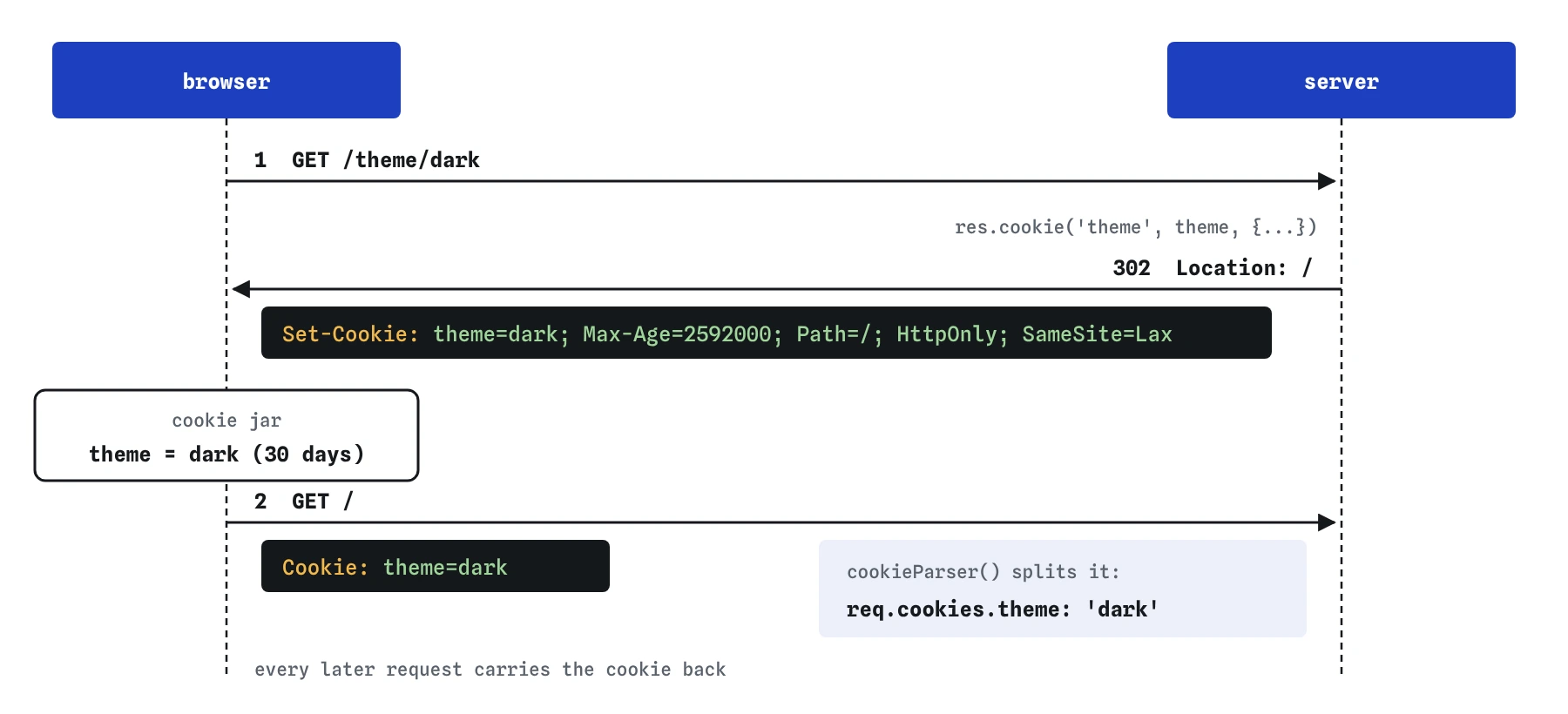
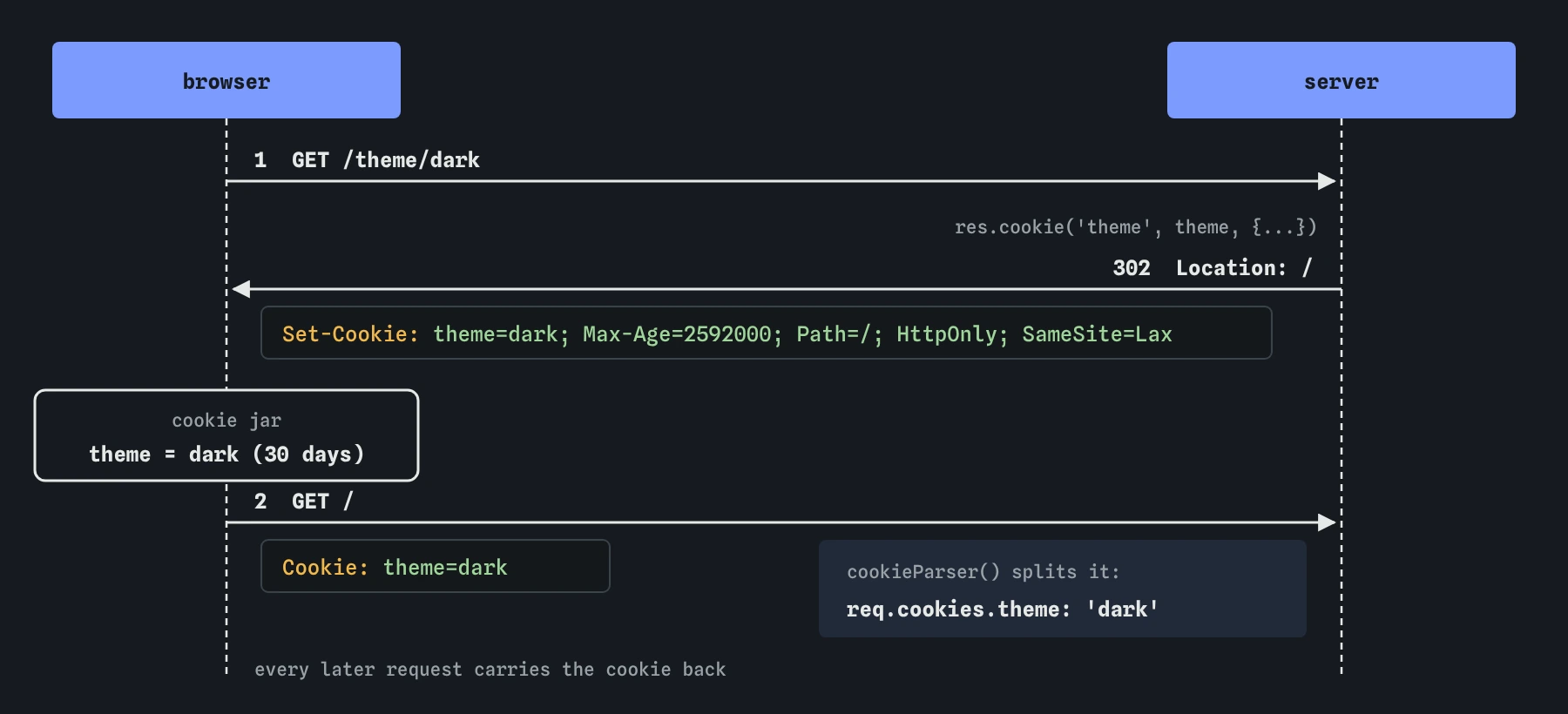
In Express you call res.cookie(name, value, options) before sending the response. It adds a Set-Cookie header to the answer. The response can still be anything: a page, JSON or, as in the starting code, a redirect back to the home page. The browser stores the cookie first and then follows the redirect, so the very next request already carries it.
Press **GET /theme/dark** and open Headers and body in the Requests view. You will see Set-Cookie: theme=dark; Path=/. The Path=/ part comes from Express and means the cookie is sent for every page on the site. Then look at the second exchange, the GET / that followed the redirect. Its request headers now include Cookie: theme=dark.
app.get('/theme/:name', (req, res) => {
  res.cookie('theme', 'dark', { maxAge: 30 * 24 * 60 * 60 * 1000 });
  res.redirect('/');
});
// Response header:
// Set-Cookie: theme=dark; Max-Age=2592000; Path=/; Expires=...
How do you read the cookies a browser sends back?
The browser sends every cookie for the site in a single Cookie request header, as one string such as theme=dark; lang=en. Express 5 doesn't split that string for you. The small cookie-parser package does: once app.use(cookieParser()) runs, each request has req.cookies, a plain object like { theme: 'dark' }.
Without it, req.cookies is undefined, and reading req.cookies.theme throws a TypeError that Express turns into a 500 page. On your own computer you would add it with npm install cookie-parser. The practice server already includes it.
Always have a fallback. The first visit has no cookie, a visitor may clear their cookies, and a value can arrive changed. The starting code uses req.cookies.theme || 'light', and the theme route only ever stores dark or light, whatever was typed in the address.
How long does a cookie last?
A cookie set without maxAge or expires is a session cookie. The browser keeps it until it closes, though many browsers restore session cookies when they reopen tabs, so don't rely on the exact moment it disappears. Give a cookie a lifetime when you want the browser to remember something for days or weeks.
In Express, maxAge is in milliseconds, even though the header itself counts in seconds. Express converts it into two attributes: Max-Age in seconds and an Expires date. Thirty days is 30 * 24 * 60 * 60 * 1000. Writing maxAge: 30 gives 30 milliseconds, which Express rounds down to Max-Age=0, and the browser deletes the cookie the moment it arrives.
To remove a cookie, call res.clearCookie('theme'). It sends the same name with an expiry date in the past. If you set the cookie with a path or domain, pass the same ones to clearCookie, or the browser treats it as a different cookie and keeps the old one. In Express 5, clearCookie ignores any maxAge or expires you pass.
What do httpOnly, sameSite and secure do?
These three options are the safety settings, and a server should set them on purpose instead of leaving them to browser defaults.
httpOnly: truehides the cookie from JavaScript on the page. The browser still sends it with requests, butdocument.cookiecan't see it. If someone manages to run a script on your site, it can't read these cookies and send them away. Use it on every cookie only the server needs to read.sameSite: 'lax'tells the browser not to attach the cookie to requests that other sites start in the background, such as a hidden form posting to your server. It is still sent when a visitor follows a normal link to your site.'strict'holds it back even then, and'none'sends it everywhere and requiressecure. Some browsers treat a missingSameSiteasLax, but other browsers have behaved differently, so set it yourself.secure: truemeans the browser only sends the cookie over HTTPS, so nobody on the network can read it in transit. Live sites run on HTTPS, so turn it on in production. A common pattern issecure: process.env.NODE_ENV === 'production', because the practice server and plainhttp://localhostdon't use HTTPS.
What should never go in a cookie?
Treat every cookie as something the visitor typed. They can open their browser's developer tools, change theme=dark to anything at all, and send it. That is harmless for a theme, as long as the server checks the value before using it. It is a serious hole for anything that grants access. A cookie like user=maya or admin=true is an invitation to edit it.
Keep cookies small and boring. Each one is limited to about 4 KB, and every cookie travels with every request, including requests for images and stylesheets. Store a short preference or an id, never a password, a card number or a whole shopping list.
For values the visitor must not change, there are two tools. Signed cookies, which cookie-parser supports with a secret, let the server detect tampering. Sessions keep the real data on the server and give the browser only a long random id. The next lesson builds a session for the bird club's login.
How can you check cookies on this page?
The Requests view shows cookies twice: in the response that sets them, under Set-Cookie, and in every later request, under Cookie. Read the attributes there. If HttpOnly or SameSite is missing from the header, the browser never received it, whatever your code says.
The Data view lists the practice browser's cookie jar: each cookie's name, value and attributes. Choose a theme, check the jar, then send GET / and watch the value travel back. Press **Start over** to clear the jar. On a real machine, the Application or Storage panel in your browser's developer tools shows the same list.
What do AI tools get wrong about cookies?
Generated Express code often reads req.cookies without adding cookie-parser, or adds it after the routes that need it. Middleware runs in the order you register it, so app.use(cookieParser()) belongs near the top. Check maxAge too: AI tools sometimes write seconds, such as maxAge: 3600, which Express reads as 3.6 seconds.
Look for missing safety options. A login cookie without httpOnly and sameSite, or one with sameSite: 'none' and no good reason, should be fixed before it ships. Be wary of code that stores a user name or role straight in a cookie and trusts it on the next request. That pattern looks like it works in testing, and anyone can defeat it by editing one value.
Field notes
- A cookie is a small note the browser stores and sends back with every request to your site.
- The server sets a cookie with
res.cookie(), which adds aSet-Cookieheader. - Without
maxAgeorexpires, a cookie usually vanishes when the browser closes. - Visitors can change any cookie, so never trust one for anything important.
Easy to get wrong
Express reads maxAge as milliseconds. 3600 is under four seconds, so the cookie vanishes almost at once. Write the arithmetic out so the unit is obvious.
Middleware only affects routes registered after it. With cookieParser() at the bottom, req.cookies is still undefined in the route above and the request fails with a 500.
The visitor controls their cookies and can set admin to anything. Anything that grants access belongs on the server, behind a random session id.
Questions people ask
Do I need to ask permission before setting cookies?
It depends on the law where your visitors live and what the cookie does. In the UK and the EU, cookies that are strictly needed for something the visitor asked for, such as a login or a basket, don't need consent, while tracking and advertising cookies do. A theme preference is usually treated as a functional cookie. Check the rules that apply to your site.
Can JavaScript on the page set cookies too?
Yes, with document.cookie, but it can't set httpOnly cookies or read them. For anything the server relies on, set the cookie from the server so you control every option.
Why does the cookie show up on requests for CSS and images?
The browser attaches every matching cookie to every request for the site, whatever the file type. That is one reason to keep cookies few and small.
Can my server read cookies from other websites?
No. A browser only sends a cookie back to the site that set it (or the domain named in its Domain attribute). Your bakery server never sees cookies from any other site.