What do you need before writing an Express server?
On your own computer you need two things: Node.js and a project folder. Node.js runs JavaScript outside the browser. Install the current long-term support version, which in 2026 means Node.js 24, with Node.js 22 still supported, and check it with node --version in a terminal. Express 5 needs Node.js 18 at the very least, so anything recent works.
Inside an empty folder, run npm init -y. That creates package.json, a small file that records your project's name and the packages it depends on. Then run npm install express. npm downloads Express and everything it needs into a folder called node_modules, and adds a line like "express": "^5.1.0" to package.json.
The practice server on this page already has Express, so you skip those steps here. You still write the same server.js you would write at home, and it runs the same way when you copy it out.
mkdir bike-shop && cd bike-shop
npm init -y            # creates package.json
npm install express    # downloads Express 5 into node_modules
node server.js         # runs your server
What are the four lines every Express server has?
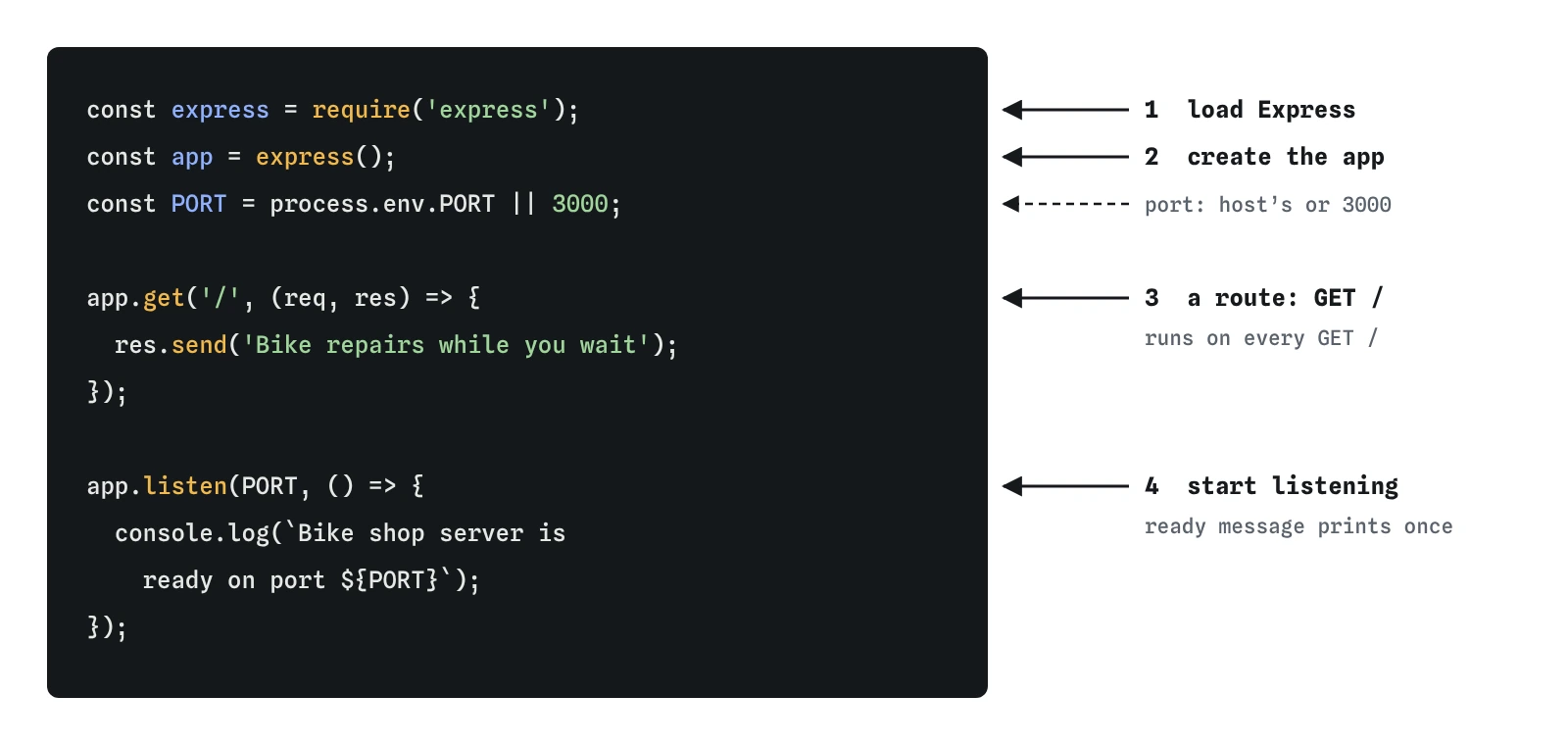
Almost every Express server, from a one-route test to a big shop site, starts with the same skeleton. Load the library, create an app, describe at least one route, and start listening. Everything else in this course is extra routes and extra settings hung on that frame.
require('express') loads the package and gives you a function. Calling that function, express(), builds a new app object. The app holds your routes and settings, and it knows how to turn an incoming request into a call to your code.
app.get('/', handler) registers a route. It says: when a GET request arrives for the path /, call this function. app.listen(PORT) opens the port and keeps the program alive. Leave out the last line and Node.js reaches the end of the file, finds nothing left to do, and exits.
const express = require('express');loads the package.const app = express();creates the app. Note the parentheses.app.get('/', (req, res) => { ... });adds a route.app.listen(PORT, () => { ... });starts waiting for requests.
What do req and res give you?
Every handler receives two objects, and Express always passes them in the same order: the request first, the response second. The names req and res are a habit, and you could call them anything. The order is what counts. Swap them and your code tries to call send() on the request, which has no such method, and the route answers 500.
req describes what arrived: the method, the path, the headers, and later the query string, route parameters and body. res is your way of answering. Calling res.send() once writes the status, headers and body and finishes the exchange. A handler that never calls a res method leaves the browser waiting, and the Requests view shows **No reply**.
A handler may be short, but it has to end in exactly one answer. That rule stays true for every route in this course.
Why read the port from process.env.PORT?
On your laptop, port 3000 is a fine choice. On a hosting platform, the platform decides the port and tells your program through an environment variable called PORT. If your code always listens on 3000, it may start without errors and still receive no traffic, because the platform sends requests somewhere else.
process.env is an object holding the environment variables Node.js was started with. process.env.PORT || 3000 means: use the platform's port if there is one, otherwise use 3000. Environment variables are always strings, which is fine here, because app.listen() accepts '8080' as happily as 8080.
Writing it this way from the first day costs nothing and saves a confusing deploy later. The hosting lesson near the end of the course comes back to this line.
const PORT = process.env.PORT || 3000;

app.listen(PORT, () => {
  console.log(`Bike shop server is ready on port ${PORT}`);
});
When does the ready message print?
The function you pass to app.listen() runs once, after the server is actually waiting for requests. That makes it the right place for a startup message. Printing the port in it saves you guessing which address to open, which helps as soon as you run two projects at once.
If something stops the server from starting, the message never appears. On your own computer the most common cause is EADDRINUSE: another program, often an older copy of the same server, already holds the port. Stop the other one, or choose a different number.
The practice server adds its own line, Server listening on http://localhost:3000, after a successful start. Look for both lines in the Log. If yours is missing and the red bar is showing, the problem is above the listen call.
How do you run it and see changes on your computer?
In a terminal inside the project folder, run node server.js. The terminal stays busy, because the server is running. Open http://localhost:3000 in a browser to send GET /. Press Ctrl and C in the terminal to stop it.
Node.js reads your file once, at startup. Edit server.js while it runs and nothing changes until you stop and start it again. Node.js 22 includes a watch mode: node --watch server.js restarts the server each time you save. Older tutorials install a separate tool for this, and with a current Node.js you don't need it.
Many projects save the command in package.json as a script, for example "dev": "node --watch server.js", and run it with npm run dev. The practice server here behaves like watch mode: every edit restarts it with fresh memory.
How do you check that your server works?
Send GET / and read the Requests view from top to bottom. You should see the request going out, the line app.get('/') naming the route that answered, a 200 status, and a body preview with your greeting. Then send GET /repairs before you have that route, and watch the same view say that no route matched and show 404.
The Log tells the other half of the story. Your ready message appears once, at startup, and never again, however many requests you send. Anything a handler prints with console.log() appears under the request that triggered it.
If the server refuses requests, nothing is listening. If it answers 500, the Log names the error and the line. If a request shows **No reply**, a handler forgot to answer. Those three cases cover most of the problems you will meet in a first server.
What should you check when an AI tool writes your first server?
AI tools write this skeleton well, and they also love older habits. Watch for npm install express@4 or code that depends on Express 4 behaviour, such as route paths with * on their own. Express 5 is the current version, and new projects should use it.
Look for extras you didn't ask for: body parsers, CORS, logging packages and a template engine on a server that answers one route. Each one is another thing to understand and keep updated. Start with the four lines and add pieces when a lesson gives you a reason.
Check that the port comes from process.env.PORT, that express() has its parentheses, and that every handler answers once. Then run it and send a request yourself. Reading the Requests view for thirty seconds catches mistakes that reading the code can miss.
Field notes
- Most Express servers share four steps: load Express, create an app, add a route, listen.
- Each handler gets the request first and the response second, usually named
reqandres. - Reading the port from
process.env.PORTlets a hosting platform choose the port. - The function passed to
app.listen()runs once the server is ready, a good spot for a message.
Easy to get wrong
express is a function that builds an app. Without the parentheses, app is the builder itself, and the first app.get() fails with “not a function”.
Express passes the request first and the response second. The names don't matter to Express, so swapping them means res is really the request, which has no send() method.
A fixed port works on your laptop and can silently fail on a host that assigns its own port. Reading process.env.PORT first works in both places.
Questions people ask
Do I need the node_modules folder in Git?
No. Add node_modules to .gitignore. Anyone who clones the project runs npm install, and npm rebuilds the folder from package.json and package-lock.json.
Should I use require or import?
Both work in Node.js 22. This course uses require() because it works in a plain server.js with no extra settings. To use import express from 'express', set "type": "module" in package.json or name the file server.mjs.
What does the caret in "^5.1.0" mean?
It lets npm install newer 5.x versions with fixes and small features, and never 6.0. The exact versions installed are recorded in package-lock.json, so every machine gets the same ones.
Why does the practice server say the request was refused?
Nothing is listening. Either the file never calls app.listen(), or the server failed to start before reaching it. The red bar and the Log say which.