What is a static file?
A static file is one the server sends exactly as it is stored, the same bytes to everyone. Stylesheets, images, fonts, browser scripts and fixed pages such as an about page are all static. The server's only job is to find the file and send it with the right Content-Type.
The pages from the last lesson were different. A route built the menu from data each time someone asked, so the answer could change. Most sites mix both: routes for anything that depends on data, and a folder of static files for everything else. The bike shop's home page never changes, so it can be a file. Its repair prices change often, so a route builds them.
How does express.static() serve a folder?
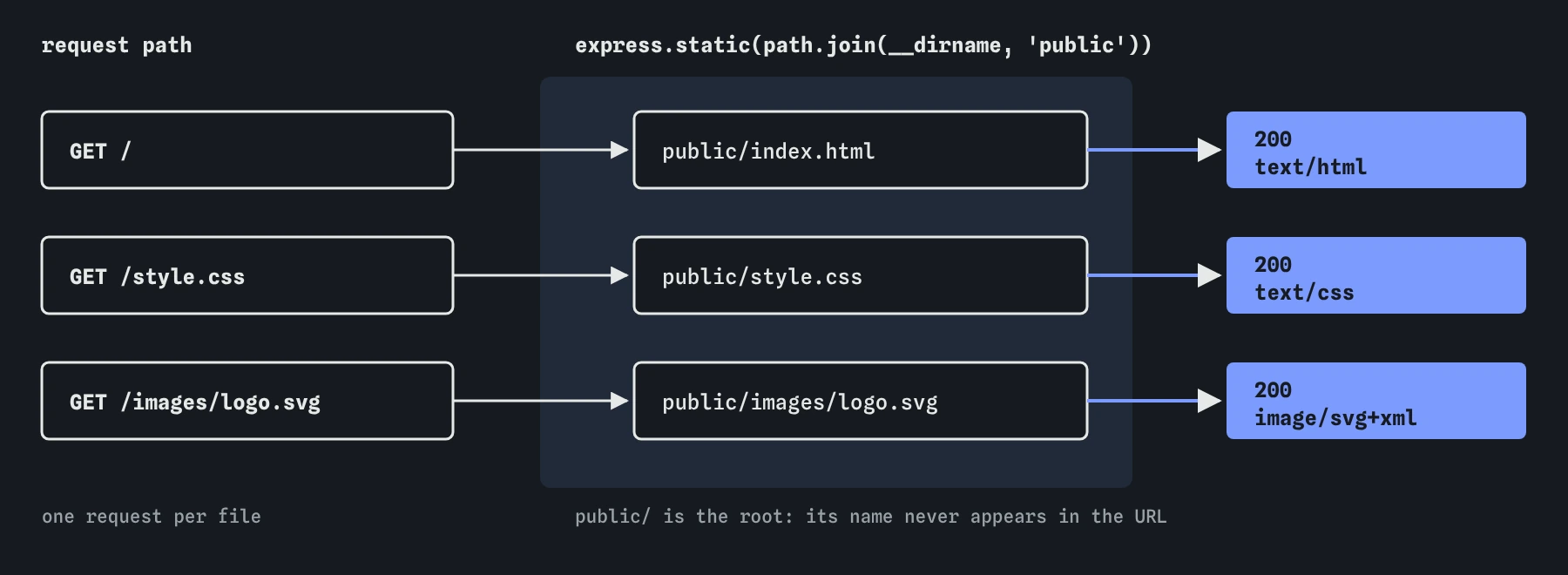
express.static() is middleware that ships with Express. You give it a folder, and it turns request paths into file paths inside that folder. GET /style.css becomes public/style.css. GET /images/logo.svg becomes public/images/logo.svg. The folder name itself never appears in the URL.
When a request arrives, the middleware checks whether a matching file exists. If it does, it sends the file, picks a Content-Type from the extension, and adds headers such as Cache-Control. If no file matches, it passes the request to the next route without an error. That is why a typo in the folder name produces no error, only a 404 for every file.
It also handles folders. A request for / looks for public/index.html, and a request for /help/ looks for public/help/index.html. That is how a plain HTML site works on almost any host.
const express = require('express');
const path = require('path');
const app = express();

app.use(express.static(path.join(__dirname, 'public')));

app.listen(3000);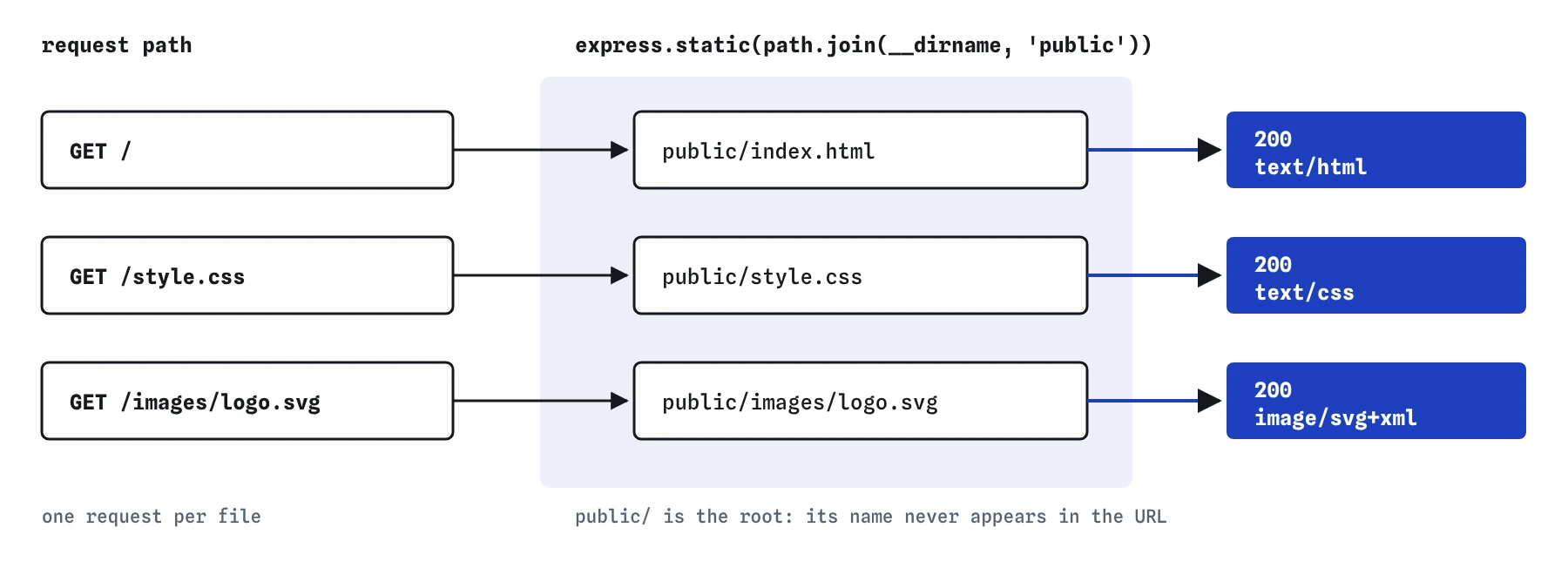
Why use path.join(__dirname, 'public')?
A relative path like 'public' is resolved from the folder you ran node in, called the working directory. Start the server from its own folder and it works. Start it from somewhere else, as hosting platforms and process managers sometimes do, and Express looks for a public folder in the wrong place.
__dirname is the folder that holds server.js, wherever you started from. path.join() adds public to it with the right separator for the operating system. The result points at the same folder every time. In the practice server __dirname is /app, so the path becomes /app/public.
What happens when the browser loads a page with CSS and images?
Send GET / and then open the Requests view. You see the request for the page, and after it a request for /style.css and another for /images/logo.svg. The browser read the HTML, found the <link> and <img> tags, and asked the server for each file separately.
Each of those exchanges says express.static and names the file that answered. If a stylesheet doesn't load, this is where you find out why: a 404 means the path in the HTML doesn't match a file, and a wrong Content-Type means the file's extension is off.
Paths in your HTML should usually start with /. href="/style.css" always means the stylesheet at the top of the site. href="style.css" is relative to the current page, so it works on / and breaks on /repairs/brakes, where the browser asks for /repairs/style.css.
Does the order of static files and routes matter?
Yes. Express keeps routes and middleware in one list, in the order your code adds them, and tries each in turn until one answers. If a route for / comes before express.static(), that route answers GET / and index.html is never reached. If the static middleware comes first, a file called public/repairs would win over your /repairs route.
Most servers put express.static() near the top, before the routes. Requests for files are answered quickly, and routes handle everything else. When you see an old page that should have been replaced, read the Requests view: it names whatever answered, route or file.
Which folder should never be served?
Never point express.static() at the project folder itself. express.static(__dirname) publishes server.js, package.json, data files and anything else that sits beside them. Try it here and send GET /data/bookings.json: a customer's name and phone number come straight back.
Real Express ignores files whose names start with a dot by default, so .env and .git are refused even then. Treat that default as a safety net. Keep a dedicated public folder that holds only files you are happy for anyone on the internet to download, and put everything else outside it.
// Publishes every file in the project, including data and code.
app.use(express.static(__dirname));

// Publishes only what is meant for visitors.
app.use(express.static(path.join(__dirname, 'public')));
What does a 404 for a static file look like?
When express.static() finds no file, it steps aside and lets the request carry on down the list. If no later route matches either, Express sends its standard Cannot GET /style.css page with status 404. The Requests view says no route matched, the same message you saw for unknown paths in earlier lessons.
In the Browser view the page itself still loads, because its own request succeeded. The missing stylesheet only shows up as plain, unstyled text, and a missing image as a broken icon with its alt text. That is why the Requests view is the better place to look: a failed file request is easy to miss on the page and impossible to miss in the list of exchanges.
Check three things when a file gives 404: the path in the HTML, the file's real name and folder in the Data view, and the folder passed to express.static(). Letter case matters on most hosting servers even when it doesn't on your laptop, so Logo.svg and logo.svg count as different files once the site goes live.
How does caching work for static files?
By default express.static() sends Cache-Control: public, max-age=0. Browsers may keep a copy, and they check with the server before using it again. That suits development, when files change often.
On a live site you can pass { maxAge: '1d' } or a number of milliseconds to let browsers reuse files without asking. The catch is that visitors keep the old file after you change it. Sites deal with that by putting a version or hash in file names, such as style.4f2a.css, so a changed file gets a new URL. The caching lesson goes further.
What should you check when an AI tool sets up static files?
Look at the folder passed to express.static(). If it is __dirname, '.' or './', the whole project is public. Look for a relative 'public' without __dirname, which works until someone starts the server from another folder.
Check the order of app.use() and the routes, especially a leftover app.get('/') placed above the static line. And send a request for one stylesheet and one image yourself. A 200 with the right type in the Requests view confirms the setup in seconds.
Field notes
- A static file is sent exactly as stored, like a stylesheet, an image or a fixed page.
express.static()turns request paths into file paths inside the folder you give it.path.join(__dirname, 'public')finds the folder no matter where you start the server.- Serve only a public folder, never the project folder that holds your server code.
Easy to get wrong
Serving the project folder lets anyone download your code and data files. Keep public files in their own folder and serve only that.
A relative path depends on where node was started. __dirname always means the folder of server.js.
The folder you serve is the top of the site, so its name doesn't appear in URLs. /public/style.css looks for public/public/style.css.
Questions people ask
Can I serve files under a prefix like /assets?
Yes: app.use('/assets', express.static(path.join(__dirname, 'public'))). Then public/style.css is at /assets/style.css, which keeps file URLs apart from your routes.
Can I use more than one static folder?
Yes. Call app.use(express.static(...)) once per folder. Express checks them in order and sends the first file it finds.
Why do I see 304 instead of 200 on my own computer?
Your browser already had the file and asked whether it changed. The server answered 304 Not Modified, and the browser used its copy. It saves sending the same bytes twice.
Should Node.js serve static files on a live site?
For small and medium sites, express.static() is fine. Large sites often put files on a content delivery network or let a proxy in front of Node.js serve them, so the server can spend its time on routes.