What are headers for?
Headers are labelled notes that travel with every request and every response, ahead of the body. Each is a name, a colon and a value, one per line. They carry everything about a message apart from its content: what format the body is in, how long it is, which language the reader prefers, which cookies apply, how long a copy may be kept.
Names ignore case, so Content-Type and content-type are the same header. Node.js lowercases every name it receives, and the Requests view shows them that way. Values are plain text, and their format depends on the header.
You have already met two. User-Agent on requests says which program is asking. Content-Type on responses says what the body is. The rest of this lesson is about reading and setting headers on purpose.
Why does Content-Type change what the browser shows?
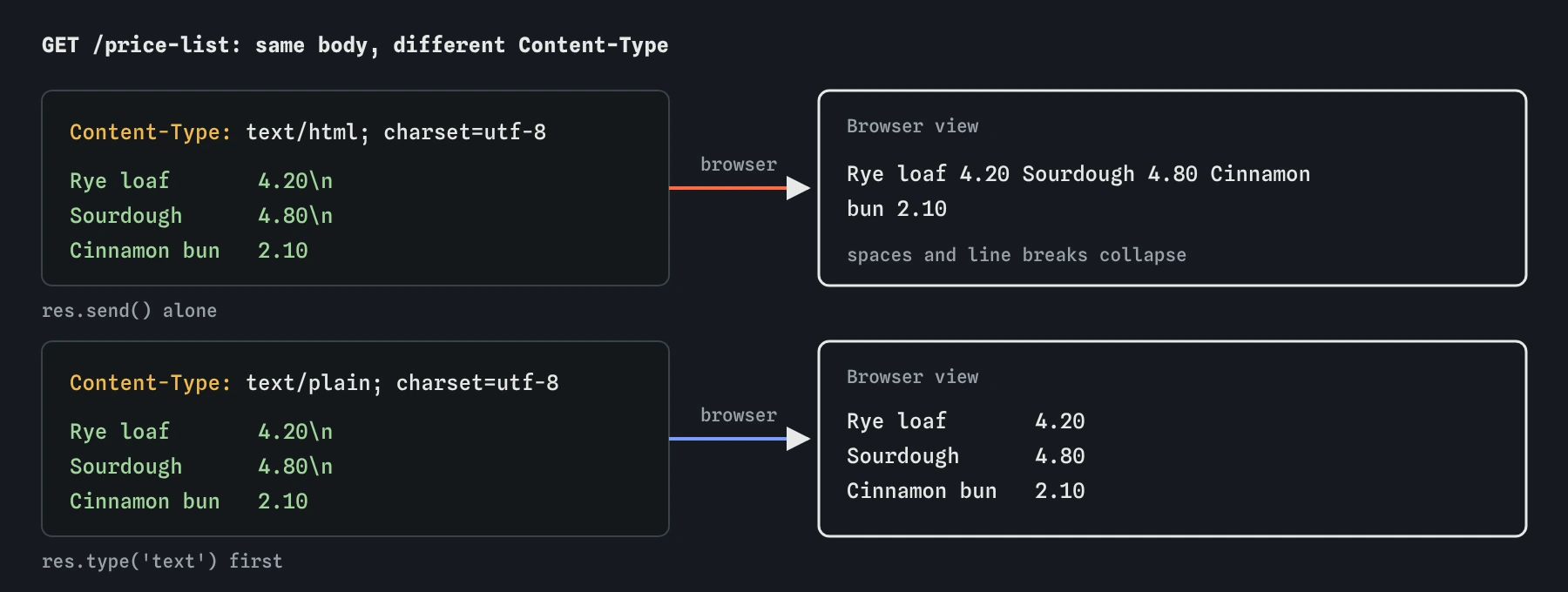
A browser receives bytes. Content-Type tells it what those bytes are. With text/html it builds a page: tags become headings and links, and runs of spaces and line breaks collapse into single spaces. With text/plain it shows the characters exactly as sent. With application/json it shows data, which many browsers format for reading. With image/png it draws a picture.
That is why the bakery price list looks wrong at first. res.send() with a string labels it text/html, so the browser squeezes three neat lines into one. The text is fine; the label is wrong. Change the label and the same body displays the way it was written.
Modern browsers mostly trust the label instead of guessing from the content. A JSON body labelled as HTML can even be dangerous, since the browser builds a page from it and runs any script inside. Browsers may also guess a type when the label is missing or vague; X-Content-Type-Options: nosniff, which the launch project adds, turns that guessing off.
text/htmlfor web pages.text/plainfor plain text, shown as written.application/jsonfor data from an API.text/cssandtext/javascriptfor stylesheets and scripts.image/png,image/jpeg,image/svg+xmland friends for images.

How do you set a response header?
res.set(name, value) sets any header. res.type() is a shortcut for Content-Type that accepts a short name such as 'text', 'json' or 'html' and fills in the full type with a character set. You can also pass an object to res.set() to set several headers at once.
Set headers before you send. Headers go out ahead of the body, so once res.send() has run they are already on their way. Setting one afterwards throws ERR_HTTP_HEADERS_SENT in the Log, and the browser never sees it.
res.send() and res.json() respect a type you set first. They only choose text/html or application/json when you haven’t picked one yourself.
app.get('/price-list', (req, res) => {
  res.type('text');                         // Content-Type: text/plain
  res.set('Cache-Control', 'max-age=600');  // keep it for 10 minutes
  res.send('Rye loaf       4.20\nSourdough      4.80');
});
How do you read the headers a visitor sent?
req.get('accept-language') returns the value of one request header, or undefined if it is missing. It ignores case, so the capitalised spelling works too. The raw object req.headers holds them all with lower-case keys, which is why req.headers['Accept-Language'] never finds anything.
Accept-Language is a good example of a header worth reading. A browser set to French sends something like fr-FR,fr;q=0.9,en;q=0.5: French from France first, any French next, English as a fallback. The q values are preferences between 0 and 1. A simple check of the first two letters is enough for a two-language bakery site.
Press **Ask in French** to send that header. Your server can use it to pick the greeting, while still offering a language switcher on the page, since visitors don’t always have their browser set the way they would like.
app.get('/', (req, res) => {
  const lang = req.get('accept-language') || '';
  if (lang.startsWith('fr')) {
    return res.send('<h1>Bonjour</h1>');
  }
  res.send('<h1>Hello</h1>');
});
Which request headers are useful to a server?
A handful come up again and again. Each is only a claim made by the client, so use them to choose a friendlier answer and never to decide who is allowed to do something.
Host: which site name the visitor typed, useful when one server answers for several domains.User-Agent: which browser or program is asking.Accept: which formats the client would like, such as HTML or JSON.Accept-Language: which languages the reader prefers.Content-Type: the format of the request body, used byexpress.json()to decide whether to parse it.Cookie: the cookies the browser holds for your site, covered in the cookies lesson.
Should you remove X-Powered-By?
Express adds X-Powered-By: Express to every response. Browsers ignore it. Its only effect is to tell anyone looking which framework you run, which saves an attacker a step when they scan for known weaknesses. Hiding it won’t make an insecure server safe, but it costs one line and gives nothing away.
app.disable('x-powered-by') turns it off for the whole app. Put it right after const app = express(); so every response is covered. Security-focused projects often use a security-headers package that sets this and a set of protective headers together; the launch project at the end of the course sets the important ones by hand so you can see each one.
Can you make up your own headers?
Yes. Any name made of letters, digits and hyphens works, such as Bakery-Oven-Batch: 42. Custom headers are useful for information that belongs to the exchange instead of the content, such as a request id you can search for in your logs, or how many items a list held before it was cut short. The old habit of starting custom names with X- is no longer recommended, though plenty of existing headers still use it.
Browsers keep custom response headers away from scripts on other sites unless you allow it, which the CORS lesson explains. Scripts on your own site can read them with response.headers.get() after a fetch().
Keep custom headers few and boring. Each one is sent on every response, so a large one costs bandwidth on every request, and anything you put there is visible to every visitor. A request id or a version number is a good fit. A list of menu items belongs in the body.
How do you check headers here, and what do AI tools get wrong?
Open “Headers and body” in the Requests view for any exchange. It lists every request header the practice browser sent and every response header your server returned, in the order they were added. When a page looks wrong in the Browser view, check Content-Type first.
Code from AI tools often sets headers after sending, reads req.headers with capitalised keys, or writes Content-Type: application/javascript where text/javascript is the current standard. Also look for res.set('Content-Type', 'application/json') followed by res.send(object); it works, but res.json(object) does both jobs and can’t get the type wrong.
Field notes
- Headers are labelled notes, a name and a value, that travel with every request and response.
Content-Typetells the browser how to show the body, for example as a page or as plain text.res.set()orres.type()sets a response header, andreq.get()reads a request header.- Turning off
X-Powered-Bystops your server announcing which framework it runs.
Easy to get wrong
Headers go out before the body. After res.send() they can’t change, and the late call throws ERR_HTTP_HEADERS_SENT.
Node.js stores request header names in lower case. req.get() ignores case and returns undefined cleanly when the header is missing.
A misspelled type is unknown to every browser and app. res.json() sets application/json for you and turns the object into JSON in one step.
Questions people ask
Why does Content-Type end with charset=utf-8?
The charset part says how the text was turned into bytes. UTF-8 handles every language and every emoji, and Express adds it for text types so accented words such as crème arrive intact.
Is there a size limit on headers?
Yes. Node.js rejects requests whose headers total more than 16 KB by default, answering 431. Large cookies are the usual way people hit it.
What is the difference between res.set() and res.append()?
res.set() replaces any existing value for that header. res.append() adds to it, which you need for headers that can appear several times, such as Set-Cookie.
Can visitors see my response headers?
Yes. Anyone can open the browser’s developer tools and read every header your server sends. Never put secrets, internal paths or private data in one.