What is a cache, and who keeps one?
A cache is a saved copy of an answer, kept so the same work doesn't happen twice. When a browser fetches the bakery's stylesheet, it can store the file and reuse it on the next page instead of downloading it again. The page loads faster, the visitor uses less data and the server answers fewer requests.
Three places keep copies. The browser has its own cache for each visitor. Between the browser and your server there may be shared caches, such as a company proxy or a content delivery network in front of your site, which keep one copy for many visitors. And your server can keep things in its own memory, like the result of a slow database query. The first two follow instructions you send in headers. The third is code you write yourself.
Caching is a trade. Every saved copy can go stale, and every copy of a private page is a copy someone else might see. The job is to decide, for each kind of answer, how long a copy stays good and who may keep it.
How does Cache-Control tell a browser what to keep?
The Cache-Control response header carries the instructions. It holds one or more directives separated by commas. max-age=86400 says the answer stays fresh for 86,400 seconds, one day; until then the browser reuses its copy without asking. public says shared caches may keep it too. private says only the visitor's own browser may. no-store says nobody keeps it at all.
One directive confuses nearly everyone. no-cache does not mean “don't cache”. It means “keep a copy, but ask the server before every reuse”. That suits pages that change often but are expensive to send in full. For anything with personal details, no-store is the one you want.
Set it with res.set() before the response is sent. For files under public, express.static() takes an option instead. Without one, Express sends public, max-age=0, which lets browsers keep files but makes them check on every use.
app.use(express.static(path.join(__dirname, 'public'), { maxAge: 86400000 }));

app.get('/api/menu', (req, res) => {
  res.set('Cache-Control', 'public, max-age=60');
  res.json(menu);
});

app.get('/account', (req, res) => {
  res.set('Cache-Control', 'no-store');
  res.send(ordersPage);
});
How long should each kind of answer stay fresh?
Think about what happens if a visitor sees an old copy. A stylesheet that is a day out of date is a small problem. A menu price that is an hour old might annoy someone at the till. A page showing another person's orders is a real leak. Those three cases map onto three settings.
- Stylesheets, scripts and images: a long
max-age, such as a day. If you put a version in the file name, likestyle.3f9a.css, you can use a year and addimmutable, because a new version gets a new name. - Public data that changes during the day, such as the menu or opening hours: a short
max-age, from a few seconds to a few minutes. - Pages for one signed-in person, such as
/accountor a basket:no-store. - Answers to
POST,PUTandDELETE: browsers don't reuse these anyway, so leave them alone.
What are ETags and 304 Not Modified?
When a saved copy has gone stale, the browser can still avoid downloading it again. Express adds an ETag header to answers sent with res.send() and res.json(): a short fingerprint of the body, such as W/"5c-9yXb...". Next time, the browser sends that fingerprint back in an If-None-Match header. If the body would be the same, Express answers 304 Not Modified with an empty body, and the browser uses its copy.
Look at any GET /api/menu exchange in the Requests view and open “Headers and body”: the ETag is there. A 304 still costs a round trip to the server, and your route still runs in full to build the body Express compares. ETags save bandwidth, while max-age saves the whole request. They work well together.
The W/ at the start marks a weak tag, meaning “same content”, which is what Express makes by default. express.static() adds its own ETag and a Last-Modified date to files.
How do you make a slow route fast with a cache in memory?
The bakery's loadMenu() takes 1200 ms, like a slow query or a call to a supplier's system. Headers can't fix that: every new visitor still waits. The server needs to remember the answer itself.
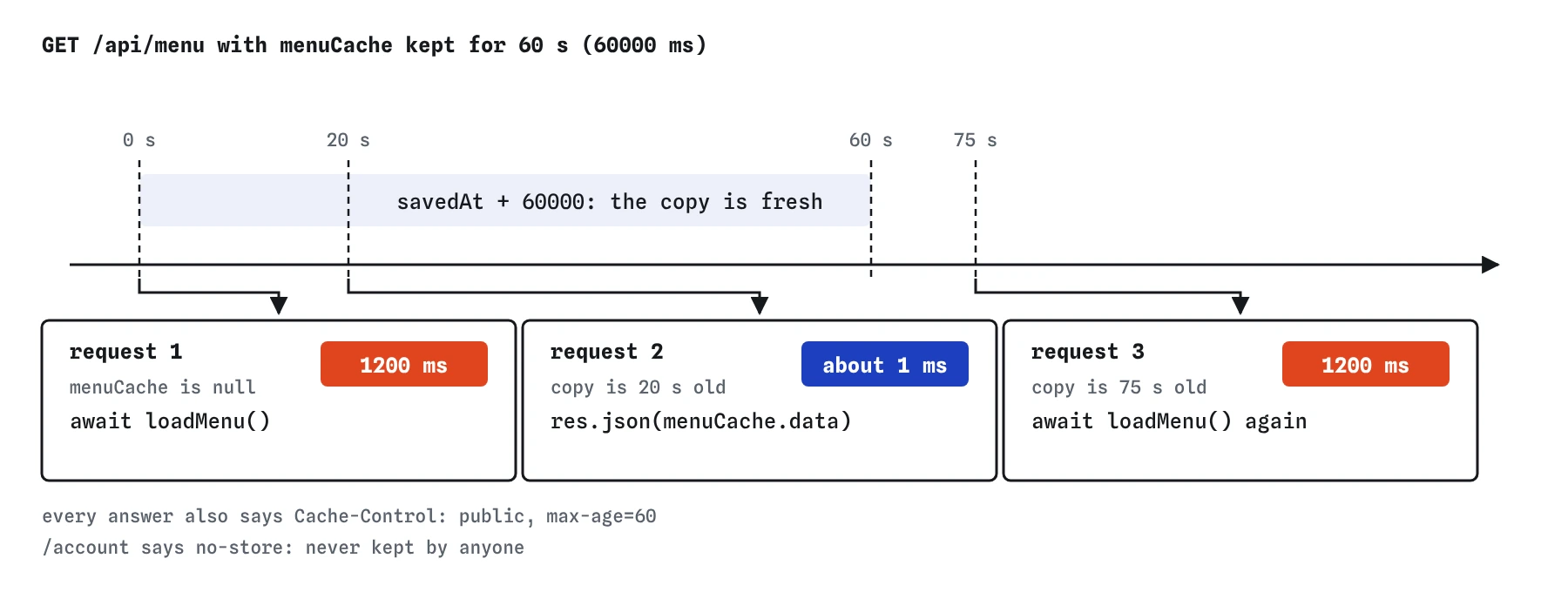
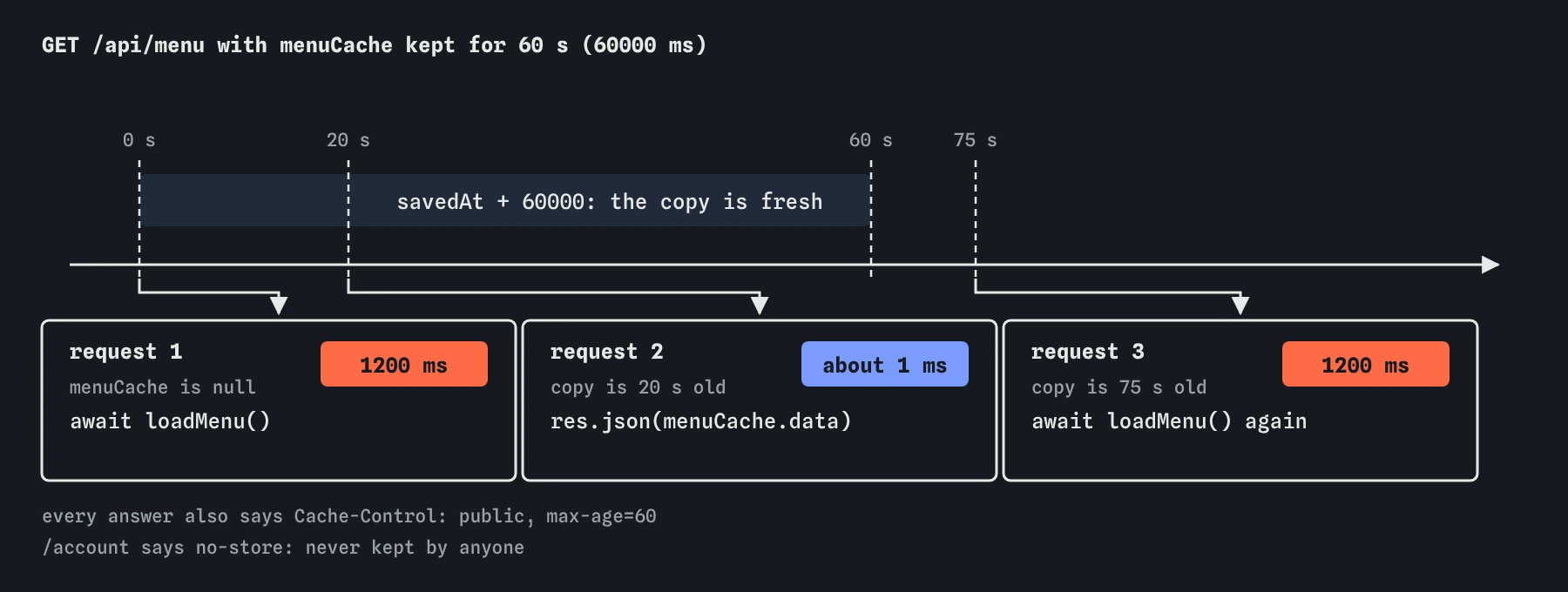
Keep the result and the time you saved it in a variable outside the route. On each request, use the saved copy if it is younger than 60 seconds, and otherwise load a fresh one. The first visitor waits; the next ones get the menu in a millisecond or two. Send GET /api/menu twice after the change and compare the times in the Requests view. The practice clock moves one second per request, so the cache stays warm. Press **Menu, two minutes later** and you will see the slow load come back once the minute is up.
let menuCache = null;

app.get('/api/menu', async (req, res) => {
  if (!menuCache || Date.now() - menuCache.savedAt > 60000) {
    menuCache = { data: await loadMenu(), savedAt: Date.now() };
  }
  res.json(menuCache.data);
});
What can go wrong with a cache in memory?
Memory belongs to one running process. When the server restarts, the cache is empty again. If your host runs two copies of the server, each has its own cache, and they can disagree for up to a minute. When that becomes a problem, teams move the cache into a separate shared store, which this course doesn't cover.
Stale data is the price of speed. If the baker changes a price, customers see the old one until the cache expires. When your own code changes the data, clear the cache right there with menuCache = null so the next request loads fresh. Keep anything keyed by user input small and bounded, or a stream of different requests will fill the server's memory. Never cache answers that depend on who is asking under a key that ignores who is asking.
Why must private pages never be cached?
A shared computer in a library keeps one browser cache for everyone who sits there. If /account says public, max-age=3600, the next person can press Back and see the last customer's orders, or a shared cache in front of the site can hand one customer's page to another. The fix is one header: Cache-Control: no-store on anything tied to a session or a login.
This is easy to get wrong with middleware that adds a long max-age to every response. Put caching rules on the routes and folders that deserve them, and give personal routes their own no-store.
How do you check caching, and what do AI tools get wrong?
In the Requests view, open “Headers and body” on each exchange and read Cache-Control and ETag. Compare the time of a first and second request to a cached route. On your own computer, the Network panel in browser DevTools shows “(disk cache)” or “(memory cache)” for reused files and 304 for revalidated ones; turn off its “Disable cache” box first.
AI tools often set maxAge: 86400 on express.static() thinking it means seconds, add one blanket Cache-Control middleware that also covers private pages, write no-cache when they mean no-store, or build an in-memory cache with no expiry and no size limit. Read every number and ask which unit it is in.
Field notes
- A cache is a saved copy of an answer so the same work doesn't happen twice.
- The
Cache-Controlheader tells browsers how long an answer stays fresh. - A small cache in memory can save the result of a slow function for a short time.
- Private pages need
Cache-Control: no-storeso a shared computer can't show them to the next person.
Easy to get wrong
The maxAge option of express.static() is in milliseconds, unlike the max-age header, which is in seconds. 86400 gives files a lifetime of 86 seconds.
no-cache still lets the browser store the page; it only has to check with the server before showing it again. Pages with personal details need no-store.
A cache only helps if you look in it before doing the slow work. Awaiting first and checking afterwards keeps every request slow.
Questions people ask
Does a 304 answer mean my route did not run?
No. With Express's automatic ETags the route runs, builds the full body, and Express compares fingerprints just before sending. The saving is in bytes sent over the network. To skip the work itself, use max-age or a cache in memory.
How do visitors get a new stylesheet if I cache it for a year?
Put a version or a fingerprint in the file name, such as style.3f9a.css, and change the name in your HTML when the file changes. Build tools do this for you. Without versioned names, keep max-age short enough that a change reaches people in reasonable time.
Can I turn off ETags?
Yes, with app.set('etag', false). There is rarely a reason to, since they cost little and save bandwidth on every revalidation.
Why does the practice server keep my cache only until I edit the code?
Each edit restarts the server with fresh memory, exactly as node --watch does on your own computer. A real server keeps its cache until it restarts or the entry expires.