What changes when a server leaves your laptop?
On your laptop the server runs while a terminal window is open, at http://localhost:3000, for one visitor: you. On a host it has to run all day on a machine you rarely see, start again by itself after a crash or a reboot, answer on whatever port the host gives it, sit behind HTTPS, and leave a record of what went wrong when you weren't watching.
Very little of this changes your routes. The bike shop's GET /api/bookings works the same in both places. What changes is the few lines around the edges: where the port comes from, what mode the server runs in, how it treats the proxy in front of it, and how the host can tell it is healthy.
Where can a Node.js server run in 2026?
There are two common choices, and both run the same server.js.
- A platform that runs Node.js apps for you. You connect a Git repository or upload a container image; the platform installs dependencies, runs your start command, gives you HTTPS on its own address or your domain, restarts the app when it crashes, and collects its logs. You give up some control in exchange for very little setup. Many platforms put an app that gets no traffic to sleep, so the first visit after a quiet spell can be slow.
- A virtual private server, a rented Linux machine. You install a current long-term support release of Node.js, copy your code, install packages with
npm ci --omit=dev, and run the server under a process manager such assystemd, which starts it at boot and restarts it after a crash. In front of it you run a reverse proxy, a web server that holds the HTTPS certificate and forwards requests to your app on a local port. You get full control and full responsibility for updates and security patches. - Static file hosts, which suit pages with no server code but can't run
server.jsat all.
Why read the port from process.env?
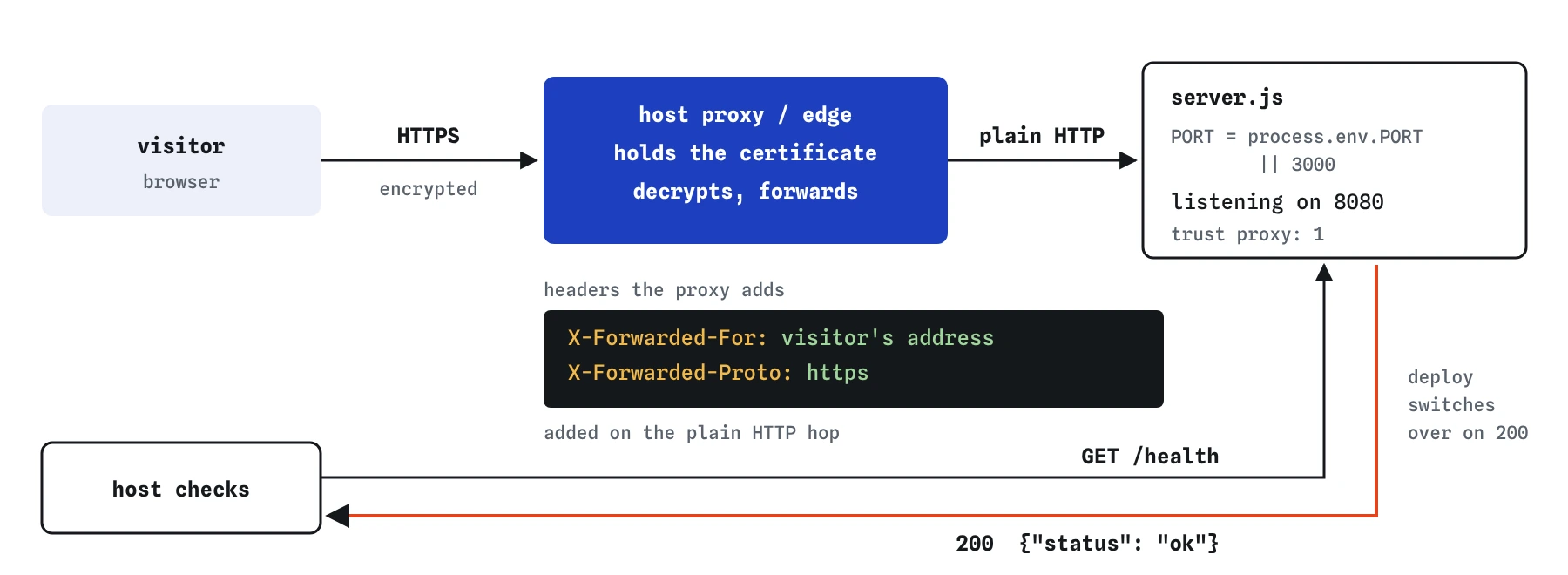
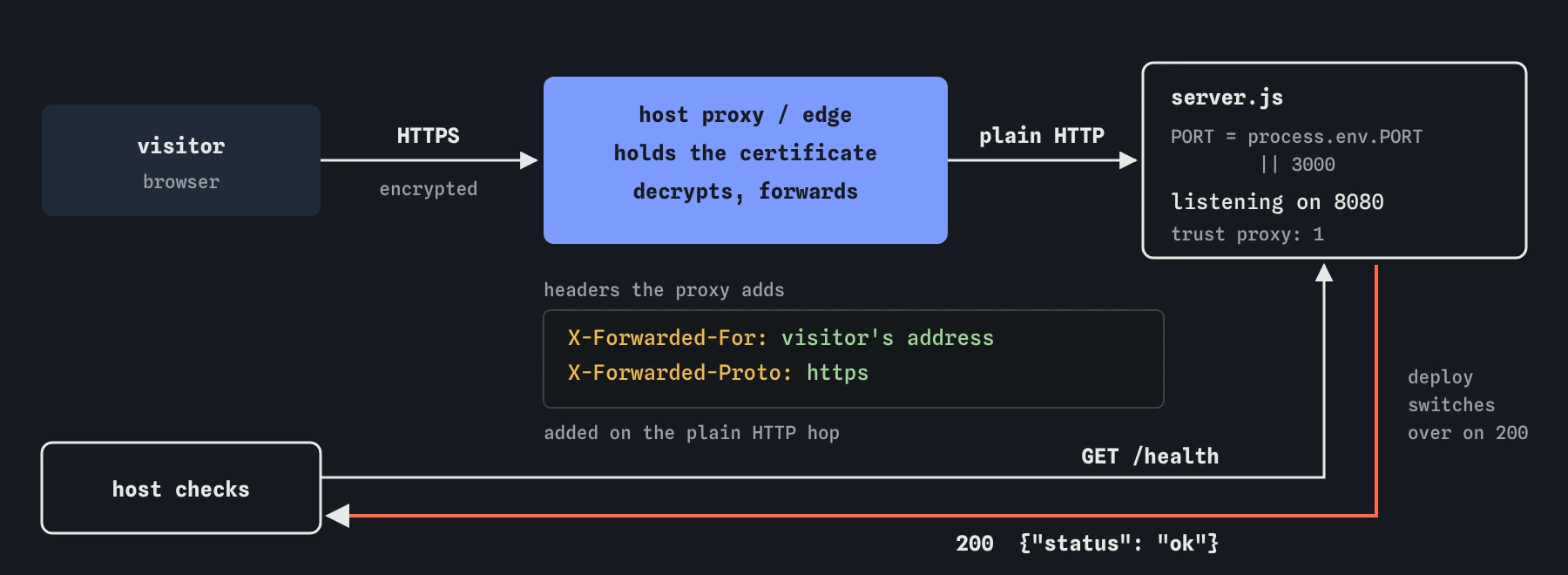
A platform decides which port your app must listen on and tells it through the PORT environment variable. A reverse proxy on your own machine is set up to forward to a port you choose, and you pass the same number in through the environment. Either way the code shouldn't hard-code 3000.
Write const PORT = process.env.PORT || 3000; and pass PORT to app.listen(). Environment values are always strings, which app.listen() accepts. Leave out the host argument. Node.js then listens on every network interface, which is what a container or proxy needs. Passing '127.0.0.1' or 'localhost' limits the server to connections from the same machine or container, a classic reason a deployed app answers nothing.
// The host chooses the port; 3000 is for the laptop.
const PORT = process.env.PORT || 3000;

app.listen(PORT, () => {
  console.log(`Bike shop server listening on port ${PORT}`);
});
What does NODE_ENV=production change?
Hosts and deploy scripts set NODE_ENV=production. Express reads it in a few places: its built-in error handler stops printing stack traces in the page, and some packages switch off development helpers. Your own code can read it too, for example to require secure cookies only in production.
It doesn't make your custom error handler safe. If your handler sends err.stack, it sends it in every mode. Log the full error with console.error(err) and send visitors a short, plain message. Express’s own default 500 page does the same thing: while NODE_ENV is not production it names the error, and in production it shows only “Internal Server Error”.
Where does HTTPS happen, and why set trust proxy?
Your Express app usually speaks plain HTTP on its port. HTTPS is handled one step in front of it, by the platform's edge or by your reverse proxy. That layer holds the certificate, often renewed automatically every few months, decrypts the request, and forwards it to your app with extra headers: X-Forwarded-For with the visitor's address and X-Forwarded-Proto with https.
Express ignores those headers until you tell it to trust them, because anyone could send them. Behind one proxy, app.set('trust proxy', 1) says “believe the last hop”. Then req.ip is the visitor rather than the proxy, req.protocol is https, and req.secure is true. That changes how rate limits keyed by IP, logs, and cookies marked secure behave. Use the number of proxies you really have, never true on a server anyone can reach directly. The practice server accepts the setting, but its pretend requests always come from one address.
What is a health check for?
A host needs a cheap way to ask “are you alive?” A GET /health route that answers 200 quickly is the usual answer. Platforms call it during a deploy, and only switch traffic to the new version once it says yes. Many also call it every few seconds afterwards and restart the app when it stops answering.
Keep it small and fast, and put it above your 404 handler like any other route. Leave out secrets, version details and anything personal. If the server can't do its job without the database, the route can try a tiny query and answer 503 when that fails, so the host knows to wait.
app.get('/health', (req, res) => {
  res.json({ status: 'ok' });
});
How do logs and restarts work on a host?
Write logs to the console with console.log() and console.error(). Platforms and process managers collect everything your server prints and let you search it, so you don't need log files. Print a clear line at startup with the port, one line per error with the request it belongs to, and never passwords, tokens or session ids.
Servers get stopped too: during each deploy, the host sends the process a SIGTERM signal and waits a few seconds. A careful server stops accepting new requests with server.close() and lets the current ones finish. Anything kept only in memory, like the bookings array here or a cache, disappears on every restart, which is why real data lives in a database.
What should you check before you deploy, and what do AI tools miss?
Run the server with PORT=8080 NODE_ENV=production node server.js on your laptop first, then try /health, a missing page and a route that fails, and read what a visitor would see. Check that .env and secrets are not in your repository and that the host has its own copies.
AI tools often write app.listen(3000) or add 'localhost' as the host, place new routes below the 404 handler, send stack traces from the error handler, set trust proxy to true without thinking about who can reach the server, or forget the health route. Read the edges of the file, the first and last twenty lines, as carefully as the routes.
Field notes
- On a host, your server runs all day for many visitors instead of only you.
- The host tells your app which port to use through the
PORTenvironment variable. - Setting
NODE_ENV=productionchanges how Express behaves, such as hiding stack traces. - A quick
GET /healthroute lets the host check that your server is alive.
Easy to get wrong
A host chooses the port, and localhost only accepts connections from the same machine or container. The proxy in front can't reach the server, so visitors get an error.
A stack trace shows visitors file paths, package names and code details. Keep it in the logs, where you can read it and they can't.
true believes every X-Forwarded-For value, so anyone who reaches the server directly can fake their IP address and slip past an IP-based rate limit. Trust only the number of proxies you actually run.
Questions people ask
Do I need a process manager on a platform that runs Node.js apps?
No. The platform starts, restarts and stops your app itself. A process manager is for a server you run yourself, where nothing else would restart the app after a crash or a reboot.
Why does my app work locally but show an error page once deployed?
Read the host's logs first. The usual causes are listening on a fixed port or on localhost, a missing environment variable such as a secret, a package installed only on your laptop, or a start command that points at the wrong file.
Should I run Node.js on port 80 or 443 directly?
Rarely. Let the platform or a reverse proxy listen on 80 and 443 and handle certificates, and keep your app on a high port such as 3000 or whatever PORT says.
Can the practice server show me a real deploy?
No. It runs in your browser tab, so it can only pretend to be a host by setting PORT and NODE_ENV. The code you write here is the same code you would deploy.