What does NULL actually mean?
NULL is SQL's marker for "no value here". It means unknown or not applicable, and it is different from zero, from an empty string and from the word null. In the repairs table, a NULL in finished_on means the bike is still in the shop. A NULL in parts_cost means nobody has priced the parts yet. Repair 6 has a parts cost of 0.0, which is a real, known value: the puncture needed no parts.
That difference changes the answer when you count money or report on work. A zero is a fact you can add up. A NULL is a gap, and SQL treats it carefully because it cannot know what belongs there. Open the Tables view and look at the repairs table: PlainFinch shows NULL cells in a muted style so you can tell them apart from empty text.
Columns allow NULL unless the table says otherwise. The schema tab shows customer TEXT NOT NULL, so every repair must have a customer, while finished_on TEXT has no such rule. Deciding which columns may be empty is part of designing a table, and later lessons cover it.
Why does = NULL never match?
Comparisons in SQL can give three answers: true, false or unknown. Any comparison involving NULL gives unknown, because the database cannot say whether an unknown value equals something. finished_on = NULL asks "is this unknown date equal to an unknown value?", and the honest answer is unknown, for every single row.
WHERE keeps only rows where the condition is true. Unknown is not true, so the row is dropped. That is why the starter query returns nothing. Open the Rows view on the starter and watch the WHERE step: all ten rows are dropped, including the four that really have no finish date.
The same thing happens with <>, <, > and IN. notes <> 'warranty' is unknown for a NULL note, so a row with no notes is dropped by a condition that looks like it should keep it. This is the most common NULL bug in real reports, and the Break it exercise shows it.
SELECT id, bike
FROM repairs
WHERE notes <> 'warranty';
How do you test for a missing value?
SQL has a separate operator for this: IS NULL. It always answers true or false, never unknown. finished_on IS NULL is true for the four open repairs. IS NOT NULL is its opposite, and keeps the six finished ones.
When you want a condition that treats NULL as a normal value, spell it out. To keep every repair that is not a warranty job, including ones with no notes at all, write notes IS NULL OR notes <> 'warranty'. Put brackets around it when you combine it with other conditions using AND.
SQLite also accepts IS between two values, which treats two NULLs as equal: notes IS 'warranty' is false for a NULL note instead of unknown. It is handy, but other databases spell it IS NOT DISTINCT FROM, so most people stick to the plain IS NULL form.
SELECT id, customer, notes
FROM repairs
WHERE finished_on IS NOT NULL
  AND (notes IS NULL OR notes <> 'warranty');
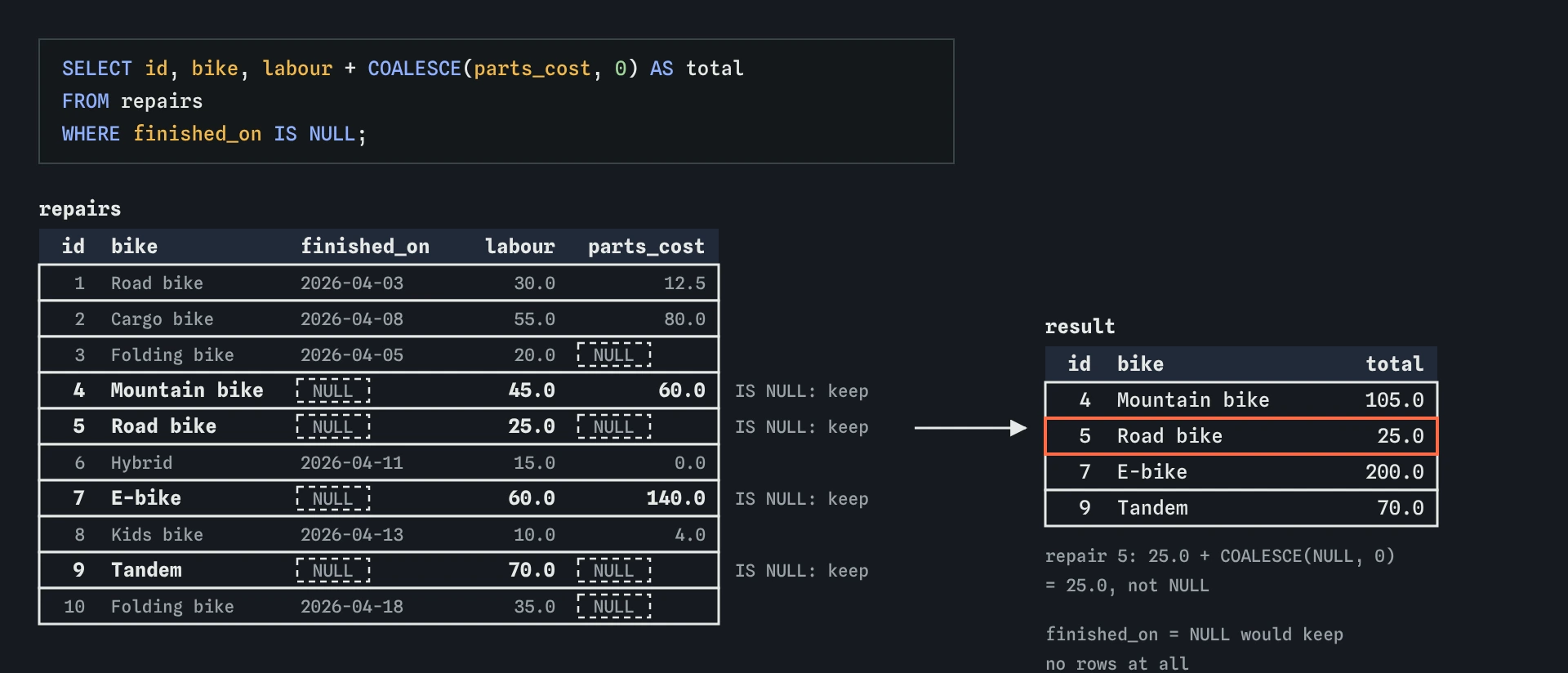
IS NULL finds the four repairs still in the shop, and COALESCE lets repair 5 show a total of 25.0 instead of a blank.What happens to NULL in a calculation?
NULL spreads. If any part of an arithmetic expression is NULL, the whole result is NULL. labour + parts_cost for repair 5 is 25.0 + NULL, which is NULL. The same goes for *, -, / and text joined with ||.
This is a sensible rule. If the parts have not been priced, the total really is unknown. The trouble comes when you meant something else, such as "what we know so far". Then you have to say what a missing value should count as, and the next section shows how.
Run the query below and look at the total column. Repairs 3, 5, 9 and 10 come back with an empty total, even though their labour is known. If you put that column on an invoice, you would bill those customers nothing.
SELECT id, labour, parts_cost, labour + parts_cost AS total
FROM repairs;
How do COALESCE and IFNULL fill the gaps?
COALESCE takes a list of values and returns the first one that is not NULL. COALESCE(parts_cost, 0) returns the parts cost when there is one and 0 when there is not. You can give it more than two values: COALESCE(notes, 'No notes yet') turns a gap into readable text for a report.
IFNULL(a, b) is the two-value version. It works in SQLite and MySQL. PostgreSQL does not have it, and SQL Server calls it ISNULL. COALESCE is standard SQL and works in all of them, so it is the safer habit.
Use these with care. Filling a gap with 0 is a decision about meaning. For a running cost estimate, treating unpriced parts as 0 is reasonable as long as everyone knows it. For a final invoice, it would undercharge. A good report often shows both: the total so far and a flag for rows that still have gaps.
SELECT id,
  labour + COALESCE(parts_cost, 0) AS total_so_far,
  COALESCE(notes, 'No notes yet') AS notes
FROM repairs;
Where does NULL go when you sort?
In SQLite, NULL sorts before every other value. ORDER BY finished_on puts the four open repairs at the top, and ORDER BY finished_on DESC puts them at the bottom. MySQL does the same. PostgreSQL and Oracle do the opposite and put NULL last in ascending order.
To make the position explicit, SQLite (since version 3.30) and PostgreSQL both accept NULLS FIRST and NULLS LAST after the direction. Writing it out makes the query behave the same on both and tells the next reader you thought about it. In MySQL, the usual trick is to sort on finished_on IS NULL first.
SELECT id, bike, finished_on
FROM repairs
ORDER BY finished_on DESC NULLS LAST;
How do you spot NULL problems in a result?
Missing rows and empty cells are the two symptoms. When a row you expected is missing, check every condition in WHERE that touches a column that can be NULL, and ask what happens when that column is empty. The Rows view helps: it shows the WHERE step with the reason each row was dropped.
When a number is blank, look for arithmetic or text joins that include a nullable column. A quick way to find gaps in a table is a query that lists the rows where a column IS NULL. Do it before you build a report on that column, so you know what you are dealing with.
- Rows missing after
<>orNOT IN: a NULL made the condition unknown. - Totals that are blank: one part of the sum was NULL.
- Odd sort order: NULL went first (SQLite, MySQL) or last (PostgreSQL).
- AI-written queries with
= NULLor!= NULL: always a bug, and SQLite will not warn you.
Is an empty string the same as NULL?
No, and mixing them causes confusing results. An empty string '' is a known value: text with no characters in it. notes = '' matches it and notes IS NULL does not. Oracle is the odd one out and treats an empty string as NULL, which surprises people who move between databases.
Data that came from spreadsheets or web forms often has both, plus strings that only contain spaces. When you clean a column, decide on one way to mean "nothing here", usually NULL, and convert the others. NULLIF(TRIM(notes), '') turns empty or space-only notes into NULL, which you can then handle with the tools above.
Field notes
- NULL means no value is known, which is different from 0 or empty text.
= NULLnever matches any row; useIS NULLorIS NOT NULLinstead.- If any part of a sum is NULL, the whole result becomes NULL.
COALESCE(value, 0)returns the first value that is not NULL, so gaps count as 0.
Easy to get wrong
Comparing anything with NULL using = gives unknown, so no row ever passes.
Rows with no notes are silently dropped, because <> with NULL is unknown.
One NULL in a sum makes the whole sum NULL. Decide what a missing value should count as.
Zero and NULL are different. Zero is a known price of nothing; NULL means the price is not known.
Questions people ask
Is NULL equal to NULL?
Not with =. NULL = NULL is unknown. Use IS when you need two missing values to count as the same.
Can a column ban NULL?
Yes. Add NOT NULL when you create the table and SQLite will reject any insert or update that leaves it empty. The lesson on rules for your data covers it.
Do COUNT and SUM skip NULL?
Most summary functions ignore NULL values. COUNT(*) counts rows, while COUNT(parts_cost) counts only non-NULL values. The lesson on counting and totals goes through each one.
What does NOT IN do with a NULL in the list?
If the list contains NULL, x NOT IN (...) is never true, so it returns no rows. Remove NULLs from the list or use NOT EXISTS.