What does WITH do?
WITH name AS ( SELECT … ) gives a query a name for the length of one statement. The final SELECT (or INSERT, UPDATE, DELETE) can then use that name as if it were a table. Each named query is called a common table expression, or CTE.
The benefit is reading order. A nested subquery has to be read from the inside out. A WITH clause reads top to bottom: first work out each repair's total, then add them up per customer, then pick the big spenders. Each step has a name that says what it holds.
A CTE is not stored anywhere. It exists while that statement runs and disappears after the semicolon. A later statement can't use it, which is a common surprise.
Run the example below. The repair_totals step joins each repair to its parts with a LEFT JOIN, so the folding bike repair, which used no parts, still appears. COALESCE(SUM(p.cost_pence), 0) turns its missing parts total into 0, otherwise labour plus NULL would give NULL and the repair would seem to cost nothing at all.
WITH repair_totals AS (
  SELECT r.id, r.customer_id,
    r.labour_pence + COALESCE(SUM(p.cost_pence), 0) AS total_pence
  FROM repairs AS r
  LEFT JOIN parts_used AS p ON p.repair_id = r.id
  GROUP BY r.id
)
SELECT *
FROM repair_totals
ORDER BY total_pence DESC;
How do I write several steps?
Write WITH once, then each step as name AS ( … ), separated by commas. Each step can use any step defined above it. There is no comma after the last step: the final SELECT follows directly.
Below, parts_per_repair totals the parts for each repair, and mechanic_load uses it to count repairs and part costs per mechanic. Repairs with no mechanic (the kids bike) drop out at the join, which you can watch in the Rows view.
WITH parts_per_repair AS (
  SELECT repair_id, SUM(cost_pence) AS parts_pence
  FROM parts_used
  GROUP BY repair_id
),
mechanic_load AS (
  SELECT r.mechanic_id, COUNT(*) AS repairs,
    SUM(COALESCE(pr.parts_pence, 0)) AS parts_pence
  FROM repairs AS r
  LEFT JOIN parts_per_repair AS pr ON pr.repair_id = r.id
  GROUP BY r.mechanic_id
)
SELECT s.name, ml.repairs, ml.parts_pence
FROM mechanic_load AS ml
JOIN staff AS s ON s.id = ml.mechanic_id
ORDER BY ml.repairs DESC;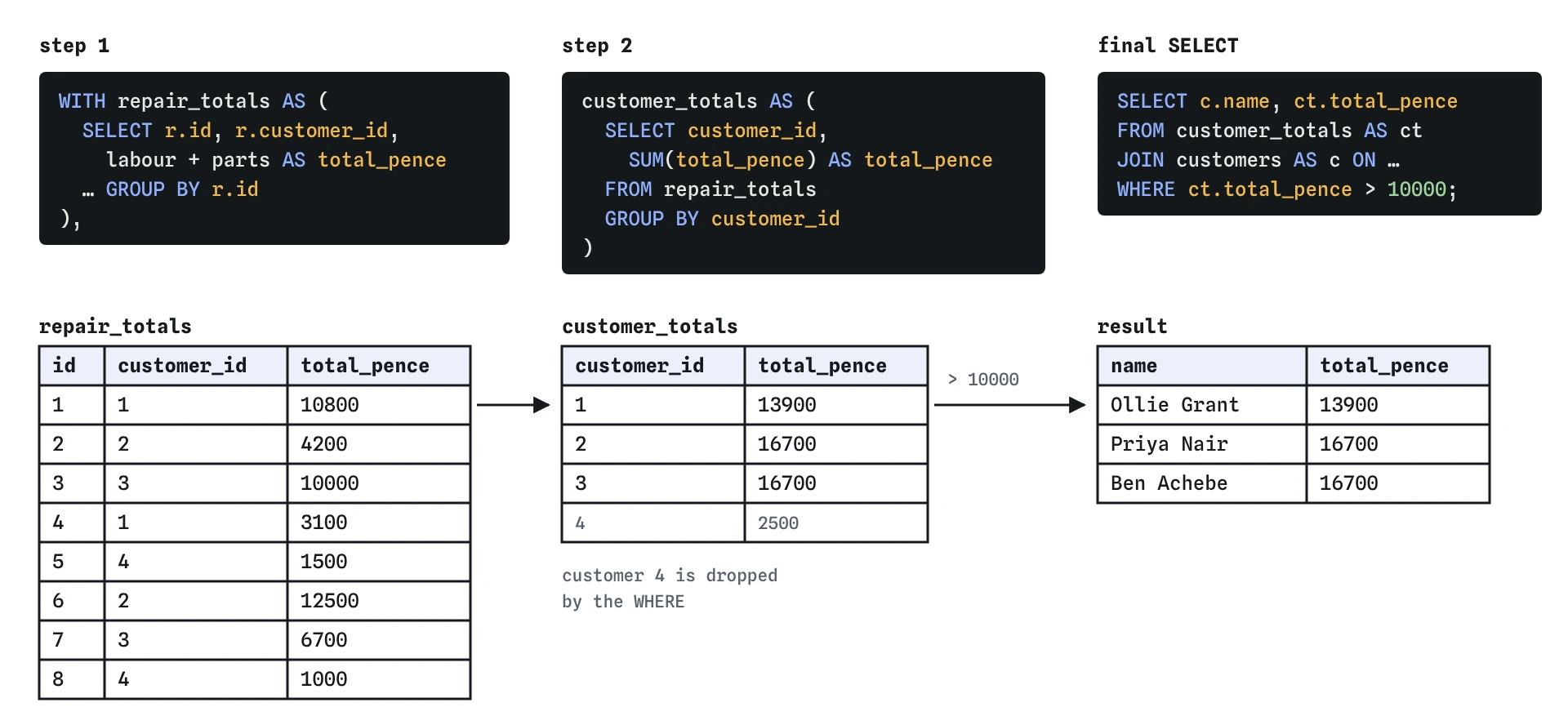
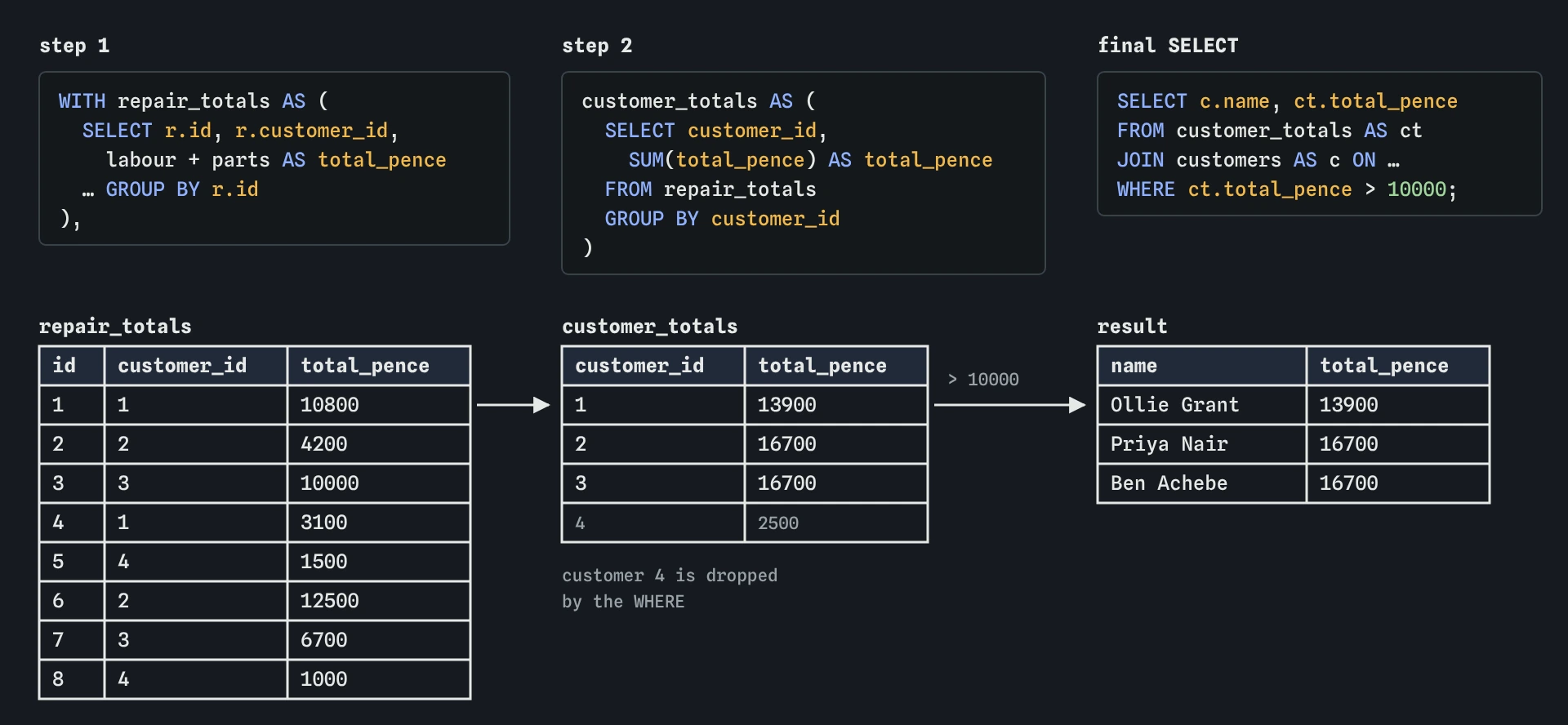
repair_totals prices each repair, customer_totals adds them up per customer, and the final SELECT only has to join names and keep totals over 10000.How do I turn a nested subquery into WITH steps?
Find the innermost subquery, give it a name, and move it to the top as the first CTE. Replace it in the original with that name. Repeat for the next level out. The final SELECT is whatever is left.
The two queries below give the same answer. The first nests a subquery in FROM. The second names that subquery busy_days. Run each and compare. On a query with three levels of nesting the difference in readability is large, and you can test each step on its own by changing the final SELECT to SELECT * FROM step_name.
SELECT booked_on, n
FROM (
  SELECT booked_on, COUNT(*) AS n
  FROM repairs
  GROUP BY booked_on
) AS t
WHERE n > 1;

WITH busy_days AS (
  SELECT booked_on, COUNT(*) AS n
  FROM repairs
  GROUP BY booked_on
)
SELECT booked_on, n
FROM busy_days
WHERE n > 1;
Which steps does the Rows view show?
The Rows view follows the final SELECT, the one after all the CTEs. It treats each CTE in its FROM as a ready-made table and shows how the final query's WHERE, GROUP BY and ORDER BY keep or drop its rows.
To inspect an earlier step, point the final SELECT at it temporarily: SELECT * FROM repair_totals;. That habit, checking each step's output before building the next, catches most mistakes early. It is the same advice as for subqueries, made easier because each step has a name.
Is a CTE faster than a subquery?
Usually the speed is the same. SQLite often folds a CTE into the main query, just as it would a subquery. Choose WITH for readability, not speed.
One difference: a CTE used twice in the final query may be computed twice, or SQLite may store its result once. You can ask for storing with AS MATERIALIZED or for folding with AS NOT MATERIALIZED (SQLite 3.35 and later, and PostgreSQL 12 and later). You will rarely need either. MySQL supports WITH from version 8.0 onward.
Where WITH does help speed is indirectly. When a query is split into named steps, it is much easier to spot the step that reads a whole table or multiplies rows through a careless join. Run EXPLAIN QUERY PLAN on the full statement, then look for SCAN lines and work out which step they belong to.
What is a recursive CTE?
WITH RECURSIVE lets a CTE refer to itself. It has two parts joined by UNION ALL: a starting row, and a step that builds the next rows from the previous ones. SQLite runs the step again and again, each time on the rows the last round produced, until a round produces no rows.
That stopping point is your responsibility. If the step's WHERE never becomes false, the query runs forever. PlainFinch stops any query after 2.5 seconds, but a real database will happily run until it runs out of memory. While you are writing one, put a LIMIT on the final SELECT as a safety stop.
The simplest use is a list of numbers or dates. This one counts from 1 to 5.
WITH RECURSIVE numbers(n) AS (
  SELECT 1
  UNION ALL
  SELECT n + 1
  FROM numbers
  WHERE n < 5
)
SELECT n
FROM numbers
LIMIT 100;
How do I walk a hierarchy like who reports to whom?
Each row in staff has a manager_id pointing at another staff row. A recursive CTE can start at the owner and repeatedly join to the people whose manager is in the previous round, carrying a depth number along.
The result lists everyone with how many levels they sit below the owner. Jess is at depth 3 because she reports to Elin, who reports to Kofi, who reports to Nadia. The same pattern works for categories inside categories, or replies to replies in a comment thread.
WITH RECURSIVE chain(id, name, role, depth) AS (
  SELECT id, name, role, 0
  FROM staff
  WHERE manager_id IS NULL
  UNION ALL
  SELECT s.id, s.name, s.role, chain.depth + 1
  FROM staff AS s
  JOIN chain ON s.manager_id = chain.id
)
SELECT name, role, depth
FROM chain
ORDER BY depth, name
LIMIT 100;
What should I check in AI-written WITH queries?
Test it step by step: run SELECT * FROM each CTE in order and check its row count makes sense before trusting the final answer.
- Every step is used. Leftover CTEs that nothing reads make the query harder to follow.
- Step names say what the rows are:
repair_totals, notcte1ortemp. - Recursive CTEs have a WHERE that must eventually be false, and a LIMIT while testing.
- UNION ALL rather than UNION in a recursive step, unless removing duplicate rows is deliberate. UNION can hide a cycle, and costs time.
- No step drops rows unnoticed: an inner JOIN in an early step removes customers or days with no matches before the final SELECT ever sees them.
Field notes
WITH name AS (SELECT ...)names a query for the length of one statement.- Separate several steps with commas, and leave no comma after the last one.
- Each step can use any step written above it.
- Turn a nested subquery into steps by naming the innermost part first.
Easy to get wrong
Commas go between CTEs only. A comma before the final SELECT makes SQLite expect another CTE and fail with a syntax error.
The semicolon ends the statement, and the CTE with it. A WITH clause and its final SELECT are one statement.
Without a condition that ends the recursion, the query never finishes. The WHERE stops it, and the LIMIT is a backstop while you test.
Questions people ask
Can I use a CTE in INSERT, UPDATE or DELETE?
Yes. Put the WITH clause first and the INSERT, UPDATE or DELETE after it, for example to delete repairs whose total is below a threshold. In SQLite the CTE can be read in subqueries of the change statement.
Can a CTE have the same name as a real table?
A CTE with the same name as a table hides that table for the rest of the statement. It works, but it confuses readers, so pick distinct names.
What is the difference between a CTE and a view?
A view is a named query saved in the database, available to every later statement. A CTE lasts for one statement. Use a CTE for steps inside one query and a view for a query many queries reuse.
How do I name the columns of a CTE?
Either alias them inside the SELECT with AS, or list them after the name: days(day) AS (…). Recursive CTEs usually list them, because the starting SELECT often has bare values like 1 or a date.