What is a subquery?
A subquery is a complete SELECT in brackets, placed inside another statement. SQLite works out the inner query's answer and uses it as part of the outer one. It lets you ask a question that depends on another question: products priced above the average, customers who have ordered cake, loaves nobody has bought.
Read a subquery from the inside out. Run the inner SELECT on its own first and look at what it returns. Then read the outer query as if that answer were typed in by hand. Most confusion with subqueries comes from guessing what the inner part returns instead of checking.
Subqueries come in three shapes, and each fits a different place. One that returns a single value goes where a value would go, such as after > in WHERE. One that returns a single column of values goes after IN. One that returns a whole table goes in FROM, or after EXISTS. Knowing which shape you need tells you how to write the inner query.
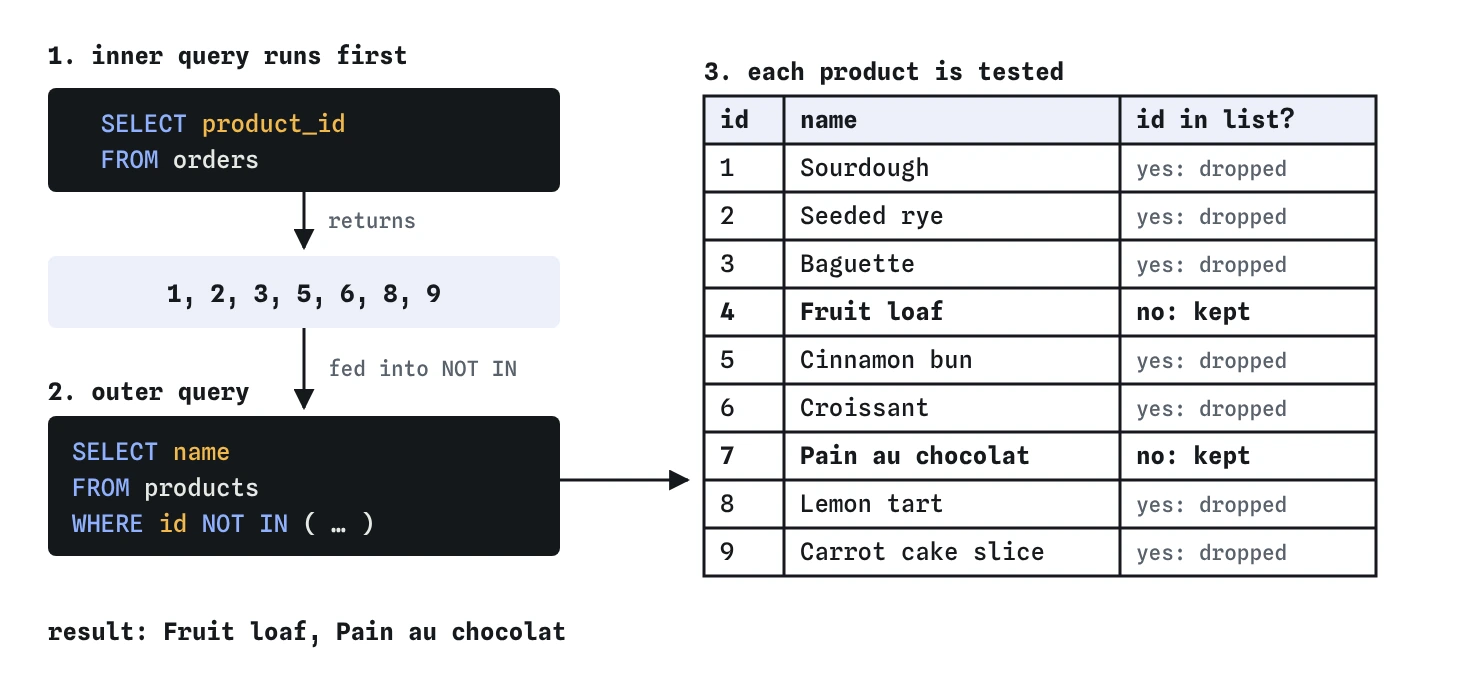
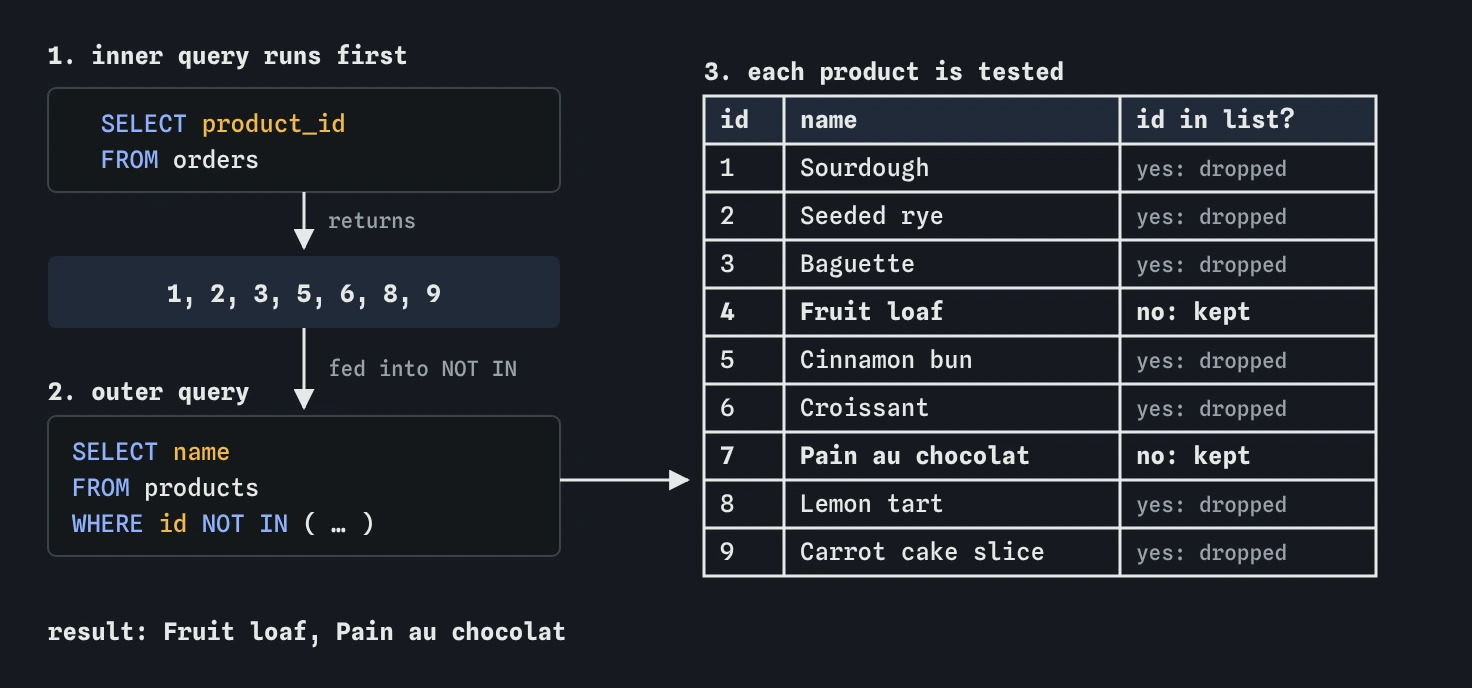
NOT IN then keeps only the products missing from that list, which are ids 4 and 7.How do I compare each row with an average?
A subquery that returns exactly one value (one row, one column) is called a scalar subquery. You can use it anywhere a single value fits: in WHERE, in the SELECT list, in a calculation.
The average product price is about 348 pence. The query below finds it with an inner query, then keeps every product above it. You can't write WHERE price_pence > AVG(price_pence) because WHERE looks at one row at a time, and an average needs all of them. The subquery computes it separately first.
SELECT name, price_pence
FROM products
WHERE price_pence > (
  SELECT AVG(price_pence)
  FROM products
)
ORDER BY price_pence DESC;
How do IN and NOT IN work with a subquery?
IN (SELECT …) keeps rows whose value appears anywhere in the inner query's list. The inner query must return one column. Below, the inner query lists every customer id that has an order for a cake, and the outer query turns those ids into names.
NOT IN keeps rows whose value is missing from the list, which is how the task finds products nobody has ordered. Check the result with the Rows view: at the WHERE step, each product is kept or dropped depending on whether its id is in the inner list.
The same answer often comes from a JOIN. Use whichever reads more clearly. IN is good when you only need to filter by the other table, not show its columns, and it never creates duplicate rows the way a join can.
SELECT name
FROM customers
WHERE id IN (
  SELECT o.customer_id
  FROM orders AS o
  JOIN products AS p ON p.id = o.product_id
  WHERE p.category = 'cake'
);
Why can NOT IN return nothing at all?
If the inner list contains a NULL, NOT IN returns no rows. SQL reads x NOT IN (1, 2, NULL) as 'x is not 1 and not 2 and not unknown'. Comparing with an unknown value gives unknown, so the whole test is never true.
The orders.product_id column here is NOT NULL, so the task is safe. On a column that allows NULL, add WHERE column IS NOT NULL inside the subquery, or use NOT EXISTS, which doesn't have this problem. The example shows the trap with Sam Patel's NULL town: no customer is returned.
SELECT name
FROM customers
WHERE town NOT IN (
  SELECT town
  FROM customers
  WHERE name LIKE 'S%'
);
What do EXISTS and NOT EXISTS check?
EXISTS (SELECT …) is true when the inner query finds at least one row. It doesn't matter what the row contains, which is why people often write SELECT 1 inside it. NOT EXISTS is true when the inner query finds nothing.
EXISTS is usually paired with a correlated subquery: the inner query refers to the current row of the outer one. Below, for each customer, the inner query looks for orders whose customer_id equals that customer's id. Yusuf has none, so he is the only one returned. This is the safest way to write 'has no …', because NULLs can't break it.
SELECT c.name
FROM customers AS c
WHERE NOT EXISTS (
  SELECT 1
  FROM orders AS o
  WHERE o.customer_id = c.id
);
Can a subquery go in FROM?
Yes. A subquery in FROM is a temporary table for the rest of the query. It must have an alias, written after the closing bracket. This is useful for summarising in two steps: first total each customer's spending, then work with those totals as if they were a table.
The example totals spending per customer inside the brackets, then keeps only the totals over £10 outside. You could do this with HAVING too. The FROM version earns its keep when the second step needs to group, join or average the first step's results. When subqueries in FROM start stacking up, a WITH clause (the next lesson) names each step and reads far better.
SELECT t.name, t.spent_pence
FROM (
  SELECT c.name, SUM(o.qty * p.price_pence) AS spent_pence
  FROM customers AS c
  JOIN orders AS o ON o.customer_id = c.id
  JOIN products AS p ON p.id = o.product_id
  GROUP BY c.id
) AS t
WHERE t.spent_pence > 1000
ORDER BY t.spent_pence DESC;
What is a correlated subquery?
A correlated subquery uses a value from the outer row, so it runs again for each outer row. The query below shows each product with the average price of its own category: for Sourdough the inner query averages breads, for the Lemon tart it averages cakes.
Correlated subqueries read naturally but can be slow on large tables, because the inner query runs once per row. An index on the column the inner query filters on helps a lot. A JOIN to a grouped subquery often does the same job in one pass.
SELECT p.name, p.category, p.price_pence,
  (SELECT ROUND(AVG(p2.price_pence))
   FROM products AS p2
   WHERE p2.category = p.category) AS category_avg
FROM products AS p
ORDER BY p.category, p.price_pence DESC;
What goes wrong with subqueries in AI-written SQL?
For each subquery, copy the inner SELECT out, run it, and check its answer is the shape the outer query expects: one value, one column of values, or a table.
= (SELECT …)where the inner query can return several rows. SQLite uses the first one without any warning, so the result looks plausible and is wrong. PostgreSQL raises an error. Use IN when more than one row is possible.NOT INon a column that allows NULL, which can return nothing at all.- A subquery in FROM without an alias. SQLite allows it, PostgreSQL before version 16 and MySQL don't.
- Deeply nested subqueries that nobody can read. Rewrite them with WITH, one named step at a time.
- A correlated subquery in the SELECT list of a big report. Check the plan with EXPLAIN QUERY PLAN and consider a join instead.
Field notes
- A subquery is a full SELECT in brackets, and its answer feeds the outer query.
IN (SELECT ...)keeps rows whose value appears in the inner list of one column.- If the inner list holds a NULL,
NOT INreturns no rows at all. NOT EXISTSis true when the inner query finds no rows, and has no NULL trap.
Easy to get wrong
WHERE tests rows one at a time and can't hold an aggregate. The subquery computes the average first.
With =, SQLite silently uses only the first row from the subquery. IN checks against all of them.
One NULL in the inner list makes NOT IN return no rows. NOT EXISTS compares row by row and isn't affected.
IN compares one value with a list of single values, so the subquery must return exactly one column.
Questions people ask
Is a subquery slower than a JOIN?
Often not. SQLite rewrites many IN and EXISTS subqueries into joins internally. Write the clearest version, then check EXPLAIN QUERY PLAN if it feels slow on real data.
How deep can subqueries nest?
Deeper than you will ever want. Past two levels, readability suffers badly. A WITH clause turns each level into a named step you can read top to bottom.
What happens if a scalar subquery finds no rows?
It returns NULL. Any comparison with NULL is unknown, so a WHERE that depends on it keeps no rows. Use COALESCE around the subquery if you need a fallback value.
Can I use a subquery in UPDATE or DELETE?
Yes. DELETE FROM products WHERE id NOT IN (SELECT product_id FROM orders) removes unsold products, and UPDATE … SET price_pence = (SELECT …) sets a value from another table. Run the subquery on its own first.