What does CASE do?
CASE lets a query choose a value row by row. You give it a list of conditions, each with a result, and for every row SQLite returns the result of the first condition that is true. It works anywhere a single value fits: in the SELECT list, inside SUM or COUNT, in ORDER BY, even in WHERE.
The shape is always the same. It opens with CASE, has one or more WHEN condition THEN result lines, an optional ELSE result for everything left over, and closes with END. After END you usually add AS some_name so the new column gets a readable header.
CASE never changes the stored data. It calculates a value for the result, the same way price_pence / 100.0 does. Open the Tables view after running any query here and the products table will look exactly as it did before.
How do I label rows, like price bands?
This is the most common use of CASE: turning a number into a category a person can read. The bakery wants every product tagged budget, standard or premium. The query below checks each product's price against the bands from cheapest upwards.
Because CASE stops at the first true WHEN, each line only needs one comparison. A product at 260 pence passes < 300 and stops there. A product at 420 fails the first test, passes < 450, and stops. Anything that fails every test reaches ELSE. You never have to write price_pence >= 300 AND price_pence < 450, which is shorter and leaves less room for a gap or overlap at the edges.
Run it and look at the pumpkin loaf. Its price is NULL, so it gets a band you probably didn't mean. The next sections explain why and how to fix it.
SELECT name, price_pence,
  CASE
    WHEN price_pence < 300 THEN 'budget'
    WHEN price_pence < 450 THEN 'standard'
    ELSE 'premium'
  END AS band
FROM products
ORDER BY price_pence;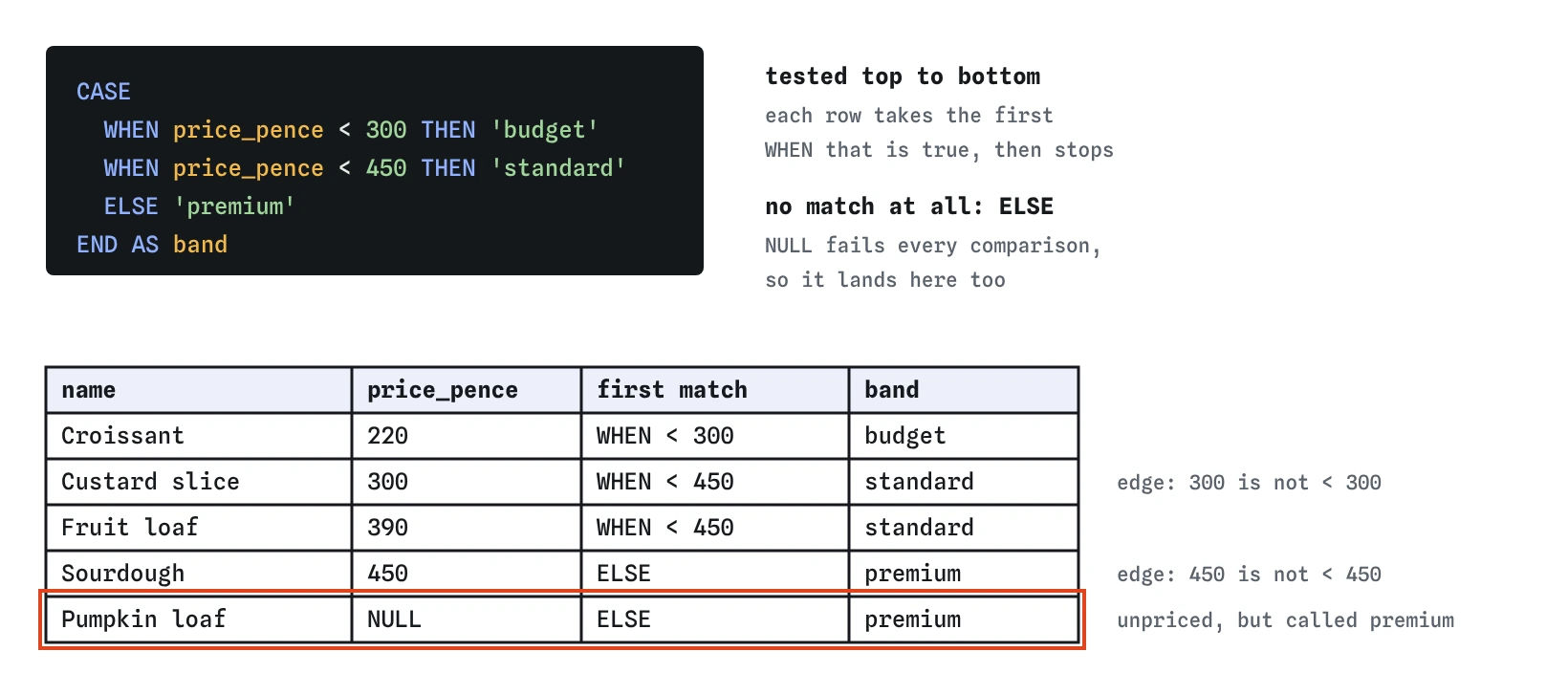
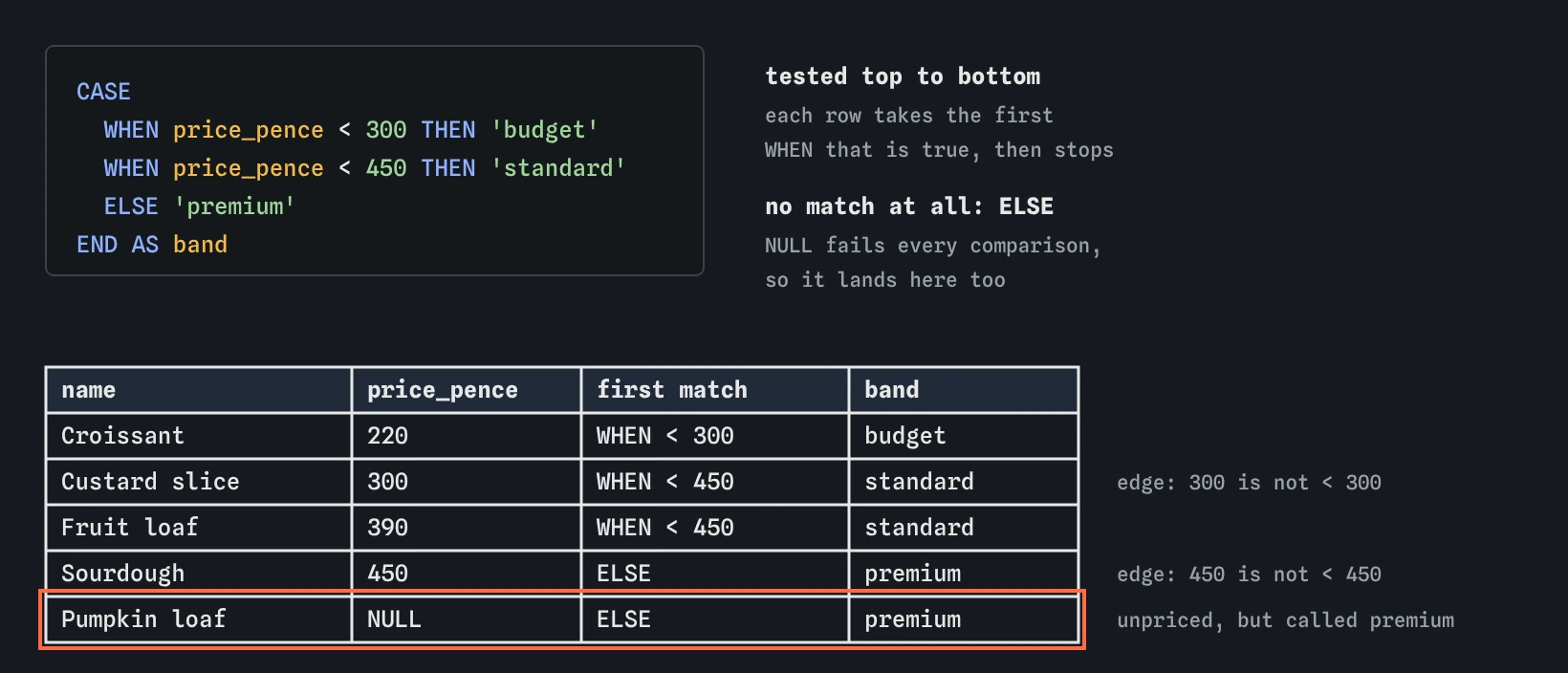
< 450 only ever sees prices of 300 and up. Check the rows on each edge, and notice how the pumpkin loaf's NULL price slips through to ELSE.What is the short form of CASE?
When every test compares the same column with a fixed value, there is a shorter form called a simple CASE. You name the column once after CASE, then list the values after each WHEN. The query below turns the short category codes into names for a menu board.
The longer form you saw first is called a searched CASE, because each WHEN holds its own full condition. Use the simple form for exact matches on one column. Use the searched form for ranges, for tests on several columns, and for anything involving NULL. If you are unsure, the searched form always works.
SELECT name,
  CASE category
    WHEN 'bread' THEN 'Loaves'
    WHEN 'pastry' THEN 'Pastries'
    WHEN 'cake' THEN 'Cakes and tarts'
  END AS menu_section
FROM products;
Why does the order of the WHEN lines matter?
SQLite tests the WHEN lines from top to bottom and stops at the first one that is true. Later lines are never looked at for that row. If you put a wide test above a narrow one, the narrow one becomes unreachable.
Swap the first two lines of the band query to WHEN price_pence < 450 THEN 'standard' above WHEN price_pence < 300 THEN 'budget' and the budget band disappears: a 220 pence croissant is under 450, so it is labelled standard and the second test never runs. There is no error and no warning. The only way to notice is to look at the result, ideally at a row near each boundary.
A good habit: after writing any CASE with ranges, check one row exactly on each edge. Here that means the custard slice at 300 and the sourdough at 450.
What happens to NULL inside CASE?
Any comparison with NULL gives unknown, and CASE treats unknown like false. A product with no price fails price_pence < 300, fails price_pence < 450, and drops through to ELSE. In the band query, the pumpkin loaf is called premium, which is wrong in a way nobody would spot on a long list.
If there is no ELSE, a row that matches nothing gets NULL. That is sometimes useful (it means 'none of the above') and sometimes a surprise. Decide which you want and write it down: either add a first line WHEN price_pence IS NULL THEN 'unpriced', or add an ELSE that makes the leftover case obvious.
The simple form has an extra trap. CASE price_pence WHEN NULL THEN 'unpriced' END never matches, because the simple form compares with = and NULL = NULL is unknown. Use the searched form with IS NULL instead.
SELECT name,
  CASE
    WHEN price_pence IS NULL THEN 'ask at the counter'
    ELSE printf('£%.2f', price_pence / 100.0)
  END AS price_label
FROM products;
How do I count only some rows with CASE?
Put a CASE inside an aggregate and you get a conditional count. SUM(CASE WHEN status = 'paid' THEN 1 ELSE 0 END) turns each paid order into a 1 and every other order into a 0, then adds them up. Several of these side by side give you a small table of counts in one pass, one column per condition.
With COUNT, leave out the ELSE. COUNT counts values that aren't NULL, so COUNT(CASE WHEN status = 'paid' THEN 1 END) works, because non-matching rows become NULL. Add ELSE 0 to a COUNT and every row counts again, since 0 is a perfectly good value. Mixing these two up is the bug in this page's Break It.
The same pattern adds up money: SUM(CASE WHEN status = 'paid' THEN qty ELSE 0 END) totals only paid quantities. SQLite also accepts COUNT(*) FILTER (WHERE status = 'paid'), which PostgreSQL supports too, but MySQL does not, so the CASE version is the one that travels everywhere.
SELECT p.category,
  COUNT(*) AS orders,
  SUM(CASE WHEN o.status = 'paid' THEN 1 ELSE 0 END) AS paid,
  SUM(CASE WHEN o.status = 'paid' THEN o.qty ELSE 0 END) AS paid_items,
  COUNT(CASE WHEN o.status <> 'paid' THEN 1 END) AS not_paid
FROM orders AS o
JOIN products AS p ON p.id = o.product_id
GROUP BY p.category;
How do I sort rows in my own order?
ORDER BY sorts text alphabetically, which is rarely the order a person wants for statuses. The bakery's order screen should show paid orders first, then refunded, then cancelled. A CASE in ORDER BY turns each status into a number, and the rows sort by that number.
You don't have to show the CASE as a column. It lives only in ORDER BY. Add a second sort key after it (here the date) so rows with the same status come out in a predictable order. Any status you forgot gets the ELSE number and lands at the end instead of vanishing.
SELECT id, status, ordered_on
FROM orders
ORDER BY
  CASE status
    WHEN 'paid' THEN 1
    WHEN 'refunded' THEN 2
    WHEN 'cancelled' THEN 3
    ELSE 4
  END,
  ordered_on;
What is IIF, and should I use it?
SQLite has a shortcut for a two-way choice: IIF(condition, value_if_true, value_if_false). It means the same as CASE WHEN condition THEN value_if_true ELSE value_if_false END. It is handy for a yes or no flag, like marking which orders included more than one item.
IIF came to SQLite from SQL Server. PostgreSQL doesn't have it, and MySQL uses IF() instead. If your SQL might move to another database, or if an AI tool will read it later, CASE is the safer choice, because every SQL database understands it.
SELECT id, qty,
  IIF(qty > 1, 'multi', 'single') AS order_size
FROM orders;
What should I check in a CASE an AI wrote?
Test it with the Rows view: the SELECT step shows the CASE result next to each row, so you can see exactly which band or flag each row received.
- The order of the WHEN lines. Read them top to bottom and ask which line a boundary value like 300 or 450 hits first.
- Missing ELSE. Decide whether NULL for 'none of the above' is what you want.
- NULL tests in the simple form, like
CASE x WHEN NULL, which never match. COUNT(CASE … ELSE 0 END), which counts every row. It should be SUM with ELSE 0, or COUNT without ELSE.- Text values with the wrong capitals.
'Paid'and'paid'are different in SQLite comparisons.
Field notes
CASEchecks its conditions row by row and returns the result of the first true one.- The WHEN lines are tested top to bottom, so put narrow tests before wide ones.
- A comparison with NULL is never true, so a missing price falls through to
ELSE. - Test for NULL first with
WHEN price_pence IS NULLto give it its own label.
Easy to get wrong
The first true WHEN wins. With the wide test on top, every cheap product is caught by it and budget never appears.
The simple form compares with =, and NULL = NULL is unknown, so the NULL line never matches. Use the searched form with IS NULL.
COUNT counts every non-NULL value, and 0 is not NULL, so it counts all rows. SUM adds the ones and zeros.
Every CASE needs END before the alias. Without it SQLite reports a syntax error near AS.
Questions people ask
Can a CASE return numbers in one branch and text in another?
SQLite allows it because it stores each value with its own type, but it makes the column hard to sort and compare. PostgreSQL refuses mixed types. Keep every branch the same type.
Can I use CASE in WHERE?
Yes, as long as it produces a value to compare. Most of the time plain AND and OR read better in WHERE, so use CASE there only when the logic really is a choice between values.
How many WHEN lines can a CASE have?
As many as you need. If the list grows past ten or so, the mapping probably belongs in its own small table that you join to, so it can change without editing every query.
Does CASE work the same in PostgreSQL and MySQL?
Yes. CASE is standard SQL and behaves the same way in all three. The differences are in the shortcuts: IIF in SQLite and SQL Server, IF in MySQL, FILTER in SQLite and PostgreSQL.
Can I nest one CASE inside another?
Yes, a THEN or ELSE can hold another CASE. It gets hard to read quickly. A single searched CASE with combined conditions like WHEN category = 'cake' AND price_pence >= 450 is usually clearer.