What does a join do?
In the last lesson you answered a two-table question by hand: look up an id, then filter the second table with it. A join does that matching for every row at once. It takes rows from two tables and builds wider rows by pairing each row on the left with the rows on the right that satisfy a condition.
For the bakery, each order has a customer_id. Joining orders to customers on customers.id = orders.customer_id glues each order to the one customer it belongs to. The result has the order's columns and the customer's columns side by side, so you can show a name next to a date, or filter orders by the customer's town.
Nothing is copied or stored. The join builds its rows while the query runs, and the tables stay exactly as they were.
SELECT orders.id, orders.ordered_on, customers.name
FROM orders
JOIN customers ON customers.id = orders.customer_id;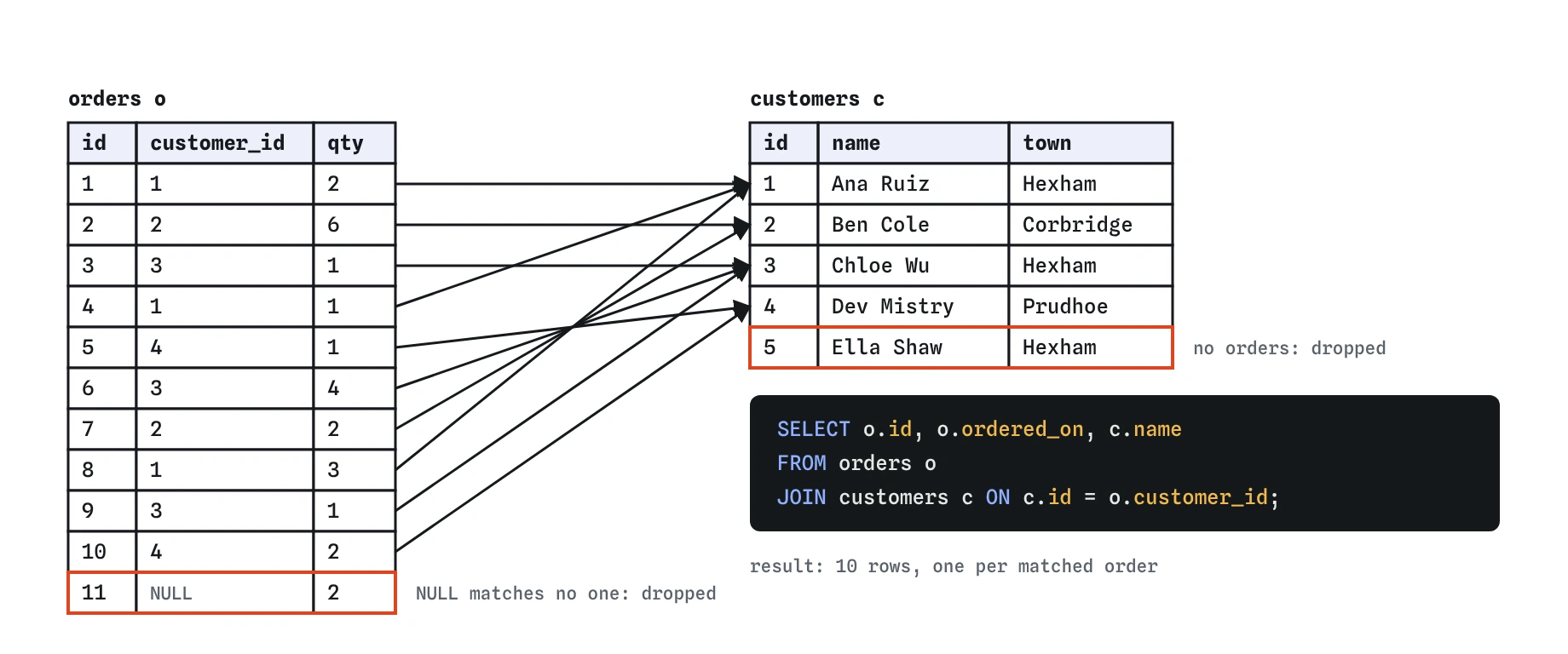
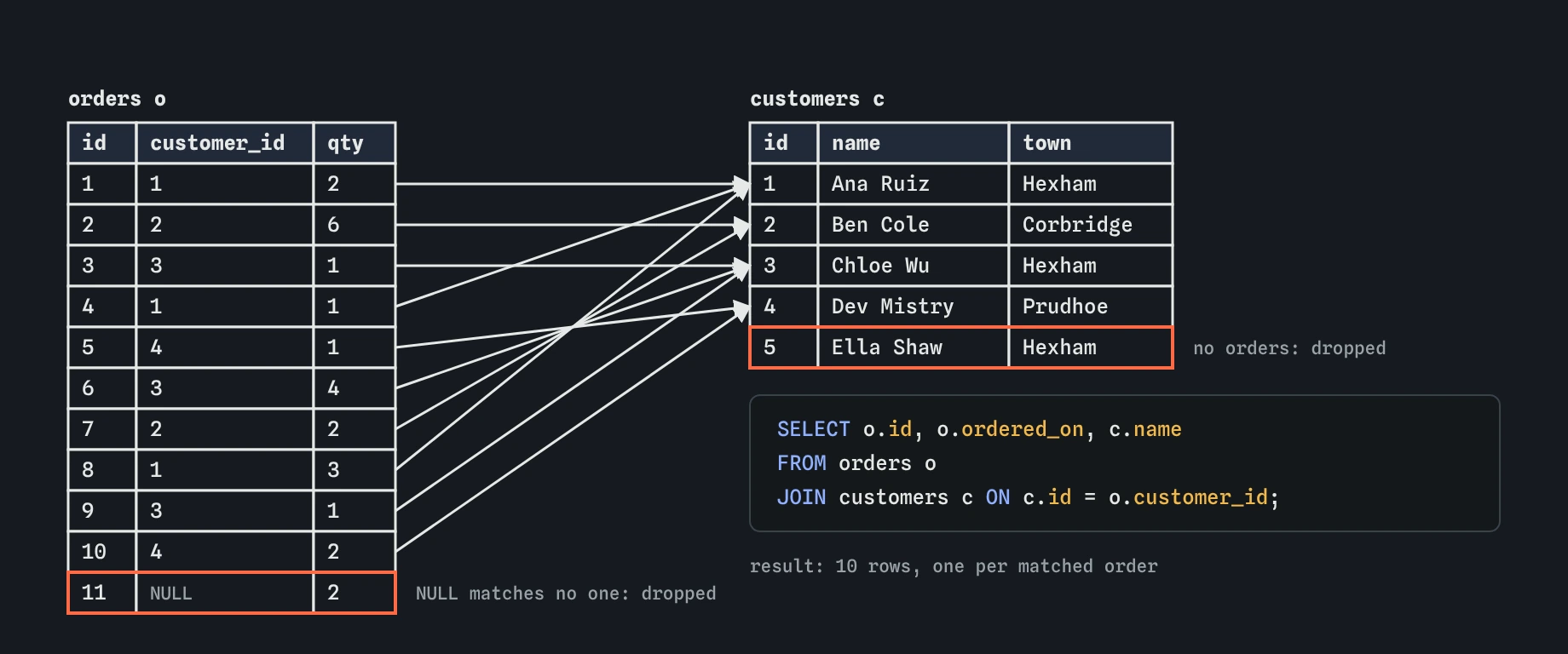
JOIN ... ON c.id = o.customer_id pairs each order with its one customer. Rows with no partner on the other side, like the walk-in sale and Ella Shaw, drop out of the result without any warning.How do you write JOIN ... ON?
Start from one table with FROM, then add JOIN other_table ON condition. The condition almost always compares a foreign key with the primary key it points at: customers.id = orders.customer_id. The order of the two sides of = does not matter.
Plain JOIN means INNER JOIN; the two spellings are identical. Inner means the result only contains pairs that matched. You will see both in real code, and most people write the shorter one.
Open the Rows view on the example above. The FROM step shows the eleven orders. The JOIN step shows each order picking up its customer's columns, and it shows the walk-in sale being dropped because its customer_id is NULL and matches no customer. Watching that step once tells you more about joins than a page of definitions.
Why use table aliases?
Writing customers.name and orders.ordered_on everywhere gets long. An alias is a short nickname given to a table in FROM or JOIN: FROM orders o JOIN customers c. After that, o.qty means the qty column of orders and c.town means the town of the customer.
Once a table has an alias, use the alias everywhere in that query. Writing orders.qty after naming the table o gives an error in SQLite, because inside this query the table is now called o.
Pick aliases you can read: the first letter of the table usually works. Avoid a, b, c handed out in order, which forces the reader to keep a lookup table in their head. You can also write FROM orders AS o; the AS is optional for tables.
SELECT o.id, o.ordered_on, c.name, c.town
FROM orders o
JOIN customers c ON c.id = o.customer_id;
What does "ambiguous column name" mean?
After a join, several tables are in play at once. If two of them have a column with the same name, SQL cannot guess which one you mean. Both orders and customers have an id. Write SELECT id in a join of the two and SQLite stops with ambiguous column name: id.
The fix is to qualify the column with its table or alias: o.id for the order number, c.id for the customer number. The same applies in WHERE, GROUP BY and ORDER BY. When orders is joined to products, name becomes the trap instead, since there is no name in orders but there is one in both customers and products when all three are joined.
A good habit is to qualify every column in a join query, even the ones that are unique today. Someone may add a name column to another table next year, and your unqualified query will break on the spot. Qualified columns also tell readers at a glance where each value comes from.
SELECT o.id AS order_id, c.id AS customer_id, c.name
FROM orders o
JOIN customers c ON c.id = o.customer_id;
Which rows does an inner join leave out?
An inner join only returns pairs that matched. Rows on either side that found no partner disappear without any warning. In this bakery that removes two kinds of row.
The walk-in sale, order 11, has customer_id NULL. NULL is never equal to anything, so it matches no customer and is dropped. Ella Shaw lives in Hexham but has no orders. No order points at her id, so she is dropped too. The demo task therefore returns six orders from Ana and Chloe, and Ella never appears.
Sometimes that is exactly what you want: "orders with their customer" has no use for customers who never ordered. When you need to keep the unmatched rows, such as "every customer and how many orders they placed, including zero", you need a LEFT JOIN, which is the next lesson.
How do you filter and group after a join?
The clauses you already know work on the joined rows. The database runs FROM and JOIN first, then WHERE, then GROUP BY, HAVING, SELECT and ORDER BY. That means WHERE c.town = 'Hexham' can filter orders by a column that only exists in customers, and GROUP BY c.name can total orders per customer.
Follow the query below in the Rows view. The JOIN step builds ten paired rows, the WHERE step keeps the six from Hexham, and the GROUP BY step gathers them under Ana and Chloe before SELECT adds up the quantities.
Group by the key when you can, here c.id, and select the name alongside it. Two customers could share a name, and grouping by the name alone would merge them into one row with a combined total.
SELECT c.id, c.name, SUM(o.qty) AS items
FROM orders o
JOIN customers c ON c.id = o.customer_id
WHERE c.town = 'Hexham'
GROUP BY c.id, c.name
ORDER BY items DESC;
What happens when the ON condition is wrong?
A join with a wrong condition still runs, and that is what makes it dangerous. Match p.id = o.id instead of p.id = o.product_id and SQLite pairs order 1 with product 1, order 2 with product 2, and so on. The result looks plausible and is nonsense.
Leave the condition out entirely and SQLite pairs every order with every customer: 11 orders times 5 customers is 55 rows. That is called a cross join. PostgreSQL refuses a plain JOIN with no ON, while SQLite and MySQL accept it, so the mistake can slip past you here.
Two quick checks catch most bad joins. First, count the rows: a join along a foreign key should give at most one row per row on the many side, here eleven or fewer. Second, read the ON line and ask whether the two columns hold the same kind of thing. An order id and a product id never do.
What about the older comma style?
Older code, and some AI output, joins with a comma and puts the condition in WHERE: FROM orders o, customers c WHERE c.id = o.customer_id. That gives the same result as an inner join. The modern JOIN ... ON form keeps the join condition next to the table it belongs to and leaves WHERE for real filters, so a missing condition is much easier to spot.
When you read generated SQL, check that every joined table has its own ON, that each ON compares a foreign key with the matching primary key, and that every column name used in more than one table is qualified.
-- Same result, older style
SELECT o.id, c.name
FROM orders o, customers c
WHERE c.id = o.customer_id;
Field notes
- A join pairs rows from two tables that meet the
ONcondition. - The
ONcondition usually matches a foreign key to the primary key it points to. - Short table aliases like
oandckeep a joined query easy to read. - When two tables share a column name, qualify it, as in
o.idorc.id.
Easy to get wrong
Both tables have id, so SQLite cannot tell which one you mean. Qualify it with the alias.
The join must match the foreign key, product_id, with the product's primary key. Matching two primary keys pairs unrelated rows.
Once you give a table an alias, refer to it by the alias for the rest of the query.
Without ON, every order is paired with every customer, giving 55 rows of mostly false pairs.
Questions people ask
Does it matter which table comes first in an inner join?
Not for the rows you get. orders JOIN customers and customers JOIN orders return the same pairs. It makes a difference for LEFT JOIN, covered next.
Is JOIN slower than querying one table?
Joining on primary keys is fast; databases are built for it. On large tables, an index on the foreign key column helps, which a later lesson covers.
Can I join on something other than keys?
Yes, any condition works, such as matching on a date or a range. Joins on keys are the everyday case and the safest.
What is USING?
JOIN customers USING (customer_id) is a shortcut when both tables have a column with the same name. It does not fit here, because the columns are id and customer_id.