Why check SQL an AI tool wrote?
AI tools write SQL that looks right far more often than it is right. They have never seen your tables, so they guess names. They have read SQL for every database at once, so they mix dialects. And they answer the question they think you asked, which may be a near neighbour of the one you meant. None of this shows up as an error. A query that runs and returns plausible numbers is the hardest kind of wrong to notice.
Reviewing does not mean rewriting. It means reading the query the way the database will, clause by clause, and checking each part against your tables and your question. It takes a few minutes, and the skills are the ones from earlier lessons: joins, NULL, GROUP BY and the Rows view.
The cost of skipping the review grows with what the query does. A wrong SELECT gives a wrong number in a report. A wrong UPDATE or DELETE changes real data, and there may be no way back.
What does the query actually ask for?
Read it back in plain words, in the order the database runs it, and write that sentence next to your original question. For the starter query: 'Take members, pair each with their sightings and drop members with none, keep sightings from 2026, group by member, count rows.' Your question was 'each member, including those with none'. The phrase 'drop members with none' is the gap, and you found it without running anything.
Pay attention to every word that changes which rows survive: JOIN versus LEFT JOIN, WHERE versus ON, > versus >=, DESC or its absence, LIMIT. Then check the rows against a fact you know. There are six members in the Tables view. A per-member answer with four rows is wrong, however tidy it looks.
-- What the AI query really returns: only members with 2026 sightings
SELECT m.name, COUNT(*) AS sightings
FROM members AS m
JOIN sightings AS s ON s.member_id = m.id
WHERE s.seen_on >= '2026-01-01'
GROUP BY m.id;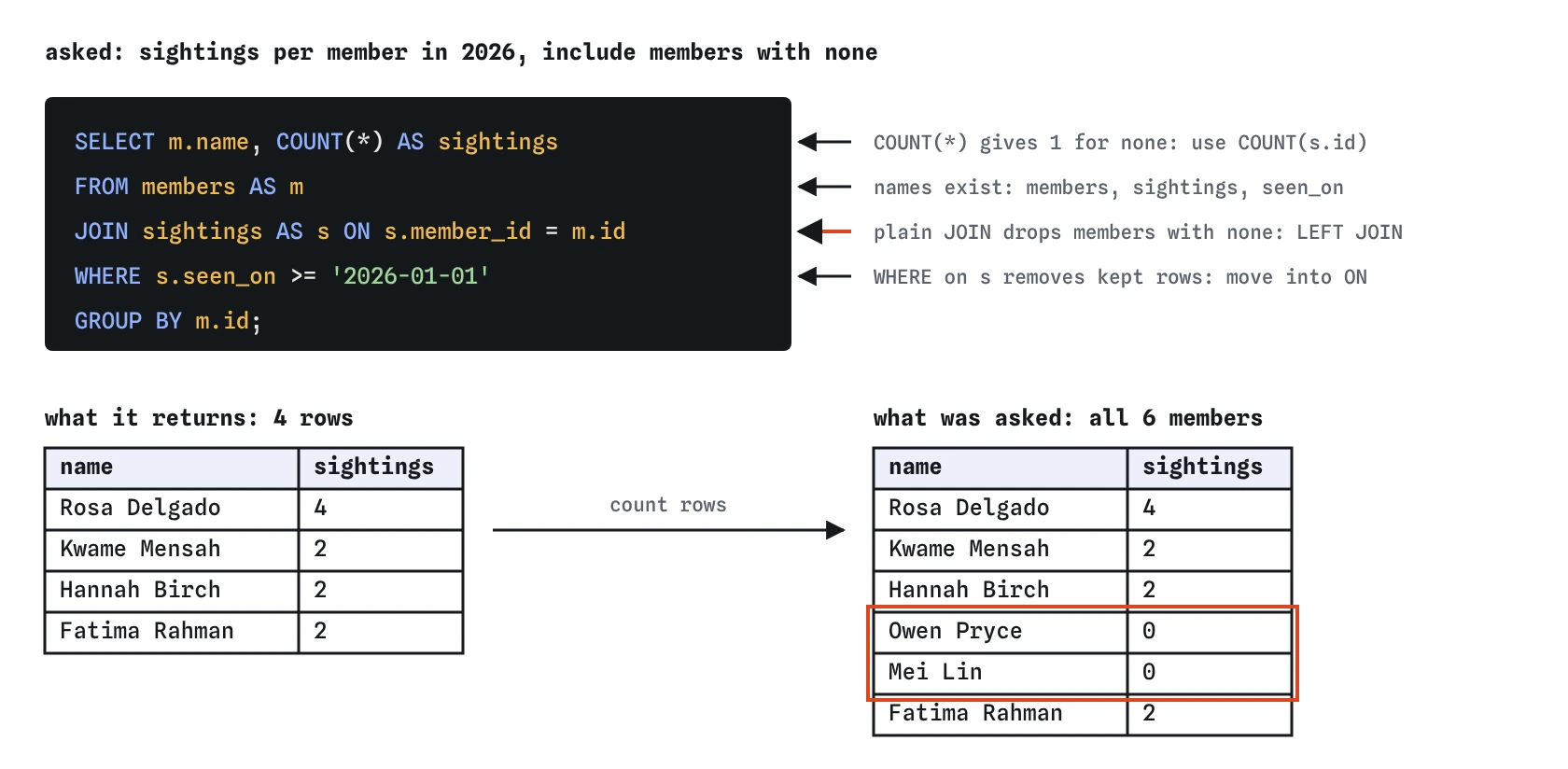
Do the tables and columns really exist?
AI tools invent names that sound right: users for members, date for seen_on, species_name for common_name, count for bird_count. If you are lucky the query fails with 'no such column' or 'no such table'. If you are unlucky, a guessed name happens to exist with a different meaning, and the query runs.
Compare every name against the schema tab, or ask the database. The list from sqlite_master and pragma_table_info is the truth, and it takes seconds to read. When you prompt an AI tool, pasting your CREATE TABLE statements in first removes most of this guessing.
SELECT m.name AS table_name, p.name AS column_name, p.type
FROM sqlite_master AS m
JOIN pragma_table_info(m.name) AS p
WHERE m.type = 'table'
ORDER BY m.name, p.cid;
Does an UPDATE or DELETE have a WHERE?
An UPDATE or DELETE without a WHERE clause changes every row in the table. AI tools sometimes leave the WHERE off when the request was vague, or put the condition in a comment instead of the code. Read the last lines of every data-changing statement before you run it.
A safe habit: turn the statement into a SELECT with the same FROM and WHERE first, and count the rows. If the AI suggests DELETE FROM sightings WHERE seen_on < '2026-01-01', run the matching SELECT and check it finds the two 2025 sightings and nothing else. Then run the DELETE inside a transaction, look at the Changes view, and only commit if the struck-through rows are the ones you meant.
-- Preview what a DELETE would remove before running it
SELECT id, member_id, seen_on
FROM sightings
WHERE seen_on < '2026-01-01';
Is an inner join dropping rows that should stay?
JOIN on its own is an inner join: it keeps only rows with a match on both sides. That is the right choice for 'sightings with their species', where every sighting has a species. It is the wrong choice whenever the question says 'each', 'every', 'including' or 'even if none'. AI tools default to plain JOIN because it is the most common form in the code they learned from.
Switching to LEFT JOIN is half the fix. A condition in WHERE that tests the right-hand table, like s.seen_on >= '2026-01-01', removes the rows the LEFT JOIN kept, because their seen_on is NULL. Put conditions on the right-hand table in the ON clause, and count a column from that table so unmatched members count as zero.
SELECT m.name, COUNT(s.id) AS sightings
FROM members AS m
LEFT JOIN sightings AS s
  ON s.member_id = m.id
  AND s.seen_on >= '2026-01-01'
GROUP BY m.id
ORDER BY sightings DESC;
What is the GROUP BY bare-column trap?
SQLite lets you select a column that is neither grouped nor inside an aggregate. The query below groups by member and also selects site. Each member has sightings at several sites, so which one appears? SQLite picks a value from one of the rows in the group, and you have no promise about which. The output looks like a fact ('Rosa's site is Allotments') and means nothing.
PostgreSQL refuses this query with an error, and MySQL refuses it in its default mode. SQLite allows it, so AI-written queries that use it run here without an error. When you review a GROUP BY, check every column in the SELECT: it must be in the GROUP BY, inside an aggregate like COUNT or MAX, or determined by the grouped key (a member's name, when you group by member id).
-- site is a bare column: the value shown is arbitrary
SELECT m.name, s.site, COUNT(*) AS sightings
FROM members AS m
JOIN sightings AS s ON s.member_id = m.id
GROUP BY m.id;
Was it written for a different database?
Unless you said which database you use, an AI tool may answer in any dialect. These are the mismatches you will meet most often, with the SQLite version:
SELECT TOP 5 ...is SQL Server. SQLite, PostgreSQL and MySQL putLIMIT 5at the end.ILIKEis PostgreSQL. In SQLite, LIKE already ignores case for English letters, or useLOWER(col) = 'value'.NOW()andGETDATE()are PostgreSQL, MySQL and SQL Server. SQLite usesdate('now')ordatetime('now').CONCAT(a, b)is MySQL and PostgreSQL. SQLite's standard way isa || b; recent SQLite versions also acceptconcat(), but older ones don't.AUTO_INCREMENTis MySQL andSERIALis PostgreSQL. In SQLite,INTEGER PRIMARY KEYgives new rows an id automatically.ISNULL(x, 0)is SQL Server. UseCOALESCE(x, 0), which works everywhere.
Why is SELECT * risky inside an app?
SELECT * is fine for exploring a table yourself. Inside application code it causes slow, quiet problems. The app receives every column, including ones it never shows, which may include private data like email addresses. When someone adds a column later, the app's results change shape without anyone touching the query. When two joined tables both have an id or name column, the app may read the wrong one.
When an AI writes a query for an app, ask it to list the columns the screen needs, with clear aliases. The query also documents itself that way: a reader can see what the code depends on.
What if the query is built by joining strings?
Sometimes an AI tool writes application code that builds SQL by gluing text together, with the user's input pasted into the middle of the query. Treat that as a security problem, not a style choice. Whatever a user types becomes part of the SQL itself, and a carefully crafted input can change what the query does.
The fix is to use parameters: placeholders in the SQL with the values passed separately, so input is always treated as data. The lesson 'SQL injection and safe parameters' covers how it works and how to spot it. For now, the review rule is short: if you see user input concatenated into a query string, stop and fix that before anything else.
What does a quick review checklist look like?
Most AI-written queries pass most of these checks. The point of the list is to find the one that doesn't before it reaches a report or a live database.
- Restate the query in plain words and compare it with the question.
- Check every table and column name against the schema.
- Make sure every UPDATE and DELETE has the WHERE you expect, and preview it as a SELECT.
- Ask whether any row that should stay could be dropped by a join or a WHERE.
- Check each SELECT column against the GROUP BY.
- Look for words from another database.
- Count the rows and check one answer by hand.
Field notes
- Restate the query in plain words and compare that with what you asked.
- Check that every table and column it names really exists in your database.
- A plain
JOINdrops rows with no match, so useLEFT JOINfor 'every' or 'including none'. - Tests on the right-hand table belong in
ON, or they remove the rowsLEFT JOINkept.
Easy to get wrong
The WHERE test on the sightings table discards members with no match, and COUNT(*) counts the empty row as one. Filter in ON and count a column from the right-hand table.
TOP is SQL Server syntax. SQLite, PostgreSQL and MySQL use LIMIT.
A comment doesn't filter anything. Without WHERE, every member's date changes.
A bare column in a grouped query shows one arbitrary value from the group. Aggregate it or group by it.
Questions people ask
How can I get better SQL from an AI tool in the first place?
Tell it you use SQLite, paste your CREATE TABLE statements, and state the question precisely, including edge cases like 'include members with no sightings'. Then review the answer anyway.
The AI's query runs without errors. Isn't that enough?
No. Most of the problems here produce no error at all: dropped rows, arbitrary bare columns, a sort in the wrong direction. Check row counts and one answer by hand.
Should I ask the AI to explain its own query?
It can help, but the explanation may describe what the query was meant to do instead of what it does. Your own plain-words restatement, checked against the Rows view, is the reliable test.
Is SELECT * ever fine?
Yes, for exploring data by hand, and inside EXISTS subqueries where the columns don't matter. Avoid it in queries that application code depends on.