What are functions in SQL?
A function takes one or more values and gives back a new one. You write its name, then the inputs in brackets: UPPER(species). You can use functions anywhere a value can go, in the SELECT list, in WHERE and in ORDER BY. The function works on each row in turn and returns a value for that row.
Functions never change the stored data. UPPER(species) shows Grey heron as GREY HERON in the result, while the table still holds Grey heron. Check the Tables view after running the demo if you want to see that for yourself. Changing stored data needs UPDATE, which comes later.
This lesson uses SQLite's names. Every database has the same ideas, but the names and details vary, especially for dates. Short notes along the way point out where PostgreSQL and MySQL differ.

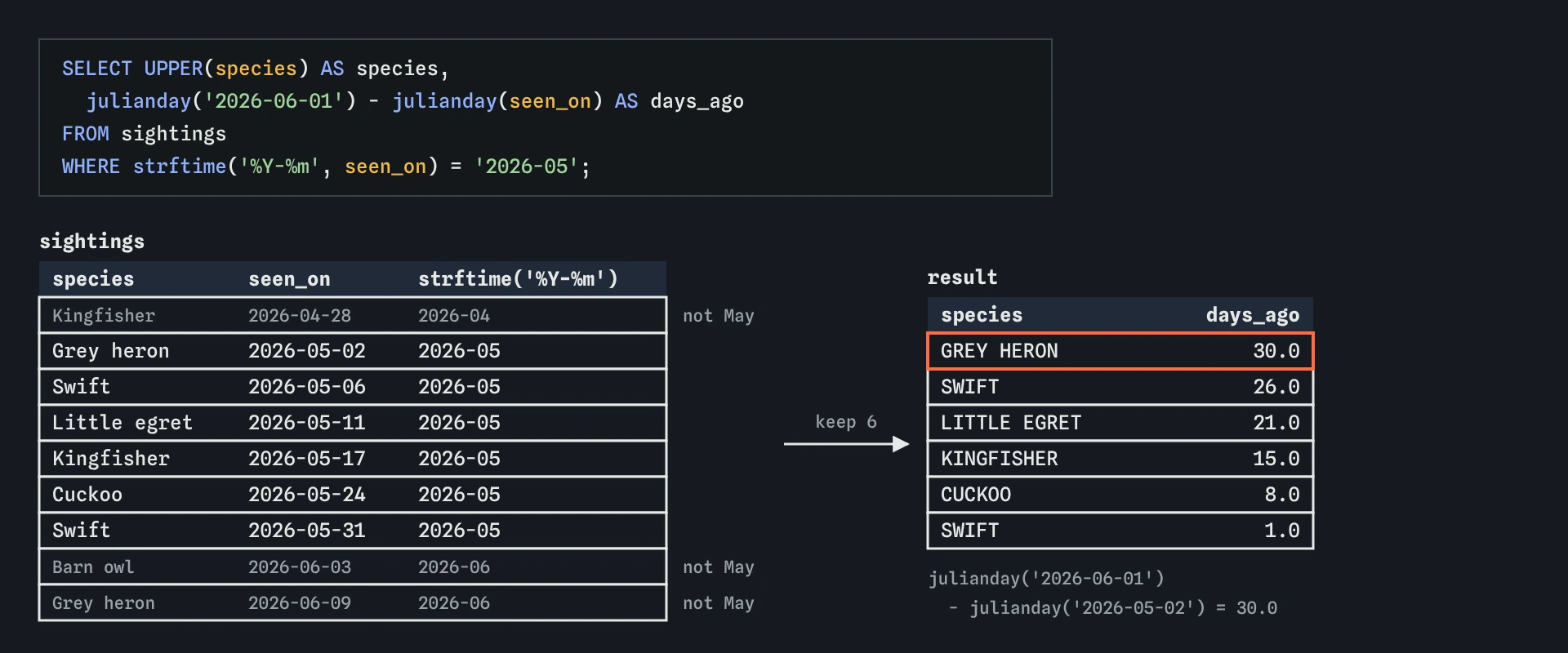
strftime cuts each date down to its month for the filter, then UPPER and julianday shape the six May rows for the newsletter.How do you change case and measure text?
UPPER and LOWER change the case of every letter. They are useful for display and for comparing text that was typed inconsistently. The members table has emails like [email protected] and [email protected]. Email addresses are not case-sensitive in practice, so LOWER(email) gives a tidy, comparable version.
LENGTH returns the number of characters. It is handy for spotting data problems: a postcode that is too long, a code with a stray space, a name that is suspiciously short. In SQLite, UPPER and LOWER only change English letters A to Z by default, the same limit as LIKE. Names with accents keep their original case.
SELECT name, LOWER(email) AS email, LENGTH(name) AS name_length
FROM members;
How do you clean up spaces and swap text?
Look at member 3 in the Tables view. The name is stored as two spaces followed by Jo Marsh. That happens all the time when data is pasted from a spreadsheet. The name looks fine on screen but sorts first and fails exact matches. TRIM removes spaces from both ends, and LTRIM and RTRIM remove them from one side only.
REPLACE(text, find, with) swaps every copy of one piece of text for another. REPLACE(place, ' hide', ' Hide') capitalises a word, and REPLACE(phone, ' ', '') strips spaces from a phone number. It is case-sensitive and replaces every occurrence, so test it on a few rows before trusting it.
To join text together, SQLite uses the || operator: name || ' <' || email || '>'. MySQL uses CONCAT(a, b) instead, because || means OR there by default. PostgreSQL supports both. SQLite 3.44 and later also has CONCAT, which treats NULL as empty text, unlike ||.
SELECT TRIM(name) || ' <' || LOWER(email) || '>' AS contact
FROM members
ORDER BY TRIM(name);
How do SUBSTR and INSTR cut text apart?
SUBSTR(text, start, length) returns part of a string. Positions start at 1, so SUBSTR('Kingfisher', 1, 4) is King. Leave out the length to take everything from the start position to the end. A negative start counts from the right: SUBSTR(email, -3) returns the last three characters.
INSTR(text, find) returns the position of the first match, or 0 if there is none. Combined with SUBSTR, it lets you split text at a character. The domain of an email is everything after the @ sign: find the @ with INSTR, then take what comes after it.
PostgreSQL calls these SUBSTRING and POSITION (it also accepts substr and strpos), and MySQL has SUBSTRING and LOCATE. If a query from somewhere else fails with no such function, the name is usually the only thing to change.
SELECT email,
  INSTR(email, '@') AS at_sign,
  LOWER(SUBSTR(email, INSTR(email, '@') + 1)) AS domain
FROM members;
How does SQLite store dates?
SQLite has no separate date type. The usual choice, and the one every lesson here uses, is text in the form YYYY-MM-DD, such as 2026-05-17. That format sorts correctly as plain text, compares correctly with < and >, and works with every date function. Year first, then month, then day, always with two digits for month and day.
Dates written any other way cause trouble. 17/05/2026 sorts by day, not by date, and the date functions return NULL for it. If you import data from a spreadsheet, convert the dates to YYYY-MM-DD before you rely on them. PostgreSQL and MySQL have real DATE and TIMESTAMP types that reject invalid dates, which is one of the bigger differences you will notice when you move.
SELECT species, seen_on
FROM sightings
WHERE seen_on >= '2026-05-01'
  AND seen_on < '2026-06-01'
ORDER BY seen_on;
How do you move a date forwards or backwards?
date() returns a date as YYYY-MM-DD text, and it accepts modifiers that move it. date('2026-05-01', '+7 days') is 2026-05-08. You can use days, months and years, positive or negative, and chain several: date(joined_on, '+1 year', '-1 day') is the last day of a one-year membership. date('now') gives today's date in UTC.
Months are the tricky unit. date('2026-01-31', '+1 month') gives 2026-03-03, because 31 February does not exist and SQLite rolls the extra days forward. If you need the end of next month, go to the start of the month first: date('2026-01-31', 'start of month', '+2 months', '-1 day') is 2026-02-28.
In PostgreSQL the same idea is written with intervals, such as DATE '2026-05-01' + INTERVAL '7 days'. MySQL uses DATE_ADD('2026-05-01', INTERVAL 7 DAY).
SELECT name, joined_on,
  date(joined_on, '+1 year') AS renewal,
  date(joined_on, 'start of month') AS joined_month
FROM members;
How do you pull out the year or month?
strftime(format, date) formats a date using codes: %Y is the four-digit year, %m the month, %d the day and %w the weekday as a number with Sunday as 0. strftime('%Y-%m', seen_on) turns 2026-05-17 into 2026-05, which is ideal for monthly reports and for grouping later on.
strftime always returns text. That trips people up: strftime('%Y', joined_on) = 2025 compares text with a number, and in SQLite they are never equal, so the query returns nothing, with no error. Compare with '2025' in quotes. PostgreSQL uses EXTRACT(YEAR FROM d) or to_char, and MySQL has YEAR(d) and DATE_FORMAT.
SELECT species, seen_on, strftime('%Y-%m', seen_on) AS month
FROM sightings
WHERE strftime('%Y-%m', seen_on) = '2026-05';
How do you count the days between two dates?
julianday(date) returns the number of days since a fixed point far in the past, as a decimal number. Subtract two of them and you get the days between: julianday('2026-06-01') - julianday('2026-05-02') is 30.0. Put the later date first to get a positive number.
The result is a decimal because julianday also counts fractions of a day when the value has a time. For plain dates it is always a whole number with .0 on the end. Wrap it in CAST(... AS INTEGER) or ROUND if you want a tidy whole number for display. In PostgreSQL, subtracting one DATE from another gives whole days directly, and MySQL has DATEDIFF.
SELECT species, seen_on,
  CAST(julianday('2026-06-01') - julianday(seen_on) AS INTEGER) AS days_ago
FROM sightings
ORDER BY days_ago;
Field notes
- A function returns a new value for each row and never changes the stored data.
- SQLite stores dates as
YYYY-MM-DDtext, which sorts and compares correctly. strftime('%Y-%m', seen_on)pulls out the year and month as text.- Subtract two
julianday()values to count the days between two dates.
Easy to get wrong
Positions start at 1 in SQL. Starting at 0 with a length of 1 returns empty text.
strftime returns text, and SQLite treats the text '2025' and the number 2025 as different values.
Earlier minus later gives a negative number. Put the later date first.
Leading spaces make an exact match fail even though the name looks right on screen.
Questions people ask
Why does a date function return NULL?
The input was not a date SQLite understands. Check the format is YYYY-MM-DD with two-digit months and days. 2026-5-7 is not valid.
How do I get today's date?
date('now') gives today's date in UTC. Add 'localtime' as a modifier for the computer's local date. Results that use it change every day, so the lessons use fixed dates instead.
Can I store times as well?
Yes, as text in the form YYYY-MM-DD HH:MM:SS. The same functions work, and time() and datetime() return the time or both parts.
Is LENGTH the number of bytes or characters?
For text, characters. LENGTH('café') is 4. Use OCTET_LENGTH in recent SQLite versions if you need the size in bytes.