Why do results need ORDER BY?
A table has no built-in order. When you run SELECT without ORDER BY, SQLite returns rows in whatever order is quickest for it to read them. On a small table that often looks like id order, which tempts people to rely on it. Add an index, change the query or move to another database, and the order can change without warning.
If whoever reads the result needs a particular order, say so with ORDER BY. It is the only way to get a guaranteed order. This lesson uses a library catalogue: each book has a title, author, genre, the year it was published, its page count and how many times it has been borrowed.
SELECT title, published_year
FROM books
ORDER BY published_year;
How do ASC and DESC work?
ASC means ascending: smallest numbers, earliest dates and A before Z first. It is the default, so ORDER BY title and ORDER BY title ASC do the same thing. DESC means descending: biggest, latest, Z first.
Text sorts by character, so capital letters and lowercase letters are not mixed together as you might expect. In SQLite's default, every uppercase letter sorts before every lowercase one. That rarely makes a difference for neat titles, and it can surprise you on data typed by people. Numbers sort as numbers, and YYYY-MM-DD dates sort correctly as text.
SELECT title, loans
FROM books
ORDER BY loans DESC;
How do you sort by more than one column?
List several columns separated by commas. The database sorts by the first one, and only uses the second to order rows that tie on the first. Here books are grouped by genre A to Z, and within each genre the most borrowed comes first.
Each column takes its own direction. ORDER BY genre, loans DESC is genre ascending and loans descending. A common slip is to write ORDER BY genre DESC, loans hoping both go descending; the DESC only applies to the column it follows.
You can sort by a column that is not in the SELECT list. That works, but the reader cannot see why rows are in that order, so it is often kinder to show it. Sorting by a column you hide is fine for a final report; while you are still writing the query, keep it visible so you can check the order by eye.
SELECT genre, title, loans
FROM books
ORDER BY genre, loans DESC;
Where do NULLs go when you sort?
Two books have no page count stored, and one has no published year. Those cells are NULL, meaning unknown. In SQLite, NULL counts as smaller than any value, so it comes first in ascending order and last in descending order.
Other databases differ. PostgreSQL treats NULL as larger than every value, so it comes last when ascending. To make the choice explicit in any of them, add NULLS FIRST or NULLS LAST after the direction. SQLite has supported these since version 3.30. MySQL does not support them, and there the usual trick is to sort on whether the column is null first.
SELECT title, pages
FROM books
ORDER BY pages NULLS LAST;
How does LIMIT answer top-N questions?
LIMIT 3 keeps the first three rows of the result and drops the rest. On its own it gives you three rows in no particular order, which is useful for peeking at a big table and nothing else. Paired with ORDER BY, it answers questions like "the three most borrowed books" or "the five newest titles".
The database always sorts first and limits second, however you think about it. Open the Rows view on the task query: you will see the ORDER BY step arrange all twelve books, then the LIMIT step keep the top three and cross out the other nine.
PostgreSQL and MySQL use LIMIT too. SQL Server writes SELECT TOP 3 … instead, and the SQL standard spells it FETCH FIRST 3 ROWS ONLY, which PostgreSQL also accepts.
SELECT title, published_year
FROM books
ORDER BY published_year DESC
LIMIT 5;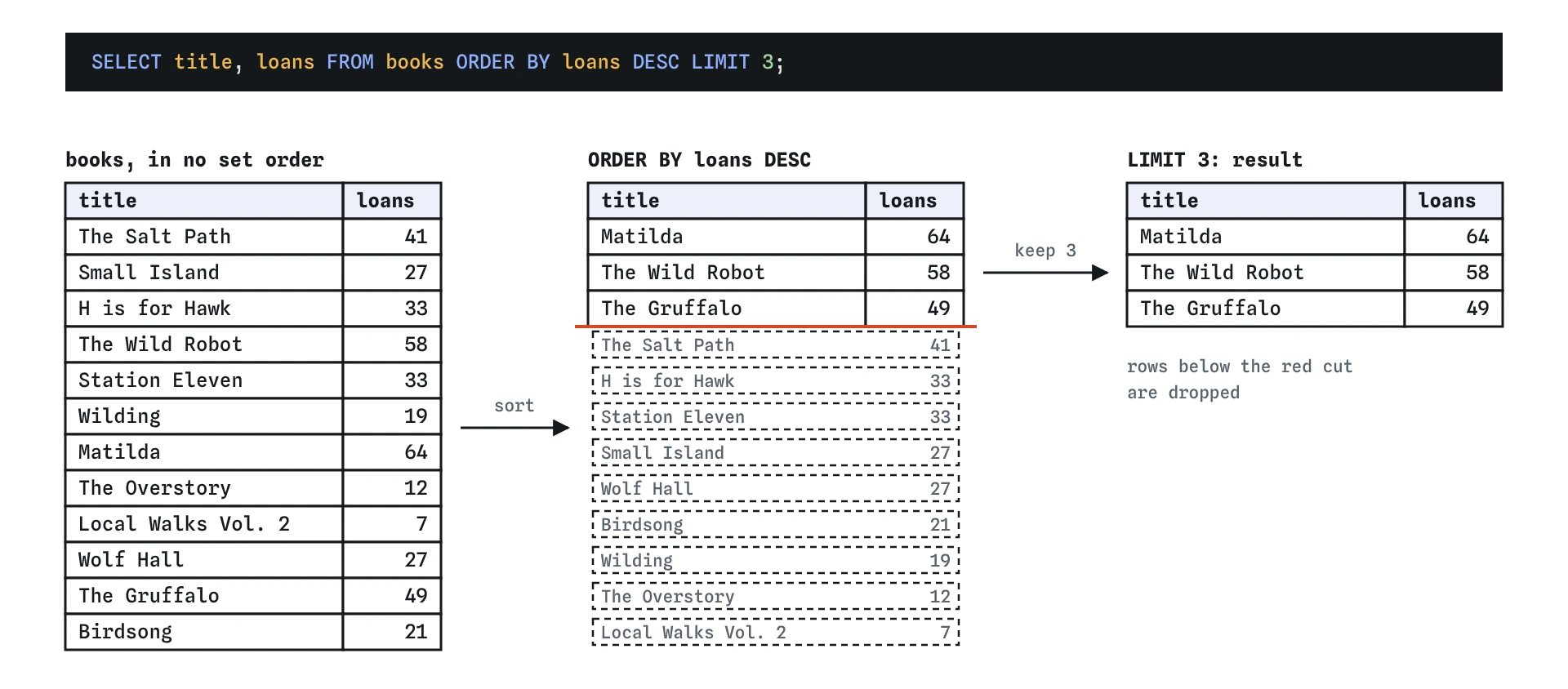
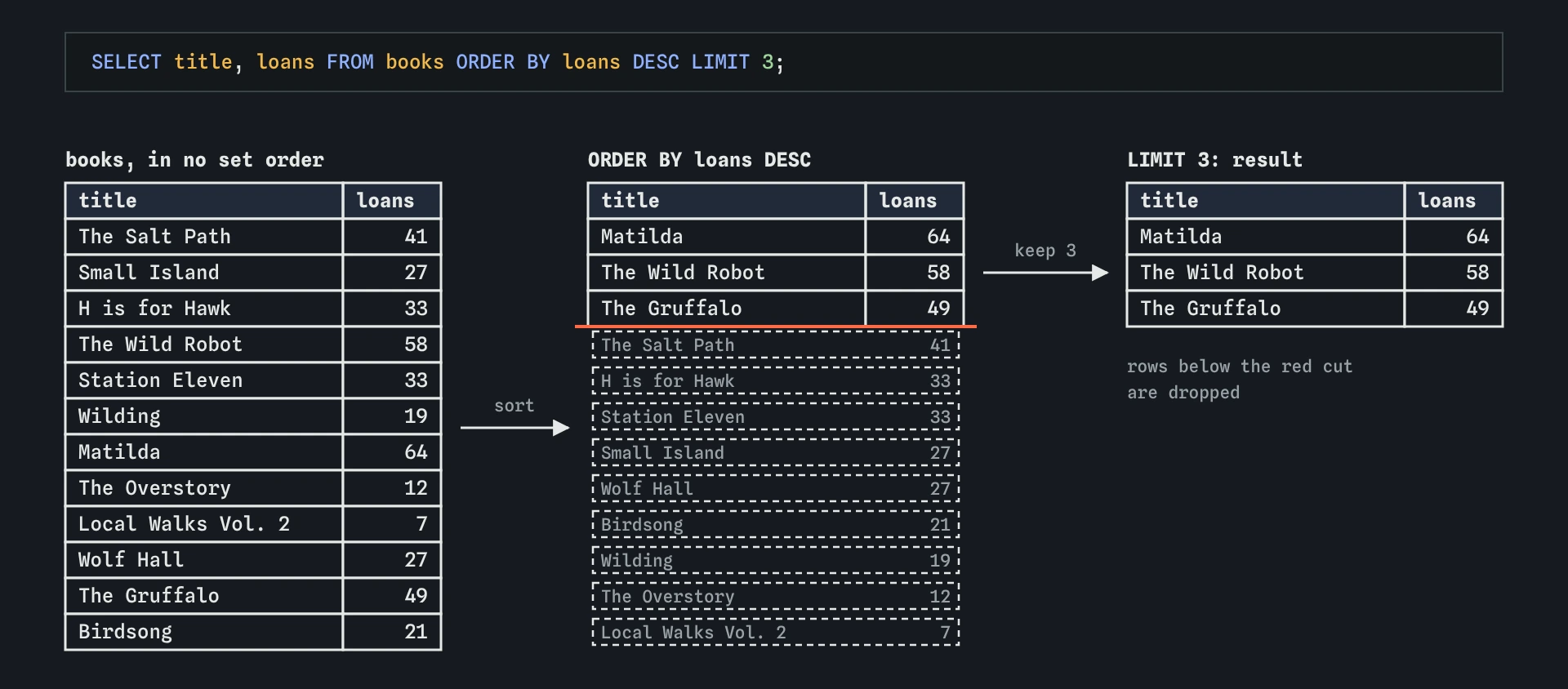
ORDER BY loans DESC sorts every book first, then LIMIT 3 keeps the top of that list. Without the sort, LIMIT would keep three books in no useful order.What does OFFSET do?
OFFSET skips a number of rows before LIMIT starts counting. LIMIT 3 OFFSET 3 gives rows four to six. Websites use this for pages of results: page one is OFFSET 0, page two is OFFSET 3, and so on.
Paging only works with a stable ORDER BY. If two rows tie and you have no tie-breaker, the database is free to put them in a different order on each request, and a book can appear on two pages or on none. Include a unique column, such as id, as the last sort column when you page.
On very large tables, a big OFFSET gets slow, because the database still has to step past every skipped row. That will not matter for this course, and it is a reason real apps sometimes page by "rows after the last id I saw" instead.
SELECT title, loans
FROM books
ORDER BY loans DESC, id
LIMIT 3 OFFSET 3;
What happens to ties at the cut-off?
H is for Hawk and Station Eleven both have 33 loans. Small Island and Wolf Hall both have 27. Ask for the top five by loans and the fifth place is a tie between two books, yet LIMIT 5 returns exactly five rows. Which one makes the cut is down to the database, unless you add a tie-breaker.
Decide what fair looks like for your question. A second sort column, such as title, makes the result repeatable. If both tied books should be included, LIMIT alone cannot do it, because it counts rows, not values. The lesson on ranking shows how to keep every row that shares a place.
SELECT title, loans
FROM books
ORDER BY loans DESC, title
LIMIT 5;
Where do ORDER BY and LIMIT go in a query?
Clauses are written in a fixed order: SELECT, FROM, WHERE, then ORDER BY, then LIMIT and OFFSET. Put them in another order and you get a syntax error. The order they run in follows the same idea: filter, then pick columns, then sort, then cut.
When you read a query an AI wrote for a "top 10" question, check three things. Is there an ORDER BY at all? Is the direction right for the question, DESC for biggest? And are ties handled in a way you are happy with?
SELECT title, loans
FROM books
WHERE genre = 'Fiction'
ORDER BY loans DESC
LIMIT 2;
Field notes
- A table has no built-in order, so use
ORDER BYwhenever order matters. ASCsorts smallest first and is the default;DESCputs the biggest first.- With several sort columns, the second only orders rows that tie on the first.
LIMITkeeps the first rows after sorting, so pair it withORDER BY.
Easy to get wrong
Without ORDER BY, LIMIT keeps three rows in whatever order the database read them. That looks like an answer but means nothing.
The default is ascending, so this returns the three least borrowed books.
Each sort column has its own direction. DESC after genre does not carry over to loans.
LIMIT must be the last clause. Written first, it causes a syntax error.
Questions people ask
Can I sort by a column number, like ORDER BY 2?
Yes, ORDER BY 2 sorts by the second column in the SELECT list. It is short but fragile: add a column at the front and the sort changes with no warning. Use names.
Does ORDER BY change how the table is stored?
No. It only orders this result. The next query starts again with no order.
How do I sort text without caring about capitals?
Add COLLATE NOCASE after the column, as in ORDER BY title COLLATE NOCASE. SQLite then compares ASCII letters regardless of case.
Can I use LIMIT without ORDER BY?
Yes, for a quick look at a table. Do not use it when you need particular rows, because you have not said which rows you want.