What does SELECT actually do?
SELECT builds the result you see. It says which columns to show, in which order, and what to call them. FROM says which table the rows come from. The database reads FROM first, gathers the rows, and only then applies the SELECT list to each one, which is why you can open the Rows view and watch the FROM step appear before the SELECT step.
This lesson uses a bird club database. members lists the four people in the club, and sightings records each time a member saw a species, where, on what date and how many birds.
SELECT name, town
FROM members;
When should you use * and when should you name columns?
SELECT * returns every column in the order the table defines them. It is ideal for a first look: you learn the column names and see what real values look like. The Tables view gives you the same picture for every table at once.
For any query you plan to keep, name the columns. The result is narrower and easier to read, the query explains itself to the next person, and it keeps returning the same shape if someone later adds a column to the table. Apps that use * can break in odd ways when a new column appears, because the code expected a certain number of columns in a certain order.
AI tools often reach for SELECT * because it never fails on a wrong column name. When you see it in generated code, ask which columns are actually used and list those instead.
SELECT *
FROM sightings;
Does the order of columns matter?
The order you write the columns is the order they appear in the result. The table does not care; the stored data stays the same. Put the column people read first at the front. For a list of sightings, the species and place usually matter more than the id, so lead with them.
You can repeat a column, mix * with named columns, or ask for the same column twice. Those are legal, though rarely useful. One form you will meet in real code is table.column, such as sightings.species. It means the same as species here, and becomes useful once a query reads from two tables that share a column name.
SELECT species, place, seen_on, id
FROM sightings;
How do you remove repeated rows with DISTINCT?
Ask for just the species column and you get ten rows, one per sighting, with Grey heron three times. Each row of the result comes from one row of the table, so repeats in the table become repeats in the answer.
SELECT DISTINCT keeps one copy of each different result row. With one column, that gives the club's species list: Grey heron, Kingfisher, Red kite, Dipper, Buzzard. Try it in the editor and compare the row counts.
SELECT DISTINCT species
FROM sightings;
What does DISTINCT compare when there are several columns?
DISTINCT looks at the whole result row, every column together. SELECT DISTINCT place, species keeps one row per pair. Grey heron at Mill Pond appears once, Red kite at Clee Hill appears once, and Kingfisher appears twice because it was seen at two different places.
That is the most common surprise with DISTINCT. Add one more column with varied values, such as seen_on, and the duplicates come back, since every row is now different somewhere. If you want one row per species, select only species. Later, GROUP BY lets you keep one row per species and still count or total the others.
Text is compared exactly, so 'Grey heron' and 'grey heron' count as different values. Real data entered by people often has those near duplicates, and DISTINCT will show them side by side, which is a handy way to spot them.
SELECT DISTINCT place, species
FROM sightings;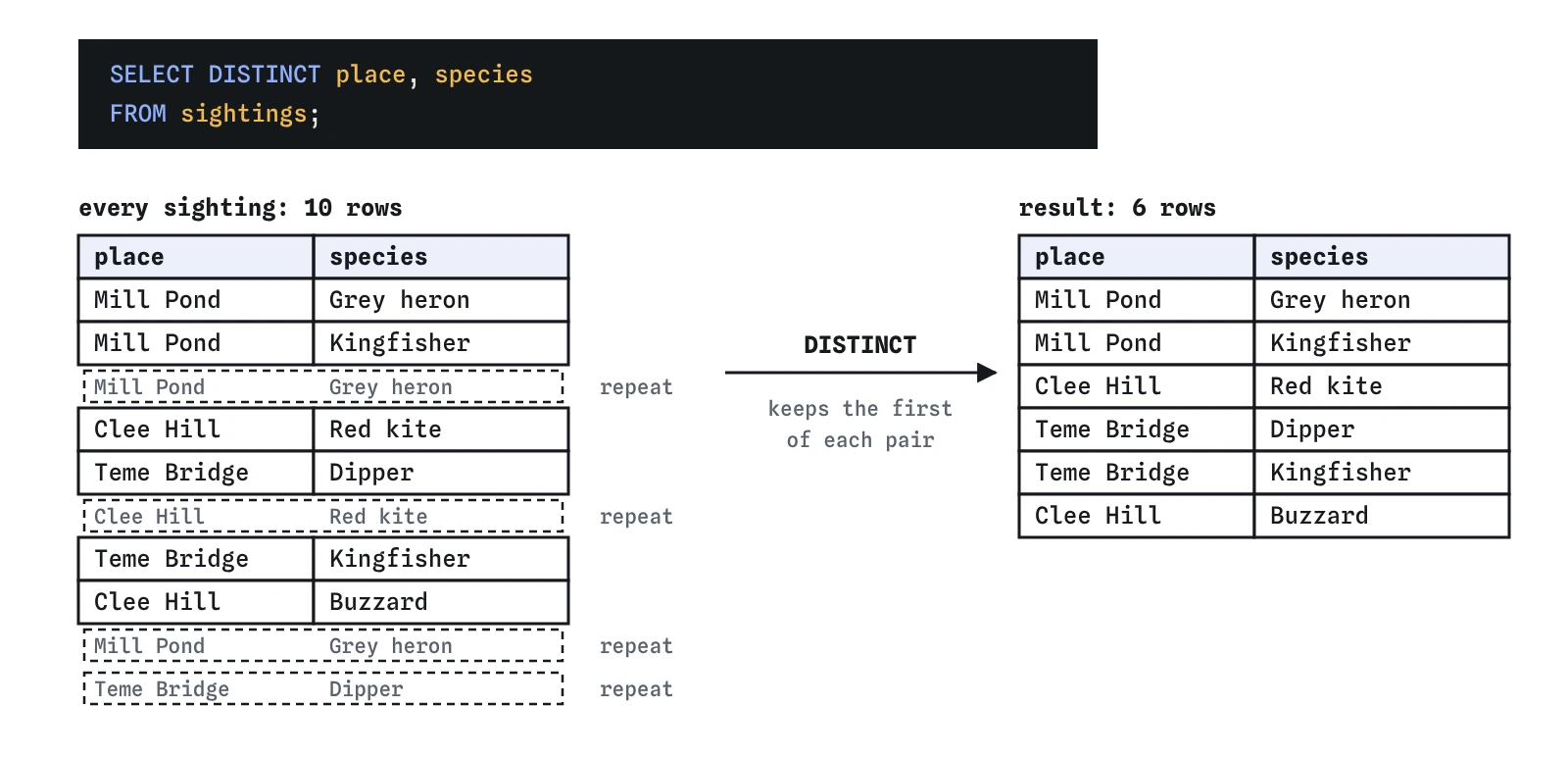
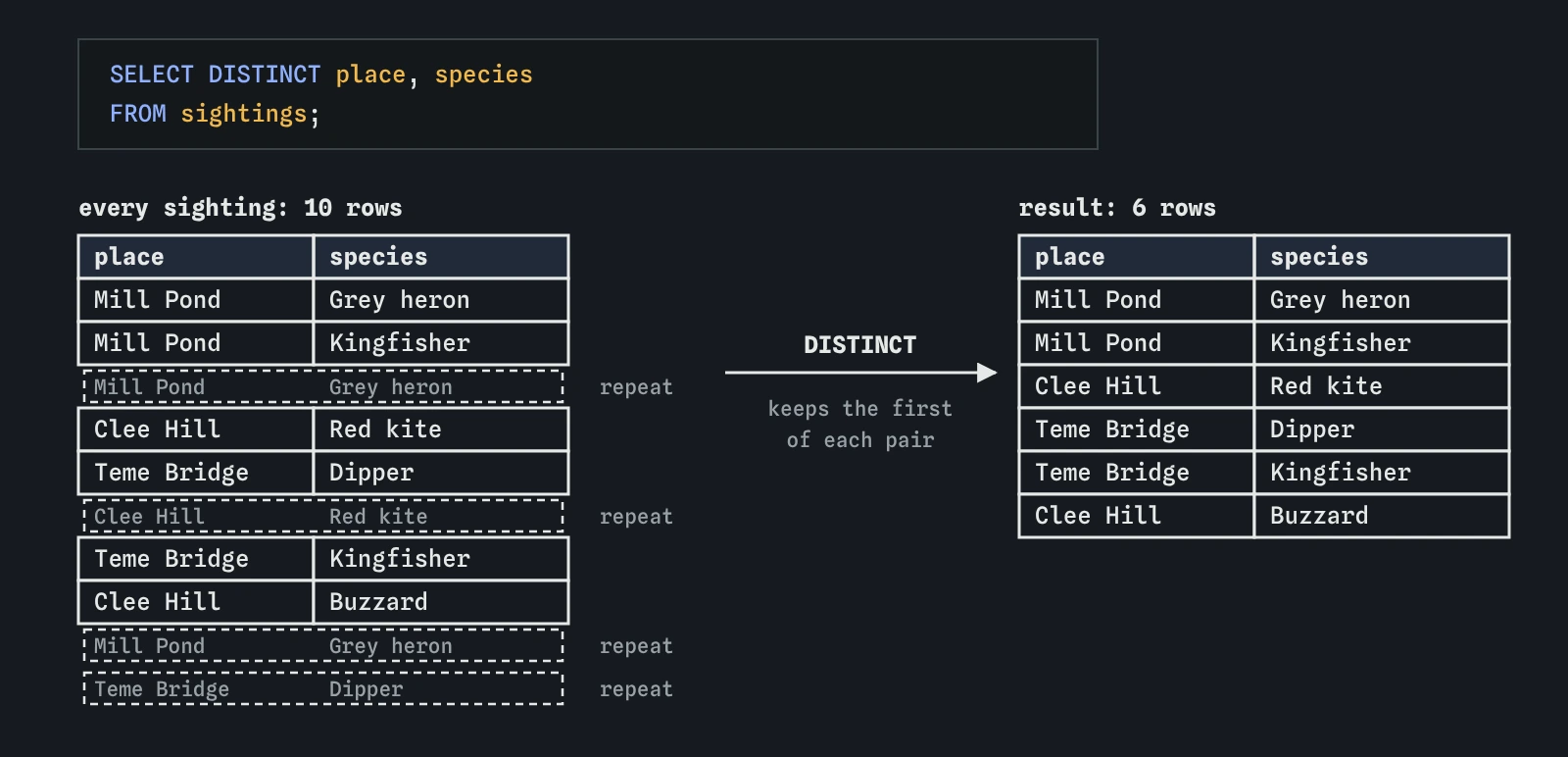
DISTINCT compares whole result rows. Grey heron at Mill Pond appears three times but stays once, while Kingfisher stays twice because it was seen at two different places.How do you write comments in SQL?
Two hyphens, --, start a comment that runs to the end of the line. /* and */ wrap a comment that can span several lines. The database ignores both. Use them to say what question a query answers or why a choice was made, such as why a column is left out.
Comments are also a quick way to switch a line off while you experiment. Put -- in front of a column and run again to see the result without it. Be careful with commas when you do this: commenting out the last column leaves a comma hanging before FROM.
/* Club species list,
   used for the newsletter */
SELECT DISTINCT species -- one row per species
FROM sightings;
Do keywords have to be in capitals?
No. select, SELECT and Select all work, because SQL keywords are case-insensitive. Most people write keywords in capitals and names in lowercase, so the shape of the query stands out: you can scan down the capitals and see SELECT, FROM, WHERE at a glance. This course follows that style.
Table and column names are case-insensitive in SQLite too, so Species finds the species column. The values inside the table are a different matter. 'Kingfisher' and 'kingfisher' are different text, and that difference shows up as soon as you start filtering rows in the next lesson.
select species from SIGHTINGS;Where do semicolons and line breaks go?
A semicolon ends a statement. With one query, the database often accepts it without the semicolon, but adding it every time is a good habit. As soon as you have two statements in a row, they must be separated by ;, or the database reads them as one broken statement.
Line breaks and extra spaces do not change the meaning. A short query fits on one line. Once it grows, put each clause on its own line, starting with the keyword, and indent continuation lines by two spaces. You will read your queries far more often than you write them, and a tidy layout makes a missing comma easy to spot.
When the editor holds several statements, every one of them runs, and the Result view shows the last one that returned rows.
SELECT name FROM members;
SELECT DISTINCT town FROM members;
Field notes
SELECT *is handy for a first look; name the columns in queries you keep.- Columns appear in the result in the order you list them after
SELECT. SELECT DISTINCTkeeps one copy of each different result row.- With several columns,
DISTINCTcompares the whole row, so each pair is kept once.
Easy to get wrong
DISTINCT works on the whole row. Adding a column with varied values, like a date, brings back the repeats you wanted to remove.
A trailing comma after the last column makes the database expect another column, so it reports an error near FROM.
A comment needs two hyphens. One hyphen is a minus sign, so the database tries to read the note as SQL and fails.
The brackets suggest DISTINCT applies to one column. It always applies to the whole row, so the brackets only mislead the reader.
Questions people ask
Does DISTINCT change the table?
No. A SELECT never changes stored data. DISTINCT only affects the rows in the result.
Why do my rows come back in a different order than I expected?
Without ORDER BY, the database may return rows in any order it finds convenient. It often looks like id order on small tables, but you cannot rely on it. Sorting comes in a later lesson.
Is DISTINCT slow?
It has to compare rows, so on very large tables it does extra work. On tables of a few thousand rows you will not notice. Use it when you need unique rows, and leave it out when the rows are already unique.
Can I select something that is not a column?
Yes. SELECT 2 + 3; works with no table at all, and you can mix calculations with columns. The lesson on calculations covers this.