Can a query work out new values?
Yes. Anything you write in the SELECT list is worked out once per row, and the answer becomes a column in the result. The table is not changed; the new column exists only in this result.
This lesson uses the bakery again, this time storing money as whole pence in integer columns: price_pence is what the customer pays and cost_pence is what the ingredients and packaging cost. Storing pence avoids the tiny rounding errors that decimal numbers bring, which is why many shops and payment systems do it. A Sourdough loaf at 420 means £4.20.
Run the query below and read the third column: 285 for Sourdough, 65 for the Seeded roll. Each row gets its own answer, worked out from its own values. You can also calculate with no table at all: SELECT 420 - 135; returns one row with 285, which is handy for testing a formula before you point it at real columns.
SELECT name, price_pence, price_pence - cost_pence
FROM products;
Which arithmetic operators does SQL have?
The usual four, plus one for remainders. They follow school rules: * and / happen before + and -, and brackets go first. When in doubt, add brackets. They cost nothing and make the intent plain to the next reader.
The order_lines table records what each order contained. If rolls are packed in bags of 6, quantity / 6 gives the number of full bags and quantity % 6 gives how many rolls are left over.
SELECT order_ref, quantity, quantity / 6 AS full_bags, quantity % 6 AS left_over
FROM order_lines;+add:price_pence + 50-subtract:price_pence - cost_pence*multiply:quantity * 2/divide:price_pence / 100.0%remainder after whole-number division:quantity % 6
How do you give a column a readable name with AS?
A calculated column gets an ugly default heading: the expression itself, such as price_pence - cost_pence. Add AS and a name after the expression to choose the heading. The name is called an alias. Use the same lowercase snake_case as real columns, such as profit_pence, so it is easy to type later.
AS is optional: price_pence - cost_pence profit_pence works too. Write AS anyway. A missing comma between two columns looks exactly like an alias without AS, and that bug is much easier to spot when every real alias says AS.
You can rename plain columns too. name AS product changes only the heading in the result. If an alias needs a space or a capital letter, wrap it in double quotes, as in AS "Profit (p)", though plain snake_case names are less fuss.
SELECT
  name AS product,
  price_pence - cost_pence AS profit_pence
FROM products;
Why does 285 / 100 give 2?
In SQLite, dividing a whole number by a whole number gives a whole number, and the remainder is thrown away. 285 / 100 is 2, not 2.85. No error, no warning, and your profits have shrunk. PostgreSQL and SQL Server do the same. MySQL is the odd one out and returns a decimal.
The fix is to make one side a decimal. 285 / 100.0 is 2.85. The decimal point is enough to change the kind of division. You can also multiply by 1.0 first, or use CAST(x AS REAL), but 100.0 is the shortest and the easiest to read.
This is one of the most common bugs in SQL written by people and AI tools alike, because the query looks right and the numbers look plausible. Whenever you see / between two integer columns or numbers, ask whether whole-number division is what you want. Sometimes it is, as with the bags of rolls above.
SELECT
  285 / 100 AS whole_pounds,
  285 / 100.0 AS exact_pounds,
  285 % 100 AS pence_left;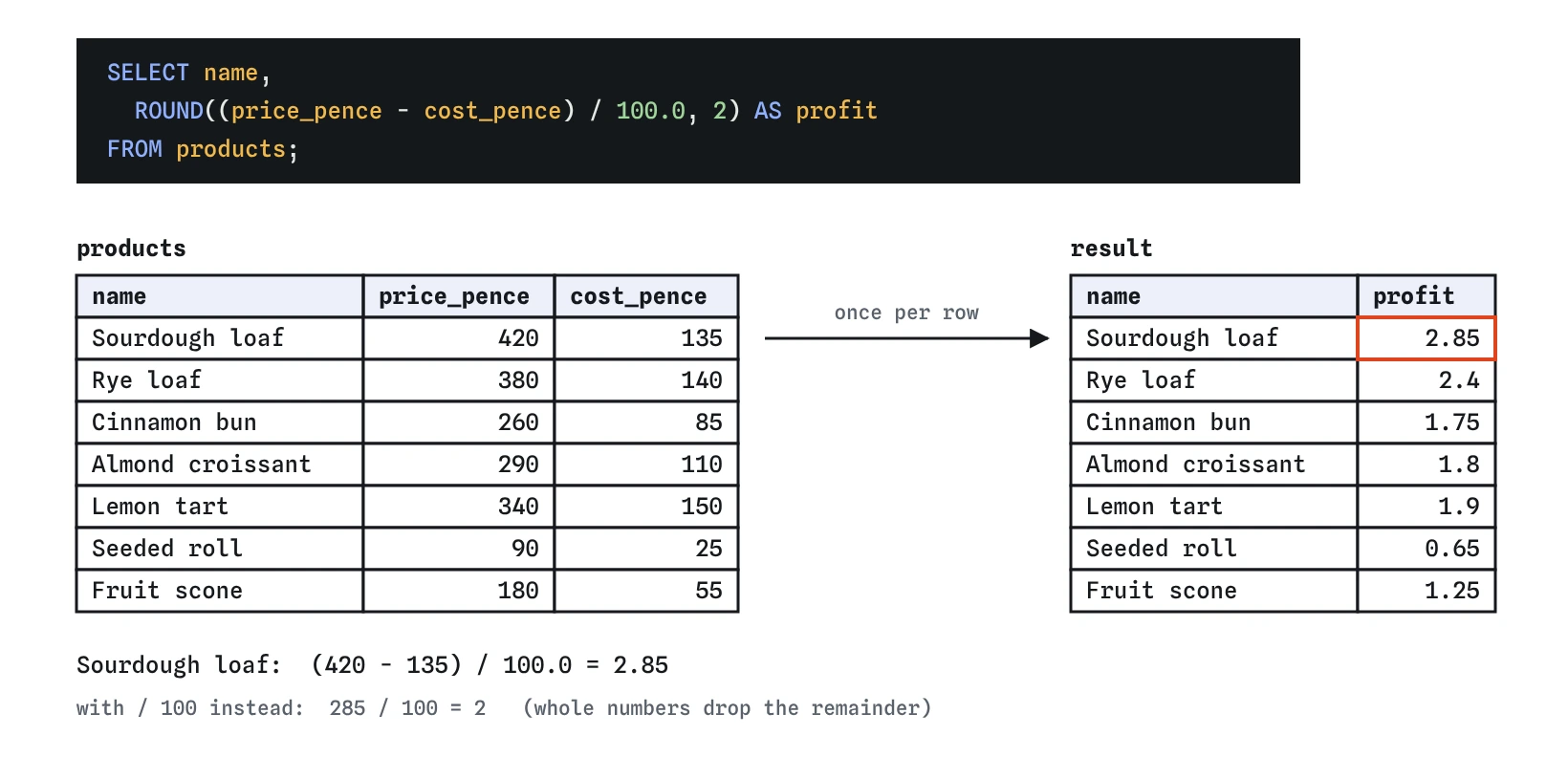
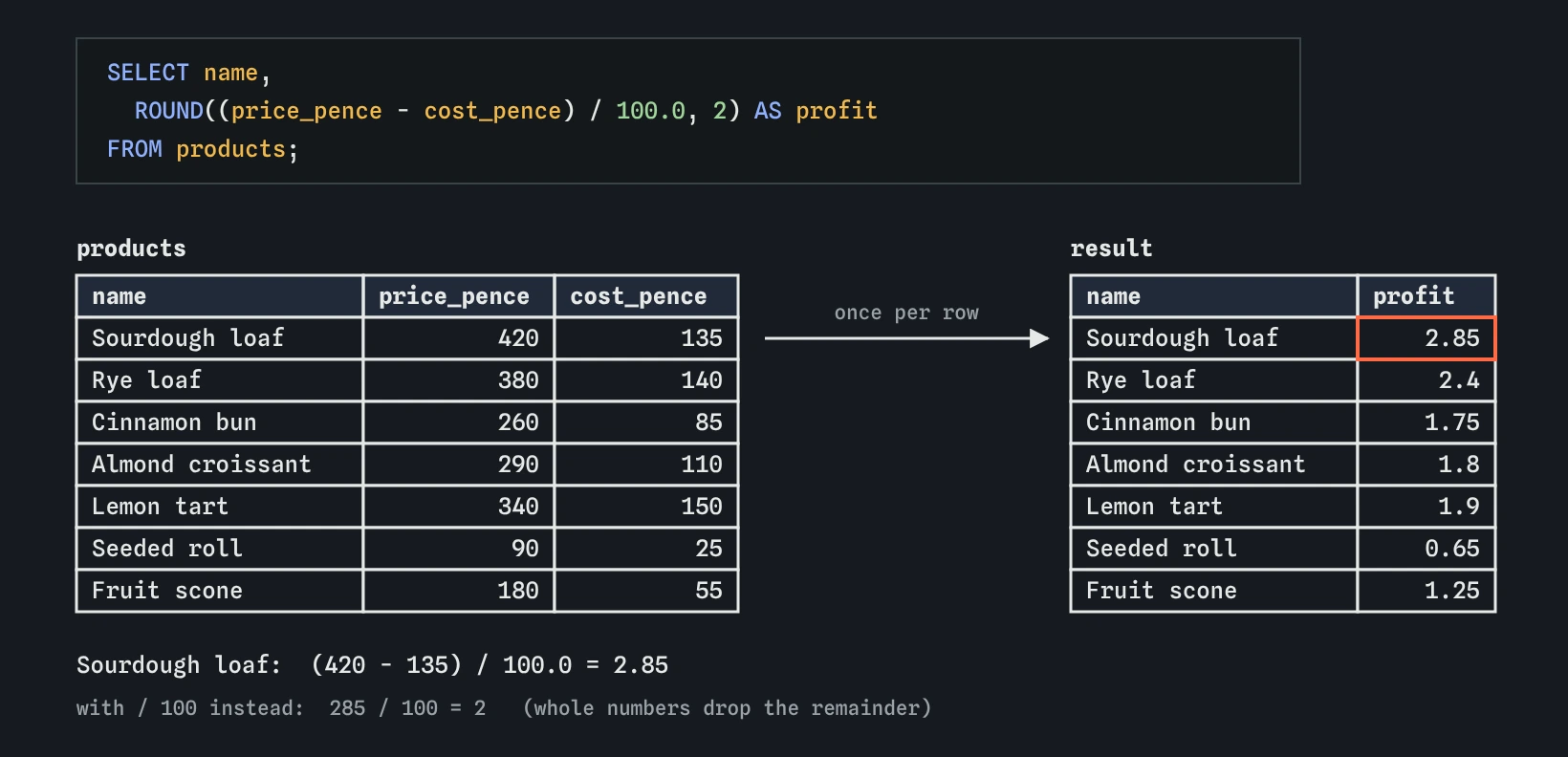
profit column. Dividing by 100.0 keeps the pence; dividing by 100 would turn 2.85 into 2.How do you round a result?
ROUND(value, places) rounds to that many decimal places. ROUND(2.857, 2) is 2.86. With no second argument it rounds to a whole number, but the answer is still a decimal, so ROUND(2.5) shows as 3.0.
Round at the end, once the calculation is done, and only for display. Rounding each step along the way lets small errors add up. SQLite drops trailing zeros when it shows a decimal, so £2.80 appears as 2.8. If you need exactly two decimal places as text, printf('%.2f', value) does that; the lesson on text functions covers it.
SELECT
  name,
  ROUND((price_pence - cost_pence) / 100.0, 2) AS profit,
  ROUND(100.0 * (price_pence - cost_pence) / price_pence, 1) AS margin_pct
FROM products;
How do you join pieces of text together?
|| joins two pieces of text into one. name || ' (' || category || ')' turns Rye loaf and Bread into Rye loaf (Bread). Numbers are turned into text automatically when you join them, so 'Bag of ' || 6 gives Bag of 6.
Do not use + for text in SQLite. It tries to treat both sides as numbers, text that does not start with digits becomes 0, and you get 0 back with no error. MySQL uses CONCAT(a, b) instead of ||, because || means OR there by default. PostgreSQL supports both.
SELECT name || ' (' || category || ')' AS label
FROM products;
Can you sort by a calculated column?
Yes. ORDER BY runs after SELECT, so it can use the alias you just created. The query below lists the most profitable products first. You can also repeat the expression itself in ORDER BY, which does the same thing.
WHERE is different. It runs before SELECT, so in most databases it cannot see your alias, and you have to repeat the expression. SQLite is lenient here and accepts the alias, but repeating the calculation keeps your query working elsewhere.
Open the Rows view to watch the order: FROM reads the rows, SELECT works out profit for each one, then ORDER BY arranges them by that new column.
SELECT
  name,
  ROUND((price_pence - cost_pence) / 100.0, 2) AS profit
FROM products
WHERE price_pence - cost_pence > 150
ORDER BY profit DESC;
What should you check in calculations an AI wrote?
Check units first: are you mixing pence and pounds, or minutes and hours? Then check every / for whole-number division. Then check where rounding happens, and that || rather than + joins text. Finally, work out one row by hand. If Sourdough's profit should be £2.85 and the result says 2, you have found a bug in a few seconds. Do the same for a cheap item and an expensive one, since rounding and division bugs often show only on certain values.
Field notes
- Expressions in the
SELECTlist are worked out once per row and leave the table unchanged. ASgives a calculated column a readable name, called an alias.- In SQLite, a whole number divided by a whole number drops the remainder, so 285 / 100 is 2.
- Divide by
100.0to keep decimals, and round only at the end withROUND.
Easy to get wrong
Both sides are integers, so SQLite drops the remainder and £2.85 becomes 2. A decimal on one side keeps the pence.
+ adds numbers. Text without leading digits counts as 0, so every row shows 0. || joins text.
Division happens before subtraction, so only the cost was divided. Brackets make the subtraction happen first.
A missing comma turns the second column into an alias for the first. Writing AS for every real alias makes this slip stand out.
Questions people ask
Does a calculated column get saved in the table?
No. It exists only in the result. To store a value you would use UPDATE, or define a generated column, both covered later.
Why store money in pence instead of pounds?
Decimal numbers like 0.1 cannot be stored exactly in binary, so sums can come out as 0.30000000000000004. Whole pence add up exactly. Convert to pounds only when you show the value.
What happens if I divide by zero?
SQLite returns NULL instead of an error. Other databases, such as PostgreSQL, stop with a division by zero error.
Can I use an alias inside another column in the same SELECT?
Not reliably. Each column in the list is worked out from the table's columns, so repeat the expression, or use a subquery or WITH step, covered later in the course.