What are you building?
The bakery owner wants a short report for May 2026: how each category of product sold. For each category, the report shows how many order lines there were, how many items went out of the door and how much money came in. Small categories that brought in less than 50 pounds are left off, because the owner only wants to talk about the ones that matter. The biggest earner goes at the top.
No new SQL appears here. Everything you need, you have already used: filtering, dates, counting, totals, grouping and group filters. What is new is putting them together for a real request, which is what most SQL work looks like. A clear request in plain English has to become a query that answers exactly that request, no more and no less.
The database has three tables. Open the schema tab and the Tables view before you write anything. customers and products describe people and things on sale. orders has one row per order line, and each line records the product's name, category and price at the moment of sale, plus the quantity, the date and a status of paid or cancelled. Walk-in customers have no customer_id.
Why does each order copy the product's details?
Prices change. If the bakery raises the sourdough price in June, the May report should still use the May price. Storing unit_price on each order line keeps a record of what the customer actually paid. The category and product name are copied for the same reason, and because the lessons on joining tables come next, so this report can be written from one table.
Once you can join tables, you will often look up names and categories from products instead. Price at the time of sale is one detail that real systems usually keep on the order, as here. That makes this table a realistic thing to report on.
How should you plan before typing?
Turn the request into a checklist before you write a line of SQL. Every phrase in the request becomes one requirement, and every requirement maps to one part of the query. Write it as a comment at the top of query.sql if it helps.
Notice that two of the filters are different kinds. "In May" and "not cancelled" are about single order lines, so they decide which rows are counted. "At least 50 in revenue" is about a whole category's total, which only exists after grouping. Spotting that difference before you start saves most of the debugging later.
- Only orders from 1 to 31 May 2026.
- Leave out cancelled orders.
- One row per category.
orders: the number of order lines in each category.items: the total quantity.revenue: quantity times unit price, added up, rounded to 2 places.- Only categories with revenue of 50 or more.
- Highest revenue first.
Which earlier lessons does each part use?
Each requirement comes straight from a lesson you have done. If a part feels shaky, go back to that lesson's examples for a minute before continuing. It is quicker than guessing.
- Filtering rows and Combining conditions:
WHEREwithANDfor the status. - Lists and ranges:
BETWEEN '2026-05-01' AND '2026-05-31'for the month. - Text and date functions: why YYYY-MM-DD text makes that range work, and
strftime('%Y-%m', ordered_on)as an alternative. - Calculations and column names:
qty * unit_price, andASto name each column. - Counting and totals:
COUNT(*),SUMandROUND. - Missing values: why counting
customer_idwould skip walk-ins. - Grouping rows:
GROUP BY category. - Filtering groups:
HAVINGfor the revenue threshold. - Sorting and limiting:
ORDER BY revenue DESC.
How do you build it one step at a time?
Start with the rows. Write a plain SELECT with the two row filters and no grouping at all, and look at what comes back. May has 27 order lines, two of them cancelled, so with both filters you should see 25 rows. Open the Rows view: the WHERE step shows each April and June row dropped for its date and each cancelled row dropped for its status. If the row list is wrong here, nothing built on top of it can be right.
Next, add the calculation as a normal column, qty * unit_price AS line_total, while the rows are still visible. Check two or three lines by hand: 6 cinnamon buns at 2.60 is 15.60. It is much easier to catch a wrong formula on single rows than inside a total.
Now group. Replace the column list with category and the three summaries, and add GROUP BY category. The Rows view's GROUP BY step shows the 25 lines gathered into four piles, and the SELECT step turns each pile into one row. Then add HAVING SUM(qty * unit_price) >= 50 and watch Drinks fall away at the HAVING step. Finally, sort with ORDER BY revenue DESC.
-- Step 1: the rows that should be counted
SELECT id, category, qty, unit_price,
  qty * unit_price AS line_total,
  ordered_on, status
FROM orders
WHERE ordered_on BETWEEN '2026-05-01' AND '2026-05-31'
  AND status <> 'cancelled'
ORDER BY category, ordered_on;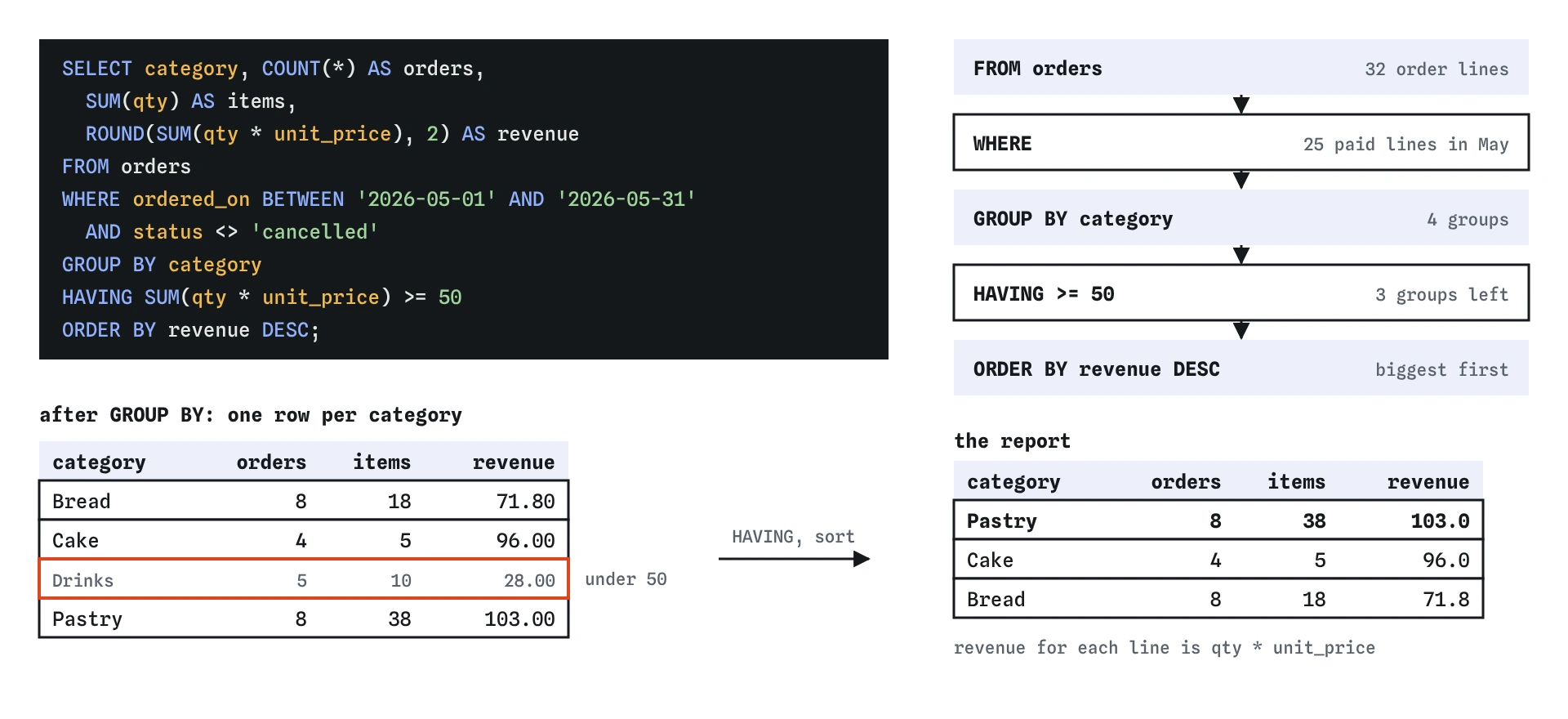
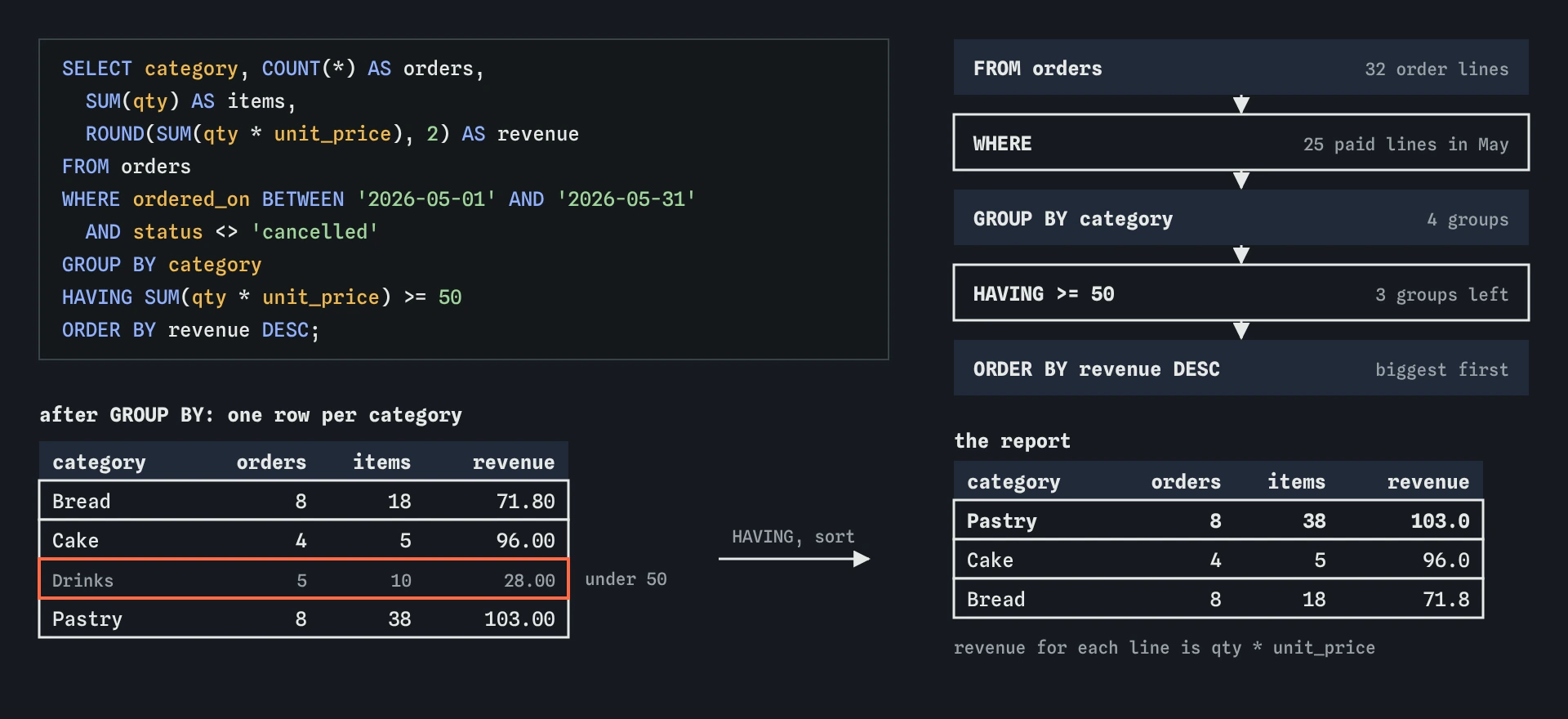
WHERE decide which order lines count, GROUP BY and HAVING work on whole categories, so Drinks at 28.00 is left off before the report is sorted.How can you check your own report?
A report that runs is not the same as a report that is right. Before you hand it over, check it against the data in a few independent ways. None of these take long, and they catch the mistakes that look most believable.
The strongest check is a total that does not depend on grouping. Add up the revenue column of your report, then add back any categories HAVING removed. It should equal one ungrouped SUM over the same filtered rows. The query below gives 298.8, which is 103.0 + 96.0 + 71.8 for the report, plus 28.0 for Drinks.
SELECT COUNT(*) AS lines,
  SUM(qty) AS items,
  ROUND(SUM(qty * unit_price), 2) AS revenue
FROM orders
WHERE ordered_on BETWEEN '2026-05-01' AND '2026-05-31'
AND status <> 'cancelled';- Totals add up: report rows plus removed groups equal the ungrouped total.
- One category by hand: list the Cake lines for May and add them yourself.
- Edge dates: the orders on 30 April, 31 May and 1 June are the ones a wrong range gets wrong.
- Cancelled orders: there are two in May. Removing the status filter should change exactly the categories they belong to.
- Column names: the owner will read
revenue, notROUND(SUM(qty * unit_price), 2).
What are the common ways this report goes wrong?
Each of these mistakes produces a report that looks reasonable. That is what makes them dangerous, and why the checks above matter. The Break it exercise contains three of them.
- Forgetting the status filter, so cancelled orders count as income.
- Counting a nullable column, such as
COUNT(customer_id), which skips walk-in sales. - Putting the revenue threshold in
WHERE, which fails with a misuse of aggregate error. - Putting the status filter in
HAVING, where SQLite tests one arbitrary row of each group. - A date range that ends at
'2026-05-30', or one that uses< '2026-05-31'and loses the last day. - Sorting ascending by leaving out
DESC. - Rounding each line before adding, so the total drifts by a penny or two.
Where can you take it next?
Once the category report matches, try these variations against the same data. Each one uses only what you know, and each makes you rethink one part of the plan instead of copying the whole query.
When you are comfortable, write the requests down in plain English first, as you did here, and then build each query in the same layers: rows, calculation, groups, group filter, order. That habit carries straight into the lessons on joining tables, where the row step gets bigger and checking it first helps even more.
-- Stretch: top products in May by revenue
SELECT product_name,
  SUM(qty) AS items,
  ROUND(SUM(qty * unit_price), 2) AS revenue
FROM orders
WHERE ordered_on BETWEEN '2026-05-01' AND '2026-05-31'
  AND status <> 'cancelled'
GROUP BY product_name
ORDER BY revenue DESC
LIMIT 3;- Top three products in May by revenue, as in the example above.
- Revenue per week, grouping by
strftime('%W', ordered_on). - The average order line value per category, rounded to 2 places.
- How much revenue came from walk-in customers compared with known customers, grouping by
customer_id IS NULL. - The same category report for April and June, to see which months were quiet.
Field notes
- Turn each phrase of the request into a checklist item before writing any SQL.
- Row conditions like the month and cancelled orders belong in
WHERE. - A condition on a category total, like revenue of at least 50, belongs in
HAVING. - Build in layers: rows first, then the calculation, then groups, then the group filter.
Easy to get wrong
A threshold on a category's total is a group filter. WHERE cannot see totals, so SQLite rejects the query.
Status belongs to single rows. In HAVING it tests one arbitrary row per group, and the cancelled rows are still counted.
May has 31 days. A range that stops early loses the last day's sales without any error.
Round once, after adding. Rounding every line first changes the total.
Questions people ask
Does my query have to match the solution exactly?
No. The check compares your result with the correct one, so any query that produces the same rows, columns and order passes. LIKE '2026-05%' instead of BETWEEN, for example, is fine.
Why use BETWEEN for the dates?
It reads clearly and includes both ends. With dates that also have times, use >= '2026-05-01' AND < '2026-06-01' instead, because a time on 31 May sorts after the plain text 2026-05-31.
Can I put revenue in HAVING by its alias?
In SQLite and MySQL, HAVING revenue >= 50 works. PostgreSQL needs the full SUM(qty * unit_price). Note that the alias is the rounded value, which can matter right at the threshold.
How would this look with separate product and order tables?
You would join orders to products to get the category. The next lessons, starting with keys and relationships, build up to that.