What does the nav element tell the browser?
The <nav> element marks a block of major navigation links. Browsers expose it as a navigation landmark. Screen reader users can list the landmarks on a page and jump straight to the menu, or past it, in one keystroke. A <div> with the same links gives them nothing to jump to.
Keep <nav> for the important link groups: the main site menu, a table of contents, breadcrumbs, pagination. A few links in a paragraph or the small legal links in a footer do not need it. If every group of links becomes a nav, the landmark list fills up and stops being a shortcut.
The element has no default look beyond being a block. Your menu still needs CSS to become a horizontal bar or a sidebar. The markup describes what the links are, and the stylesheet decides where they sit.
Why put the links in a list?
A menu is a list of destinations, so a <ul> with one <li> per link is the natural structure. Screen readers announce "list, 5 items" when they enter it, which tells the user how long the menu is before they start. With bare links in a row, that count is missing.
Lists also give you clean hooks for CSS. You can remove the bullets with list-style: none, lay the items out with flexbox, and add spacing without stray spaces between inline links. Use <ol> when order matters, as in breadcrumbs or the steps of a checkout.
Safari with VoiceOver drops list semantics when bullets are removed by CSS, in some versions. Inside a <nav> that loss is much smaller because the landmark still names the group. Some teams add role="list" to the <ul> to bring the count back, which is harmless.
<nav aria-label="Main">
  <ul>
    <li><a href="/">Home</a></li>
    <li><a href="/walks">Walks</a></li>
    <li><a href="/sightings">Sightings</a></li>
    <li><a href="/join">Join</a></li>
  </ul>
</nav>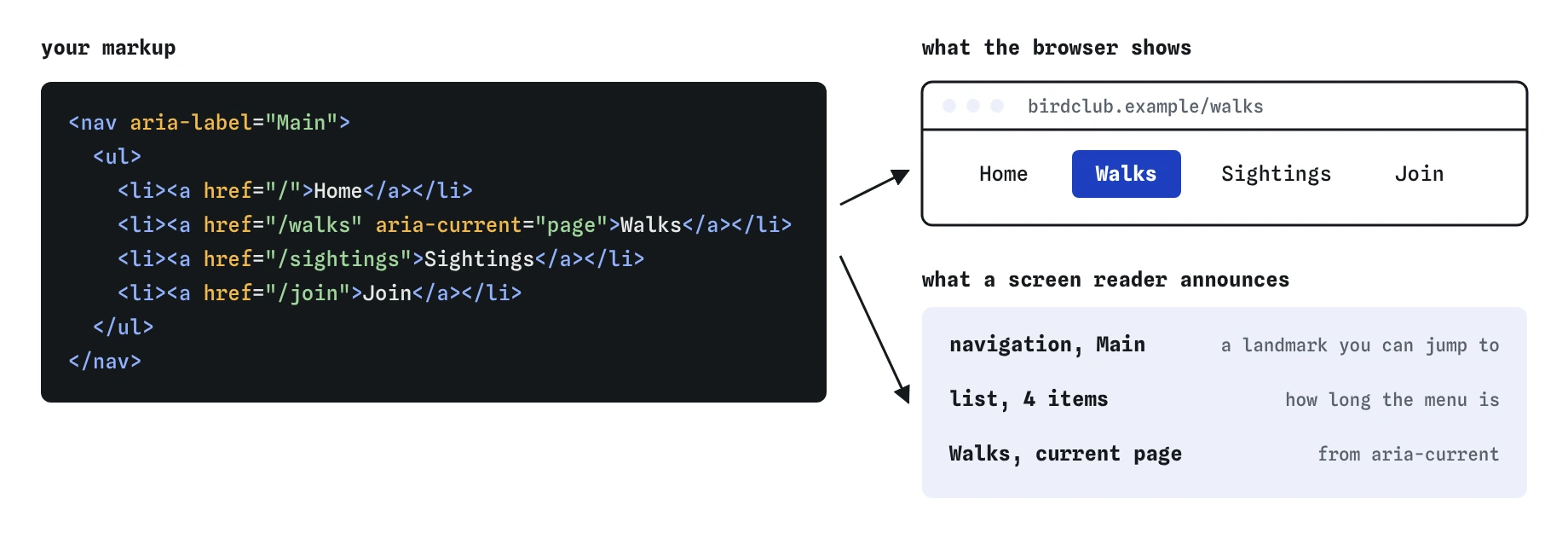

nav, ul and aria-current supply the second.How do you mark the current page?
Add aria-current="page" to the link that points to the page the visitor is on. Screen readers then read "Walks, current page, link", so people know where they are without seeing the highlight. Only one link in a given menu should carry it.
The same attribute is a convenient CSS hook. A selector like nav a[aria-current="page"] can underline or colour the active item, so you do not need a separate active class that might drift out of sync with the real state.
Other values exist for other kinds of "current": step for a step in a process, location for a point in a flow chart, date for today in a calendar, and plain true for anything else. For site menus and breadcrumbs, page is the right value.
<li><a href="/walks" aria-current="page">Walks</a></li>What is a skip link and why add one?
Keyboard users move through a page with the Tab key. Without help, they tab through every menu link on every page before reaching the content. A skip link is the first focusable item on the page and jumps straight to the main content.
The basic version is a link to the id of your <main> element. Many sites hide it visually until it receives focus, then show it in the corner. Hiding it with display: none makes it unusable, because hidden elements cannot be focused. A visually hidden class that reappears on :focus is the usual approach.
Test it by loading the page and pressing Tab once. You should see the link. Press Enter and the next Tab should land inside the main content, not back in the menu.
<body>
  <a class="skip" href="#content">Skip to content</a>
  <header>...</header>
  <main id="content">...</main>
</body>
How do breadcrumbs work in HTML?
Breadcrumbs show where a page sits in the site: Home, then Walks, then Winter walks. They are navigation, and their order is part of the meaning, so use a <nav> with an ordered list inside.
Label the nav with aria-label="Breadcrumb" so it is distinct from the main menu. Mark the last item, the page you are on, with aria-current="page". Many sites leave the last item as plain text instead of a link, and both patterns are fine as long as it is clearly the current page.
The separators, such as slashes or arrows, should come from CSS, for example a ::before on each list item. If you type them into the HTML, screen readers read "slash" between every crumb.
<nav aria-label="Breadcrumb">
  <ol>
    <li><a href="/">Home</a></li>
    <li><a href="/walks">Walks</a></li>
    <li><a href="/walks/winter" aria-current="page">Winter walks</a></li>
  </ol>
</nav>
What if a page has more than one nav?
Many pages have a main menu, breadcrumbs, a sidebar of sections and pagination. Each one is a navigation landmark, and a screen reader lists them all as "navigation". Without labels, the user cannot tell which is which.
Give each <nav> a short aria-label such as "Main", "Breadcrumb", "Sections" or "Pagination". Screen readers say "Main navigation", so leave the word "navigation" out of the label to avoid hearing it twice. If the nav already has a visible heading, point to it with aria-labelledby instead.
<nav aria-label="Sections">
  <h2 id="toc">On this page</h2>
  ...
</nav>
<!-- or -->
<nav aria-labelledby="toc">...</nav>
Why is div soup a problem for menus?
"Div soup" is a menu built from nested <div> and <span> elements with click handlers instead of links. It can look identical, and it fails in ways you only notice when you test properly. A span with an onclick cannot be reached with Tab, does not show a link URL on hover, cannot be opened in a new tab and is not announced as a link.
Real <a href> elements give you all of that for free: keyboard focus, Enter to follow, middle-click to open in a tab, right-click to copy the address, and correct announcements. Search engines also follow real links to discover your pages, while script-only menus can hide whole sections from them.
Dropdown menus need extra care. The usual accessible pattern is a <button> with aria-expanded that shows and hides a nested list of links. The popover attribute and <details> can do some of this without script. Avoid role="menu" for site navigation, because it tells screen readers to expect app-style arrow-key menus that a normal link list does not provide.
- Use
<a href>for every destination, never a div or span with a click handler. - Use a
<button>to open and close a submenu, never a link withhref="#". - Keep the menu in the HTML so it works before scripts load.
How do you test a menu, and what do AI tools get wrong?
Put the mouse away and use only the keyboard. Tab should reach every link in a sensible order, the focus ring should be visible, and Enter should follow the link. Then open the accessibility tree in DevTools and confirm you see a navigation landmark with a list inside.
AI-generated menus often have the same faults: links built from divs, href="#" placeholders left in, the active item shown only by a class with no aria-current, several unlabelled navs, and a hamburger icon with no accessible name. Check each of these before you ship generated code.
Field notes
- A
<nav>marks a block of main links so assistive tech can jump straight to it. - Put menu links in a
<ul>with one<li>for each link. - Add
aria-current="page"to the link for the page the visitor is on.
Easy to get wrong
A clickable span cannot be focused with the keyboard and is not announced as a link. A real link inside nav works everywhere.
A class only changes the look. aria-current tells screen reader users which page they are on, and it works as a CSS hook too.
Two unlabelled navs are both announced as "navigation", so users cannot tell them apart.
Typed separators are read aloud between every crumb. Draw them with CSS instead.
Questions people ask
Should navigation links be in a list?
Yes for menus. A list tells screen readers how many items there are and gives you clean structure for styling.
Does nav need to be inside header?
No. The main menu often sits in the header, but a nav can appear in a sidebar, in the main content or in the footer.
What does aria-current="page" do?
It marks the link to the page the user is on, so screen readers announce "current page". It does not change the look unless you style it.
How many nav elements can a page have?
As many as there are major link groups, but label each one with aria-label or aria-labelledby so users can tell them apart.
Should I use role="menu" for my site menu?
No. That role is for application menus with arrow-key control. Site navigation should be a nav with a list of plain links.